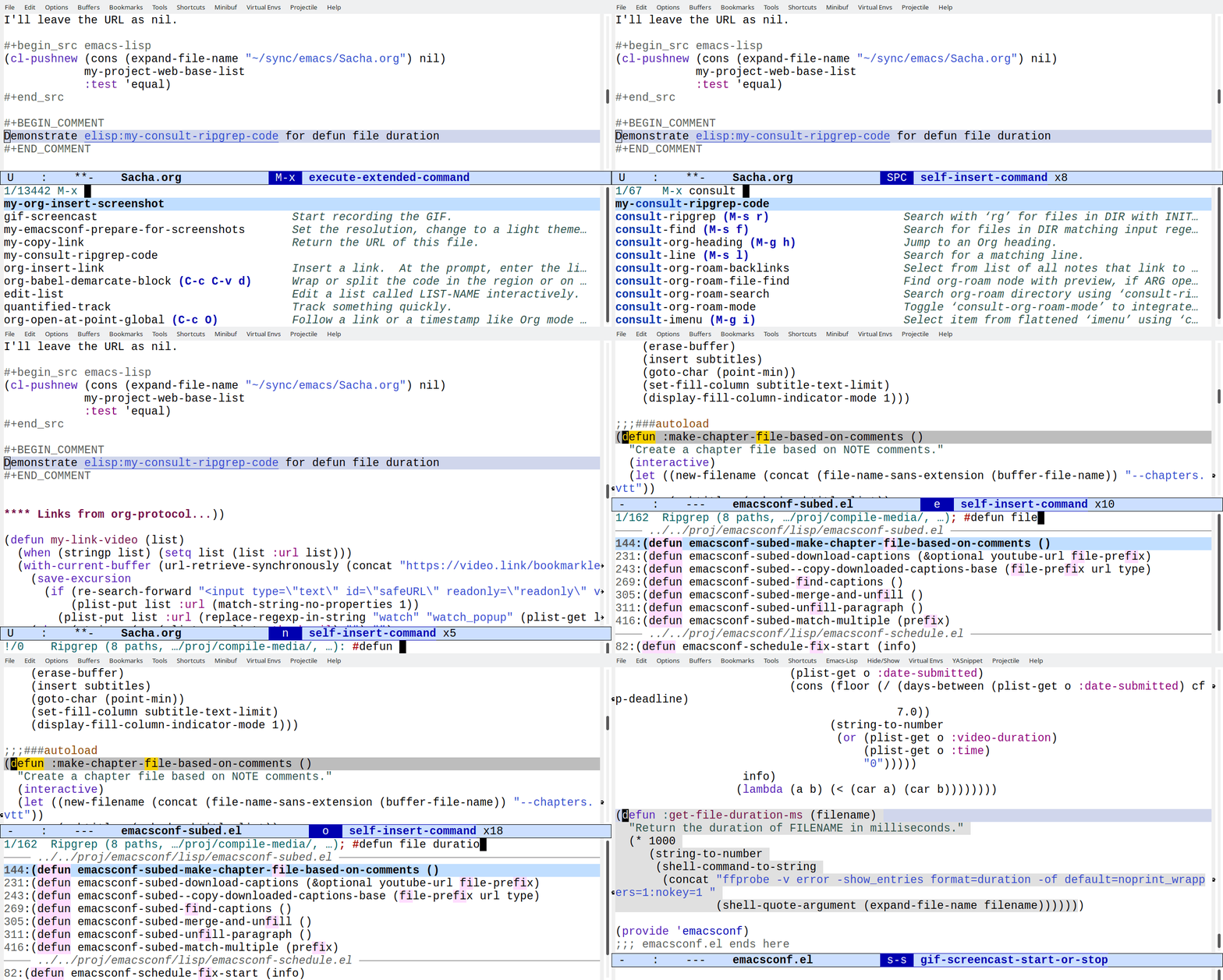
For this livestream, I experimented with scheduling it for
8:00 AM EST instead of just starting it whenever I could
squeeze in the time.1 People dropped by! And
asked questions! And suggested interesting things! Wow. This
could be fun.
I wrote a bunch of blog posts throughout the week and added
lots of little videos to them. It was easy to walk through
my recent posts and demonstrate things without worrying
about (a) accidentally leaking personal information or (b)
flubbing things on camera, since apparently my multitasking
abilities are on the way down.2 It felt good to go
through them and add some more commentary and highlights
while knowing that all the details are there in case people
want to do a deeper dive.
I roughly edited the transcript from Deepgram and I uploaded
it to YouTube, fixing some bugs in my Deepgram VTT
conversion along the way. I think I like having proper
transcripts even for ephemeral stuff like this, since it
costs roughly USD 0.21 for the 43-minute video and I can
probably figure out how to make editing even faster..
New projects are easier to keep working on when they have
immediate personal benefits. It's easy for me to keep doing
Emacs News every week because I have so much fun learning
about the cool things people are doing with Emacs. I think
it'll be easy for me to keep doing Yay Emacs livestreams
because not only do I get to capture some workflows and
ideas in videos, but other people might even tell me about
interesting things that could save me time or open up new
possibilities. Also, it's worth building up things I love.
I'm going to try scheduling another stream for next Sunday
(Jan 21) at 7:30 AM EST. Maybe I can experiment with
sharing my screen with the Surface Book or the W530 and then
using that computer to stream. We'll see what that's like!
Thanks to the unpredictability of life with
a kiddo, scheduling things has been one of my life goals for
a while! <laugh> When I created the event, the kiddo was
still in her winter-break habit of sleeping in until 10 or
11, so I figured that I had a little time before I needed to
call in for her virtual school at 8:45 AM. Of course, that
week she decided to start setting her alarm for 7:59 AM so
that she could wake up early and have watching time, and she
actually started waking up around that time. So for Friday,
I woke up earlier (well, the cat woke got me up even
earlier) and packed a little breakfast she could have in the
living room (since my computer's on a kitchen cabinet)…
and that was the one day she snoozed her alarm clock and
sleep in. I've scheduled the next stream for 7:30 AM… and
she has announced that she wants to set her alarm for
7:30ish. Hmm.
I notice that it can be a little challenging for me
to talk and do things at the same time. This is particularly
obvious when I'm cubing (brain hiccup at the last step,
gotta solve the whole Rubik's cube all over again). It's
also why I prefer to record the audio for my presentations
separately instead of winging it. =) It could be verbal
interference, (very mild, totally expected) age-related
cognitive decline (which is a topic I've been meaning to
write up my notes on), or my squirrel brain could just have
been pretty bad at this all along. Anyway, words or code,
sometimes I just gotta pick one. Never mind my laptop's CPU
not handling ffmpeg well, my brain's CPU gets high
utilization too. That's good, though!
tldr (2167 words): I can make animating presentation maps easier by
writing my own functions for the Emacs text editor. In this post, I
show how I can animate an SVG element by element. I can also add IDs
to the path and use CSS to build up an SVG with temporary highlighting
in a Reveal.js presentation.
Convert PDF to SVG with Inkscape (Cairo option) or pdftocairo)
PNG / Supernote PDF: Combined shapes. Process
Break apart, fracture overlaps
Recombine
Set IDs
Sort paths -> Animation style 1
Adobe Fresco: individual elements in order; landscape feels natural
Animation styles
Animation style 1: Display elements one after another
Animation style 2: Display elements one after another, and also show/hide highlights
Table: slide ID, IDs to add, temporary highlights -> Reveal.js: CSS with transitions
Ideas for next steps:
Explore graphviz & other diagramming tools
Frame-by-frame SVGs
on include
write to files
FFmpeg crossfade
Recording Reveal.js presentations
Use OCR results?
I often have a hard time organizing my thoughts into a linear
sequence. Sketches are nice because they let me jump around and still
show the connections between ideas. For presentations, I'd like to
walk people through these sketches by highlighting different areas.
For example, I might highlight the current topic or show the previous
topics that are connected to the current one. Of course, this is
something Emacs can help with. Before we dive into it, here are quick
previews of the kinds of animation I'm talking about:
Figure 1: Animation style 1: based on drawing order
Animation style 2: building up a map with temporary highlights
Getting the sketches: PDFs are not all the same
Let's start with getting the sketches. I usually export my sketches as
PNGs from my Supernote A5X. But if I know that I'm going to animate a
sketch, I can export it as a PDF. I've recently been experimenting
with Adobe Fresco on the iPad, which can also export to PDF. The PDF I
get from Fresco is easier to animate, but I prefer to draw on the
Supernote because it's an e-ink device (and because the kiddo usually
uses the iPad).
If I start with a PNG, I could use Inkscape to trace the PNG and turn
it into an SVG. I think Inkscape uses autotrace behind the scenes. I
don't usually put my highlights on a separate layer, so autotrace will
make odd shapes.
It's a lot easier if you start off with vector graphics in the first
place. I can export a vector PDF from the SuperNote A5X and either
import it into Inkscape using the Cairo option or use the command-line
pdftocairo tool.
I've been looking into using Adobe Fresco, which is a free app
available for the iPad. Fresco's PDF export can be converted to an SVG
using Inkscape or PDF to Cairo. What I like about the output of this
app is that it gives me individual elements as their own paths and
they're listed in order of drawing. This makes it really easy to
animate by just going through the paths in order.
Animation style 1: displaying paths in order
Here's a sample SVG file that pdfcairo creates from an Adobe Fresco
PDF export:
Adobe Fresco also includes built-in time-lapse, but since I often like
to move things around or tidy things up, it's easier to just work with
the final image, export it as a PDF, and convert it to an SVG.
I can make a very simple animation by setting the opacity of all the
paths to 0, then looping through the elements to set the opacity back
to 1 and write that version of the SVG to a separate file.
From how-can-i-generate-png-frames-that-step-through-the-highlights:
my-animate-svg-paths: Add one path at a time. Save the resulting SVGs to OUTPUT-DIR.
Figure 2: Animating SVG paths based on drawing order
Neither Supernote nor Adobe Fresco give me the original stroke
information. These are filled shapes, so I can't animate something
drawing it. But having different elements appear in sequence is fine
for my purposes. If you happen to know how to get stroke information
out of Supernote .note files or of an iPad app that exports nice
single-line SVGs that have stroke direction, I would love to hear
about it.
Identifying paths from Supernote sketches
When I export a PDF from Supernote and convert it to an SVG, each
color is a combined shape with all the elements. If I want to animate
parts of the image, I have to break it up and recombine selected
elements (Inkscape's Ctrl-k shortcut) so that the holes in shapes are
properly handled. This is a bit of a tedious process and it usually
ends up with elements in a pretty random order. Since I have to
reorder elements by hand, I don't really want to animate the sketch
letter-by-letter. Instead, I combine them into larger chunks like
topics or paragraphs.
The following code takes the PDF, converts it to an SVG, recolours
highlights, and then breaks up paths into elements:
my-sketch-convert-pdf-and-break-up-paths: Convert PDF to SVG and break up paths.
(defunmy-sketch-convert-pdf-and-break-up-paths (pdf-file &optional rotate)
"Convert PDF to SVG and break up paths."
(interactive (list (read-file-name
(format "PDF (%s): "
(my-latest-file "~/Dropbox/Supernote/EXPORT/""pdf"))
"~/Dropbox/Supernote/EXPORT/"
(my-latest-file "~/Dropbox/Supernote/EXPORT/""pdf")
t
nil
(lambda (s) (string-match "pdf" s)))))
(unless (file-exists-p (concat (file-name-sans-extension pdf-file) ".svg"))
(call-process "pdftocairo" nil nil nil "-svg" (expand-file-name pdf-file)
(expand-file-name (concat (file-name-sans-extension pdf-file) ".svg"))))
(let ((dom (xml-parse-file (expand-file-name (concat (file-name-sans-extension pdf-file) ".svg"))))
highlights)
(setq highlights (dom-node 'g'((id . "highlights"))))
(dom-append-child dom highlights)
(dolist (path (dom-by-tag dom 'path))
;; recolor and move
(unless (string-match (regexp-quote "rgb(0%,0%,0%)") (or (dom-attr path 'style) ""))
(dom-remove-node dom path)
(dom-append-child highlights path)
(dom-set-attribute
path 'style
(replace-regexp-in-string
(regexp-quote "rgb(78.822327%,78.822327%,78.822327%)")
"#f6f396"
(or (dom-attr path 'style) ""))))
(let ((parent (dom-parent dom path)))
;; break apart
(when (dom-attr path 'd)
(dolist (part (split-string (dom-attr path 'd) "M " t " +"))
(dom-append-child
parent
(dom-node 'path`((style . ,(dom-attr path 'style))
(d . ,(concat "M " part))))))
(dom-remove-node dom path))))
;; remove the use
(dolist (use (dom-by-tag dom 'use))
(dom-remove-node dom use))
(dolist (use (dom-by-tag dom 'image))
(dom-remove-node dom use))
;; move the first g down
(let ((g (car (dom-by-id dom "surface1"))))
(setf (cddar dom)
(seq-remove (lambda (o)
(and (listp o) (string= (dom-attr o 'id) "surface1")))
(dom-children dom)))
(dom-append-child dom g)
(when rotate
(let* ((old-width (dom-attr dom 'width))
(old-height (dom-attr dom 'height))
(view-box (mapcar 'string-to-number (split-string (dom-attr dom 'viewBox))))
(rotate (format "rotate(90) translate(0 %s)" (- (elt view-box 3)))))
(dom-set-attribute dom 'width old-height)
(dom-set-attribute dom 'height old-width)
(dom-set-attribute dom 'viewBox (format "0 0 %d %d" (elt view-box 3) (elt view-box 2)))
(dom-set-attribute highlights 'transform rotate)
(dom-set-attribute g 'transform rotate))))
(with-temp-file (expand-file-name (concat (file-name-sans-extension pdf-file) "-split.svg"))
(svg-print (car dom)))))
You can see how the spaces inside letters like "o" end up being black.
Selecting and combining those paths fixes that.
Combining paths in Inkscape
If there were shapes that were touching, then I need to draw lines and
fracture the shapes in order to break them apart.
Fracturing shapes and checking the highlights
The end result should be an SVG with the different chunks that I might
want to animate, but I need to identify the paths first. You can
assign object IDs in Inkscape, but this is a bit of an annoying
process since I haven't figured out a keyboard-friendly way to set
object IDs. I usually find it easier to just set up an Autokey
shortcut (or AutoHotkey in Windows) to click on the ID text box so
that I can type something in.
Autokey script for clicking
import time
x, y= mouse.get_location()
# Use the coordinates of the ID text field on your screen; xev can help
mouse.click_absolute(3152, 639, 1)
time.sleep(1)
keyboard.send_keys("<ctrl>+a")
mouse.move_cursor(x, y)
Then I can select each element, press the shortcut key, and type an ID
into the textbox. I might use "t-…" to indicate the text for a map
section, "h-…" to indicate a highlight, and arrows by specifying
their start and end.
Setting IDs in Inkscape
To simplify things, I wrote a function in Emacs that will go through
the different groups that I've made, show each path in a different
color and with a reasonable guess at a bounding box, and prompt me for
an ID. This way, I can quickly assign IDs to all of the paths. The
completion is mostly there to make sure I don't accidentally reuse an
ID, although it can try to combine paths if I specify the ID. It saves
the paths after each change so that I can start and stop as needed.
Identifying paths in Emacs is usually much nicer than identifying them
in Inkscape.
Identifying paths inside Emacs
my-svg-identify-paths: Prompt for IDs for each path in FILENAME.
(defunmy-svg-identify-paths (filename)
"Prompt for IDs for each path in FILENAME."
(interactive (list (read-file-name "SVG: " nil nil
(lambda (f) (string-match "\\.svg$" f)))))
(let* ((dom (car (xml-parse-file filename)))
(paths (dom-by-tag dom 'path))
(vertico-count 3)
(ids (seq-keep (lambda (path)
(unless (string-match "path[0-9]+" (or (dom-attr path 'id) "path0"))
(dom-attr path 'id)))
paths))
(edges (window-inside-pixel-edges (get-buffer-window)))
id)
(my-svg-display "*image*" dom nil t)
(dolist (path paths)
(when (string-match "path[0-9]+" (or (dom-attr path 'id) "path0"))
;; display the image with an outline
(unwind-protect
(progn
(my-svg-display "*image*" dom (dom-attr path 'id) t)
(setq id (completing-read
(format "ID (%s): " (dom-attr path 'id))
ids))
;; already exists, merge with existing element
(if-let ((old (dom-by-id dom id)))
(progn
(dom-set-attribute
old
'd
(concat (dom-attr (dom-by-id dom id) 'd)
" ";; change relative to absolute
(replace-regexp-in-string "^m""M"
(dom-attr path 'd))))
(dom-remove-node dom path)
(setq id nil))
(dom-set-attribute path 'id id)
(add-to-list 'ids id))))
;; save the image just in case we get interrupted halfway through
(with-temp-file filename
(svg-print dom))))))
Then I can animate SVGs by specifying the IDs. I can reorder the paths
in the SVG itself so that I can animate it group by group, like the
way that the Adobe Fresco SVGs were animated element by element.
The way it works is that the my-svg-reorder-paths function removes
and readds elements following the list of IDs specified, so
everything's ready to go for step-by-step animation. Here's the code:
Animation style 2: Building up a map with temporary highlights
I can also use CSS rules to transition between opacity values for more
complex animations. For my EmacsConf 2023 presentation, I wanted to
make a self-paced, narrated presentation so that people could follow
hyperlinks, read the source code, and explore. I wanted to include a
map so that I could try to make sense of everything. For this map, I
wanted to highlight the previous sections that were connected to the
topic for the current section.
I used a custom Org link to include the full contents of the SVG
instead of just including it with an img tag.
#+ATTR_HTML: :class r-stretchmy-include:~/proj/emacsconf-2023-emacsconf/map.svg?wrap=export html
my-include-export: Export PATH to FORMAT using the specified wrap parameter.
I wanted to be able to specify the entire sequence using a table in
the Org Mode source for my presentation. Each row had the slide ID, a
list of highlights in the form prev1,prev2;current, and a
comma-separated list of elements to add to the full-opacity view.
Reveal.js adds a "current" class to the slide, so I can use that as a
trigger for the transition. I have a bit of Emacs Lisp code that
generates some very messy CSS, in which I specify the ID of the slide,
followed by all of the elements that need their opacity set to 1, and
also specifying the highlights that will be shown in an animated way.
my-reveal-svg-progression-css: Make the CSS.
(defunmy-reveal-svg-progression-css (map-progression &optional highlight-duration)
"Make the CSS.map-progression should be a list of lists with the following format:((\"slide-id\" \"prev1,prev2;cur1\" \"id-to-add1,id-to-add2\") ...)."
(setq highlight-duration (or highlight-duration 2))
(let (full)
(format
"<style>%s</style>"
(mapconcat
(lambda (slide)
(setq full (append (split-string (elt slide 2) ",") full))
(format "#slide-%s.present path { opacity: 0.2 }%s { opacity: 1 !important }%s"
(car slide)
(mapconcat (lambda (id) (format "#slide-%s.present #%s" (car slide) id))
full
", ")
(my-reveal-svg-highlight-different-colors slide)))
map-progression
"\n"))))
Since it's automatically generated, I don't have to worry about it
once I've gotten it to work. It's all hidden in a
results drawer. So this CSS highlights specific parts of the SVG with
a transition, and the highlight changes over the course of a second or
two. It highlights the previous names and then the current one. The
topics I'd already discussed would be in black, and the topics that I
had yet to discuss would be in very light gray. This could give people
a sense of the progress through the presentation.
As a result, as I go through my presentation, the image appears to
build up incrementally, which is the effect that I was going for.
I can test this by exporting only my map slides:
Graphviz, mermaid-js, and other diagramming tools can make SVGs. I
should be able to adapt my code to animate those diagrams by adding
other elements in addition to path. Then I'll be able to make
diagrams even more easily.
Since SVGs can contain CSS, I could make an SVG equivalent of the
CSS rules I used for the presentation, maybe calling a function with
a Lisp expression that specifies the operations (ex:
("frame-001.svg" "h-foo" opacity 1)). Then I could write frames to
SVGs.
FFmpeg has a crossfade filter. With a little bit of figuring out, I
should be able to make the same kind of animation in a webm form
that I can include in my regular videos instead of using Reveal.js
and CSS transitions.
I've also been thinking about automating the recording of my
Reveal.js presentations. For my EmacsConf talk, I opened my
presentation, started the recording with the system audio and the
screen, and then let it autoplay the presentation. I checked on it
periodically to avoid the screensaver/energy saving things from
kicking in and so that I could stop the recording when it's
finished. If I want to make this take less work, one option is to
use ffmpeg's "-t" argument to specify the expected duration of the
presentation so that I don't have to manually stop it. I'm also
thinking about using Puppeteer to open the presentation, check when
it's fully loaded, and start the process to record it - maybe even
polling to see whether it's finished. I haven't gotten around to it
yet. Anyhow, those are some ideas to explore next time.
As for animation, I'm still curious about the possibility of
finding a way to access the raw stroke information if it's even
available from my Supernote A5X (difficult because it's a
proprietary data format) or finding an app for the iPad that exports
single line SVGs that use stroke information instead of fill. That
would only be if I wanted to do those even fancier animations that
look like the whole thing is being drawn for you. I was trying to
figure out if I could green screen the Adobe Fresco timelapse videos
so that even if I have a pre-sketch to figure out spacing and remind
me what to draw, I can just export the finished elements. But
there's too much anti-aliasing and I haven't figured out how to do
it cleanly yet. Maybe some other day.
I use Google Cloud Vision's text detection engine to convert my
handwriting to text. It can give me bounding polygons for words or
paragraphs. I might be able to figure out which curves are entirely
within a word's bounding polygon and combine those automatically.
It would be pretty cool if I could combine the words recognized by
Google Cloud Vision with the word-level timestamps from speech
recognition so that I could get word-synced sketchnote animations
with maybe a little manual intervention.
Anyway, those are some workflows for animating sketches with Inkscape
and Emacs. Yay Emacs!
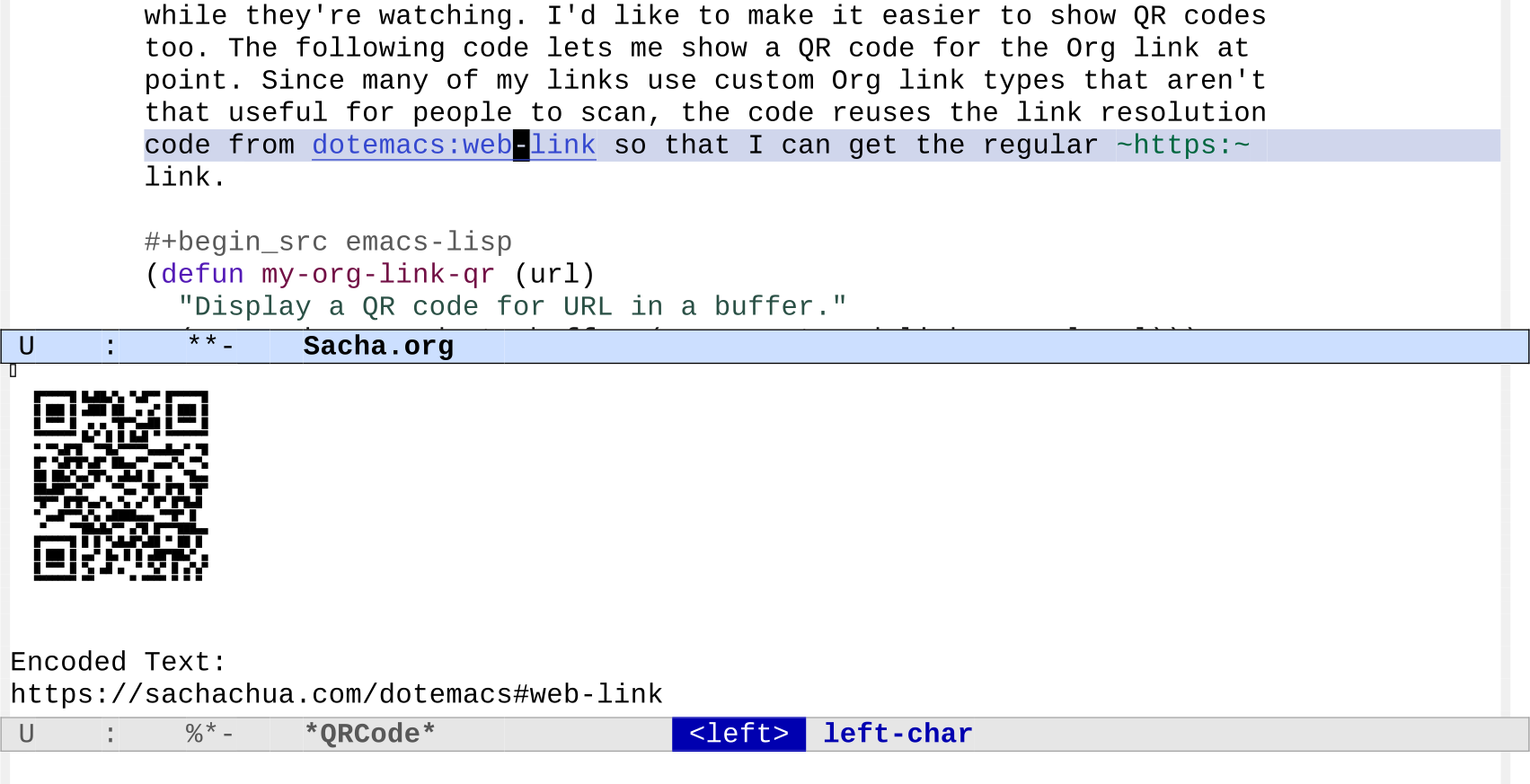
[2024-01-12 Fri]: Added some code to display the QR code on the right side.
John Kitchin includes little QR codes in his videos. I
thought that was a neat touch that makes it easier for
people to jump to a link while they're watching. I'd like to
make it easier to show QR codes too. The following code lets
me show a QR code for the Org link at point. Since many of
my links use custom Org link types that aren't that useful
for people to scan, the code reuses the link resolution code
from https://sachachua.com/dotemacs#web-link so that I can get the regular
https: link.
(defunmy-org-link-qr (url)
"Display a QR code for URL in a buffer."
(let ((buf (save-window-excursion (qrencode--encode-to-buffer (my-org-stored-link-as-url url)))))
(display-buffer-in-side-window buf '((side . right)))))
(use-packageqrencode:config
(with-eval-after-load'embark
(define-key embark-org-link-map (kbd "q") #'my-org-link-qr)))
Figure 1: Screenshot of QR code for the link at point
[2024-01-12 Fri] Added embark action to copy the exported link URL.
[2024-01-11 Thu] Switched to using Github links since Codeberg's down.
[2024-01-11 Thu] Updated my-copy-link to just return the link if called from Emacs Lisp. Fix getting the properties.
[2024-01-08 Mon] Add tip from Omar about embark-around-action-hooks
[2024-01-08 Mon] Simplify code by using consult--grep-position
Summary (882 words): Emacs macros make it easy to define sets of related functions for custom Org links. This makes it easier to link to projects and export or copy the links to the files in the web-based repos. You can also use that information to consult-ripgrep across lots of projects.
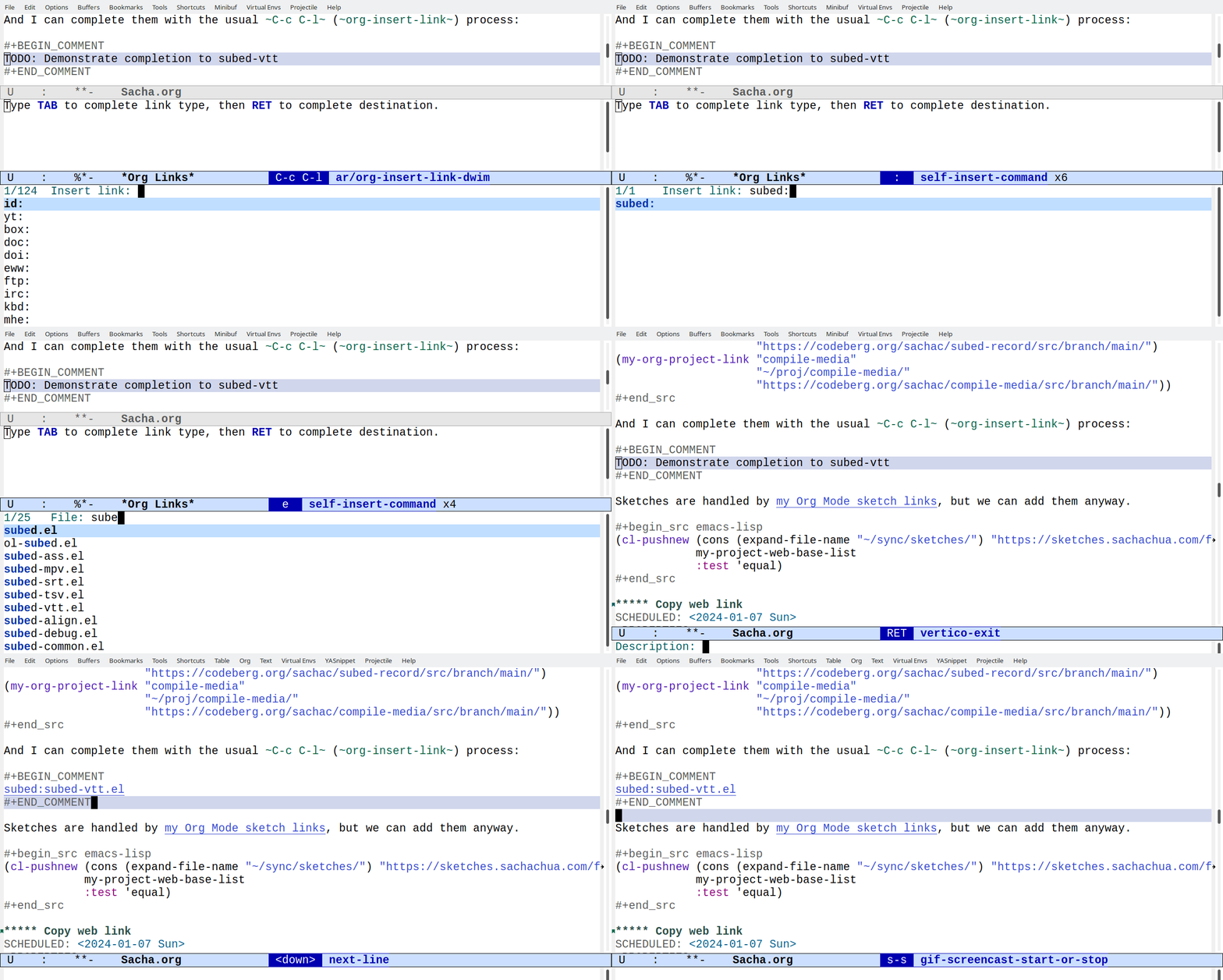
I'd like to get better at writing notes while coding and at turning
those notes into blog posts and videos. I want to be able to link to
files in projects easily with the ability to complete, follow, and
export links. For example, [[subed:subed.el]] should become
subed.el, which opens the file if I'm in Emacs and exports a
link if I'm publishing a post. I've been making custom link types
using org-link-set-parameters. I think it's time to make a macro
that defines that set of functions for me. Emacs Lisp macros are a
great way to write code to write code.
I've been really liking being able to refer to various emacsconf-el
files by just selecting the link type and completing the filename, so
maybe it'll be easier to write about lots of other stuff if I extend
that to my other projects.
Copy web link
[2024-01-19 Fri]: Add Wayback machine.
Keeping a list of projects and their web versions also makes it easier
for me to get the URL for something. I try to post as much as possible
on the Web so that it's easier for me to find things again and so that
other people can pick up ideas from my notes. Things are a bit
scattered: my blog, repositories on Github and Codeberg, my
sketches… I don't want to think about where the code has ended
up, I just want to grab the URL. If I'm going to put the link into an
Org Mode document, that's super easy. I just take advantage of the
things I've added to org-store-link. If I'm going to put it into an
e-mail or a toot or wherever else, I just want the bare URL.
I can think of two ways to approach this. One is a command that copies
just the URL by figuring it out from the buffer filename, which allows
me to special-case a bunch of things:
(defunmy-copy-link (&optional filename skip-links)
"Return the URL of this file.If FILENAME is non-nil, use that instead.If SKIP-LINKS is non-nil, skip custom links.If we're in a Dired buffer, use the file at point."
(interactive)
(setq filename (or filename
(if (derived-mode-p 'dired-mode) (dired-get-filename))
(buffer-file-name)))
(if-let*
((project-re (concat "\\(" (regexp-opt (mapcar 'car my-project-web-base-list)) "\\)""\\(.*\\)"))
(url (cond
((and (derived-mode-p 'org-mode)
(eq (org-element-type (org-element-context)) 'link)
(not skip-links))
(pcase (org-element-property :type (org-element-context))
((or"https""http")
(org-element-property :raw-link (org-element-context)))
("yt"
(org-element-property :path (org-element-context)))
;; if it's a custom link, visit it and get the link
(_
(save-window-excursion
(org-open-at-point)
(my-copy-link nil t)))))
;; links to my config usually have a CUSTOM_ID property
((string= (buffer-file-name) (expand-file-name "~/sync/emacs/Sacha.org"))
(concat "https://sachachua.com/dotemacs#" (org-entry-get-with-inheritance "CUSTOM_ID")))
;; blog post drafts have permalinks
((and (derived-mode-p 'org-mode) (org-entry-get-with-inheritance "EXPORT_ELEVENTY_PERMALINK"))
(concat "https://sachachua.com" (org-entry-get-with-inheritance "EXPORT_ELEVENTY_PERMALINK")))
;; some projects have web repos
((string-match
project-re filename)
(concat (assoc-default (match-string 1 filename) my-project-web-base-list)
(url-hexify-string (match-string 2 filename)))))))
(progn
(when (called-interactively-p 'any)
(kill-new url)
(message "%s" url))
url)
(error"Couldn't figure out URL.")))
Another approach is to hitch a ride on the Org Mode link storage and
export functions and just grab the URL from whatever link I've stored
with org-store-link, which I've bound to C-c l. I almost always
have an HTML version of the exported link. We can even use XML parsing
instead of regular expressions.
(defunmy-org-link-as-url (link)
"Return the final URL for LINK."
(dom-attr
(dom-by-tag
(with-temp-buffer
(insert (org-export-string-as link 'html t))
(xml-parse-region (point-min) (point-max)))
'a)
'href))
(defunmy-org-stored-link-as-url (&optional link insert)
"Copy the stored link as a plain URL.If LINK is specified, use that instead."
(interactive (list nil current-prefix-arg))
(setq link (or link (caar org-stored-links)))
(let ((url (if link
(my-org-link-as-url link)
(error"No stored link"))))
(when (called-interactively-p 'any)
(if url
(if insert (insert url) (kill-new url))
(error"Could not find URL.")))
url))
(ert-deftestmy-org-stored-link-as-url ()
(should
(string= (my-org-stored-link-as-url "[[dotemacs:web-link]]")
"https://sachachua.com/dotemacs#web-link"))
(should
(string= (my-org-stored-link-as-url "[[dotemacs:org-mode-sketch-links][my Org Mode sketch links]]")
"https://sachachua.com/dotemacs#org-mode-sketch-links")))
(defunmy-embark-org-copy-exported-url-as-wayback (link)
(interactive"MLink: ")
(my-embark-org-copy-exported-url link t))
(defunmy-embark-org-copy-exported-url (link &optional wayback)
(interactive"MLink: \np")
(let ((url (my-org-link-as-url link)))
(when (and (derived-mode-p 'org-mode)
(org-entry-get-with-inheritance "EXPORT_ELEVENTY_PERMALINK")
(string-match "^/" url))
;; local file links are copied to blog directories
(setq url (concat "https://sachachua.com"
(org-entry-get-with-inheritance "EXPORT_ELEVENTY_PERMALINK")
(replace-regexp-in-string
"[\\?&].*"""
(file-name-nondirectory link)))))
(when (and wayback (not (string-match (regexp-quote "^https://web.archive.org") url)))
(setq url (concat "https://web.archive.org/web/" (format-time-string "%Y%m%d%H%M%S/")
url)))
(kill-new url)
(message "Copied %s" url)))
(with-eval-after-load'embark-org
(define-key embark-org-link-map
"u"#'my-embark-org-copy-exported-url)
(define-key embark-org-link-map
"U"#'my-embark-org-copy-exported-url-as-wayback)
(define-key embark-org-link-copy-map
"u"#'my-embark-org-copy-exported-url)
(define-key embark-org-link-copy-map
"U"#'my-embark-org-copy-exported-url-as-wayback))
We'll see which one I end up using. I think both approaches might come in handy.
Quickly search my code
Since my-project-web-base-list is a list of projects I often think
about or write about, I can also make something that searches through
them. That way, I don't have to care about where my code is.
I can add .rgignore files in directories to tell ripgrep to ignore
things like node_modules or *.json.
I also want to search my Emacs configuration at the same time,
although links to my config are handled by my dotemacs link type so
I'll leave the URL as nil. This is also the way I can handle other
unpublished directories.
Actually, let's throw my blog posts and Org files in there as well,
since I often have code snippets. If it gets to be too much, I can
always have different commands search different things.
At some point, it might be fun to get Embark set up so that I can grab
a link to something right from the consult-ripgrep interface. In the
meantime, I can always jump to it and get the link.
Tip from Omar: embark-around-action-hooks
[2024-01-07 Sun] I modified oantolin's suggestion from the comments to work with consult-ripgrep, since consult-ripgrep gives me consult-grep targets instead of consult-location:
(cl-defunembark-consult--at-location (&rest args &key target type run &allow-other-keys)
"RUN action at the target location."
(save-window-excursion
(save-excursion
(save-restriction
(pcase type
('consult-location (consult--jump (consult--get-location target)))
('org-heading (org-goto-marker-or-bmk (get-text-property 0 'org-marker target)))
('consult-grep (consult--jump (consult--grep-position target)))
('file (find-file target)))
(apply run args)))))
(cl-pushnew#'embark-consult--at-location (alist-get 'org-store-link embark-around-action-hooks))
I think I can use it with M-s c to search for the code, then C-.
C-c l on the matching line, where C-c l is my regular keybinding
for storing links. Thanks, Omar!
In general, I don't want to have to think about where something is on
my laptop or where it's published on the Web, I just want to
It's nice to feel like you're saying someone's name correctly. We ask
EmacsConf speakers to introduce themselves in the first few seconds of
their video, but people often forget to do that, so that's okay. We
started recording introductions for EmacsConf 2022 so that stream
hosts don't have to worry about figuring out pronunciation while
they're live. Here's how I used subed-record to turn my recordings
into lots of little videos.
First, I generated the title images by using Emacs Lisp to replace
text in a template SVG and then using Inkscape to convert the SVG into
a PNG. Each image showed information for the previous talk as well as
the upcoming talk. (emacsconf-stream-generate-in-between-pages)
Figure 1: Sample title image
Then I generated the text for each talk based on the title, the
speaker names, pronunciation notes, pronouns, and type of Q&A. Each
introduction generally followed the pattern, "Next we have title by
speakers. Details about Q&A." (emacsconf-pad-expand-intro and
emacsconf-subed-intro-subtitles below)
00:00:00.000 --> 00:00:00.999
#+OUTPUT: sat-open.webm
[[file:/home/sacha/proj/emacsconf/2023/assets/in-between/sat-open.svg.png]]
Next, we have "Saturday opening remarks".

00:00:05.000 --> 00:00:04.999
#+OUTPUT: adventure.webm
[[file:/home/sacha/proj/emacsconf/2023/assets/in-between/adventure.svg.png]]
Next, we have "An Org-Mode based text adventure game for learning the basics of Emacs, inside Emacs, written in Emacs Lisp", by Chung-hong Chan. He will answer questions via Etherpad.
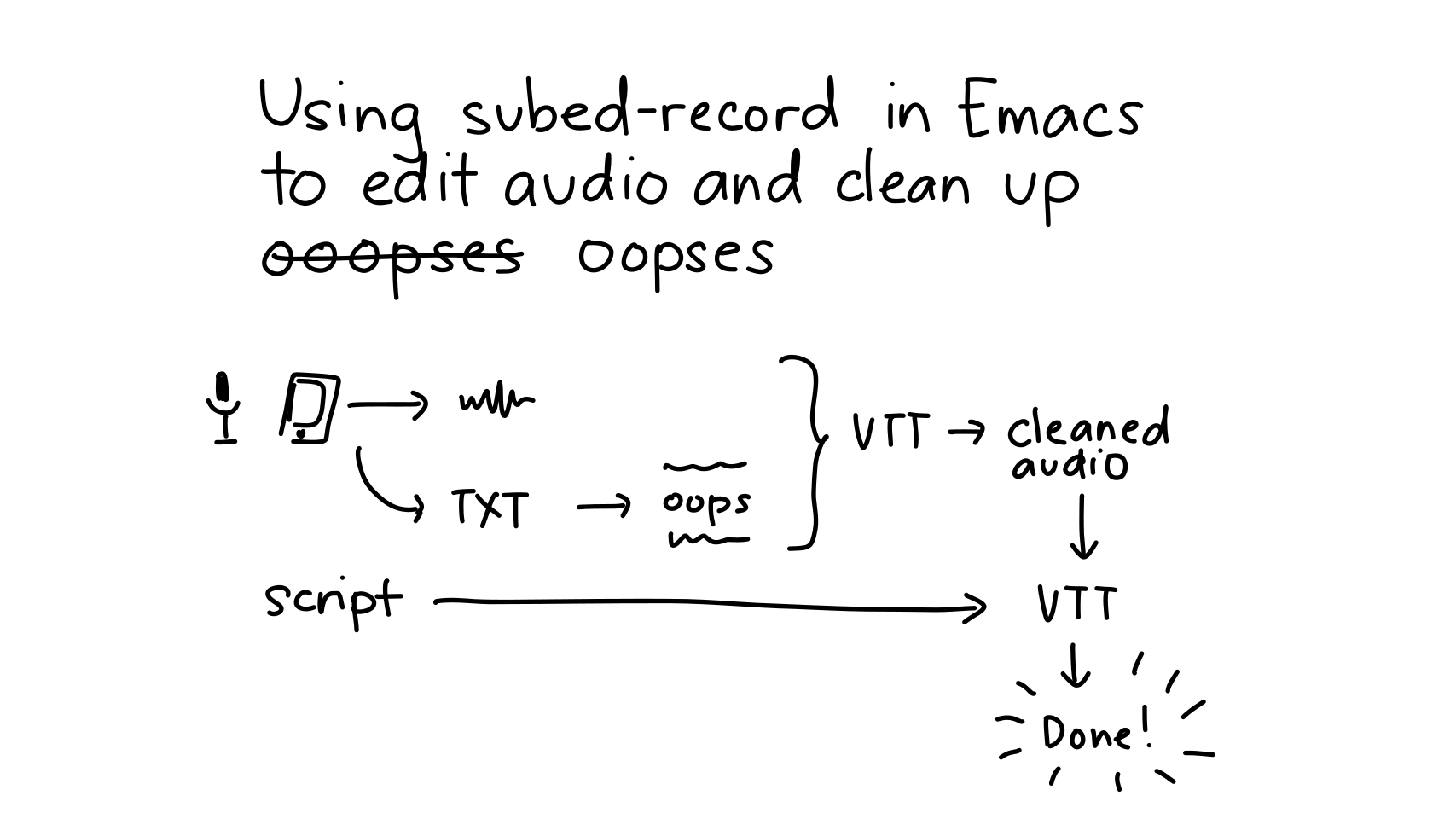
I copied the text into an Org note in my inbox, which Syncthing copied
over to the Orgzly Revived app on my Android phone. I used Google
Recorder to record the audio. I exported the m4a audio file and a
rough transcript, copied them back via Syncthing, and used
subed-record to edit the audio into a clean audio file without
oopses.
Each intro had a set of captions that started with a NOTE comment.
The NOTE comment specified the following:
#+AUDIO:: the audio source to use for the timestamped captions
that follow
[[file:...]]: the title image I generated for each talk. When
subed-record-compile-video sees a comment with a link to an image,
video, or animated GIF, it takes that visual and uses it for the
span of time until the next visual.
#+OUTPUT: the file to create.
NOTE #+OUTPUT: hyperdrive.webm[[file:/home/sacha/proj/emacsconf/2023/assets/in-between/hyperdrive.svg.png]]#+AUDIO: intros-2023-11-21-cleaned.opus00:00:15.680-->00:00:17.599
Next, we have "hyperdrive.el:
00:00:17.600-->00:00:21.879
Peer-to-peer filesystem in Emacs", by Joseph Turner
00:00:21.880-->00:00:25.279
and Protesilaos Stavrou (also known as Prot).
00:00:25.280-->00:00:27.979
Joseph will answer questions via BigBlueButton,
00:00:27.980-->00:00:31.080
and Prot might be able to join depending on the weather.
00:00:31.081-->00:00:33.439
You can join using the URL from the talk page
00:00:33.440-->00:00:36.320
or ask questions through Etherpad or IRC.
NOTE#+OUTPUT: steno.webm[[file:/home/sacha/proj/emacsconf/2023/assets/in-between/steno.svg.png]]#+AUDIO: intros-2023-11-19-cleaned.opus00:03:23.260-->00:03:25.480
Next, we have "Programming with steno",
00:03:25.481-->00:03:27.700
by Daniel Alejandro Tapia.
NOTE#+AUDIO: intro-2023-11-29-cleaned.opus00:00:13.620-->00:00:16.580
You can ask your questions via Etherpad and IRC.
00:00:16.581-->00:00:18.079
We'll send them to the speaker
00:00:18.080-->00:00:19.919
and post the answers in the talk page
00:00:19.920-->00:00:21.320
after the conference.
I could then call subed-record-compile-video to create the videos
for all the intros, or mark a region with C-SPC and then
subed-record-compile-video only the intros inside that region.
Using Emacs to edit the audio and compile videos worked out really
well because it made it easy to change things.
Changing pronunciation or titles: For EmacsConf 2023, I got the
recordings sorted out in time for the speakers to correct my
pronunciation if they wanted to. Some speakers also changed their
talk titles midway. If I wanted to redo an intro, I just had to
rerecord that part, run it through my subed-record audio cleaning
process, add an #+AUDIO: comment specifying which file I want to
take the audio from, paste it into my main intros.vtt, and
recompile the video.
Cancelling talks: One of the talks got cancelled, so I needed to
update the images for the talk before it and the talk after it. I
regenerated the title images and recompiled the videos. I didn't
even need to figure out which talk needed to be updated - it was easy
enough to just recompile all of them.
Changing type of Q&A: For example, some speakers needed to switch
from answering questions live to answering them after the
conference. I could just delete the old instructions, paste in the
instructions from elsewhere in my intros.vtt (making sure to set
#+AUDIO to the file if it came from a different take), and
recompile the video.
And of course, all the videos were captioned. Bonus!
So that's how using Emacs to edit and compile simple videos saved me a
lot of time. I don't know how I'd handle this otherwise. 47 video
projects that might all need to be updated if, say, I changed the
template? Yikes. Much better to work with text. Here are the technical
details.
Generating the title images
I used Inkscape to add IDs to our template SVG so that I could edit
them with Emacs Lisp. From emacsconf-stream.el:
emacsconf-stream-generate-in-between-pages: Generate the title images.
emacsconf-stream-svg-set-text: Update DOM to set the tspan in the element with ID to TEXT.
(defunemacsconf-stream-svg-set-text (dom id text)
"Update DOM to set the tspan in the element with ID to TEXT.If the element doesn't have a tspan child, use the element itself."
(if (or (null text) (string= text ""))
(let ((node (dom-by-id dom id)))
(when node
(dom-set-attribute node 'style"visibility: hidden")
(dom-set-attribute (dom-child-by-tag node 'tspan) 'style"fill: none; stroke: none")))
(setq text (svg--encode-text text))
(let ((node (or (dom-child-by-tag
(car (dom-by-id dom id))
'tspan)
(dom-by-id dom id))))
(cond
((null node)
(error"Could not find node %s" id)) ; skip
((= (length node) 2)
(nconc node (list text)))
(t (setf (elt node 2) text))))))
emacsconf-pad-expand-intro: Make an intro for TALK.
(defunemacsconf-pad-expand-intro (talk)
"Make an intro for TALK."
(cond
((null (plist-get talk :speakers))
(format "Next, we have \"%s\"." (plist-get talk :title)))
((plist-get talk :intro-note)
(plist-get talk :intro-note))
(t
(let ((pronoun (pcase (plist-get talk :pronouns)
((rx"she") "She")
((rx"\"ou\"""Ou"))
((or'nil"nil" (rx string-start "he") (rx"him")) "He")
((rx"they") "They")
(_ (or (plist-get talk :pronouns) "")))))
(format "Next, we have \"%s\", by %s%s.%s"
(plist-get talk :title)
(replace-regexp-in-string ", \\([^,]+\\)$"", and \\1"
(plist-get talk :speakers))
(emacsconf-surround " (" (plist-get talk :pronunciation) ")""")
(pcase (plist-get talk :q-and-a)
((or'nil"") "")
((rx"after") " You can ask questions via Etherpad and IRC. We'll send them to the speaker, and we'll post the answers on the talk page afterwards.")
((rx"live")
(format " %s will answer questions via BigBlueButton. You can join using the URL from the talk page or ask questions through Etherpad or IRC."
pronoun
))
((rx"pad")
(format " %s will answer questions via Etherpad."
pronoun
))
((rx"IRC")
(format " %s will answer questions via IRC in the #%s channel."
pronoun
(plist-get talk :channel)))))))))
Overall notes in Emacs with outline, org-timer timestamped notes; capture to this file
Elisp to start/stop the stream → find old code
Use the Yeti? Better sound
tee to a local recording
grab screenshot from SuperNote mirror?
Live streaming info density:
High: Emacs News review, package/workflow demo
Narrating a blog post to make it a video
Categorizing Emacs News, exploring packages
Low: Figuring things out
YouTube can do closed captions for livestreams, although accuracy is
low. Videos take a while to be ready to download.
Experimenting with working out loud
I wanted to write a report on EmacsConf 2023 so that we could share it
with speakers, volunteers, participants, donors, related organizations
like the Free Software Foundation, and other communities. I
experimented with livestreaming via YouTube while I worked on the
conference highlights.
It's a little over an hour long and probably very boring, but it was
nice of people to drop by and say hello.
The main parts are:
0:00: reading through other conference reports for inspiration
49:00: fiddling with the formatting and the export
It mostly worked out, aside from a brief moment of "uhhh, I'm
looking at our private conf.org file on stream". Fortunately, the
e-mail addresses that were showed were the public ones.
Technical details
Setup:
I set up environment variables and screen resolution:
I switch to a larger size and a light theme. I also turn consult previews off to minimize the risk of leaking data through buffer previews.
my-emacsconf-prepare-for-screenshots: Set the resolution, change to a light theme, and make the text bigger.
I can think of a few workflow tweaks that might be fun:
a stream notes buffer on the right side of the screen for context
information, timestamped notes to make editing/review easier (maybe
using org-timer), etc. I experimented with some streaming-related
code in my config, so I can dust that off and see what that's like.
I also want to have an org-capture template for it so that I can add
notes from anywhere.
I think I'll try going through an informal presentation or Emacs News as my next livestream experiment, since that's probably higher information density.