6098 comments
2357 subscribers
6261 on Twitter
Subscribe! Feed reader E-mail

On this page:

Thinking about Quantified Awesome, meetups, and DemoCamp

So I’ve taken to calling my personal dashboard Quantified Awesome, and I even have the domain name for it. The name is fun, and it reminds me that this is data tracking for a reason: to live an even more awesome life. Right now, I use it for time, clothes, library books, fruits and vegetables, stuff, and measurements. I’ll add more as ideas come to me, and as I use the tools, I’ll flesh out the interface.

Quantified Self Toronto meetups have been fantastic for getting more ideas and for sharing what I’m working on with other people. I think this kind of tracking would be the kind of geeky thing that might be interesting for the DemoCamp Toronto crowd, too.

DemoCamp demos tend to be mostly startups, and I’m not at the point of turning this into a business yet. I remember they had lots of fun with my Livin’ la Vida Emacs talk, though, and I’d like to inspire people to apply their skills – programming, designing, whatever – to their own lives. I’d also love to connect with other people so that I can be inspired by their examples. People who are into this sort of thing in Toronto are probably already part of Quantified Self Toronto, though, so there may not be that much extra value in presenting something mainly for connection purposes. If I’m going to focus on either inspiring or collecting feedback, then, I want to make sure that people’s activation costs are low.

So, what would it take to get this to the point where I can create a lot of value in 10 minutes of demo and five minutes of Q&A? (Or if this is anything like my other talk, a short demo derailed by people anticipating jokes, turned into a general truth-is-funnier-than-fiction thing. =) )

I’d probably want to have lots of data driving lots of visualizations, because they’re easier to see on a big projected screen. If I build this up over a few months, I’ll have the data to let me ask interesting questions and report on behavioural changes, which will be really useful. I may want to shift from using RaphaelJS to using Protovis or a similar library for visualizations so that I can take advantage of the source code examples for a wide range of charts.

Another key thing would be to either allow other users or share the source code (maybe both! less hassle for helping people get started). That way, it’s not just about “Hey, this is cool! But you can’t use it unless you build your own.”

Opening this up to people will probably mean splitting my project time into development and support. It’s a trade-off: would the increased feedback be worth the support load? Depending on people and expectations (here there be bugs!), it might be okay. It might be a good idea to slow down and apply the same discipline we’re adopting on our work projects, too: test, test, test. I think it might be worth gradually opening this up over the next few months, with an eye towards demonstrating it at DemoCamp when I think it’ll help lots of people get started. It’s also highly likely that there’ll be a second Quantified Self conference, so that might be something good to plan for as well.

There are plenty of companies focused on making money by helping people track their life (health, mostly). Me, I want to be able to ask questions about life and figure out how to answer them, I want to inspire other people to try doing that too, and I eventually want to help build tools to make it easier for people to do so. Besides, it’s a great way to practice my development skills without giving in to the temptation to spend all that time on work instead. =)

Short URL: http://sachachua.com/blog/p/22631

Quantified Self Toronto #9

image

image

image

Short URL: http://sachachua.com/blog/p/23121

Work, extracurriculars, and measuring time: an epiphany

I remember now why I had stopped tracking time before. Breaking things down at the project level made me feel weird about my extracurricular interests at IBM, like the community toolkit and now the IBM comics. On one hand, I wanted to support our utilization goals and claim time as accurately as possible. On the other hand, I didn’t want to give up personal time, especially as I could use it to build more functionality into Quantified Awesome. I felt conflicted. I found myself slipping from the feeling of an abundance of time to the feeling of a scarcity of it, to be carefully portioned out among too many demands.

Today, brainstorming how to address my worst-case scenario considerations, I realized something: I’d been thinking about it the wrong way. It’s not extra time I’m donating or a hobby I might outgrow. It’s a live opportunity to test ideas with a massive, built-in internal market.

Comics on the intranet homepage? A fledgling artist couldn’t buy that kind of space. A community analysis tool that other people have come to rely on? Good practice in supporting disparate users and scaling up value.

No money might change hands, but a steady stream of thank-you notes helps my manager argue for a top rating, which often translates into a bonus.

So now I’ve got a couple of ways to rethink how this fits into my life.

I can promote these extracurriculars from the category “Work – Other” to “Discretionary – Other” or something similar, and budget myself four or five hours a week. It’s not work, it’s learning.

Alternatively, I can keep it under “Work – Other” and add an effective 10% overhead to my billable work. Many people have told me that I’m a fast developer, anyway, so scaling my output down to that of a somewhat above average developer will still mean that we do good stuff. The cognitive surplus goes into process improvement, self-development, and happiness, which is definitely worthwhile. I get stressed when I feel like I’m letting my other priorities slip, so spending time on them is important too.

These extracurricular interests can create a lot of value. I should adjust my measurements accordingly so that my measurements don’t lead to conflicting feelings.

How you measure affects how you manage.

Short URL: http://sachachua.com/blog/p/23106

Quantified Awesome: Squishing my excuses

I’ve been fiddling with Quantified Awesome, this personal dashboard that I’m building so that I can keep track of what’s going on in my life and use that data to make it even more awesome. For example:

  • Tracking my time helps me make sure work doesn’t tempt me too much, and that I make time for both personal projects as well as connecting with other people. It also helps me improve my time estimates: How much time does it really take to walk to the subway station? How instant are instant noodles?
  • Tracking library books reminds me before they’re overdue, helps me collect my reading history, and gives me a greater appreciation for where my tax dollars go.
  • Tracking my clothes helps me remember to wear different types of clothes more often, makes it easier to donate items I don’t typically wear, and encourages me to try new combinations.
  • Tracking the produce we get from community-supported agriculture helps us avoid waste.
  • Tracking stuff helps me remember where infrequently-accessed items are.

It turns out that other people are interested in this too. 21 people have signed up through my “I’ll e-mail you when I figure out how to get this ready for other people” page, and my mom wants to use it too. That’s awesome!

Now I have to go ahead and actually build it so that other people can use it. That’s scary.

And like the way I deal with other scary, intimidating, procrastination-inducing things, I’m going to list my excuses here, so that I can shine a light on those assumptions and watch them scurry away like the cockroaches they are and, if necessary, squishing them with a well-applied flipflop.

  • Excuse #1: Idiosyncrasy. The way I work might be really weird, and other people may not be able to figure out what to do.
    • What’s the worst-case scenario? “I have no idea how this works!” I end up with lots of crufty special cases because I can’t figure out how to reconcile different ways of working.
    • What’s the best case? I adapt the system to the way other people work, and I get inspired by what they do. I build a lovely, flexible web app and API.
  • Excuse #2: Risk. I’m fine with loading my own data into an experimental system, but if I mess up and delete other people’s data, I’ll feel terrible. Also, they might trigger bugs.
    • What’s the worst-case scenario? Catastrophic data failure, nothing saved.
    • What’s the best case? Regular backups help me recover from any major mishaps, and careful coding avoids more common mistakes.
  • Excuse #3: Support. I’m going to spend more time handling bug reports and feature requests, and less time building little things that might be useful only for me.
    • What’s the worst-case scenario? People get annoyed and frustrated because I’m currently focused on other things, like my work.
    • What’s the best case? I get the system to become mostly usable for people, and I use my discretionary time to build more features. People’s requests inspire me to build more stuff and create more value.
  • Excuse #4: Documentation. I’ll need to write documentation, or at the very least online help. This means confronting the less-than-intuitive parts of the system. ;)
    • What’s the worst-case scenario? I describe what currently exists, get frustrated because I want to improve it, and end up cycling between updating documentation and improving the system.
    • What’s the best case? I describe what currently exists, and end up improving it along the way. I build online help into the system so that it’s easy to change. There’s a blog that helps people learn about updates, too.
  • Excuse #5: Offline access. A web-based time tracker might be of limited use if you don’t have web access often. I’ve been working on an offline HTML5 interface, but it’s still buggy.
    • What’s the worst-case scenario? Early testers try it out, but get frustrated because of the lack of offline access.
    • What’s the best case? I figure out the HTML5 offline thing. Someone else might be interested in building a native app, and we work together on fleshing out an API.
  • Excuse #6: Impatience. If I bring people on too early, they might get annoyed with a buggy system, and lose interest.
    • What’s the worst-case scenario? People give it a cursory try, and give up in annoyance.
    • What’s the best case? Early users are extraordinarily patient. We figure out a minimal viable product for each of them – the simplest thing that could possibly support what they want to do. Over time, things keep getting better and better. Also, I build a decent export interface, so even if people move on to a different system, they’ll still have their data.
  • Excuse #7: Privacy and control. A bug might accidentally expose people’s information, which is not fun. I also don’t want to have to police the system for objectionable content, considering the thumbnail uploads.
    • What’s the worst-case scenario? Someone’s private notes get accidentally published.
    • What’s the best case? People sign on knowing that I might have bugs, and don’t save any super-secret or inappropriate information on the system.

Okay. I think I can deal with that. So, what are the smallest, least-intimidating steps I need to take in order to get closer to opening up?

  • Write a quick test to make sure that people’s data will stay private. We’ll make people’s accounts private by default, although mine will stay mostly-public.
  • Make a list of things that people should be able to do right now. (Not including new functionality!) Gradually write tests to nail down that behaviour.
  • Make a list of things that people may want to do some day. Eventually set up an issue tracker.
  • Enable Devise’s invitable feature so that I can set up accounts for people easily.
  • Doublecheck backups.
  • Bring one person on. Then the next, then the next…

It will still be better than nothing, it will be a good learning experience, and participation is purely voluntary anyway.

One step at a time.

Short URL: http://sachachua.com/blog/p/23098

Quantified Awesome: Community-supported agriculture with Plan B Organic Farms, fall 2011

image

After a good summer season with Plan B Organic Farms, we decided to sign up for their fall season as well. This time, I made sure to weigh and track all the produce that came in. I also took notes on what we did with the produce to make it easier to think of ways to use them before they were wasted.

Here’s what I was curious about:

  • How much did we get?
  • What was the cost per kilo or pound?
  • How does it compare to organic produce prices at the supermarket?
  • What were the proportions like? Did they match up with our perceptions?
  • How do I feel about the different vegetables now?

How much did we get? Over the 11 distributions I tracked, we received a total of 71.6 kilograms of organic produce and a container of apple cider. This worked out to an average of 6.5kg per distribution, with a standard deviation of 1.08kg.

What was the cost per kilo or pound? Weekly half-shares cost $25, about $3.84/kg or $1.75/lb of organic produce (not including the cider).

How does it compare to organic produce prices at the supermarket? The No Frills supermarket we usually shop at doesn’t have a wide selection of organic produce, so I used prices from GroceryGateway instead. In a past analysis, I found them to be usually 10% more than No Frills prices, and there are minimum order limits and delivery fees as well. Using the prices for organic produce whenever available and guessing “bunch” weights from my data, I calculated that we received an average of $31 of produce each week (including the cider). This worked out to a savings of $6 per week, or 20% (not including taxes, delivery charges, or other purchases to meet the minimum).

Would we have bought all that produce if we weren’t part of the community-supported agriculture program? I’m not sure, but the commitment device of having a box of vegetables come into our house every week helped us improve our diet.

What were the proportions like? Did they match up with our perceptions?

image

I’m surprised by this, because it felt like we received a whole lot more squash and cabbage (which I’ve included in the Greens category). They were bulky and not in our usual cooking repertoire, so they were more of a challenge. We mostly managed to finishing the cabbage, but we had to cut up and throw some of the squash away. The apples and tomatoes were occasionally suspect, too.

Here’s the breakdown within each category:

image

On average, we received 11 different types in a distribution (standard deviation = 1.2), covering 32 different types in total. The fall box included imported items such as bananas and kiwi to fill out the selection, as well as produce grown in greenhouses.

How do I feel about the different vegetables now? After two seasons of community-supported agriculture, I’m more comfortable with dealing with the increased volume of vegetables passing through our kitchen. We’ve organized the pantries with bins so that we can store all the squash and onions neatly, and we manage to get through the produce in our fridge drawers in a reasonable period of time. We waste a small fraction of the produce through inattention (apples, mostly), but have managed to convert most of the produce into good food. I’d say we’re working at 90-95% efficiency or so.

Some experimental recipes have been more fun than others. Sweet potato fries have become a favourite in the house. Baked acorn squash with brown sugar and butter is a nice winter dessert. We discovered that adding sausages to butternut squash soup makes it much easier to finish. Turnips and beets still need a lot of tweaking.

We’ve signed up for a bi-weekly winter share from Cooper’s Farm CSA in order to take advantage of delivery. We happened to start with their program in time to make a side-by-side comparison with Plan B Organic Farms, and they turned out favourably (although their produce required more scrubbing). We’ll see how things work out over the next season.

Here’s my raw data.

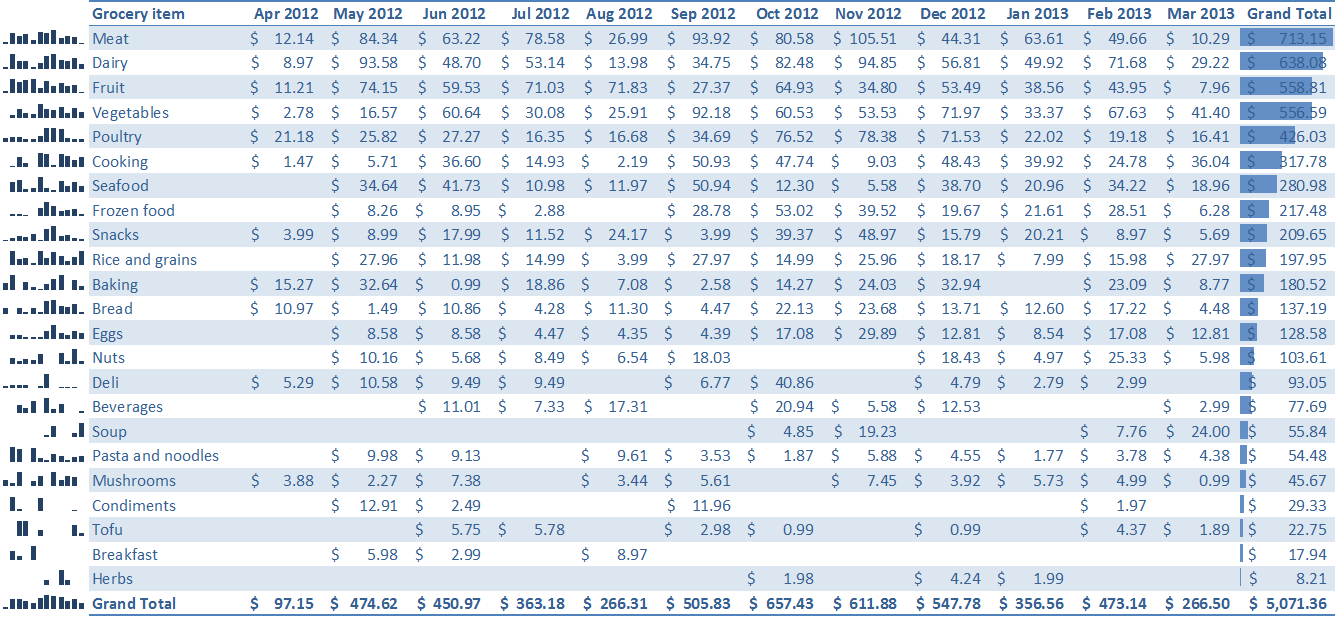
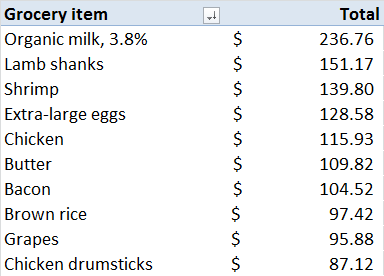
How I tracked this: I built a small tool for tracking community-supported agriculture into my Quantified Awesome website. Every week, I weighed all the produce and typed in the their names and weights. At the end of the season, I copied the data and used pivot tables in Microsoft Excel to analyze the results by category and week. I manually checked the GroceryGateway website for prices, and I used VLOOKUP to cross-reference the data with the prices.

My input system didn’t do anything special that a spreadsheet couldn’t handle, although I liked how the weights became part of my dashboard. If you want to start tracking either community-supported agriculture or your regular groceries, you can start with a spreadsheet (Microsoft Excel or OpenOffice). Log the produce you receive or buy, and summarize them in ways that help you answer your questions. Have fun!

Short URL: http://sachachua.com/blog/p/23096

How I used the 5-day holiday

I took Friday off because I had worked the previous weekend, so our Christmas / Boxing Day holiday turned into a 5-day break. We had a long list of tasks we had saved for blocks of unstructured time, so there was never a dull moment.

Here’s how the break shaped up.

  • Discretionary (48%, 54:50)
    • Quantified Awesome: 25:05
    • Social: 20:42
  • Sleep (41%, 46:12, average of 9:14 per day)
  • Personal (7%, 8:17)
  • Unpaid work (4%, 4:40)
    • Cooking: 2:01
    • Tidying up: 1:51
    • Laundry: 0:48

I’ve added many features to Quantified Awesome, and have started using it as my main time tracking and reporting tool. I don’t have offline access to it yet, though, which annoys me. I can continue to use Tap Log Records for that and merge the records from time to time, but I’d rather develop an HTML5 or Android application that can make the process easier. After I get that sorted out, then I’ll work on opening it up to other people (privacy, access, documentation…) More weekend hacking.

We also spent some time this weekend decluttering. We’ve been building a habit of clearing the kitchen table and the sink every night. I figure that if we can deal with those two areas, we can use that momentum to tackle the rest of the clutter and simplify our lives.

The freezer is full of chili, beef bulgogi, and baked beans. We’re ready for the next few weeks, and for starting 2012 smoothly.

It’s odd knowing exactly where my time went, but I like it.

Next steps:

  • Prototype offline HTML5 interface for Quantified Awesome? Might take several weekends
  • Get rid of another trashbag of clutter
Short URL: http://sachachua.com/blog/p/23084

Quantified Awesome: Building my own time tracker

I took advantage of the holiday break to build my own time tracker into Quantified Awesome. I wanted a simple way to capture activities, thoughts, and other records, using a hierarchy to simplify entry and reporting. This involved ripping out my old code related to Time Recording and Tap Log Records, but it was worth it. Now the reports are more useful for work and life. I’m sure I’ll come up with other improvements as I use it.

After lots of digging, I found a tutorial that helped me figure out OmniAuth. I added Google Accounts and Facebook login to the web app. I still haven’t opened it up to signups, but now I can log in easily, and the site will automatically add signup entries for people who try to use Google or Facebook to sign up. I hope to open things up before the next Quantified Self Toronto meetup on January 17.

I added OAuth because I wanted to be able to synchronize with Quantified Awesome using a native Android application. The web interface for Quantified Awesome is somewhat usable on my Android, and it would be good to tweak it further for the small screen. Still, I don’t always have Internet access, so I want to build an app that can accept data offline and sync it up when ready. I still have to figure out how to use Account Manager and the sync API on the Android. I’m not sure if I can get all that in tomorrow, but there will be other weekends to work on this.

I like tracking my time. The data helps me answer questions like:

  • How much time does it really take me to finish a task?
  • Can I work a good week, getting lots of things done, while making time for personal projects?
  • What’s truly important to me, as shown by what I spend time on?

With my own time tracker, I hope to make data capture and analysis smoother. It’ll be a good excuse to get deeper into Rails 3.1 and Android development, too – skills that might come in handy over the next few years.

I’m happy with the way I used this holiday weekend. It felt like a good balance between spending time with W- and working on my personal projects. I slept more than I expected to and Friday was less productive than the other days, but it was good to take it easy. With clear tasks in front of me in terms of improving Quantified Awesome, I’m sure I’ll have fun.

Short URL: http://sachachua.com/blog/p/23083

Get the highlights as a PDF!

Stories from my Twenties: Highlights from a Decade of Blogging

Free sample!