
Disabling touch on Windows 8 on a Lenovo X220 tablet
Posted: - Modified: | geekUpdate 2014/01/07: You can use the Device Manager to disable the touchscreen devices. I found mine under Human Interface Devices.
I often draw with my stylus in tablet mode. Palm detection doesn’t work particularly well, so I prefer to disable the touch screen and use either my stylus or a mouse. Unfortunately, the option for disabling the touch screen disappeared when I upgraded to Windows 8:

See, no checklist to disable it!
After much searching, experimenting, and updating of drivers, I’ve found something that lets me keep the pen capability while disabling touch. I needed to go into Device Manager and disable the HID-compliant mouse there:
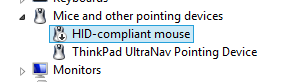
I missed it because I was trying to disable all sorts of other things under Human Interface Devices:
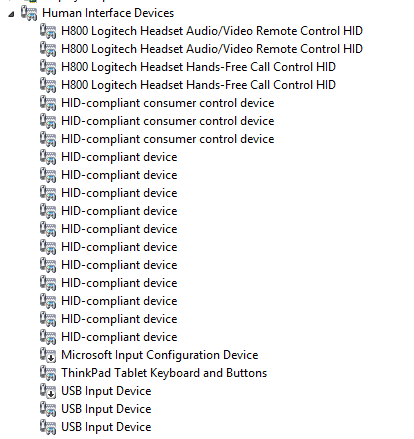
… which includes the pen input. I thought the touch input was there as well, but no luck. Good thing I checked other categories.
I’m glad I’m doing this now instead of right before a conference or on an international trip. Next time, I should make sure to check driver support, not just software. I don’t know if that would’ve completely avoided the problem, though, as many of the web pages I came across talked about other solutions.
Onward!