<?xml version="1.0" encoding="UTF-8"?><?xml-stylesheet href="/assets/atom.xsl" type="text/xsl"?><feed
	xmlns="http://www.w3.org/2005/Atom"
	xmlns:thr="http://purl.org/syndication/thread/1.0"
	xml:lang="en-US"
	><title>Sacha Chua - tag - autodesk</title>
	<subtitle>Emacs, sketches, and life</subtitle>
	<link rel="self" type="application/atom+xml" href="https://sachachua.com/blog/tag/autodesk/feed/atom/index.xml" />
  <link rel="alternate" type="text/html" href="https://sachachua.com/blog/tag/autodesk" />
  <id>https://sachachua.com/blog/tag/autodesk/feed/atom/index.xml</id>
  <generator uri="https://11ty.dev">11ty</generator>
	<updated>2013-05-27T12:00:00Z</updated>
<entry>
		<title type="html">How I set up Autodesk Sketchbook Pro for sketchnoting</title>
		<link rel="alternate" type="text/html" href="https://sachachua.com/blog/2013/05/how-i-set-up-autodesk-sketchbook-pro-for-sketchnoting/"/>
		<author><name><![CDATA[Sacha Chua]]></name></author>
		<updated>2014-02-11T06:46:02Z</updated>
    <published>2013-05-27T12:00:00Z</published>
    <category term="drawing" />
<category term="process" />
		<id>https://sachachua.com/blog/?p=24851</id>
		<content type="html"><![CDATA[<p>UPDATE 2014-02-10: Check out <a href="https://sachachua.com/blog/?p=26817&#038;shareadraft=baba26817_52f97f96dc49e">my free/PWYW downloadable resources for Autodesk Sketchbook Pro</a>: the grid I use, the brushes, and a PSD that has the grid and a blank layer.</p>
<p>&#8212;-</p>
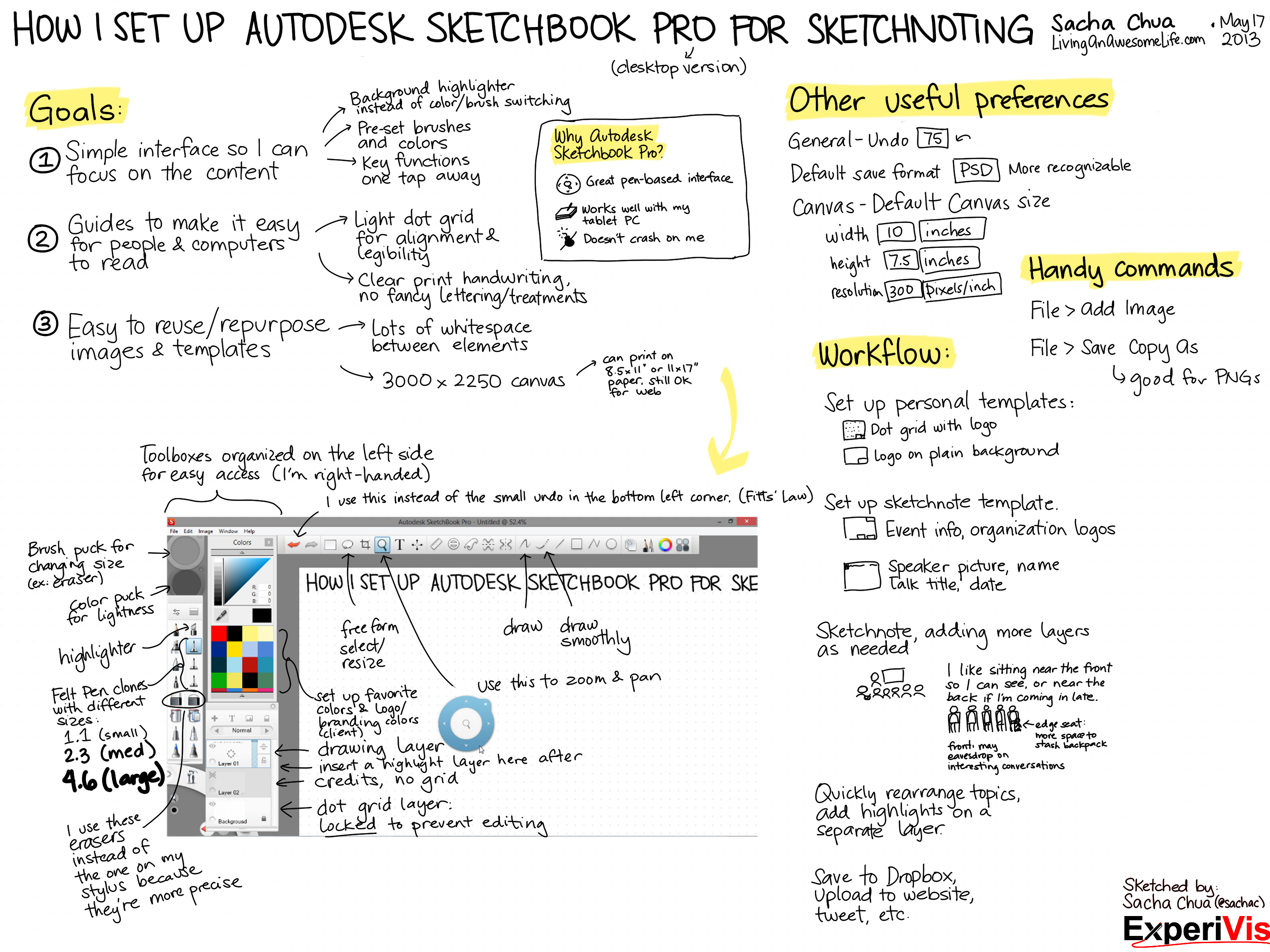
<p>Matt just got a tablet, so he wanted to know how I set up Autodesk Sketchbook Pro for my sketchnoting. See the sketchnote below for my layout and brush sizes, and a few other tips. =) I sometimes tweak brush sizes depending on the size of the project, but they’re roughly around that proportion (1.1-1.3, 2.3-2.5, 4.6 or so).</p>
<p><a href="https://sachachua.com/blog/wp-content/uploads/2013/05/How-I-Set-Up-Autodesk-Sketchbook-Pro-for-Sketchnoting.png"><img loading="lazy" style="background-image: none; padding-top: 0px; padding-left: 0px; display: inline; padding-right: 0px; border: 0px;" title="How I Set Up Autodesk Sketchbook Pro for Sketchnoting" alt="How I Set Up Autodesk Sketchbook Pro for Sketchnoting" src="https://sachachua.com/blog/wp-content/uploads/2013/05/How-I-Set-Up-Autodesk-Sketchbook-Pro-for-Sketchnoting_thumb.png" width="580" height="435" border="0"></a></p>
<p>The dot grid I use works out to roughly 40 pixels square with dots that are 5 pixels or so in diameter. If I draw small letters at 1 grid unit (~40px) high, this is mostly readable when printed on 8.5”x11” and requires a little scrolling and zooming when viewing on the computer. I usually draw titles at 2-3 grid units high (80 or 120 pixels). Sometimes I use the dot grid just as a guide for keeping letters mostly level, and I pick a size in between.</p>
<p>You can <a href="mailto:sacha@sachachua.com?subject=Comment%20on%20https%3A%2F%2Fsachachua.com%2Fblog%2F2013%2F05%2Fhow-i-set-up-autodesk-sketchbook-pro-for-sketchnoting%2F&body=Name%20you%20want%20to%20be%20credited%20by%20(if%20any)%3A%20%0AMessage%3A%20%0ACan%20I%20share%20your%20comment%20so%20other%20people%20can%20learn%20from%20it%3F%20Yes%2FNo%0A">e-mail me at sacha@sachachua.com</a>.</p>]]></content>
		</entry>
</feed>