<?xml version="1.0" encoding="UTF-8"?><?xml-stylesheet href="/assets/atom.xsl" type="text/xsl"?><feed
	xmlns="http://www.w3.org/2005/Atom"
	xmlns:thr="http://purl.org/syndication/thread/1.0"
	xml:lang="en-US"
	><title>Sacha Chua - tag - screenshot</title>
	<subtitle>Emacs, sketches, and life</subtitle>
	<link rel="self" type="application/atom+xml" href="https://sachachua.com/blog/tag/screenshot/feed/atom/index.xml" />
  <link rel="alternate" type="text/html" href="https://sachachua.com/blog/tag/screenshot" />
  <id>https://sachachua.com/blog/tag/screenshot/feed/atom/index.xml</id>
  <generator uri="https://11ty.dev">11ty</generator>
	<updated>2010-12-16T13:00:00Z</updated>
<entry>
		<title type="html">More MobileOrg hacking on the Android</title>
		<link rel="alternate" type="text/html" href="https://sachachua.com/blog/2010/12/more-mobileorg-hacking-on-the-android/"/>
		<author><name><![CDATA[Sacha Chua]]></name></author>
		<updated>2010-12-16T18:00:00Z</updated>
    <published>2010-12-16T13:00:00Z</published>
    <category term="android" />
<category term="emacs" />
<category term="org" />
		<id>https://sachachua.com/blog/?p=21973</id>
		<content type="html"><![CDATA[<p>I’ve gotten IBM’s permission to contribute my changes back to the MobileOrg project, yay! (Disclaimer: I’m doing this as myself and not as an employee of IBM, and all the usual disclaimers apply.) Code and issue-tracking at <a href="https://github.com/sachac/mobileorg-android">https://github.com/sachac/mobileorg-android</a>.</p>
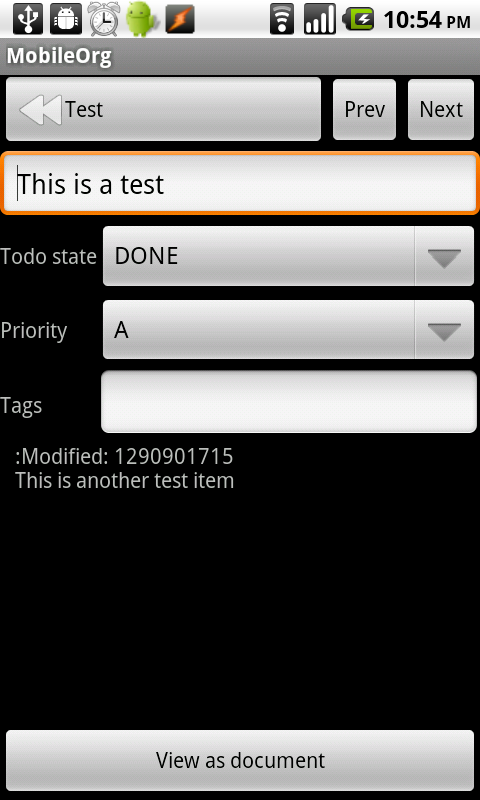
<p>Before and after:</p>
<p><a href="https://sachachua.com/blog/wp-content/uploads/2010/12/editbefore1.png"><img loading="lazy" style="border-bottom: 0px; border-left: 0px; margin: 0px 5px 5px 0px; display: inline; border-top: 0px; border-right: 0px" title="editbefore[1]" border="0" alt="editbefore[1]" src="https://sachachua.com/blog/wp-content/uploads/2010/12/editbefore1_thumb.png" width="188" height="313"></a> <a href="https://sachachua.com/blog/wp-content/uploads/2010/12/image5.png"><img loading="lazy" style="border-bottom: 0px; border-left: 0px; margin: 0px 0px 5px; display: inline; border-top: 0px; border-right: 0px" title="image" border="0" alt="image" src="https://sachachua.com/blog/wp-content/uploads/2010/12/image_thumb5.png" width="188" height="313"></a> </p>
<p>There are still <a href="https://github.com/sachac/mobileorg-android/issues">bugs to work out</a>, but whee!</p>
<p>You can <a href="https://sachachua.com/blog/2010/12/more-mobileorg-hacking-on-the-android/#comment">view 1 comment</a> or <a href="mailto:sacha@sachachua.com?subject=Comment%20on%20https%3A%2F%2Fsachachua.com%2Fblog%2F2010%2F12%2Fmore-mobileorg-hacking-on-the-android%2F&body=Name%20you%20want%20to%20be%20credited%20by%20(if%20any)%3A%20%0AMessage%3A%20%0ACan%20I%20share%20your%20comment%20so%20other%20people%20can%20learn%20from%20it%3F%20Yes%2FNo%0A">e-mail me at sacha@sachachua.com</a>.</p>]]></content>
		</entry><entry>
		<title type="html">Android Tasker: Setting time limits for Angry Birds and other timesucks</title>
		<link rel="alternate" type="text/html" href="https://sachachua.com/blog/2010/12/android-tasker-setting-time-limits-for-angry-birds-and-other-timesucks/"/>
		<author><name><![CDATA[Sacha Chua]]></name></author>
		<updated>2011-08-02T01:49:19Z</updated>
    <published>2010-12-15T13:00:00Z</published>
    <category term="android" />
		<id>https://sachachua.com/blog/?p=21965</id>
		<content type="html"><![CDATA[<p><a href="https://sachachua.com/blog/wp-content/uploads/2010/12/angrybirds.png"><img loading="lazy" style="border-bottom: 0px; border-left: 0px; margin: 0px 0px 0px 5px; display: inline; border-top: 0px; border-right: 0px" title="angry-birds" border="0" alt="angry-birds" align="right" src="https://sachachua.com/blog/wp-content/uploads/2010/12/angrybirds_thumb.png" width="188" height="113"></a> </p>
<p><a href="http://www.rovio.com/index.php?page=angry-birds">Angry Birds</a> is our new household obsession. J- plays it on her iPod Touch. W- plays it on his Nokia N8. Me, I caved in and installed it on my Android phone. It’s a physics-based puzzle game with amusingly Rube Goldberg-ish levels. I tell myself that playing contributes to social bonds with W- and J-. </p>
<p><a href="https://sachachua.com/blog/wp-content/uploads/2010/12/image3.png"><img loading="lazy" style="border-bottom: 0px; border-left: 0px; margin: 0px 0px 5px; display: inline; border-top: 0px; border-right: 0px" title="image" border="0" alt="image" src="https://sachachua.com/blog/wp-content/uploads/2010/12/image_thumb3.png" width="580" height="348"></a> </p>
<p>The game is set up as a long series of puzzles much like the screen above. When you finish a puzzle by destroying all the green pigs, you see one to three stars depending on your score, and you can either replay the level or move on to the next one. </p>
<p>Angry Birds is easy to learn and very engaging. I’m often tempted to check out the next puzzle even when I really should be going to bed. I tried using <a href="http://www.appbrain.com/app/tea-timer/goo.TeaTimer">Tea Timer</a> to give myself five-minute limits, but that took too many taps to set up.</p>
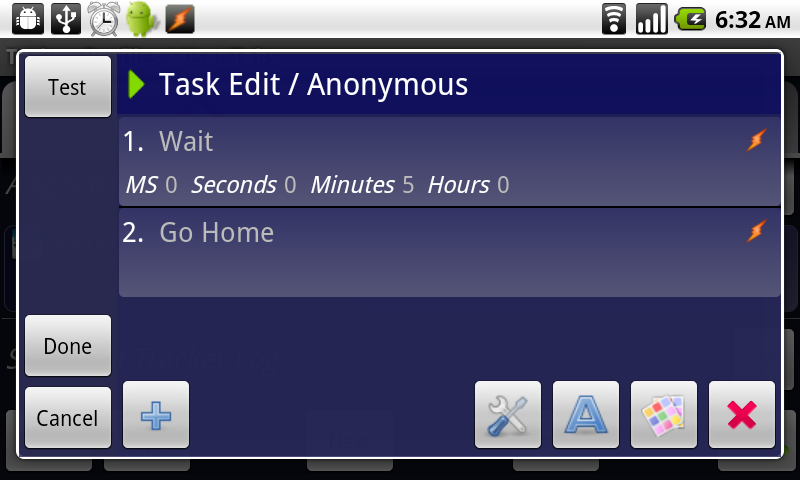
<p><strong>Solution: Use </strong><a href="http://www.appbrain.com/app/tasker/net.dinglisch.android.taskerm"><strong>Tasker</strong></a><strong> to automatically set up a five-minute time limit for Angry Birds. </strong>That way, the timing is built in. I created a quick task that started whenever I launched Angry Birds, waited five minutes, and then returned me to the home screen. It’s enough to snap me out of the timesuck haze and remind me what I should be doing. </p>
<p>Here’s how:</p>
<ol>
<li>In Tasker, click on <strong>New </strong>and set up a profile. For the context, choose <strong>Application</strong>. Choose the application(s) you want to limit, such as Angry Birds. Click on <strong>Done</strong>.</li>
<li>Click on <strong>New Task</strong>. You will be prompted for the task name. You can give the task a name if you want, or leave it anonymous. Click <strong>OK.</strong></li>
<li>Click on the <strong>+</strong> sign to add a new action. Choose <strong>Tasker &gt; Wait </strong>and set it to the duration you want. Click on Done.</li>
<li>Click on the <strong>+</strong> sign to add another action. Choose <strong>App &gt; Go Home</strong>. This should keep the applications running, but return you to the home screen so that you can decide what to do next. </li>
</ol>
<p>Instead of returning to the home screen, you might want to have Tasker bring up your task list, your calendar, or a note from your saner and more productive self. </p>
<p><a href="https://sachachua.com/blog/wp-content/uploads/2010/12/image4.png"><img loading="lazy" style="border-bottom: 0px; border-left: 0px; margin: 0px 0px 5px; display: inline; border-top: 0px; border-right: 0px" title="image" border="0" alt="image" src="https://sachachua.com/blog/wp-content/uploads/2010/12/image_thumb4.png" width="580" height="348"></a> </p>
<p>I really like Tasker. =) It takes some getting used to, but it’s powerful. It’s like being able to <a href="http://www.gnu.org/s/emacs/manual/html_node/elisp/Advising-Functions.html">defadvice</a> Android applications. defadvice is an Emacs-ism that lets you specify code that runs before, after, or around other code, and it’s one of the reasons why Emacs is amazingly programmable. In addition to context-sensitive settings (like the way I automatically turn WiFi when I leave the house), Tasker lets me specify actions and settings that are active before, after, or around other things on my Android. I wish my apps exposed more functionality to Tasker. </p>
<p>Here’s the XML version, if you want to import it. <a href="https://sachachua.com/notebook/android/tasker_angry_birds.prf.xml">tasker_angry_birds.prf.xml</a></p>
<pre class="brush: xml; auto-links: true; collapse: false; first-line: 1; gutter: true; html-script: false; light: false; ruler: false; smart-tabs: true; tab-size: 4; toolbar: true;">&lt;class cl=&quot;TaskerData&quot; sr=&quot;&quot;&gt;
  &lt;class cl=&quot;Task&quot; sr=&quot;task21&quot;&gt;
    &lt;id&gt;21&lt;/id&gt;
    &lt;class cl=&quot;Action&quot; sr=&quot;act1&quot;&gt;
      &lt;class cl=&quot;IntArg&quot; sr=&quot;arg0&quot;&gt;
      &lt;/class&gt;
      &lt;code&gt;25&lt;/code&gt;
    &lt;/class&gt;
    &lt;class cl=&quot;Action&quot; sr=&quot;act0&quot;&gt;
      &lt;class cl=&quot;IntArg&quot; sr=&quot;arg4&quot;&gt;
      &lt;/class&gt;
      &lt;class cl=&quot;IntArg&quot; sr=&quot;arg3&quot;&gt;
      &lt;/class&gt;
      &lt;class cl=&quot;IntArg&quot; sr=&quot;arg2&quot;&gt;
        &lt;val&gt;5&lt;/val&gt;
      &lt;/class&gt;
      &lt;class cl=&quot;IntArg&quot; sr=&quot;arg1&quot;&gt;
      &lt;/class&gt;
      &lt;class cl=&quot;IntArg&quot; sr=&quot;arg0&quot;&gt;
      &lt;/class&gt;
      &lt;code&gt;30&lt;/code&gt;
    &lt;/class&gt;
  &lt;/class&gt;
  &lt;class cl=&quot;Profile&quot; sr=&quot;prof15&quot;&gt;
    &lt;nme&gt;Angry birds&lt;/nme&gt;
    &lt;id&gt;9999&lt;/id&gt;
    &lt;class cl=&quot;AppContext&quot; sr=&quot;con0&quot; ve=&quot;2&quot;&gt;
      &lt;label0&gt;Angry Birds&lt;/label0&gt;
      &lt;cls0&gt;com.rovio.ka3d.App&lt;/cls0&gt;
      &lt;pkg0&gt;com.rovio.angrybirds&lt;/pkg0&gt;
    &lt;/class&gt;
    &lt;mid0&gt;21&lt;/mid0&gt;
  &lt;/class&gt;
  &lt;tv&gt;1.0.13m&lt;/tv&gt;
&lt;/class&gt;</pre>
<p>You can <a href="https://sachachua.com/blog/2010/12/android-tasker-setting-time-limits-for-angry-birds-and-other-timesucks/#comment">view 3 comments</a> or <a href="mailto:sacha@sachachua.com?subject=Comment%20on%20https%3A%2F%2Fsachachua.com%2Fblog%2F2010%2F12%2Fandroid-tasker-setting-time-limits-for-angry-birds-and-other-timesucks%2F&body=Name%20you%20want%20to%20be%20credited%20by%20(if%20any)%3A%20%0AMessage%3A%20%0ACan%20I%20share%20your%20comment%20so%20other%20people%20can%20learn%20from%20it%3F%20Yes%2FNo%0A">e-mail me at sacha@sachachua.com</a>.</p>]]></content>
		</entry>
</feed>