<?xml version="1.0" encoding="UTF-8"?><?xml-stylesheet href="/assets/atom.xsl" type="text/xsl"?><feed
	xmlns="http://www.w3.org/2005/Atom"
	xmlns:thr="http://purl.org/syndication/thread/1.0"
	xml:lang="en-US"
	><title>Sacha Chua - tag - vm</title>
	<subtitle>Emacs, sketches, and life</subtitle>
	<link rel="self" type="application/atom+xml" href="https://sachachua.com/blog/tag/vm/feed/atom/index.xml" />
  <link rel="alternate" type="text/html" href="https://sachachua.com/blog/tag/vm" />
  <id>https://sachachua.com/blog/tag/vm/feed/atom/index.xml</id>
  <generator uri="https://11ty.dev">11ty</generator>
	<updated>2013-12-02T12:00:00Z</updated>
<entry>
		<title type="html">Setting up virtual machines with Vagrant</title>
		<link rel="alternate" type="text/html" href="https://sachachua.com/blog/2013/12/setting-up-virtual-machines-with-vagrant/"/>
		<author><name><![CDATA[Sacha Chua]]></name></author>
		<updated>2013-11-13T22:55:26Z</updated>
    <published>2013-12-02T12:00:00Z</published>
    <category term="geek" />
		<id>https://sachachua.com/blog/?p=26388</id>
		<content type="html"><![CDATA[<p>I spent a week focusing on system administration, and I feel more comfortable with my setup already. My web server hosts a number of blogs (like this one!) as well as my <a href="http://quantifiedawesome.com">QuantifiedAwesome.com</a> tracking dashboard. I want to make sure that things are backed up <em>and</em> that I can verify that my backups are running by creating a working website. It’s also useful to have a separate development environment where I can try out server configuration changes before applying them to production. Virtual machines to the rescue!</p>
<p><a href="http://www.vagrantup.com">Vagrant</a> is a tool that makes it easy to create and manage virtual machines with forwarded ports and shared folders. I use it for a couple of Ubuntu-based virtual machines on my laptop, and another backup-focused virtual machine on our Ubuntu desktop.</p>
<p><a href="https://sachachua.com/blog/wp-content/uploads/2013/11/2013-10-28-Setting-up-virtual-machines-with-Vagrant.png"><img loading="lazy" style="background-image: none; padding-top: 0px; padding-left: 0px; display: inline; padding-right: 0px; border-width: 0px;" title="2013-10-28 Setting up virtual machines with Vagrant" alt="2013-10-28 Setting up virtual machines with Vagrant" src="https://sachachua.com/blog/wp-content/uploads/2013/11/2013-10-28-Setting-up-virtual-machines-with-Vagrant_thumb.png" width="640" height="487" border="0"></a></p>
<p>You can make your Vagrant box more secure by changing the default passwords for <strong>root</strong> and <strong>vagrant</strong>, and setting up your own SSH key. Use <strong>vagrant package</strong> and <strong>vagrant box add </strong>to make this a new base box.</p>
<p><strong>Related tools:</strong></p>
<ul>
<li>Give <a href="https://github.com/jedi4ever/veewee">Veewee</a> kernel and install info, and it will make base boxes for you. Good for testing different versions of distributions.</li>
<li>Vagrant works with <a href="http://www.opscode.com/chef/‎">Chef</a>, <a href="http://puppetlabs.com/‎">Puppet</a>, or shell scripts for provisioning. Need to reverse-engineer config from an existing server? Check out <a href="http://devstructure.com/blueprint/">Devstructure Blueprint</a>.</li>
<li>If you upgrade kernels or Virtualbox/VMWare, you might find <a href="https://github.com/dotless-de/vagrant-vbguest">vagrant-vbguest</a> handy.</li>
<li>If your host system is pretty much the same as your deployment system architecture, check out <a href="http://www.docker.io">Docker</a> for a lighter-weight way to isolate your development environment.</li>
</ul>
<p>&#8212;<br>
These are some of my notes from when I was setting up my VMs. Different console backgrounds in Putty really help!</p>
<p><a href="https://sachachua.com/blog/wp-content/uploads/2013/11/2013-10-28-Setting-up-my-development-environment-VMs.png"><img loading="lazy" style="background-image: none; padding-top: 0px; padding-left: 0px; display: inline; padding-right: 0px; border-width: 0px;" title="2013-10-28 Setting up my development environment VMs" alt="2013-10-28 Setting up my development environment VMs" src="https://sachachua.com/blog/wp-content/uploads/2013/11/2013-10-28-Setting-up-my-development-environment-VMs_thumb.png" width="640" height="488" border="0"></a></p>
<p>&nbsp;</p>
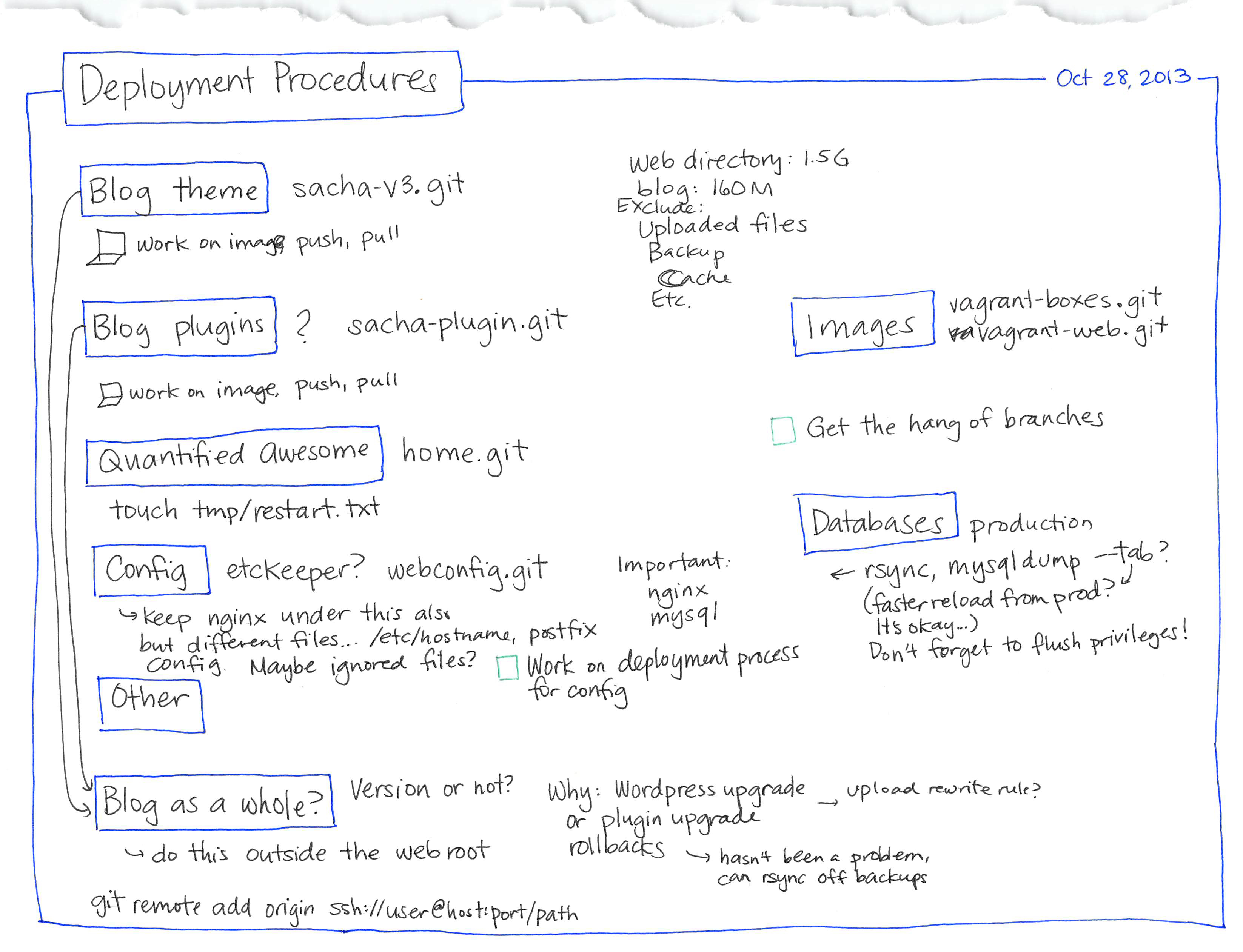
<p><a href="https://sachachua.com/blog/wp-content/uploads/2013/11/2013-10-28-Deployment-procedures.png"><img loading="lazy" class="alignnone size-medium wp-image-26390" alt="2013-10-28 Deployment procedures" src="https://sachachua.com/blog/wp-content/uploads/2013/11/2013-10-28-Deployment-procedures-640x490.png" width="640" height="490" srcset="https://sachachua.com/blog/wp-content/uploads/2013/11/2013-10-28-Deployment-procedures-640x490.png 640w, https://sachachua.com/blog/wp-content/uploads/2013/11/2013-10-28-Deployment-procedures-200x153.png 200w" sizes="(max-width: 640px) 100vw, 640px"></a></p>
<p>You can <a href="mailto:sacha@sachachua.com?subject=Comment%20on%20https%3A%2F%2Fsachachua.com%2Fblog%2F2013%2F12%2Fsetting-up-virtual-machines-with-vagrant%2F&body=Name%20you%20want%20to%20be%20credited%20by%20(if%20any)%3A%20%0AMessage%3A%20%0ACan%20I%20share%20your%20comment%20so%20other%20people%20can%20learn%20from%20it%3F%20Yes%2FNo%0A">e-mail me at sacha@sachachua.com</a>.</p>]]></content>
		</entry>
</feed>