<?xml version="1.0" encoding="UTF-8"?><?xml-stylesheet href="/assets/atom.xsl" type="text/xsl"?><feed
	xmlns="http://www.w3.org/2005/Atom"
	xmlns:thr="http://purl.org/syndication/thread/1.0"
	xml:lang="en-US"
	><title>Sacha Chua - tag - pivot</title>
	<subtitle>Emacs, sketches, and life</subtitle>
	<link rel="self" type="application/atom+xml" href="https://sachachua.com/blog/tag/pivot/feed/atom/index.xml" />
  <link rel="alternate" type="text/html" href="https://sachachua.com/blog/tag/pivot" />
  <id>https://sachachua.com/blog/tag/pivot/feed/atom/index.xml</id>
  <generator uri="https://11ty.dev">11ty</generator>
	<updated>2014-10-20T12:00:55Z</updated>
<entry>
		<title type="html">Microsoft Excel: Converting a summary table / crosstab back into data rows</title>
		<link rel="alternate" type="text/html" href="https://sachachua.com/blog/2014/10/microsoft-excel-converting-summary-table-crosstab-back-data-rows/"/>
		<author><name><![CDATA[Sacha Chua]]></name></author>
		<updated>2014-10-16T04:43:32Z</updated>
    <published>2014-10-20T12:00:55Z</published>
    <category term="geek" />
		<id>https://sachachua.com/blog/?p=27543</id>
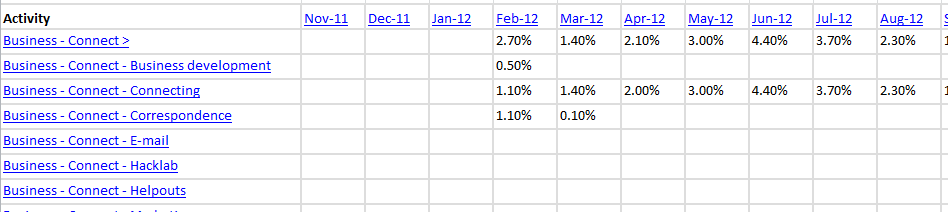
		<content type="html"><![CDATA[<p>I recently wanted to transform a summary table of the form:</p>
<p><a href="https://sachachua.com/blog/wp-content/uploads/2014/10/2014-10-15-20_36_58-Microsoft-Excel-Book2.png"><img loading="lazy" class="alignnone size-medium wp-image-27544" src="https://sachachua.com/blog/wp-content/uploads/2014/10/2014-10-15-20_36_58-Microsoft-Excel-Book2-640x143.png" alt="2014-10-15 20_36_58-Microsoft Excel - Book2" width="640" height="143" srcset="https://sachachua.com/blog/wp-content/uploads/2014/10/2014-10-15-20_36_58-Microsoft-Excel-Book2-640x143.png 640w, https://sachachua.com/blog/wp-content/uploads/2014/10/2014-10-15-20_36_58-Microsoft-Excel-Book2-280x62.png 280w, https://sachachua.com/blog/wp-content/uploads/2014/10/2014-10-15-20_36_58-Microsoft-Excel-Book2.png 948w" sizes="(max-width: 640px) 100vw, 640px"></a></p>
<p>into a table with rows of (activity, date, value) so that I could add columns for year and month and then analyze the data using a pivot table.</p>
<p>It turns out that you can do this with another pivot table, yay! I followed <a href="http://stackoverflow.com/questions/11674964/how-can-i-transform-rows-into-repeated-column-based-data/11676403#11676403">this tutorial</a> to convert my summary columns into data rows using Microsoft Excel 2010.</p>
<ol>
<li>Press <strong>Alt-D, P</strong> to get to the secret pivot table wizard that's different from the one you get from Insert &gt; Pivot table.</li>
<li>Choose <strong>Multiple consolidation ranges. </strong>Click <strong>Next.</strong></li>
<li>Choose <strong>I will create the page fields. </strong>Click <strong>Next.</strong></li>
<li>Select the range and add it. Go through the rest of the wizard to create a pivot table.</li>
<li>Remove the row and column fields.</li>
<li>Double-click on the total.</li>
</ol>
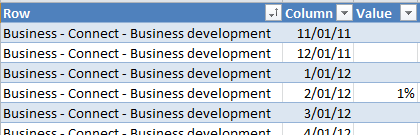
<p>You should now see a table with the data from your crosstab.</p>
<p><a href="https://sachachua.com/blog/wp-content/uploads/2014/10/2014-10-15-20_43_25-Microsoft-Excel-Book2.png"><img loading="lazy" class="alignnone size-full wp-image-27545" src="https://sachachua.com/blog/wp-content/uploads/2014/10/2014-10-15-20_43_25-Microsoft-Excel-Book2.png" alt="2014-10-15 20_43_25-Microsoft Excel - Book2" width="420" height="135" srcset="https://sachachua.com/blog/wp-content/uploads/2014/10/2014-10-15-20_43_25-Microsoft-Excel-Book2.png 420w, https://sachachua.com/blog/wp-content/uploads/2014/10/2014-10-15-20_43_25-Microsoft-Excel-Book2-280x90.png 280w" sizes="(max-width: 420px) 100vw, 420px"></a></p>
<p>Neato! Pivot tables are even cooler than I thought.</p>
<p>You can <a href="https://sachachua.com/blog/2014/10/microsoft-excel-converting-summary-table-crosstab-back-data-rows/#comment">view 17 comments</a> or <a href="mailto:sacha@sachachua.com?subject=Comment%20on%20https%3A%2F%2Fsachachua.com%2Fblog%2F2014%2F10%2Fmicrosoft-excel-converting-summary-table-crosstab-back-data-rows%2F&body=Name%20you%20want%20to%20be%20credited%20by%20(if%20any)%3A%20%0AMessage%3A%20%0ACan%20I%20share%20your%20comment%20so%20other%20people%20can%20learn%20from%20it%3F%20Yes%2FNo%0A">e-mail me at sacha@sachachua.com</a>.</p>]]></content>
		</entry>
</feed>