
Extract PDF highlights into an Org file with Python
| orgI've been trying to find a good workflow for highlighting interesting parts of PDFs, and then getting that into my notes as images and text in Emacs. I think I've finally figured out something that works well for me that feels natural (marking things.
I wanted to read through Prot's Emacs configuration while the kiddo played with her friends at the playground. I saved the web page as a PDF and exported it to Noteful. The PDF has 481 pages. Lots to explore! It was a bit chilly, so I had my gloves on. I used a capacitative stylus in my left hand to scroll the document and an Apple Pencil in my right hand to highlight the parts I wanted to add to my config or explore further.
Back at my computer, I used pip install pymupdf to install the PyMuPDF library. I poked around the PDF in the Python shell to see what it had, and I noticed that the highlights were drawings with fill 0.5. So I wrote this Python script to extract the images and text near that rectangle:
import fitz
import pathlib
import sys
import os

BUFFER = 5

def extract_highlights(filename, output_dir):
    doc = fitz.open(filename)
    s = "* Excerpts\n"
    for page_num, page in enumerate(doc):
        page_width = page.rect.width
        page_text = ""
        for draw_num, d in enumerate(page.get_drawings()):
            if d['fill_opacity'] == 0.5:
               rect = d['rect']
               clip_rect = fitz.Rect(0, rect.y0 - BUFFER, page_width, rect.y1 + BUFFER)
               img = page.get_pixmap(clip=clip_rect)
               img_filename = "page-%03d-%d.png" % (page_num + 1, draw_num + 1)
               img.save(os.path.join(output_dir, img_filename))
               text = page.get_text(clip=clip_rect)
               page_text = (page_text
                            + "[[file:%s]]\n#+begin_quote\n[[pdf:%s::%d][p%d]]: %s\n#+end_quote\n\n"
                            % (img_filename,
                               os.path.join("..", filename),
                               page_num + 1,
                               page_num + 1, text))
        if page_text != "":
            s += "** Page %d\n%s" % (page_num + 1, page_text)
    pathlib.Path(os.path.join(output_dir, "index.org")).write_bytes(s.encode())

if __name__ == '__main__':
    if len(sys.argv) < 3:
        print("Usage: list-highlights.py pdf-filename output-dir")
    else:
        extract_highlights(sys.argv[1], sys.argv[2])
After I opened the resulting index.org file, I used C-u C-u C-c C-x C-v (org-link-preview) to make the images appear inline throughout the whole buffer. There's a little extra text from the PDF extraction, but it's a great starting point for cleaning up or copying. The org-pdftools package lets me link to specific pages in PDFs, neat!
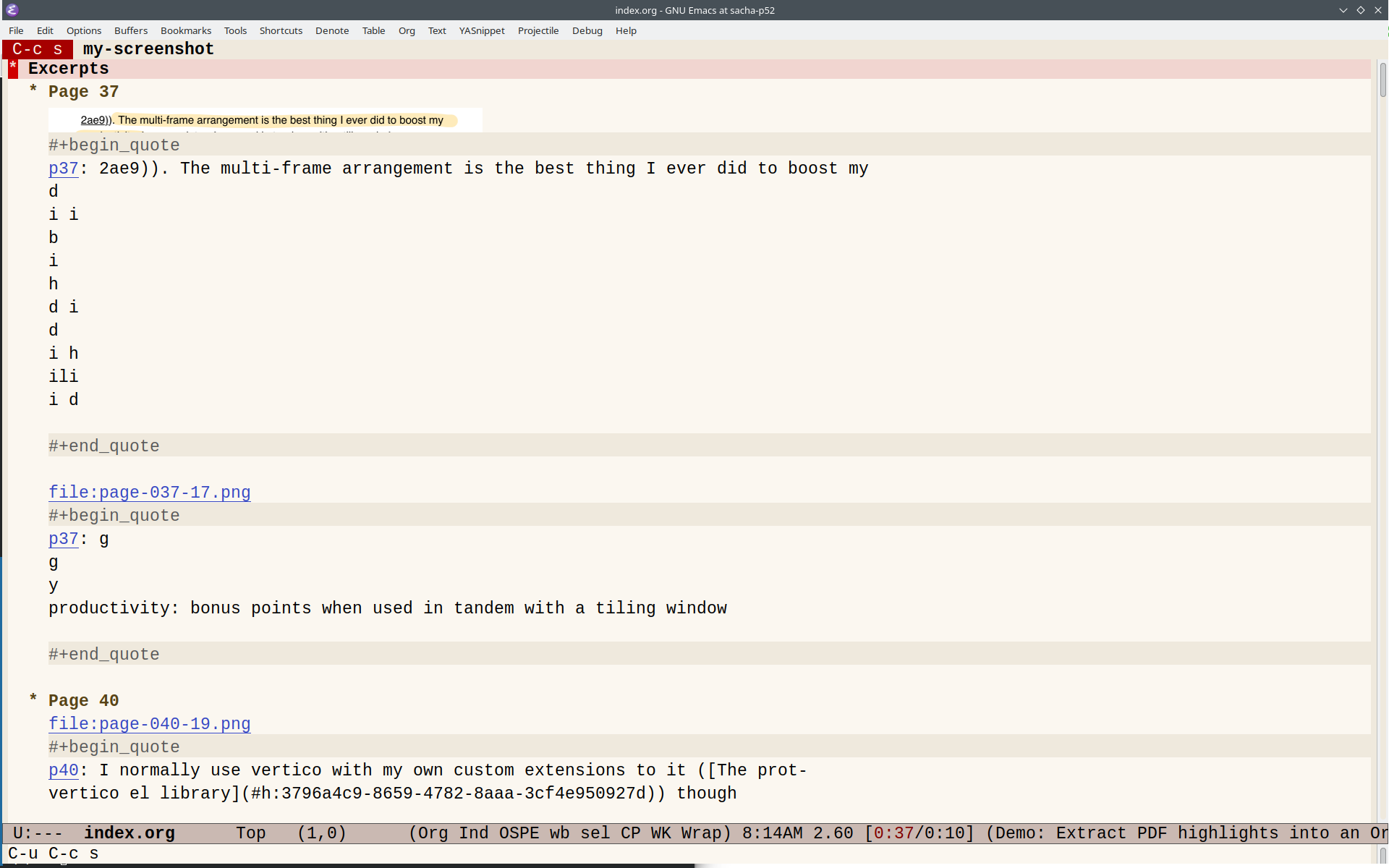
To set up org-pdftools, I used:
(use-package org-pdftools
  :hook (org-mode . org-pdftools-setup-link))
Here's my quick livestream about the script with a slightly older version that had an off-by-one bug in the page numbers and didn't have the fancy PDF links. =)