
Preventive maintenance and the Goldtouch Go! keyboard
| geek, kaizen, lifeOther people might go to a massage therapist to relax. I go so that I can spend an hour and a half picking a specialist’s brain for tips on preventive maintenance. “Why is that muscle sore? What can I do about it? What’s that one connected to? How about that one?” I’ve set aside space in my budget for quarterly sessions with Shelagh, a massage therapist at the Well of Alternative Medicine, and she’s been teaching me all sorts of useful exercises.
I told Shelagh how tips from a previous massage convinced me to shift from a backpack to a rolling suitcase and from medium heels to flat shoes. Now we’re working on avoiding the issues many people get from lots of computer work: hunched shoulders, aching necks, painful wrists. I’ve ordered this just-released Goldtouch Go! portable ergonomic keyboard: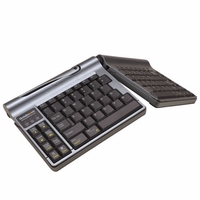
The Goldtouch site will charge $150 for international shipping, so order it from The Human Solution if you need it shipped internationally. The coupon code “ergonomics” may save you $10.
I thought about getting the Happy Hacking Lite keyboard, but I do actually like split keyboards. I also considered the Kinesis Advantage (too big) and the Kinesis Freestyle (too many accessories if I want the incline). The Goldtouch Go! looks like it’ll be worth trying out.
Then I’ll do what another coworker of mine does: prop the laptop on an overturned recycling bin so that it’s at eye level, and then use a keyboard and mouse for good posture.
A little bit of preventive maintenance now can help me enjoy life much more and much longer in the future. =) What do you do for preventive maintenance?
6 comments
Basti
2009-06-07T17:13:37ZTake a look at geekhack.org for info on high quality keyboard. Great forum, very addictive.
Damien McKenna
2009-06-07T19:10:31ZI'll be very interested to see how it works out. I use exclusively use laptops these days (McBook Pro for work, McBook for personal stuff) and enjoy working with them more so than a regular desktop, but I wish I could use an ergonomic keyboard..
James Golden
2009-06-08T15:14:40ZI get a one hour message every week and use the desktop version of the Goldtouch keyboard. i tried the Go, but the keys did not seem as soft as the desktop version. I hope that you like it. I think that posture variation is key when trying to improve comfort. Some use multiple mice. one in the right hand and one in the left.
I vary my posture between an Extra Large mouse and rollerbar device (both products are made by my company)
rjh
2009-06-09T14:45:15ZRight move on the Kinesis keyboard. I have one and it has made a huge difference in comfort, fatigue, joint pain, and typing accuracy and speed. But it is way too big for carrying around in any laptop bag. It's a desktop only device.
I would consider one if you end up with a significant level of desktop work. The only problem that I have with them is re-learning the local of the ctrl and meta keys. The moved to entirely different fingers and positions. That's tough on an Emacs user.
James Vasile
2009-06-11T03:52:20ZSwitch it up. I change my ergonomic setup every few months. Find things that work and cycle them. Change your mouse, your keyboard, your chair as soon as your body feel that groove turning into a rut.
Focus on posture. Setup reminders to sit up straight, hold your hands up properly for typing. If you're too tired to do this, you're too tired to focus properly on work. Take a few minutes, close your eyes, rest, then walk around and come back ready to position yourself for more work.
Sacha Chua
2009-06-11T12:53:34ZI schedule 10-second breaks every 5 minutes and 3-minute breaks every hour (thank you, Workrave!), and I pay attention to my posture. I like working at home because I get to do other productive things with those breaks, but I've been coming into work more frequently so that I can coach other people on Drupal. =) Hmm, I've never quite made an effort to hold my hands up, but I'll try that and see what it's like. Thanks for the tips and for reading! =)