
Karthik's notes on Emacs Chat 24: Omar Antolin Camarena
| emacsHere's a guest post from Karthik Chikmagalur in response to Emacs Chat 24: Omar Antolin Camarena.
- 16:00 - Omar's embark-on-last-message is gold! I implemented it and have already used it a dozen times in an hour.
17:00 - Omar mentions his tmp package for creating throwaway buffers. I use the scratch package for this.
M-x scratchwill open up a scratch buffer. If you had a region selected, that will be copied to the scratch buffer. By default, it will use the same major mode as the buffer you calling it from. CallingM-x scratchwith a prefix arg will let you pick the major mode you want.I have some additional customizations to try to automagically pick a major mode based on what I have selected: https://github.com/karthink/.emacs.d/blob/3deed38c0e02e95fdfab6812c494b1736b945a1e/lisp/utilities.el#L36
Also related is the edit-indirect package, which I'm sure you're aware of. I think of it as scratch's dual: scratch is for when I want to edit something without regard to its provenance,
edit-indirectis for editing the source (exactly likeorg-edit-special).I also try to automagically guess which major mode a piece of text should be edited in.
edit-indirectedits something that looks like a lisp form inlisp-interaction-mode, even if the origin is (say) this email composition buffer: https://github.com/karthink/.emacs.d/blob/3deed38c0e02e95fdfab6812c494b1736b945a1e/lisp/utilities.el#L6721:20 - You mention that you sometimes want to insert something into the minibuffer when you're in the minibuffer, but you end up inserting into the main buffer instead. Omar agreed that there is no easy fix for this.
Omar, Daniel Mendler and I actually discussed this years ago and came up with a separate command to do this:
(defun minibuffer-replace-input (&optional arg)
  "Replace original minibuffer input.

When a recursive minibuffer is active, insert the current string
into the original minibuffer input.  With prefix ARG, replace it
instead."
  (interactive "P")
  (when (and (minibufferp) (> (minibuffer-depth) 1))
    (let* ((replacement (minibuffer-contents)))
      (unwind-protect (minibuffer-quit-recursive-edit)
        (run-at-time 0 nil
                     (lambda (rep)
                       (when arg (delete-minibuffer-contents))
                       (insert rep)
                       (pulse-momentary-highlight-one-line))
                     replacement)))))
I don't need it every day, but when I do it's very handy.
29:40 - Omar mentions that he prefers to have lots of commands to mark specific text objects instead of hammering
expand-region(orexpreg-expand). There is a (now) old package called easy-kill which does this, allowing you to define marking commands for different objects at point (e.g. s for sexp, w for word, l for line, d for defun etc). It's easy to add support for more objects because I think it integrates withthing-at-point. The marking command provided by this package is actually calledeasy-mark.But
easy-kill/easy-markis actually the best of both marking styles, because you can useSPCto cycle between marking all the different text objects at point. I've further integrated this with expand-region so that at any point in theeasy-killmark process I can expand the region as well: https://github.com/karthink/.emacs.d/blob/3deed38c0e02e95fdfab6812c494b1736b945a1e/lisp/setup-editing-extra.el#L250- 36:00 - Didn't know Omar is the reason
vertico-grid-modeexists. That's fortunate, I use it all the time! - 44:00 - Omar's point about improving ffap to improve Embark's default action on files is great, really speaks to my sensibilities about composing features in Emacs in a way that provides multiplicative benefits.
- 48:00 -
NOPE! I useCANCELLEDas aTODOkwd in Org, but the fact that it's not 4 letters long has bothered me forever.NOPEis much better. 58:30 - Re: Omar's toggle map: this is something I think many users end up writing? Mine is a transient map:
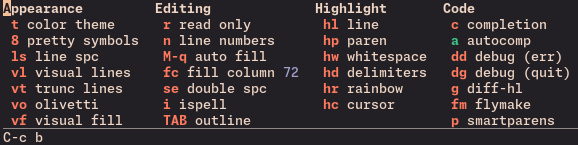 that grows extra columns in specific major-modes:
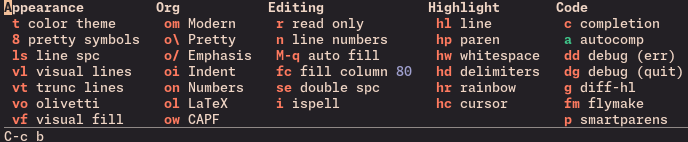
But I appreciate that Omar uses a regular keymap instead of a visual menu, that's the Embark way. Transient menus are frustratingly non-composable with other Emacs features.
- 1:00:00 -
isearch-delete-wrongis actually built-into ISearch? PressingC-gonce should delete the non-matching part. It's possible he's customizedC-gto quit Isearch right away. - 1:07:30 - I didn't understand Omar's practice of using embark-dwim to
preview the result of any minibuffer command, like
org-ql-find. Is this something you were able to reproduce?- I've been using dot-mode for almost as long as Emacs, to the point where I've often made the mistake of assuming it was an included feature. It uses simple heuristics, but works surprisingly well at capturing your intent on what the "bounds of an edit" should be in Emacs.
Omar mentioned that he stopped using multiple-cursors because the immediate feedback from all cursors inspired false confidence, as off-screen cursors could do something unexpected. I use a personal fork of a package called macrursors that's somewhere in between multiple-cursors and keyboard macros:
https://github.com/corytertel/macrursors Fork: https://github.com/karthink/macrursors
It's inspired by both multiple-cursors and meow's
beacon-mode. It places cursors at the locations where the keyboard macro will be executed, but executes the full keyboard macro at each location at once, without immediate updates. This addresses the "false confidence" issue, but it does three other things that are very handy:- You can bound the region inside which cursors should be placed. The
scope can be the paragraph, like in Omar's example, but also any
other text object (defun, line etc), and you can cycle between the
scopes or expand it with
expand-region. - You can place cursors from most common actions, like at ISearch or Avy candidates (selectively or all at once), or at all text objects of a certain type inside the bounds.
You can "narrow" the buffer to only the cursor locations, fitting and verifying more of them on screen. When the macro runs, the selective display in the buffer persists for a second so you can scan the results:
https://share.karthinks.com/macrursors-isearch-hideshow-demo.mp4
Steps:
- Start ISearch and search for
cl-defmethod - Create cursors from all ISearch matches
- Selectively display only the cursors
- Show more context around the cursors
- Make a change (involving a kmacro counter)
- Finish. (The selective display persists for a second.)
- Examine the changes.
- Start ISearch and search for
It uses undo amalgamation by default so you can undo all the cursor changes except the original one in one step. Of course, your changes are stored in the kmacro ring so you can now apply them as regular keyboard macros too.
Most of these features are probably present in multiple-cursors at this point, although I'm not sure about bounding cursor ranges with
macrursors-select. But this has replaced the usual keyboard macro workflow for me, and not many people are aware of macrursors so I thought I'd mention it.- You can bound the region inside which cursors should be placed. The
scope can be the paragraph, like in Omar's example, but also any
other text object (defun, line etc), and you can cycle between the
scopes or expand it with
Thanks to Karthik for his notes! If you have any comments, please feel free to email him.