
Emacs Chat 22: Shae Erisson
Posted: - Modified: | emacs, emacs-chat-podcast, emacs-chat: Transcript, yay!
I chatted with Shae Erisson about Emacs, keyboards, Org Mode, and life.
View it via the Internet Archive, watch/comment on YouTube, read the transcript online, download the video / MP3 / transcript, or e-mail me your thoughts!
- Shae Erisson: Haskell, Python, Swedish, knitting, mountain unicycling, contact juggling
- Shae Erisson's blog - 1. DO SOMETHING 2. BRAG ABOUT IT
- Shae Erisson (@shapr@recurse.social) - recurse.social
- Shae Erisson's blog - Programmers want flow. when programming, light turns RED
- shapr/markovkeyboard: keyboard layout that changes by markov frequency · GitHub
Chapters
- 0:00 Intro
- 0:57 1999, IRC, community building in Haskell
- 1:58 Emacs as a light-weight build-your-own-editor toolkit
- 2:51 LSP, treesitter, Magit, jujutsu, C++, Python, Haskell, rust
- 3:35 how does a new person experience Emacs? Emacs is always fun.
- 4:03 Markov keyboard project, moving to Finland, right-handed Dvorak, split keyboard; Jeff Raskin; I am not a koala
- 6:43 Purpose-specific function keys
- 7:30 Trackballs, scroll
- 8:14 1" trackpad rings
- 8:54 Pair programming: ttyshare, shwim
- 13:13 Recurse Center, "What is that keyboard? What is that editor?!", Emacs bankruptcy and starter kits
- 16:06 hippie-expand
- 17:14 yasnippet
- 18:52 Function keys
- 20:02 Org Mode
- 21:14 Show Org agenda when idle
- 21:58 Programmers want flow. When programming, light turns red
- 24:25 ef-themes and modus-themes, season
- 25:56 htmlize (does this still work on Wayland?)
- 26:37 lsp-ui-imenu, jumping through rust code
- 28:25 laptop with 126GB of RAM
- 29:46 LSP coolness, Haskell, treesitter
- 31:58 Combobulate
- 32:46 What else are you using your 126 gigabytes of RAM for?
- 33:25 TalonVoice
- 34:45 NixOS, following Steve Purcell about 5 years behind
- 35:03 envrc
- 35:52 time-tracking
- 37:01 taxes with Org Mode, remote lookup
- 40:55 finding notes with C-s
- 42:35 Org Mode, managing inbox
- 46:28 Timestamps
- 49:12 Org timers
- 53:53 Org Mode snippets
- 57:15 Compilation finish function: handle success
Transcript
Transcript
0:00 Intro
Sacha: Okay, so I'm going to actually remember to hit go live. I've got a 10 second delay, so if we need to panic, we can panic. Okay, so let's see. I think we are live. Hi, everyone. This is Emacs Chat number 22 after a long hiatus. And today, I'm here with Shae Erisson, who is also like an Emacs friend from a long time back. So this is it. As you were just saying, this is the first time we're actually talking live. And I'm looking forward to hearing about your configuration, how you use Emacs, Shae. But before we dive into that, can you give us a little bit of context? Who you are, what sorts of things you do, and how you use Emacs for that? 0:57 1999, IRC, community building in Haskell
Shae: I would say that... I guess I started using Emacs in 1999 when I moved to Finland. And I remember about the same time I was on IRC and I was really frustrated. I remember I got on the Perl IRC channel and I was like, hey, I want an editor that has syntax highlighting. I want to see colors to these words when I'm typing them. And they were like, noob, and they kick-banned me. And I was like, well, maybe I don't want to learn Perl, which I never did. And I guess that was an early introduction into I wanted to be part of communities where people were sharing positive things and building up each other. Actually, I ended up starting the Haskell IRC channel a couple of years later, and that became a very big thing. I would say that I'm mostly known for my work in community building in the Haskell programming language community, because I did that for, I don't know, 15 or 20 years. But I really like Emacs. 1:58 Emacs as a light-weight build-your-own-editor toolkit
Shae: So like last week at the same time I had the standing chat with a friend of mine who is also a programmer and he said oh so you're going to do this thing in a week do you want to give me like a preview of the talk and I was like yeah I guess so and some of the things that were really interesting was he was like I've never really tried Emacs I don't know much about it I kind of have this impression that it is a very lightweight build your own editor toolkit and I I was kind of taken aback because, you know, I guess I still have this long ago and far away. I don't know if you remember 8 Megs and Constantly Swapping is what people used to call Emacs and things like that. And I was, it was just kind of, I realized I'm still in my little echo chamber. And this is why I like to talk to other people all the time is because I want to have some exposure to what other people are doing. 2:51 LSP, treesitter, Magit, jujutsu, C++, Python, Haskell, rust
Shae: I guess things about Emacs that really changed stuff for me is language server protocol, TreeSitter. Those, I think, are two very powerful tools that are much more generic than, I mean, Magit, of course, is like magic. Although I've mostly switched to jujitsu lately instead for the last year. Let's see, I had, I guess, let's see, I did C++, I did Python, I did a whole lot of Python. And then I had Haskell jobs for five or six years. And then I switched to Rust about a year and a half ago. I now have a Rust job. And one of the things that Prot had asked, I think, or you had asked, and I forget exactly how this went. 3:35 how does a new person experience Emacs? Emacs is always fun.
Shae: It was great fun watching your livestream. And it was, how does a new person kind of get comfortable with using Emacs for a particular purpose. And I look for things, in fact, like how do I use Emacs for Rust, Rust development? And I found a couple of good guides on, and I was able to follow most of them, although my Yesnitit stuff is broken and I don't exactly know why tab doesn't work, right? But, you know, like there's always, Emacs is always fun, right? There's so many cool things you could do with it. 4:03 Markov keyboard project, moving to Finland, right-handed Dvorak, split keyboard; Jeff Raskin; I am not a koala
Shae: I noticed, I actually hadn't seen your preview page and I noticed that you found my Markov keyboard. Sacha: When you say Emacs is fun, I'm reminded of all of your fun, crazy keyboard experiments. It's like, what? I have a feeling you like to tinker with things. Shae: Yeah, so I think actually the influences as to how I got to where I am are pretty interesting. So the person that I ended up moving to Finland to for dating her, we started a company, we did projects, and I was the programmer. We had this pretty big project. I guess it was like 350,000 euros. And I mean, that was going to be over four years and we had to kind of complete the whole thing, and I was the programmer and we'd had the lowest bid... I had an IBM model M, you know, the super clicky with like all the... And about three years into it, my arm started really hurting a lot. But I was the only programmer. And nobody else knew all the code. And we had to ship it, because that's how we got paid. And so I ended up pushing through. And at the end of it, my arm just didn't work anymore. So for about a year and three months, what I did was I actually taught myself to type right hand. ...Dvorak, because I was already using two-hand Dvorak, and so I kept programming, but I just... One of the things was... like, I like programming, I like using computers, I don't want to wear out my arms again, I don't want to blow them out, so I ended up switching to split keyboards, and I will show you. This is very much the kind of thing that I like to use, and that is like this. 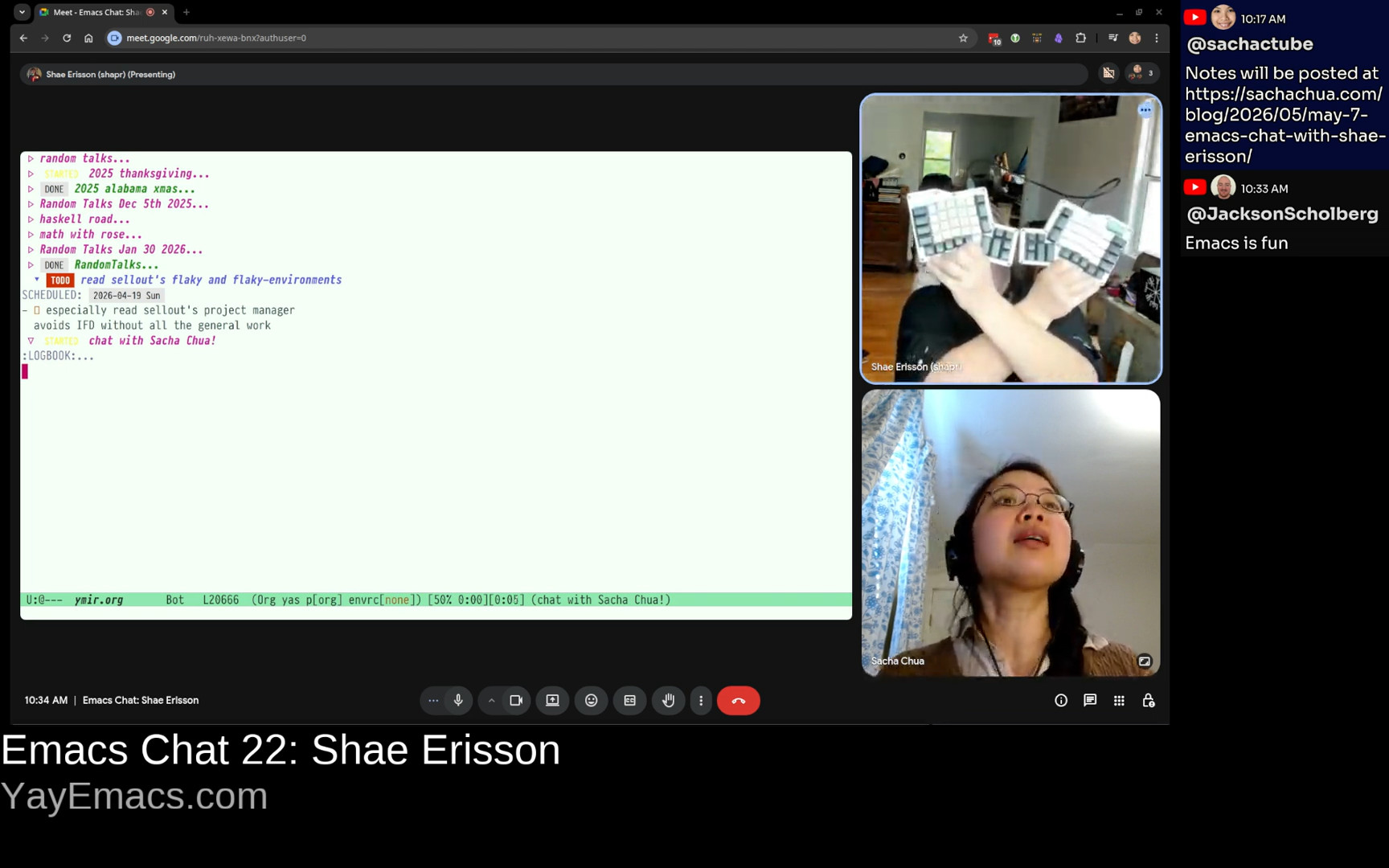 Shae: This is an Ergodox Infinity, but there's a lot of other keyboard flavors like this. And one of the things that I particularly like about this... So around the same time I met Jeff Raskin, who wrote the Inhumane Interface. And so for this particular thing, this is like Control and Alt and Hyper and Super and Shift. And this means that under one thumb, I have a lot more modifier keys than you get off of a standard. And it also means... A lot of my problems started with Emacs pinky, the dreaded, the infamous... I think that one of my... I made a keyboard layout called "I am not koala." You may not know this, but koalas have two thumbs. They have one on each side. And that's cool, but I don't have two thumbs, and I realized that when I was trying to grab something, I didn't put my pinky on it. That would be silly, right? I want to put my thumb around it. And so I decided I would move all of my chording keys under my thumbs. And that's kind of how I...
 6:43 Purpose-specific function keys
Shae: And another thing I did was when I was really only able to use one hand, was I made my function keys mostly purpose-specific. And that was from Jeff Raskin's writings in The Humane Interface. So I guess I'm a programmer who really likes writing code, doesn't want to wear out my arms, and likes to do fun keyboard things, yeah. Sacha: Definitely. You're in it for the long term. You don't want to use up all of your arm capacity now and not be able to keep programming in the future. And now there's hardware to make that easier. So I'm glad. Split keyboards with extra thumb keys seem to be very popular in the Emacs community. I'm now tempted to find space in my desk in order to make that happen. 7:30 Trackballs, scroll
 Shae: Another thing I ended up switching to was I started using trackballs. Oh yeah, yeah. I tend to go completely overboard when trying out new things, so I bought 20 different models of trackballs and ended up settling on this one. The nice thing about this one is that this is how you scroll, and it has four buttons. Sacha: That is really cool. I like using ThinkPads, so I've been just living off the tiny little mouse in the middle of the keyboard. But back in the day, I also used a trackball. If I can get to the point where I want to take my hands off the keyboard again in order to do mouse things, that would probably be the direction I would go.
 8:14 1" trackpad rings
Shae: I had an experiment in that area, which is where I purchased a one-inch touchpad, and I strapped it to my finger. And it was a PS2, and it had a USB converter plugged into it. And the idea was I could keep typing, and then I could move the mouse around without taking my hands off the keyboard. And now they actually have touchpad rings. They came out six months or a year ago. It's relatively recent. But the idea is no change in context. Sacha: I've only seen the scroll rings, but now there's a touchpad version. That is interesting. Shae: Yeah, I think that's pretty cool stuff. Hardware is actually improving things. 8:54 Pair programming: ttyshare, shwim
Shae: Oh, another thing, one of the things you talked about with Prot was how do you learn other people's stuff? And one of the things that I use for pairing, so I have one coworker, and it's a strange, interesting job. I like it a lot. And I met this coworker at a previous job, and one of the things, let's see if I can find it. So we used to, at the previous job, we used this thing called ttyshare. Have you heard of it? ttyshare. It's great. You can run it in a terminal and then you can effectively share your terminal with someone else. And so you have multiplayer terminals and that's neat. It was kind of a pain to set up. You had to make sure that you weren't NATed, you know, like you had to have effectively... someone had to have a public IP. You had to do a couple of other things. And as part of my job, I'm now, I guess, part maintainer for Magic Wormhole, the software. 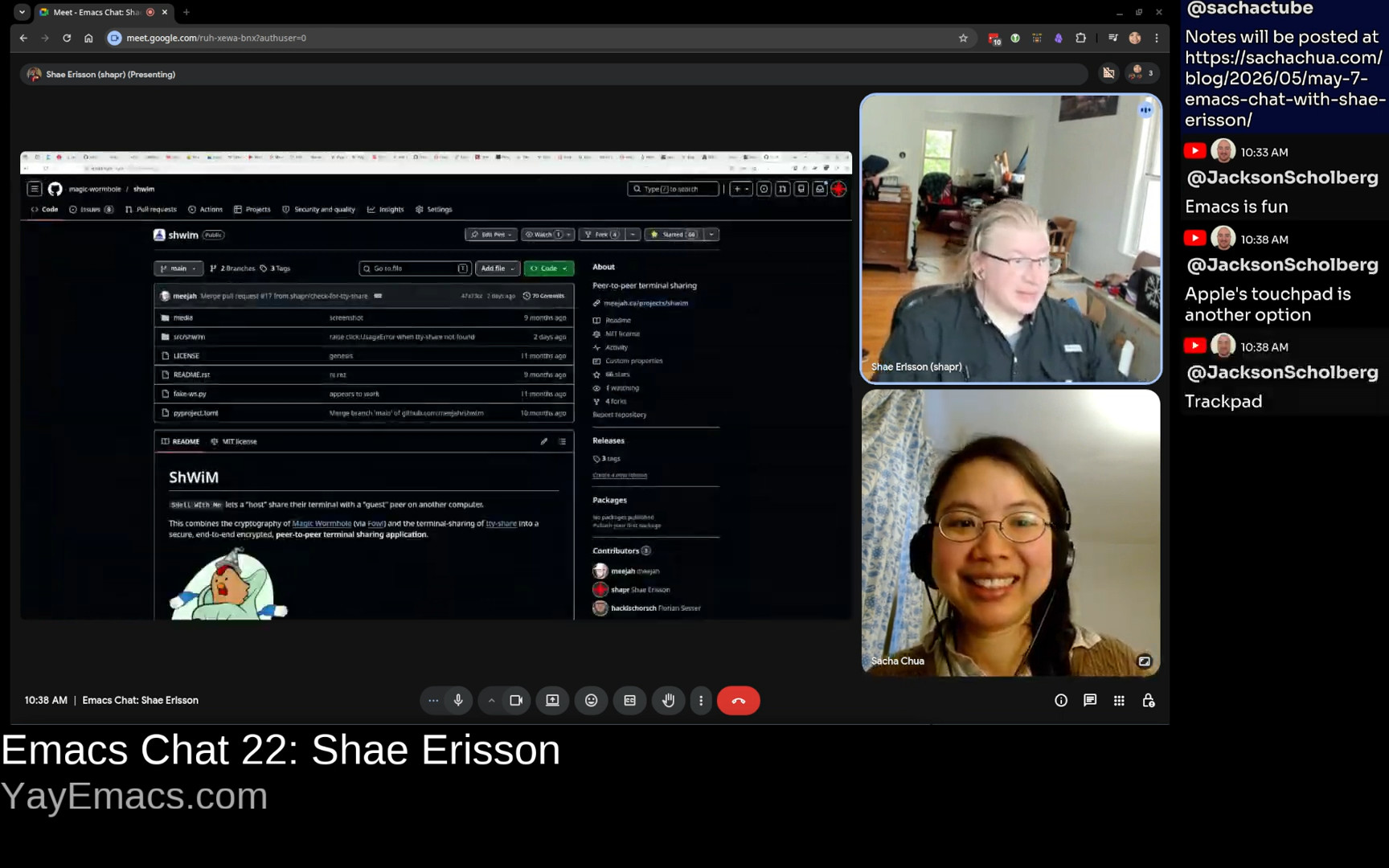 Shae: And so one of the things that my coworker wrote was this nifty thing called ShWiM. And it's basically "shell with me." And it's a wrapper around TTY share so that with one single command, you can share a terminal. And the way that we use this is... We both run Emacs as a server, and then we use emacsclient in the terminal to connect.
 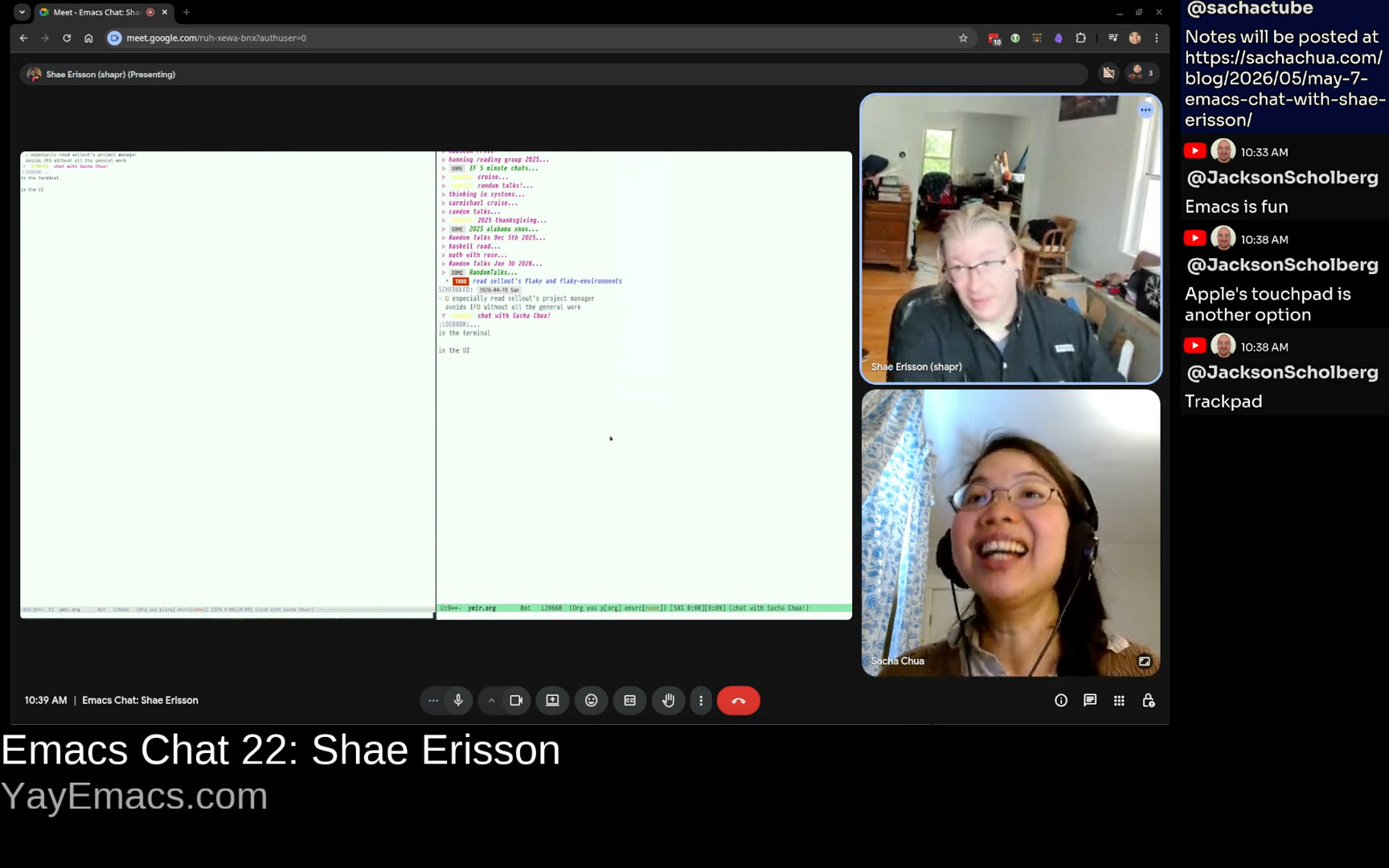 Shae: I don't know if you've ever done this, but I can have a terminal right next to this, and if I run emacsclient in a window, then I'm sharing the same thing. This is a graphical chat with Sacha, in the terminal or in the UI, and both of them are updated. Sacha: That's fantastic. I remember people were using tmate for something similar before where you could share that. But yeah, it's just making it seamless, making it frictionless. And on the other side, I have also just been using wormhole to send large files back and forth between Karthik and John Wiegley because we have this other Emacs chat thing where we're going to post it eventually, once I finish figuring out how to redact all the personal information and Org files. But yeah, it's great for being able to send things without having to worry about, oh, you know, what's my public IP? Can I tunnel all the different things to get past whatever firewalls there are? So if this also works for terminal things plus Emacs client, that sounds really, really exciting. Shae: We've tried some other experiments. One of the things we tried to do was, and the only downside is like, what if my terminal has a different size, then you have to kind of shrink and match. And so we tried to honestly directly bridge to Emacs clients. And because I don't know if you're aware that there's effectively a local socket for the Emacs client that you can have multiple things connect to. But it turns out there's some sort of like system so I couldn't like reach across the network and directly use my co-workers Emacs session and he couldn't use mine. Weird things happened when we tried to do this cross host. As far as I can tell the Emacs client only works in the same host. Sacha: That's interesting. Lately, I've also been experimenting with CRDT, which has that Emacs-less plant as well. So that's been nice. But yeah, of course, a lot of people will be kind of stuck with the first challenge of finding someone that they can pair in Emacs with. Shae: I understand. And I think I'm honestly very happy that my one single coworker at this job is also a big Emacs user. And so we exchanged cool ideas and worked on stuff. And I'm very happy about that. Sacha: Were they already an Emacs person before they joined? Or did you pick the coworker because they were an Emacs person? Shae: They picked me. They were pretty much the person who started this thing. And they picked me because they'd worked with me at the previous job. Although I did have an experience like that. I had this massive Emacs config file, like 20,000 lines, and half of it was comments because it had accrued over 20 years.
 13:13 Recurse Center, "What is that keyboard? What is that editor?!", Emacs bankruptcy and starter kits
Shae: And in 2019, when I first went to the Recurse Center, well, my first batch, I just was extremely extroverted and social. But my second immediate following batch, which is not the common pattern, I was like, okay, my goal is to write a bunch of Haskell, get some Haskell jobs, And so I went to the quiet room on the quiet floor. But then someone else came in, Marianne, my favorite programming friend. And she was like, what is that keyboard you're using? And I was like, ah, this is an Ergodox thing. And then she's like, what is this editor you're using? And I was like, oh, that's Emacs. And I was kind of a grumpy, like, I'm trying to get stuff done. But she was persistent. She was like, show me this thing. And so I was like, I'll show you Emacs. And she was like, this is great. And I was like. This thing? OK, cool. And I was like, I don't think you want my config. You'll probably want a starter kit. And she was like, well, what are starter kits? And I was like, well, I've heard about Spacemacs. I've heard about Doom. And I would try one of those. So she tried Spacemacs. And I guess this next part happened over several months. She tried Spacemacs. And then she was like, I like it, but it's slow. So I'm switching to Doom Emacs. And I would pair with her. And I was like, wow, look at all these cool things that the starter kits can do. I ended up flushing my entire 20-year-old config and kind of starting over and stealing a lot of great ideas from the starter kits. And Marianne is very ambitious, independent, hardworking, very focused. I'm not very focused. But I've learned a lot of things from her and watching her kind of... I haven't done C in Emacs in a long time so it's great fun to watch her learn these new things and then I learned stuff too and yeah it's good to have collaborative people to work with. Sacha: So it sounds like if people would like to encourage more people to talk to them about Emacs, feel free to use your strange keyboards out in public. Shae: I like that. That's good. That is good. Yeah I think that's reasonable. Sacha: Yeah, and I've just recently started digging into the starter kits too, because I realized I don't know much about them. It is really interesting going through them and discovering all these Emacs 31 options that you can enable to simplify your config or improve your workflow and all that stuff. So there's a lot of good stuff in starter kits, even for people who are not newcomers. Shae: I agree. And I think there's nothing wrong with just learning a bunch of new things, trying them out, and also throwing them away if you don't like them. Sacha: Now that you've declared Emacs bankruptcy and rebuilt your Emacs on top of other people's starter kits, what has made it into your config? What have you kept from those 20 years of tinkering with Emacs that you really wanted to stick around? 16:06 hippie-expand
Shae: I think the only thing that has absolutely stuck around is my use of hippie-expand, which is, I believe, a very old... an ancient tool from a different time. Most of the other stuff is kind of gone. Gone to the wayside. But I really like, I honestly really like hippie-expand. And I know that like, I have rarely heard of other people who use hippie-expand. But you use it? I think you just muted yourself. Sacha: I also vote for hippie-expand. It's a nice way to try different functions and just say, I just want all these different possible completions to go in there. Shae: Yeah. The thing for me that really sold me on hippie-expand is that most of the time when I am... When I'm doing something, I want to say, like, I can already see that word, just pick that one. And so I'll type the first characters and hit, like, meta forward slash, and ta-da, it's usually there. But then sometimes I do really want, like, some Elisp or some other stuff. And so I actually spent a lot of time tuning this the first time. 17:14 yasnippet
Shae: I actually only changed it for the first time recently because I was reading a how to write Rust well inside Emacs and they said oh well you want to use yasnippet and so I you know the funny thing is that yasnippet I believe is the thing that got me into Emacs like in 1999 I met this Finnish person Erno Kuusela in Oulu, Finland. Really cool guy. I was like, wow, how do you do this? As soon as you open a file, it's got a substructure and a skeleton. And when you type part of a function or something, it just populates it. And he was like, I'm using this snippet command in Emacs. That's why I was like, what's Emacs? It was very exciting. And at the time, I was using Vim. And Vim was not as, I don't want to say, automatable. Sacha: Yeah, now with Neovim and Lua, people are writing more extensions for it. But before, you had to know a lot of magic in order to customize Vim. Shae: Right, right. I agree. Let's see, what else do I do? I run my own email server, and I, of course, read my email in Emacs. In GNU, no less. Which is, I know, an NNTP reader, but it's still also a great... I used to use twiddle compile and I think that stopped working like six years ago, so I need to get rid of this comment, but there's still a lot of kind of cruft from earlier times. 18:52 Function keys
Shae: Remember how I said that I use function keys to have like purpose specific stuff? This was especially true because, I mean, I had my left arm strapped to my chest for like a year and three months before I even started regaining any flexibility, and that meant that... I'm amazed that you could just map them directly to single commands instead of giving in to the temptation to make them prefixes for longer keystrokes. I didn't really have the choice because I had only one arm that worked. It was just a lot harder to do any chording at the time. I still have a lot of these. F3 I use a lot, which is like, oh, what am I working on right now? That is org-clock-goto. A lot of times, I want to have a terminal that's in Emacs, so that's vterm, 20:02 Org Mode
 Shae: And I actually really do use the calendar all the time. This is like just switch to whatever it is. Of course, my email is here. You know what, let's see... So this... I don't know, have you seen this before? Have you seen this thing called STARTED in an Org mode file? Sacha: I use a STARTED state, yes. Shae: Well, I got it from you! So if I look at like, my Org Mode configuration, a lot of this STARTED stuff I have from you, I don't know when, but you were the person who introduced me to it. Sacha: It's the reminder that I did start working on this. I tend to get distracted by intermediate tasks, so it's nice to be able to say, try to finish these ones first before you move on to the next thing, maybe? Shae: I agree. I have the same thing, yeah. And I keep meaning, because this is... I know that you can put Org Mode configuration into the first TODO item. I would really like to move it into the elisp and I just haven't gotten around to it. And it's been 10 years. I mean, maybe I should just do it.
 21:14 Show Org agenda when idle
 Shae: One of the things I did that I found fun... I really have written almost zero Elisp, but I did actually puzzle my way through this a year ago. Since so much of my life is in Org Mode, I learned how to make timers. This is very close to what you get directly out of how to do timers in Emacs. After some amount of time, I want my Org agenda to pop up because I want to say like, oh, what is the stuff I'm supposed to be doing? And what am I forgetting? What has been scheduled? And what is on my to-do list? And I also like to look at what is the stuff I've been working on lately? And I really like that a lot.
 21:58 Programmers want flow. When programming, light turns red
 Shae: Another thing that I realized is that I had a blog post that was wildly popular. Where did I put it? And it was all about Emacs. I don't know if you saw the... Here we go. It was... Ah, here it is. So here it is in... This is very much an Emacs... Sacha: Oh, yeah, I remember that one. I put it in Emacs News. I thought it was great. Shae: All right, cool. Sacha: I would like the kiddo to sometimes be able to acknowledge this, but this is not happening. Still, yes. Shae: Right, right. Yeah, and so this was really fun because, like... I had a friend who was in development and there was like millions of dollars spent on how do you detect whether a programmer is in flow and it came down to if they're typing they're probably in flow so and that was it because they tried to look at EGs and doing all kinds of other stuff but it was like if they're typing don't interrupt them. And I don't know, because I do so much in Emacs, I'm not sure how accurate this was. But basically, that's where I learned to do timers the first time. Or maybe... I don't remember which one I did first. And the idea then was as soon as basically my average typing into Emacs has gone up a certain amount, then it will actually switch to busy. And it works just fine. It was a lot of fun to write. Sacha: So yeah, interesting use of getting the activity. I've seen other fun implementations of this. I think there's a c-c-c-combo package that makes some fun animation appear if you're typing really quickly. Shae: Oh, oh, yeah. I'm guessing because I think Atom, the Atom editor had that for a while. I guess that's where it came from. Sacha: So yeah, because you can instrument Emacs and play around with it, you can certainly do all sorts of things based on that information. Okay, so you've got it, you've got it set up so that when you come back to your computer, it'll show you the stuff that you've been working on. And when you're working on the things, you can tell it to tell the rest of the world not to bug you. Gotcha. Shae: That's right. [Sacha: What other fun stuff do you have in there?
 24:25 ef-themes and modus-themes, season
Shae: I discovered that I love the EF themes. I love the Modus themes. They make me very happy. They're just unreasonably pleasant. As someone who has tried every single Emacs theme ever, they're just my favorite themes.  Shae: And so, at the moment, it's summer... Where did my summer go? How can this be? There we go. How come I'm in spring? Wait, isn't spring over? Hasn't summer just started? You know what I was thinking would be fun would be take the time of day, and you know that the EF themes has spring, summer, autumn, and winter, and I'm not sure if there are dark versions of each of those, but I thought, like I know that Modus themes will do this like check for the local time of when it turns dark, and then it will go from the light theme to the dark theme as soon as the sun hits, and I was like, well, what if I do that for seasons, you know, wouldn't that be cool? Sacha: There's this subtle sense of change as you go through the year. But of course you also have this thing there where you just randomize it. Shae: Well, I like that. Sometimes it's like I'm just kind of like, ah, I'm bored. I'm just bored of what I'm looking at. And so I will just change my thing. And it's just time for something. I don't know. It seems to work. It's like it gives me a little brain break from what I was staring at. And I did not know I was going to reset the effects scale, but that's fine. Interesting. What else do I have in here?
 25:56 htmlize (does this still work on Wayland?)
Shae: Oh, Emacs HTMLize. I'm a little sad. I switched to Wayland. And if I remember correctly, HTMLize only works with, or maybe HTMLize still works, and it's the SVG one that doesn't work. Emacs SVG is a thing that if you're running with an X11 backend, you can turn your current screen directly into an SVG, which is really cute. It does not work in Wayland. I think HTMLize does still work. What other things do I have in here? I don't know. I guess a lot of it lately has been trying to make Rust things work smoothly. I've been trying to do some... I wonder does... Oh, cool. That was not what I expected. 26:37 lsp-ui-imenu, jumping through rust code
 Shae: I just started doing this thing with imenu. imenu integrates nicely with LSP. Sacha: That is a very pretty sidebar thing, and I need to learn how to do that. Shae: So because I have all these extra modifiers, my s-i is lsp-ui-imenu. And the reason that what I mostly use that for is when I have like a bunch of Rust code and I want to quickly jump through the structure of it. Basically that integrates with LSP, finds all the definitions, and I can quickly jump through it. I used to use lsp-treemacs for that, but lsp-treemacs puts things in its own order, not quite the same order I want, although treemacs is quite nice. I think that the thing to do is that you and I at some time maybe the next time if we do this again we should set up with a Shwim connection and you and I can both share our Emacs and then you can show me cool things that you do and I can show you cool things that I do and then we can start filing over some of the things. How about that? Sacha: That sounds fantastic. I know we'd wanted to experiment with pair programming a long time ago so that sounds like a seamless way to do it. And therefore I will go and figure out how to install shim and get it working. I will probably need your help to actually test it. I don't know, I think I can rustle up. Maybe it'll work off my phone. You haven't tried that. But lspui, okay, so I've just been using straight up imenu, like on Neanderthal, but lsp-ui has this fancy grouping of things and colors and stuff, so I definitely want to check that out. Shae: I'm a fan, yeah. I don't know. Do I have anything else exciting that goes with this in here?
 28:25 laptop with 126GB of RAM
Shae: I will say that at the moment, the system I'm working on, I like buying unreasonably powerful laptops. And so, like, this system has 128 gigs of RAM and 24 cores. My previous laptop has 192 gigs of RAM. Long story short, I end up in a lot of cases where I want to use more memory. I've got all these cores. Can you do something with them? Perhaps you've already seen things like LSP doctor, which will say, have you tried this thing? Have you done this other thing? LSP has really changed Sacha: I have not. Sorry, would you like to show me this LSP doctor thing? Because I have not ever seen it. Shae: Yeah. Do you use language servers much for your development? Sacha: I am only just getting used to having a relatively modern 2018 instead of 2010 laptop. And so I have the red squigglies and various things, but I don't know what to do with them yet. Shae: Well, I mean, I'm doing a lot of this. So I have... 29:46 LSP coolness, Haskell, treesitter
Shae: Originally for me it was like I spent a lot of time with the Haskell language server because I was doing so much Haskell and it was a super powerful thing. In fact, somebody decided to hammer in half of a proof assistant into the Haskell language server and that was magic. You could do incredible stuff with that because you could just grab all of your local variables and transform the whole shape of your function and you could just write little snippets and just have it work. And that was amazing. It wasn't quite... One of the goals that I believe is... For future development of all programming editors, I believe that something like Emacs macros, but instead for abstract syntax trees, I believe this is an essential ingredient that we do not yet have. And I think that TreeSitter is the first step towards there. We now have one of the hats, right? Which is where we can take... TreeSitter is, you know, if you've used it... It is like you write some effectively C code to produce a really fast parser. Or is it like JavaScript that then compiles to C code? I forget exactly how it works. But the nice thing about TreeSitter is, I don't know if you remember, I'm sure you do remember, that if you were writing Python code and you used a triple-quoted string, you had to then add a comment with another quote because regular expressions is how Emacs was doing all the syntax highlighting. And honestly, that was kind of crap. And then there were projects like the Semantic Bovinator that made a full parsing suite in Elisp, which to me is half brilliant and half insane. And then there was TreeSitter, which kind of took over the world because it was... I think that the language server and TreeSitter are the first two of these editor generic pieces, and I suspect there will be more. I think that something where you can modify the abstract syntax tree and then put back to the source is one of those potential paths forward. I hope so. Sacha: Yeah, that would be great if you could just do the manipulations and then roundtrip it back into source code. Just regenerate the changed part of your code. That sounds fantastic. So it sounds like you were able to do some kind of manipulation with the Haskell use case that you were describing. Any chance you can show us like the awesomeness? Shae: Sadly, that sadly does not work anymore. 31:58 Combobulate
Shae: But you know, if you're looking for something in that area, have you heard of a Emacs library called Combobulate? Sacha: I have heard of it. I haven't dug into it. Shae: So it uses TreeSitter for source code manipulation by, and it's a lot closer to the way that like, you know, in Org Mode, you can like hold meta and arrow to kind of move things around. It uses TreeSitter to let you both move around in the context as well as actually alter the shape. And to me, this is the first step towards this tool that I want, which is where I can write a keyboard macro and have it edit an abstract syntax tree and then spit the results back into the buffer. Yeah. Sacha: All right. 32:46 What else are you using your 126 gigabytes of RAM for?
Sacha: What else are you using your 126 gigabytes of RAM for? Shae: Let's see. Honestly, I'm going to tell you that Rust Analyzer can take a lot of memory. And a Rust compilation can take a lot of cores. And I'm okay with that because I actually, I do like, and I will say that this laptop is actually from this year. So it's a brand new, like, top of the line. But then like, how would I, because I've got like, which I think is a bunch of matrix multiplication hardware. How do I use that from Emacs? I don't know. I'm sure I can find something, you know. 33:25 TalonVoice
Sacha: Maybe voice computing? Shae: Oh, that's an idea. Yeah, one of my friends, she's using Talon. Have you heard of Talon? Sacha: Yeah, I've heard of Talon. There are a couple of videos about people using Talon to code by voice, usually involving memorizing kind of a different alphabet for very quickly accessing different shortcuts. But it sounds really cool, and you sound like you've got the hardware to do something amazing with it. Shae: That's true. Well, you know, Talon actually lets you do something very similar to Combobulate, where you can navigate the AST of your source code. You can kind of move around very quickly. I don't know, like, are we like at the end of our? No, no, we're halfway through, right? Sacha: We're halfway through. I have about 28 minutes before the kiddo runs out and starts demanding lunch. Shae: Okay, well, I feel like I've been driving the structure of our just kind of like dumping random things. Did you have any questions or anything you wanted to cover? Sacha: This is all amazing. I come in with no preconceived notions. I'm just like, okay, shapr does cool things with Emacs. Let's hear about it. Let's go, let's go. Shae: That works for me. Yeah. I mean, a lot of it's been focused on Rust development lately. Rust and Jujutsu. 34:45 NixOS, following Steve Purcell about 5 years behind
Shae: I've been doing a lot of Nix. I'm running NixOS. I don't know if you're familiar, but that's been great fun. It's funny, I feel like I've been following Steve Purcell around from a technical perspective. I'm always about five years behind Steve. 35:03 envrc
Shae: I was like, oh, you know, NixOS is kind of a pain with Emacs. And just like this, what was it, NixOS? I forget. Anyway, Steve was like, oh, well, have you tried my library, envrc? And I was like, what's that? And he was like, well, now each buffer can have its own envrc. And I was like, it's perfect. That's exactly what I need. Because previously, every time I switched buffers, it would then go load all of the local everything in Nix. And sometimes that could take a long time, especially if I'm doing Haskell, that could take 10 seconds, and I really don't want that sort of lag. And so Steve Purcell's brilliant library, envrc, says, you know what? Every single buffer can just keep such a thing, and then you can only relit it when you need to. And that's pretty awesome. Sacha: That sounds cool, and I should check that out too. 35:52 time-tracking
Sacha: @JacksonScholberg has a question. He says, "I was curious about what you were tracking your time working on, how you track it." Is it just Org Clock? So this is how you keep track of the things you're working on and what got interrupted by the new thing that you just added to the stack and so forth? Shae: Right. In fact, I have this thing. Honestly, when I sit down on my computer, Just clock in. You'll notice in the bottom right here, we have chat with Sacha, right? And so like, I just kind of clock in stuff. And like, I'm not always, I really kind of need to reorganize my Org mode files because I've been naming them per host because I previously had like a work Org mode and I had a home Org mode. now that my home hardware is also my work hardware I guess and so like I still have my previous laptops things where I'm keeping my events I really need to reorganize things but I mean yeah I schedule things I oh you know I've got a weird thing to show you 37:01 taxes with Org Mode, remote lookup
 Shae: I decided that it would be great fun to do my taxes. Sacha: You are showing me your taxes, do I need to like black out this whole thing? Shae: Well, this is actually just an example from the docs. So I could actually share my taxes on it because I mostly don't care. But I think in fact you can figure out exactly how much money I'm making by looking at the open whatever. So the thing about this is that I decided to file all of my tax forms directly into Org Mode spreadsheets and then do remote lookups. So basically each spreadsheet was one particular form. And then once I'd gotten to the bottom, like I need this result, like what's my estimated income? And then I would use the lookup, kind of this cross spreadsheet lookup. And that's how I did my taxes for last year. And then my de facto mother-in-law, she's an accountant, and she didn't exactly do this thing, but it was pretty close. She was like, you've got all your taxes in the spreadsheet. I was like, yeah. And then she looked at it and she was like, what is that? And I was like, anyway. So I got to kind of file everything back out into TurboTax, but that was a fun thing to build. Sacha: Yeah, I have something like that too. So for example, whenever I do my tax paperwork, I just have to have like, you know, the step by step checklist. Okay, this is where I need to go to get this number. This is where I can put it in. And then eventually it spits out a table that says, okay, put this in box 11, put this in box 13, so that I don't have to do the steps by hand. Because even before the, you know, for me, I use like simple stacks or whatever, it's web based. But before you get to the point where you can put the numbers in the form, you gotta go to this website, calculate this thing, and Org just makes all of that so much easier. Shae: I agree. Yeah. Sacha: And this remote lookup thing is something I'm always looking up because Org tables are so powerful, but also I need more examples in my life to remember how to use them. Shae: Well, I think it took me four hours the first time to get it all figured out. But I can send you an example without showing it here. I can send you an example because I figured out, I think I've hammered the remote lookup down very thoroughly. Sacha: And once you've got it right, you can just keep filling that in or copy and paste it. You have an example of the syntax and that's already all you need. Shae: Right. I did run across some limitations of the evaluation method of Org mode spreadsheets. But maybe I've been using them a little too hard, if that makes any sense. Sacha: Oh, what kind of limitation? Shae: Honestly, I think I finally found a way to say every single... Because it was... So really the way that spreadsheets work is they're much more like Dataflow. And that is just that you end up with, like, either you work from the endpoint, which is like much more Haskell style evaluation, which is where you're like, I need to start here. What depends on this? But in the case where you have a whole bunch of different Org Mode spreadsheets, I think I ended up with this little text style hack where I just ran it a bunch of times. So it's like evaluate, evaluate, evaluate. Because remote lookups I ran, you know, I don't remember. And I think I took notes, but I don't remember. That's one of the great things about Org Mode is that I swear it's my, like, half of my brain is in my Org Mode notes. And whenever I had, I'm like, oh, what was that thing? I'm like, well, fortunately, with my terrible short-term memory, I took copious notes because otherwise I would never be able to get back to it.
 40:55 finding notes with C-s
Sacha: What is your favorite way of finding those notes? Shae: I actually use a lot of C-s just because I kind of have some idea of where they are in my tree structure and I'll also say I use a lot of my Org capture templates and they're not super complicated. I have like a to-do, I have a journal, I have ideas and like random ideas will float into my head like you saw Markov keyboard right it is like the weirdest art piece you've seen all day right and Markup keyboard shows up on the front page of Hacker News once a year or so. And people are like, programmers have gone too far. This cannot possibly be usable by humans or something. And I'm like, well, I don't know. I think it was art. And so a lot of times those things will drop into my head, something like that, where I'm trying to do something else. And so I will quickly write down the idea and then just gotten it out of my head enough that I can continue with what I was doing. And so I have a long list of strange ideas. A recent one was like, you've probably had your teeth worked on once or twice. And you know that the dentist always had to move the light around. And I'm like, but we have really good eye tracking. Wouldn't it make sense to figure out where the dentist or the car mechanic is what they're looking at? And then have the light move around behind them to figure out how to actually light up the place they're looking at, right? We've got vision tracking. Why don't we do this? But I don't really, yeah. I decided maybe I don't want to work on that one right now. Sacha: It sounds like an involved project. Yeah. Yeah, yeah, yeah. Okay, so you're capturing, you're stuffing a lot of these ideas into an inbox. 42:35 Org Mode, managing inbox
Sacha: A lot of people are probably in the same boat where they've got these inboxes full of ideas. How do you deal? Shae: I archive stuff when I'm done with it. Sacha: Oh yeah? Shae: Yeah, so a lot of times, and I find this very valuable, is like if I look at... Do I have it? Oops, that was not what I meant to do. Sacha: Alright, so you basically just do aggressive speed commands, archive, archive, archive, or look at the agenda and just mark a whole bunch of things and say, that's it, that's gone. It was written down and then it can go. Shae: Yeah, well, when I'm really done with something, when the thing is finished, then I will just archive it. I mean, do you use Archive much? Sacha: I do. I have a function that goes through my inbox file and just archives anything that was marked as done. Shae: Oh, nice! Sacha: Because that way it clears it up, right? So I'll refile things where I'm like, okay, it's done, but it has important information. I want to put it somewhere else. But if it's just a transitory task that I'm using to remind myself, tomorrow I have to do this, go find the water bottle when it's done, I don't need to know about it in the future. So it's left in my inbox because I checked it off, and then periodically I'll say, clean up inbox. Not only will it remove all of the done things, but if I leave a tag In the title of the task or if the task matches certain regular expressions, it will refile it to the appropriate place in my kind of more permanent thing. So I can say, okay, all of my Emacs related tasks will get automatically refiled to my Emacs category without my having to do that manually. Shae: So you're using tagging because I kept trying to do tagging and never quite did it. Sacha: I use tagging sometimes when I remember it, but this is also why I use the The regular expression match against the title. I'm using Orgzly on Android to capture the thing on my phone. I might want to say this is a consulting task. File it in the right place so it doesn't get lost in my inbox. Shae: Wow. When is your interview so I can learn from your tricks? Sacha: This is now. Here we go! You can ask questions. The nice thing about conversations is that we jostle different ideas, and we are like, oh yeah, maybe I should write a blog post about that, because I take it for granted. So now apparently I have to write a blog post about my cleaning up process. My inbox is very long. The other thing, speaking of dealing with really long lists that I picked up from John Wiegley was I also sometimes remember to check this list of random items. So in my agenda, there's also like this, you know, random selection of things that I have not gotten around to thinking about further, but it's there just in case serendipity or boredom make me do something. Shae: you know that's... I've thought about having... because you know, I've got the pop-up this little timer that pops up my agenda, but I've thought about maybe adding a section I don't know if I could add a section here but it would be something that says like at the bottom here's two or three random to-do's that have been open for a while just like for garbage collection. Because I know that in Jujutsu, I've got a cool little query that says, if you have any change sets that are more than two weeks old and are not in a permanent branch state, maybe you should do something about them. It's just called to do. It'd be kind of nice to have that for Org Mode as well. Sacha: Yeah, it's just, you know, and our brains do these strange things with randomness, right? They're like, oh, I want to see what's new now. Shae: Right, right, yeah. Oh, I have a question. You have this thing where you had... 46:28 Timestamps
Shae: I saw you taking notes with Prot, and you had this timestamp. Sacha: Oh, yeah, yeah, yeah. I'm using it now. Okay, okay. So I have it bound two ways now. I have it as a dabbrev, so dynamic abbreviation, and I also have it as a yasnippet because sometimes I'm using it with either SPC or tab to complete it. And I don't really want to think, I just want to get the timestamp in and then move on. And so abbrevs can run functions to evaluate it. You can insert the timestamp that way. Or yesnippet, of course, can evaluate the thing. And now I have those. It's basically just a wall-clock time so that I can go back and plop in the chapters as time offsets, which are automatically calculated from the YouTube data on when the stream started. So I don't have to manually calculate my chapters. But it's super useful to have these times everywhere. And in this case, during a conversation, I want to be able to say, hey, we talked about something interesting. And then be able to go back to that point in the video later on. Shae: So you're matching? Oh, oh, wow. Sacha: So my shortcut for yasnippet is "ot" because I never type "ot" elsewhere, and it's close enough. I use Dvorak, so my O is on home row, and T is close by. Also, on the other hand... There you go. Shae: Did I already show you that this is actually Dvorak? Sacha: Oh, there you go. Now I can see the keycaps. Yeah, earlier it was kind of blurry, but now, yes, yes. So yes, that is my shortcut for inserting the timestamp. I previously added seconds as well, but then I realized that my kind might be false precision. So I just, you know, just use a minute at the moment and then I go back and adjust the timestamps a little bit later. But yeah, you can use abbreviations for all sorts of things, including times and dates and stuff. Shae: Have you ever tried Org timestamp? Sacha: Yeah, Org timer. So Org timer gives you a relative timestamp, right? You can say Org timer. Oh, okay. So, sorry. Are you talking about the C-u C-c ! or something of that sort? So that's actually what I initially was doing, but then it was too many keystroke word modifiers to remember. And then I had to press RET to select the, you know, thing. So now I just have an abbreviation insert the Org mode formatted timestamp for me. And then I have this code that searches for Org timestamp regular expression and then does the calculation and conversion and stuff. 49:12 Org timers
 Sacha: So Org timer is a separate thing. It's useful for meetings and things like that. You would say, okay, your Org timer starts at the beginning of the meeting and then you can have a list and it automatically, like if you alt shift enter or something like that in the list, it'll automatically like insert the right timer, relative timer to it. There you go. So there's an org-timer-start. But the reason I didn't go that approach was because then you A. have to remember to actually start the timer and B. then you have to synchronize your time with video time. Which might not have started at the same time. So now I'm just like, okay, wall clock for everything. And then I can do the transformation with whatever I like. And since I'm editing my subtitles in Emacs, I can say, hey, this file started at this time, according to YouTube. And then just, you know, map all of the wall clocks to the appropriate subtitle times. Shae: Wow. That's really cool. Sacha: Anyway, so timers, relative, absolute, and using abbreviations is great. Which I think actually is a thing that I picked up from Karl. Karl Voit because he also likes to use... He has an abbreviation, not at the Emacs level, but he has an abbreviation on his system level, like with his window manager, so he can use this timestamp trick anywhere, including in Etherpad or wherever else where you want to insert the date and time. That's V-o-i-t, by the way. But yeah, so times are a great way to just leave yourself a pointer to that moment so you can go back to it later. Shae: Now I'm curious, how well does that integrate with this sort of thing? Because I really like looking back at my history agenda. Sacha: If you have it insert an inactive timestamp, I think it should still show up there. I think it will be a little like those. Shae: Yeah, it looks like the... Well, it looks like these two are showing up. Sacha: Yeah, yeah, yeah. Yeah, so that's a basic thing that I would have inserted by my either abbrev or... So it's not even dabbrev. It's just regular abbrev in Emacs. Shae: What's the difference? Sacha: dabbrev is like hippie... Okay, let me just double check here. I feel like dabbrev is sort of hippie expand-ish. It looks in your buffer or possibly other buffers. And I think hippie-expand and dabbrev, they kind of work together. It's an option to have them work together. Okay, so hippie-expand is... Oh, so I see. Hippie-expand is the more advanced version of dabbrev. dabbrev was Dynamic Expand, and Hippie Expand says, yes, that, but try a whole bunch of other things first. But my timestamp thing is actually just done by a regular abbrev, and I will find the thing in my config for "ot". Oh, yeah. I will put it in my chat. Shae: My spelling, most people say my emails are spelled really well, but it's only because I have ispell set up. Sacha: Yeah, ispell is great. I am learning French and therefore... Shae: Oh, c'est très bien. Je parle un peu de français aussi. Sacha: Oh, oui. I'm keeping a journal in French on my blog and I have the Tatoeba Project with all the example sentences and I have a consult interface to look up stuff in them so I can just borrow other people's words and try to make it sound more natural. Plus of course the usual searching for words in dictionaries and stuff. Anyway, in the chat, I put in my global abbrev table definition for insert format time string. In case you want to steal that, it's right there. Shae: I will definitely save that into my notes here.
 53:53 Org Mode snippets
Shae: Another thing I use a lot is I use Org Mode snippets. I will tell you that the first time, I guess if I look back at... This is another thing that I have done a lot of in the past, which is where... I love the fact that Org Mode snippets are just executable. I can just run them. I guess two jobs, three jobs ago, there was a case where, because I would keep the results around and look at them, there was a case where, I guess a couple of months before, something got shipped to a customer, and I noticed our database schema had changed and I prevented a tremendous amount of upset and emergency by being like this doesn't look great. I got one from two weeks ago, and it does not match. Something's wrong here. Everybody's like, I don't think so, Shae. And I'm, like, no no no, we do have a problem, we've got to fix this. And they were, like, oh crap! And then I was like, yeah, solved a problem! Sacha: Yeah, I basically try to do as much in a snippet instead of in, you know, in a scratch buffer or whatever, just because having that record, the fact that I did it, and also any notes that I had leading up to it and the output of it, it's just so helpful.  Shae: Oh, I've got a cool thing that I'm doing for work. And that is that our readme file is not only a word file, but we also have the demonstration of our actual thing is done by using like dependent snippets. And so that means that like if you want that, perhaps this is something everyone already knows, I don't know, but we basically are using the results of earlier commands in later places. And the other nice thing about that is that then when we want to check, we have to effectively dock tests, right? When we want to check and see if our software works the way it does in the readme, we evaluate the final Org Mode snippet, which then calls it forward, calls it forward, and then if something goes up or not. Well, I guess I need to fix something. And so it was pretty exciting to put Org Mode niftyness into our, into my Word reading file, you know? Sacha: Nice, nice. And you did mention your other coworker is on board with the whole Emacs thing. So that's one of the things that people are often like, I want to use Org Mode and I want to use it for like the documentation or the testing or whatever, but they got to get everyone else on board with the thing. Otherwise it's Jupyter Notebooks or whatever else, right? Shae: Right. Okay, so I have a joke for you that I came up with a long time ago, and that is, do you know the only way, there's only one way that Sauron could have organized the invasion of Middle-earth, and do you know what he used? Sacha: What? Shae: Orc Mode. It's a terrible joke, isn't it? Sacha: That's okay. I'm sure someone in the comments will come up with an even worse pun. Shae: I'm excited! It's going to be great! Sacha: Never underestimate the punniness of the Emacs community. Shae: I completely agree. I don't know. Do I have anything else exciting in here?
 57:15 Compilation finish function: handle success
 Shae: I actually really like this one. I used to run all of my tests in compile. F12, I have F12 bound to compile. And one of the things I wanted was, I wanted something where it was, if the compile is successful, don't show me the results, because everything's good. And so since I'm doing stuff in Rust, when I run all the tests, it leaves the buffer up, and I need to get around to actually doing stuff like this for Rustic mode as well, where when the tests pass, just go away, because it's all good. And when the tests don't pass, show me where to... I need to look at the problem. And I got this from Enberg and Emacs, I don't know, 20 years ago. Maybe it was less than 20 years ago, but it probably wasn't. So yeah, there's so much good stuff. Yeah, there's just so much good stuff. And I also like to, oh, look, here we go. You can see that this is long gone, by the way. It's not there anymore. Sacha: I have a proper, you know, it's sachachua.com/dotemacs. A lot easier to remember. But yeah, and I think that's, yeah, yeah, I remember that now. defadvice is also obsolete. The new hotness is advice-add or something like that. Shae: Oh, really? I'm going to make another TODO item for there. Sacha: I was digging through my notes trying to find, do you share your config anywhere? Shae: No, but you know, at this point if I share it on YouTube, I might as well just throw it up somewhere. Why not? It's not very exciting. Like if you look at someone like Ross Baker who has magic, like wow, is there some magic coming in from Ross Baker? I'm so excited to see more stuff from him. There's just like, I guess I feel like compared to almost everybody else I know, I feel like a power user. Because I'm like, you know, I wish I could do this thing. A lot of times someone I know is like, well, I did that thing and here's a library. And I'm like, yeah, I'll have to do it. And I just, I guess I feel like I'm a power user. And on the good side, I guess I kind of, I really haven't written that much Elisp ever, like I was saying in the comments during your interview with Prot. And I kind of like to, it's just I guess it's never quite gotten to the top of my stack. And I did decide it was time for me to send money to Parade for at least for themes, if not for like, please teach me some Elisp so I can actually, because you know, it's not that Elisp is hard. It's more like, how do I kind of, what are the things I interact with? What are the words? What's the vocabulary of working with Emacs? I don't actually really know. As a user, sure, I can do cool stuff. I can do Lisp macros. I've done Scheme and Lisp some of the past, but not inside Emacs. Sacha: Alright, so let me clarify. After more than 20 years of using Emacs, did you say you feel like a power user or do not feel like a power user? Shae: I definitely feel like a power user, but I don't feel like someone who does much of anything with Elisp. I don't really feel like someone who has much of a clue in the internals. And that's not entirely true. I have some of the ideas. But for the most part, I haven't actually needed to know that much about the internals. And sure, I've dug into things like how do you efficiently work with large buffers in your ??, like the ropes data structure and stuff like that. That was more for fun. Although it is something that Emacs does and does extremely well. But I'd kind of like to... There's a lot of things I'd kind of like to change and I don't really have enough of the understanding of the kind of how I would write the Elisp to do it. Here's a good example. When I hit F3, it takes me to the one I'm currently clocked into. Unless I haven't clocked in to something since I started Emacs. And honestly, I would like to use something like org-ql, the Org query language, to go find if I've just started Emacs, and Org does not know about something, you know, I just want you to go search for it. I have so many cores and so much memory, just go find it. Sacha: That sounds like an excellent reason to go learn Emacs so that you can have it... If you're not currently clocked in, go find the most recent clocked in task and go there, or maybe present you with a list of things and then go from there. I would love to hear about your Emacs Lisp learning journey because that's one of the big things that moves people from, you know, power users, yes, but users, to using Emacs as a lightweight editor toolkit for something that's custom fit to exactly what their workflow is. And on that note, I'm going to try to wrap up gracefully before the kiddo, you know, just like drags me out here. Thank you so much for doing this. I look forward to more conversations. I'm going to post the transcript and other things like that pretty quickly, I think, because I have this nice workflow now that lets me take screenshots and everything, but there's so much here that I want to unpack. But I hear the kiddo, bye!
#+begin_export 11ty
<a name="end-ec22-transcript"></a></details> #+end_exportbvt
Chat
- JacksonScholberg: Emacs is fun
- JacksonScholberg: Apple's touchpad is another option
- JacksonScholberg: Trackpad
- JacksonScholberg: Lol
- JacksonScholberg: I was curious about what you are tracking your time working on
- JacksonScholberg: How you track it.
- JacksonScholberg: You clock in and out to what you are working on. I like that idea.
- Bezaar.musicc: That's great!
- PuercoPop: the buffer api (properties) is the hardest part for me
- charliemcmackin4859: I think you still have a timer going, btw
Find more Emacs Chats or join the fun: https://sachachua.com/emacs-chat
You can e-mail me at sacha@sachachua.com.