
Emacs by Voice meetup
| emacs, speech-recognition
Emacs, speech recognition, dictation, voice commands, speech synthesis
Download the unedited transcript
- 0:00 Introduction
- 0:32 Human-Computer Interaction (HCI) research into dictation challenges, voice repair
- 3:42 The window manager
- 4:28 Earwig
- 5:49 An overview of related research papers
- 8:04 Composability
- 8:20 Discoverability
- 9:37 Using large language models for voice repair
- 14:11 A hybrid model combining dictation and typing
- 15:43 Independent changes, and sharing ideas
- 17:08 Hammerspoon
- 22:00 Learning how to communicate with the computer via voice is like learning to type
- 22:40 More attempts
- 23:10 We need a which-key
- 23:22 More attempts
- 24:52 Emacs, Hammerspoon, and the browser
- 25:56 More dictation challenges
- 27:38 Command mode and dictation mode
- 28:40 Mispronunciations and dictionaries
- 31:35 Complex commands
- 47:50 Muscle memory
- 49:13 Personalization and collaboration
- 52:33 Composing sequences of commands
- 53:48 Transcription in the background
- 54:50 Talking when there are other people around
- 56:02 Emacslisten and Emacspeak
- 57:02 Recording on the go
- 59:25 Predicting the next token in phony
- 1:00:32 Interactive completion interface for phony commands
- 1:01:39 Working with other applications
- 1:02:19 Voice repair with LLMs
- 1:03:23 String distance
- 1:04:11 Prioritizing more literal matches
- 1:05:09 Approximate match on invisible text
- 1:06:13 Constrained grammars and Talon Voice
- 1:08:02 Multilingual
- 1:10:46 Editing text
- 1:14:44 Large language models and context
- 1:17:26 Using Emacs to talk to websites
- 1:18:16 Communicating with terminals from Emacs
- 1:19:18 OBS and other programs with sockets
- 1:19:59 Youtube and org mode
- 1:21:35 Customizing emacs for your needs
- 1:23:13 Little microphones
- 1:26:23 Maybe a monthly meetup
- 1:27:14 Back to talking about inexpensive little microphones
- 1:28:58 What's next
- 1:30:58 Figuring out a smoother on ramp
- 1:33:50 Monitoring multiple audio devices
- 1:36:10 Directing speech recognition results into etherpad
- 1:37:33 Questions and answers from irc
- 1:38:35 Transcription in the background
- 1:40:36 Mostly constrained by imagination
- 1:41:30 Putting it to work
- 1:42:43 Sharing common components
- 1:46:40 Modifying how phony parses things
- 1:49:18 Regular expressions
- 1:59:32 Figuring out words in context
- 2:01:33 More about voice repair in large language models
- 2:02:17 Regular expressions, and grammar portability
- 2:03:47 Talon voice
Transcript (unedited)
0:00 Introduction
other: You can see my screen now, right? Yes, we can. You're welcome. okay. me: Oh, I had to click on the go live button. Thank you for letting me know. I had not set it up to to go live, so I'm so glad you told me. One time I had a I had a stream and I forgot to hit the go live button like until twenty minutes into the thing. other: YouTube is really weird anyway, so I know. me: So this is good. We're making progress. other: I know. me: All right, yes. other: So, um 0:32 Human-Computer Interaction (HCI) research into dictation challenges, voice repair
other: I read some papers, and there's a lot about transcription, but I think that the kind of work that we're trying to integrate everything. It's not really heavily uh explored in literature. One of the things I was reflecting is that we really are trying to solve four pro uh four problems at the same time. So we have the problem of transcription, and as I said, I think that that's relatively um uh solved. And then we have the problem of editing. Whether it's text that we already have. or is text that we are uh transcribing. And uh The technical term I just discovered is called voice repair. And uh, so I think that is actually valuable in terms of searching for uh those concepts. And I think that, um, Editing is is is quite interesting because the problems of editing transcription are different than the problems of Just Perhaps. Editing text that we already have. um input via the keyboard or anything like that that is relatively correct. And then we have the problem of the commands. And this is actually where I'm the most interested on these days. How do we execute commands? In a way that it is kind of universal. And uh, but managing risk, because I think that's the fundamental problem with with voice, that we have ambiguity. We don't, we uh, we are never sure whether the computer is going to interpret what we want to say in the way that we want. So I don't want it to destroy my computer because it understood a different command than the one I wanted. And I think that um commands are relatively solved with the infrastructure that you have um uh developed, Sacha, because Um As long as we don't have parameters. As long as we don't have parameters. So if we can create a command that doesn't take parameters, we can get. The computer to execute it. And so, but one of the things that fascinates me is that Emacs has the ability to run any command by name. And not only that, but it has it is very, very smart in a way that it separates any function. From an interactive function. And how it creates a language of description of the interactivity with the user. Whether it's a string, a file, a function, a number, et cetera. So I started to wonder. Why is that we don't take advantage of that? Why is that we are basically just trying to call the commands and then deal with whatever comes next? In a different way. Why is that we don't create infrastructure that we can just say? Just call this command and it has whatever parameters that is defined with interactive, we're going to deal with them with voice. >> Yeah, that would be really cool. >> I think that that's kind of bringing it a little bit to our near next next layer. And um, and of course, there's also the issue of once you are outside Emacs. Then what do you do? Because as long as you're inside Emacs. Then everything is fine, but the moment that you want to actually interact with other applications, and and we have talked about this in the past, uh, you use Firefox, Spook uh, Spookfox. Um, I develop an extension to be able to actually talk to the browser within Emacs because you want to be able to control everything from just one single place, right? 3:42 The window manager
other: And but I think the window manager is kind of the other stage. So if you have a window manager that is extensible. Then you can essentially try to do the same. Whether with the same infrastructure as Emacs or through Emacs calling the window manager. And uh, but I think that um The window manager is another one of those natural places. where voice uh needs to live, no voice control needs to live. Mac OS has been doing it for a very, very long time, but it's a very simplistic way of essentially executing a command that you have predefined. And uh, so you have the same problem as we have with uh with funny that you have to define commands before you can call them. And they cannot take parameters and things like that. And... 4:28 Earwig
other: So then I started to experiment with earwig. And um I don't know if you have tried. And uh so uh Let me actually move this. >> I >> So Whoever this T H and >> I only just came across E rig last week, so yeah, I haven't tried it yet. >> Yeah, whoever this is T H N D R Burr. Is He essentially has implemented the basic infrastructure that you have created in a way that people can just download as a module and then use it. Uh, before I discover it, um I was trying to reproduce, like many others, your environment. And then you get into the issues that you have already dealt with, like timing, uh, utterances, uh, the spacing between them. So there are problems that everybody who starts to go into that into this immediately understands, right? And uh, so then I I I developed an extension on top of um IRI called Onivaben. And I'll I'll actually demonstrate that. And uh, and then the last thing I actually did was. Let's try voice repair. As just a a something that The LLMs can actually do. I think the little lips are are excellent to do that. And tap. So so that's kind of. The different things I was actually uh exploring. Um 5:49 An overview of related research papers
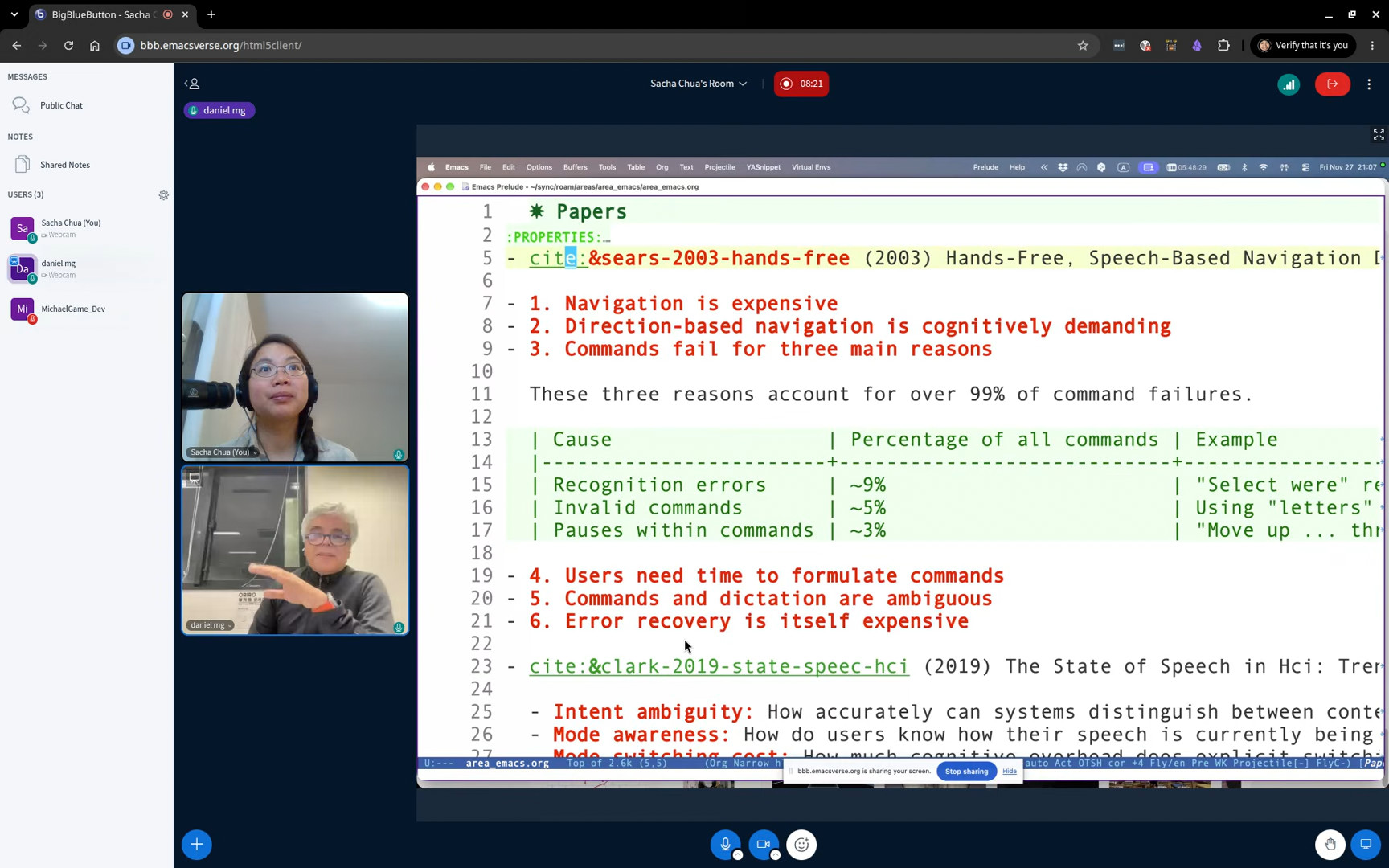 other: The four papers I think that they're interesting, but the one I really want you to think about is the following. This is the paper. Uh so
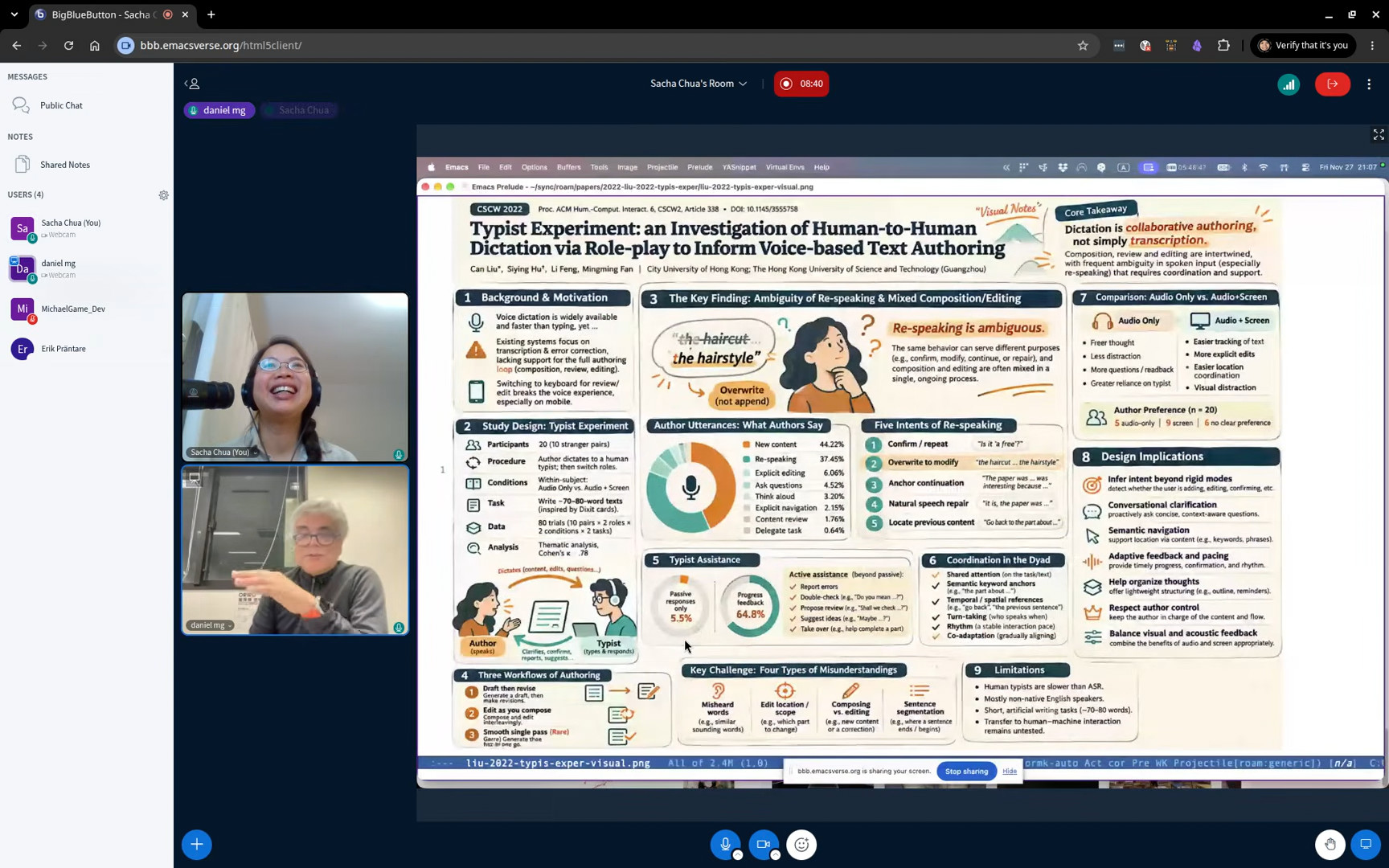 other: These people, what they did was extremely simple. This is a guy paper. What they did is to have two people transcribing. One person transcribing the other. And it's such a simple idea, and it really highlights the challenges of transcription. And they handled in two different uh environments. And one of them was A person is able to see the screen. Think of it like pair programming, where the other person is transcribing, but it's not able to touch the keyboard. Yeah. And the other person And the other uh environment is where Up uh, the person is not able to see the screen. It's only transcribing. It's like in the other side of the computer. And you realize that there are a lot of very interesting um commands that a person actually utters. That they're not really what we are trying to do some when we are thinking about Emacs, because the way that we think about Emacs. So, so think about this. Think about actually asking asking, for example, your daughter to dictate you something. And then see what happens and then how she actually edits that text as she's trying to tell you what it is. And for example, next paragraph, or go back to two words or two lines, or things like that, which some of those we have already solved with some of some of the some of the commands they have created. But it actually brings another way in which we tend to interact. with dictation as we are correcting it on the fly. okay, so that this is actually, um, I can actually um I'll I'll share with you the citations. They're already here. Uh, so this is uh sorry, uh. Uh Alpist. Excuse me. >> I'm looking forward to reading that. I mean, amusingly, my daughter actually does dictate her homework to me. So Familiar with the scenario. >> okay, so you understand, you understand these problems then already. And uh, but anyway, so this was actually a very, very interesting experiment, in my opinion. And uh, and then there are other papers that basically do a little bit of of the um Of the the the Basically, break down the different challenges.
8:04 Composability
other: One thing that I found very interesting is this idea of composability. So combine dictation, editing, and application control at the same time, which is essentially what we're trying to do. That's what the the voice people call uh essentially what we're trying to create in Emacs. 8:20 Discoverability
other: And there's also very interesting aspects that I think that we tend to forget, which is one of them is discover discoverability. Because once you start speaking, it's like Oh, what were the commands that I can say? How do I remember what are the different things? So I think that there's actually a lot of issues that the people in HCI have actually dealt with. And um, so I think that there is a lot for us to learn um in that sense. okay, so >> I love this. I love the the research background you're bringing to it. >> Yeah, of course. So you know, you know, uh, that's my job. So I bring that. So here's an example of voice repair, okay? And tab. So This is essentially something that I dictated. And I'm actually just reformatting it. >> I'm going to tell you right, like right. Do you know about M-q and you can use that to fill the paragraph? >> Yes, but I I actually I didn't want to specify the width because if I do it, it will actually do it like. >> okay. >> Way beyond. Oh, I I should use visual mode. Visual mode, that's the one. >> All right. okay. okay. >> And Yeah. >> Here we are. >> And that has been one of the things that I learned in the last six months to use visual mode more frequently. Especially because a lot of applications are expecting markdown in just one single line. And that So 9:37 Using large language models for voice repair
other: So this is imagine, so this is actually um. One of those dictations. That I have completed and now I need to repair. So the way that that we tend to do it is by going back and doing one thing at a time. This is the area where DLMs are actually great at helping us. okay. So I create a small function and Uh, voice uh repair. Region. So if you read this, um Oh. For example, the number one, number two, number three. Uh Then there is delay the last two sentences. Replace globally Sacha for great Sacha. And so I'm going to send that to the lem. And we'll see what it returns. >> Yeah, formatting. >> And then it does it does the formatting. >> Yeah. >> Now. I ask it to. To rub between brackets. Anything that DLM was not totally sure about. Um. Uh, visual. Line mode. And so the idea essentially is that I get a little bit of information about where to look for potential errors. Now, one of the aspects of LM editing text. Is that It's very hard to see diffs. You need to read everything again. >> I have something for that. >> It's it's like reading papers. Once the student finishes, you have to actually go and read everything from the beginning. So that creates a little bit of a challenge. So is it worth to actually ask for a full repair or do you prefer to repair it? I think it depends on the balance of how much you have to do. versus um um how quick you can you uh uh sorry how much you have to do versus how quickly you can actually do it. And that's essentially what the user defines. But I really like actually the fact that with a relatively simple prompt, 20 lines, I can actually get. to this level. Where it fixes a lot of the problems. You probably have noticed they would once once you start speaking, if you stop for a little bit, then it Thinks that they are two sentences, that should be together. >> That w that's yeah. Yeah. >> And those are the kind of jobs where the LLM is actually very good at doing that, right? Um With Mm-hmm. Yeah. >> I I would be very interested in seeing your prompt. Um, and the second thing that I want to say is for the purposes of comparing, uh, if you use gptel rewrite, then you can get a diff. Uh, but you can also modify it so that like you can write some code or have your LM generate some code to use a W diff instead, which is a word-based diff. So one of the interfaces that I've been playing around with, uh, the idea is to show the word-based diff so that the the the additions uh or changes jump out at you because it's fontified differently and then be able to use voice or mouse or keyboard to accept or or modify certain changes. And I haven't nailed down the interface yet, but the Dul D diff might be an interesting approach. >> So we we think alike, uh, because I already implemented it with GPT write uh rewrite. And uh, but it is very difficult to actually see depths of of text that you're editing. Because in this case, we're actually also breaking the lines. >> Yeah, yeah. Yeah. >> And so it becomes a little bit complicated. So I'm not totally sure whether that's actually the best way to do it or not. >> For like for me, I like the the breaking of the lines doesn't matter so much because that's very easy to visually verify if it's all right. What I'm annoyed about right now is I can't, I can't quite get a prompt that will leave my wording alone. And so using W div ignores all the white space changes. It just focuses on the changes in words. So that's what, you know, that's that's what I'm trying. >> I think the great thing of trying to divide the problems is that different people will probably concentrate on different aspects and different people will experiment with different aspects. So once we know that we have to do um sentence repair and voice repair, then you can have all of these different uh styles using def or using just basically replacement. I was thinking that maybe the way to do it is to have Um, overlays. >> Yeah. >> actually highlight the areas where where things have been changed or where where the uh D L L M has uh Yeah. problems actually trying to do it, right? >> Yes. >> And um, so, but anyway, so that's kind of my very simple just a one hour. Not even an hour, just a few minutes try to. deal with the problem of voice uh repair. And uh, so I think that there's a lot of potential. Uh, on that. I really think that that will allow us to forget about having to do the edit every single item at a time, which is very tedious. And I think that perhaps for all for many of us, the ideal and I 14:11 A hybrid model combining dictation and typing
other: We can see it when in your videos is do a hybrid mode. Well, you have voice for. Quick. Typing. And then you go and then manually edit with a keyboard. Because it's much faster than using the uh voice to do the um The the uh finding text, locating, and et cetera. And uh, yeah, so so I don't know if you have any questions, you can interrupt me so or um. If Yeah. >> I just want to steal the prompt from your config. Is is that? That's already online as well. >> Uh, yes, I can show you, and um so um. >> Yeah, the um the >> Also ah, where's uh be ah Let's roll the file. Ooh. >> Application of LLMs to simple edits uh was also explored by Abinot Tushar in his uh ESI dictate. So I think it's it's definitely a a very flexible approach. I'm also really curious about picking up the editing commands that uh both Eric and um and th Thunderburr have explored, the kind of the editing grammar for more deterministic edits. >> Yes, exactly. Uh, this is this is the prompt, so um, it's Just two pages and uh >> It's a >> And then it has actually actually some examples. Uh, but again, so There's no evaluation of this. This is actually just like trying it and it kind of worked. >> Yeah, okay. >> And um, and I'm going to actually push this into my repository. Uh, the main start. I'm customizing a slightly earweek at this point. To be able to do what I want. 15:43 Independent changes, and sharing ideas
other: So we're going to have a lot of uh Um. independent changes because uh Is is we're moving too fast in this to actually be able to build on top of each so of each other. I think that's going to be a little bit of a challenge. I agree. Yeah. Yeah. >> And that's okay, because we're we're sharing ideas at the highest level also of what kind of what interface patterns make sense, you know, like and as soon as someone comes up with an idea, then it's very easy to re-implement that with the power of Lisp or even, you know, with LLM assistance to to fit into your particular system. So, like, for example, I've been really liking this idea of an independent voice cursor, which I borrowed from Abino, where you can you can leave the dictation moving. While your c your your typing cursor is off somewhere else, maybe even a completely different buffer. >> That's a great idea. And I already adopted it in other things I've been doing. Like, um, I basically just let Emacs do its job interacting with a website, and then whenever that website finishes, insert there, and then I don't have to be babysitting that buffer anymore. It can actually be hidden below, right? So I think that there's another advan a lot of advantage being able to do async operations where the pointer, uh, the point is already fixed. In a given location. And uh, so so that's that's about repair. Um, let me give you a little bit of a demo of of uh the two systems that I have. Um 17:08 Hammerspoon
other: I used to run Linux as my laptop, and uh, but since COVID, I moved to macOS. And one of the reasons is that um I'm using a tool called Hammerspoon. That allows me to essentially It's essentially a window manager. And uh, and uh, the window manager is moving from Lua, where it was programmed, and it's now JavaScript. Uh, we're moving to version two. Uh Probably in the next couple of weeks, we're going to have a major release. So I've been actually porting my code into that. So, um, when you were experimenting with uh with Emacs, I started experimenting with um With hammerspoon and So There's a the most simple one is just transcription. Uh, this is an example of transcription that is very similar to the one that Sacha has been creating for a long time. And so nothing special. And learning a lot from you in terms of being able to use um. spacing to be able to actually start uh The transcription at the same time that recording goes, because otherwise at the beginning, I have to wait a lot before anything will be transcribed. And the the longer that you speak, the longer that delay is going to be. So, but I'm really uh I'm really affected. By and I think. All of us are, by the way, that Emacs affects our brain. Um Think of it like the story of the arrival movie. The language affects the the way that we think. And our language is the language of Emacs. So it affects the way that we think about problems. 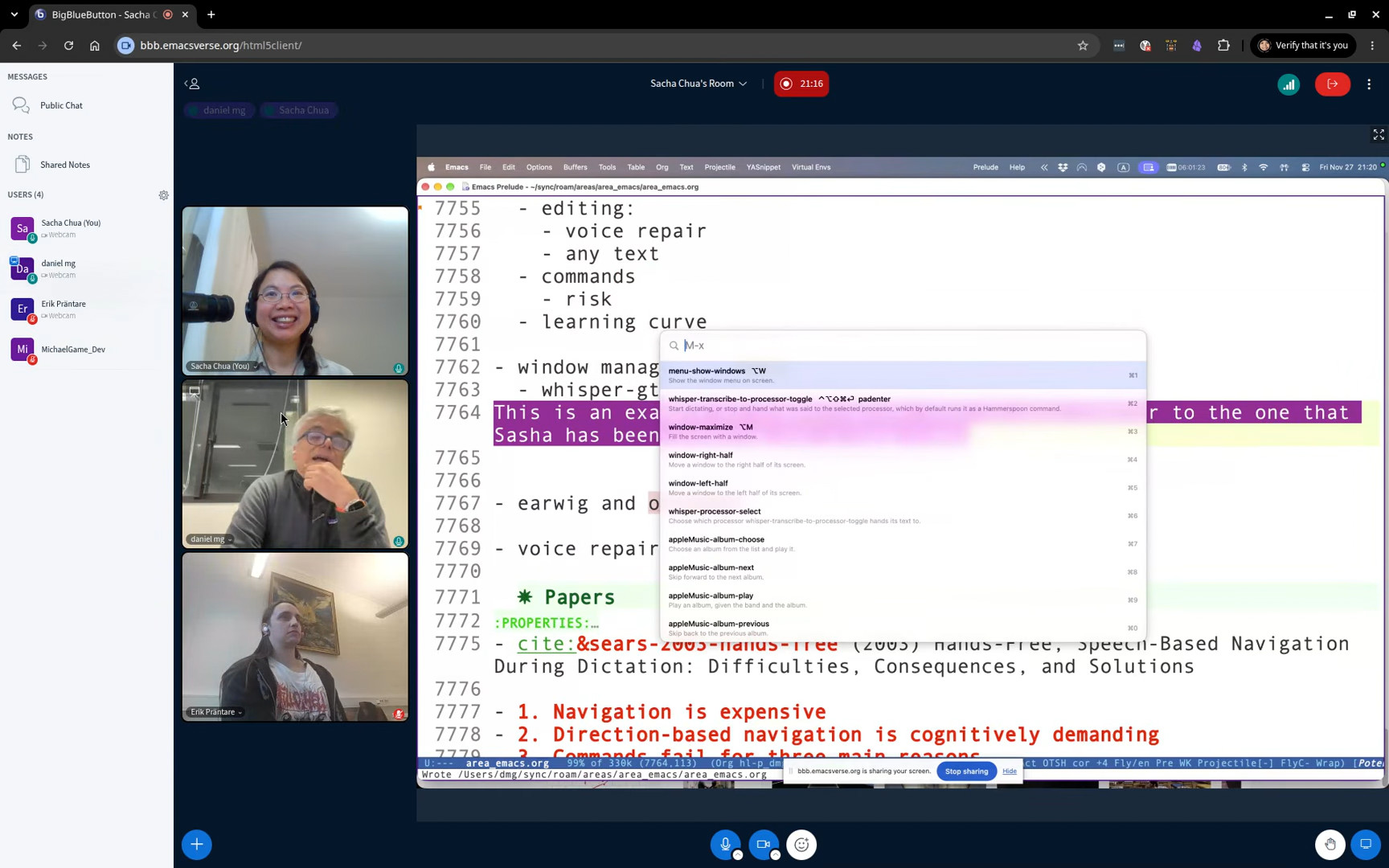 other: And uh, so what I wanted was to have a M-x. For the window manager. So I created a layer to be able to have interactive commands. So essentially, not every command is interact uh is interactive because otherwise they you get too many. And then the challenge is. If the command requires parameters, I had to create infrastructure to be able to Grab the parameter. So what does that mean in this context? So let's assume that you want to maximize a window. If there's a window already. Um. Um active. It maximizes that one. Otherwise, it will ask you, which window do you want me to maximize? Which is kind of similar to what Emacs does for optional parameters. So that's kind of the idea. So that means that I can actually call um Let me, for example, use window right. Um Half, and then it will actually uh do that. So This was important because if I wanted to be able to have The ability to call any command via voice, I needed to have this feature. okay. So, um. This is my whisper menu. Uh, this is my Whisper menu. I'm using Whisper as the back end for this. Uh, so the one that we've shown is dictate. And I can also dictate to the clipboard. Uh, for example, if I move the the the window to another window. It automatically. Dictates to the clipboard. Because who knows where it's going to end. That's one of the things you start to discover that you just don't want any window to actually accept whatever you type. >> Mm. >> Some problems that don't exist with typing. >> That's an interesting approach. I've just I've been having it dictate straight in. >> Exist with both. And uh, I also define something called um Uh, filter, which is essentially, and I have seen this in many applications for Mac OS and Windows, that they allow you to filter the transcription through an LLM. And then I can define the the uh the prompt to be able to do that. I call that filter. So I can actually determine the filter. I can also define the language that I'm going to do the transmission. So essentially kind of kind of trying to bring the same power that we have in Emacs to the window manager. Uh, the one I want to show is the one I call to processor, okay? Window. Left. Right. Sorry. Uh Window half left. Window Left half. >> Yeah, it works. >> Let me show let me let me check the command. Oh, here it is. So it actually did it. Sorry, it's the problem that oh, I always forget actually the name of the commands. Um >> Define them both. >> Yep. Yeah, so uh that's essentially the problem I was uh talking about the discovery discoverability. And actually, that brings a very interesting problem, which is. Learning to type. Let me let me let me. We need a a different word because this is not typing by voice. Um.
22:00 Learning how to communicate with the computer via voice is like learning to type
other: Learning to communicate with the computer with via voice is probably similar to learning to type. It's going to be slow. It's going to be challenging at the beginning, but the better, the more that you do it, the better and the faster that you become. And you, you are a very good example of that, because you can actually now do things significantly fast because you have been trying it over and over and over again. And I think that's essentially what we all need to be able to become. So I think that people, one of the lessons that I think we should all have is that everybody. It's going to be slow and frustrated at the beginning. And as we as we move forward, then we're going to improve and just become more effective. 22:40 More attempts
other: Uh, with these tools. Uh, let me give you another example. Um, let's try another one. Uh. Apple music. Ah, let me let me first check check the commands on that because that would probably be easier than trying to. Apple music. Apple music focus, Apple Music Focus, so and uh 23:10 We need a which-key
other: >> So it's it's kinda like we need a witch key, right? >> Yeah. >> A which key equivalent for voice, where if you say something that's a partial, like just a prefix of other commands, it will display just that subset. 23:22 More attempts
other: >> Exactly. I have some Emacs. So let's say Emacs agenda. Let's try Emacs agenda. And because that's an interesting problem. >> Will you have any private information in your Emacs agenda that you might accidentally show? >> Up. Mm. >> okay. >> It will not pass, um. Emacs agenda. E Max Agenda. >> Ha ha, it's it's a dictionary problem. >> It's a dictionary problem. So I have not been able to actually so I have not dealt with the problem of having some synonyms. So, because Emacs is one of those that it just doesn't match. Änte. >> Oh yeah, the way that I do it is, um, is I I run my I re I run my like common edits replacements. As as part of my filter for all of the the commands, right? So if you're using I don't know if you're using Emacs to drive the the rest of it, but if you can use if you can use your speech uh output your speech input results from Emacs. Into whatever else you're using, then then that's where you can do the replacements also. Yeah, yeah. >> So this is done independently. So here I have a whisper server. And Hammerspoon is talking to that whisper server. >> okay. >> So this this was the beginning before I went, and then um Hammerspoon is able to execute Emacs commands. And um so that There's a lot of interaction between both of them. And uh, so let me let me. Yeah, go ahead. 24:52 Emacs, Hammerspoon, and the browser
other: >> Yeah, see, I wonder if it if it makes sense to do it the other way around, where Emacs is telling Hammerspoon, here's a string, here's the plain text, and then can you just execute it? >> And I will be able to do that because um I have the ability to code either one from each other. So I have the ability to call. From the browser Emacs, I have the ability to call from Emacs the browser and the same two direction. So the three main tools that I use are those. And I really believe that. Our Emacs way of thinking is like we need the tools that we use to be extensible. And I think the browser is very extensible by the ability of being able to inject JavaScript or to be able to have extensions that do whatever we want. So I totally agree. And that For example, one of the things that I'm very helpful thankful is Emacs everywhere. I had to create an ex an extension to be able to connect it to Hammerspoon, but I can use Emacs everywhere. Um, in macOS. So I can always edit fields with that, right? 25:56 More dictation challenges
other: Let me show you now only weapon and um So First, let me show you um. E week d dictate. This is an example of dictation. okay, help. I thought they will give me help, but they didn't. Oh, this is what another one of the problems, right, that we have. The moment that we get into dictate, it just keeps going. It just keeps going. It just keeps going. That's actually one of those things that I have to learn still to be able to do. And uh, because otherwise then I just get garbage or things that uh modify uh buffers that I shouldn't be modifying. Because of this, right? And uh, let me actually let me get the the the help, uh, earlier. Um Uh, help. And uh, these are the commands that it has. So, um. Scratch that, comment that, select, uh, format, replace, etc., etc., etc. Um, the ability to go to certain line. And I extend it with this. Front command. okay. >> Yeah. >> And um, so Let me actually try again and um Run. Bookmarks. Oh. >> Does it have to be run command bookmarks? >> okay. Run bookmarks. He caught the O. That's part of the utterance. And uh, let me stop it and try again. And uh, 27:38 Command mode and dictation mode
other: so the the the way to actually do it, I have to say, okay. >> okay. >> before it goes into command mode. So that's actually an interesting aspect. And the literature talks a lot about this. Are you dictating? >> Yeah, yeah. >> Or are you in command mode? >> Yeah, yeah. >> And the switch between them is expensive. So that's another challenge, right, that we have. okay. Ron. Bookmarks. So um, it gives me completion. So this actually, um, let me let me run the OB OB one, uh, sorry, the only. Uh, help and task so these are the commands I have. Um 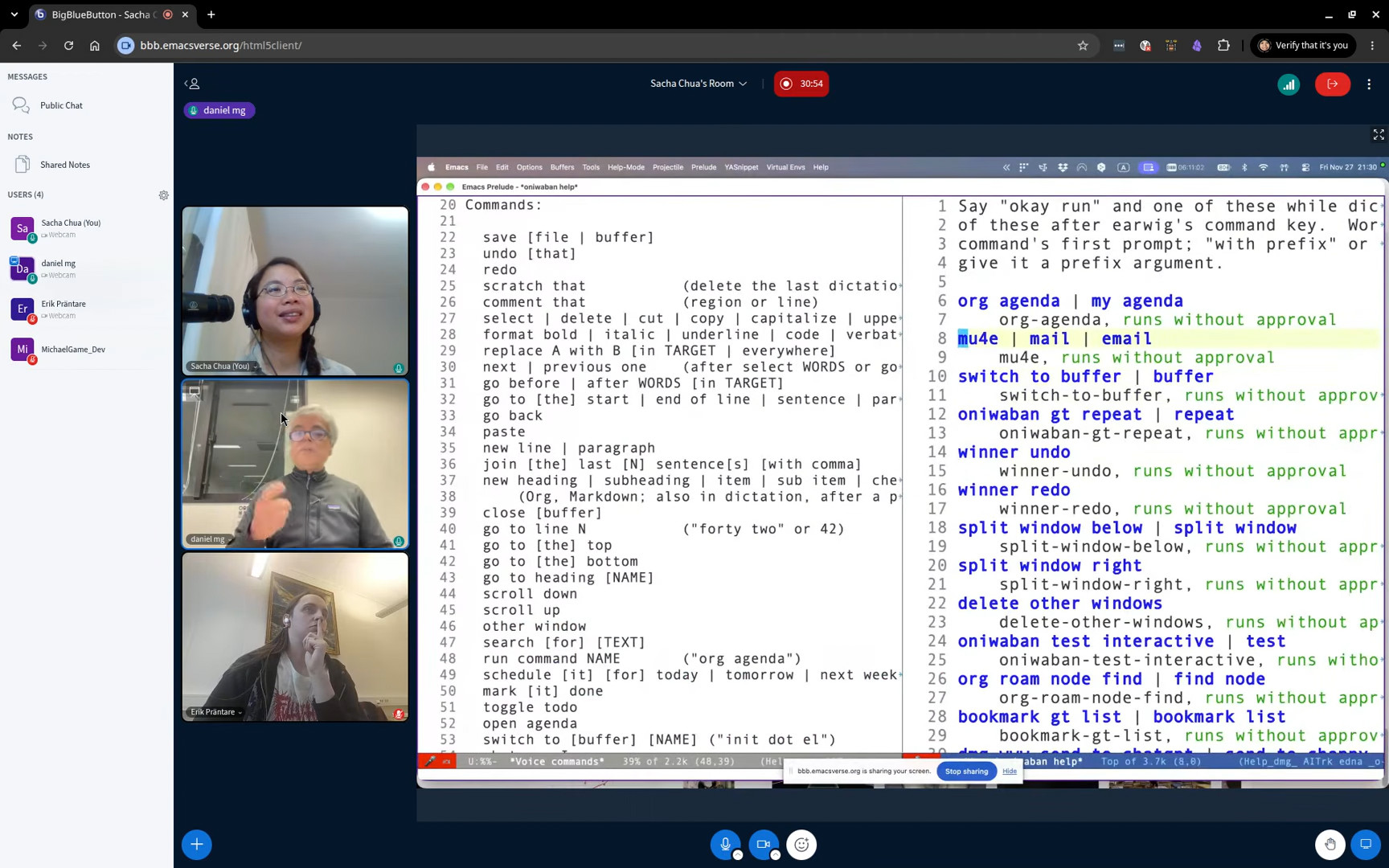 other: Let me open for E. So this mu4e is a command that doesn't have parameters. Um Oh, so I have doctors. okay. Run. Male.
28:40 Mispronunciations and dictionaries
other: >> Oh, because it became Ron. >> Run. Or it became wrong. So that's actually a problem that I have with my pronunciation. So that's another interesting aspect. Is it because I mispronounced the words? Or is because I shouldn't really create a dictionary? Because the problem of a dictionary is the moment that you commit to that word. You cannot say the other word. So >> Ah, uh, what I do sometimes is I define the the the substitution in terms of the phrase. But it might also be interesting to have a second dictionary that you can run only in the context of a command temporarily. >> Yeah. >> So I wonder, so like, since Erica's here, the >> I mean, I >> Good. >> Yeah, though, I think like the the core of the issue is that, uh, like, do I sound good? >> Yeah. >> Does it sound fine? >> Yeah. >> Yeah. I think the core of the issue is like because this approach takes like a um model like transcription model where you first dictate and it translates it into text and then you try to parse that. Uh, but Tallinn, for example, like, um You communicate with Talon and tell it what the actual grammar is. And then when it decodes, it can only decode into a legal utterance. So that increases the Like precision a lot. So for example, Sacha, you have talked about your start screaming problem. So if you told Talon that you were to start screaming, it would like understand that it is start screaming because it cannot decode into start screaming. >> Yeah. Uh, but on the I guess it it's great for for the controlled vocabulary so voice control, but if you also want to do a lot of free dictation, it would be amazing to be able to switch switch the modes or like, you know, bias the the recognition one way or the other. >> Well, I I think that's where. I personally end up finding myself when I'm messing with the voice command stuff right now and the dictation is. I am going into commands mode. Um, and just mostly having that in the background. And then if I need my actual transcription, I have your transcription buff buffer that you have set up, and I'm kind of doing it that way. Uh, so far, that's been most of my thing, though I think I will, you know, obviously use more dictation mode when I'm doing something like a blog post or whatever. Yeah. That's something that I've been. uh noticing as I've messed with this uh you know the past week or two. >> That's my default now too. Um, when it starts up, it's just in commands mode, and then I can switch it to dictation either vocally or with my with my uh uh my my keyboard shortcut. And now I'm tempted to make my space bar a push to talk that just switches into dictation mode for that. So kind of different things to play around with. >> Yeah, that's actually so that's that uh so with uh that's one of the reasons that I like to be here uh with external keyboard, because then I can actually use the numerical pad. to be able to issue commands. Uh Because that the the problem also with keys, right? And uh >> Yes. 31:35 Complex commands
other: >> So let me show you the complex commands. Let's hope that it actually works. So um okay, run DMG bus. Seven. okay, next. >> Oh yeah, so that you got interactive. >> And it opened in the other in the other in the in the other um. Uh Uh, in the other so it was in another uh Browser. Sorry, in another screen. So that's essentially how it works. So Run that command. Let me stop. Yeah. Boss, actually, let's look at the description, describe function, uh, DMG, uh, uh, sorry, describe function. Uh, DMG bus. Um, essentially an interactive function that detects a route. So what this is doing is so all I all I do, let me show you the definition. So um Uh Uh Voice transcription. So the way that I define it is the following. I don't want to define Another function just to be able to call it via voice. So what I do is that I use commands that I already have. And sorry, that's not where where is it? Here's the list. So these are the commands. All of these are regular commands. Interactive. And then this is a A potential synonym. that I have to be able to call it. So I can call it Org agenda or I can call it my agenda. And then I have an optional confirmation. Uh, let's try that now. So notice kill buffer here. Kill buffer doesn't have confirmations. As Neil. So that means by default it's true. So I need to confirm that. Oh, sorry. Um okay, Ron. Keel buffer. Uh. >> Uh, pronunciation challenge. >> My kill is not very good. And that Mm-hmm. okay. >> Maybe you can add an alias right now. >> Keel buffer. okay. Keel Buffer. It has to reset the mode before I can actually do the command. Uh, let me use the other alternative, which is actually directly into the command. So uh, earwick has two modes, dictate and command. Uh, let's hope that uh the ear wig actu um actually uh I already uh did it uh so only uh Execute command. Will this work? Uh oh no, this is actually uh. Uh Airwig command. Ron Keel Buffer. Yeah, it doesn't work with that. Let me actually try again with the other one. Ron. Kill buffer. Yeah, so again, so that's actually my pronunciation. Um, let's do another one. Um okay. >> Command modes, right? di >> Yeah. Uh >> Do you also have it running for all like all the interactive commands in general, or are you manually defining them? Because I have some code in my config. >> So I'm manified adding them because otherwise then it will become unmanageable. >> okay. Uh >> And um, so okay. >> I I will let you turn off your dictation thing first. >> Split window right. okay, split window right. >> It's not doing the uh like beginning of utterance thing. >> Ah, this is the problem with the with the timing. okay. >> Yeah, the way that I I have mine is it it splits my my silence. >> Split window right. >> Huh. >> okay, split window. >> Chris is a live demo. >> So it's struggling with that. And um Uh okay. Wiener und du So nothing is working now. Yeah. >> It's okay. It it it's one of those things. It's only when you're demonstrating it. >> Let me just try one last one. okay. Run mail. >> Oh yeah. >> okay. So that worked. So I think that what happens is I'm still uh struggling with the utterances. okay, run split window. It caught it caught the A. okay. >> I I was >> Run split window. Yeah. >> Yeah. >> So it's a little bit of of trying to actually get. Um, the word incorrect and but I want to run one that requires parameters. Um Uh, let's do the bookmark. Um Actually, where I should be doing this is earwig. uh help because then I can actually show you what the commands are. So, um Uh, no, this is a weak help. Uh, only uh help. okay, this these are the commands. So these are the commands, but this is actually the help. So in the probe, you can say okay next, and it will send you to the next field. It's the equivalent of doing a return in a parameter. okay cancel cancels the command. okay previous goes back to the previous question. So essentially, I have a function that sits on top of um. Um, call interactive. That gathers the parameters. And then once they're actually completed, it will call the function. So that way I can take advantage of the interactive description, but I'm not using interactive directly. Yeah. In things like consult, you can take advantage of um. trying to pick the specific number of of the selection. >> Huh. I should try that. >> okay, run bookmark. okay. Pick four. okay, next. That worked. okay. So what they did is actually call Org wrong node find. That requires a string, but it's also using consult. So it's aware of consult and allows me to use the consult um infrastructure to be able to actually jump to a given line. And so that's essentially, and the advantage is that I don't have to program any of that. All of that is done via this by simply defining that the function. It's callable. Via voice. >> That's wonderful. >> So that's essentially the experiment the experimentation I've been doing, to be able to simply add. The function. The ali uh an optional alias. And then Whether it's pre approved. If it's not pre approved, it will ask me, do you really want to run this? >> That's a great idea. Uh >> okay, kill current buffer. Yeah, it has problems with my kill. Let me stop it and turn again. okay. Kill buffer. Oh, I forget to say run. That's actually the problem. okay. Ron Keel Buffer. >> Mm, yeah. >> And here's what it asked me. I said, cancel. >> Yeah, yeah. >> So notice actually that it asked me and then I cancel it. So that's the idea behind their pre-approval. Obviously, there's a lot of experimentation for this because It's obvious that I'm actually saying too many words to run the commands. What I need is actually a way to. Uh, reduce that. And or basically, um, the different the problem of being in the interactive mode is that. I'm dictating at the same time that I'm actually. Um. doing uh commands on the co on on the mini buffer. Because the pr the the command might require text. And there are two ways to do that. One of them is If I say the command plus some text, it assumes that the first string is the first parameter. The the rest of the string is the first parameter. And then it might run it. Otherwise, then if it requires more, then it will actually put that into the mini buffer and wait for me to actually say something, go to the next field, et cetera. And uh, but anyway, so that's kind of the demo. So Hopefully that gives you an idea of This. vision that I have. of being able to use interactive. as a way to create commands. So we don't have to create one command for every um Um. So one non parameter command. And the main problem with that is the lack of being able to input. Parameters. It reduces a lot the flexibility of the language. And with this and with this some practice, then the ability to be able to say the parameters opens way more possibilities. I think. It's a matter of actually seeing whether that works or not. >> Eric, you've been working with this for far longer. Do you have a workaround for interactive functions with parameters, multiple parameters even? >> No, no, this is actually Eric. Yeah, so I mean, usually I just uh make the command in such a way that there are parts of it that are optional. And uh So whenever one of the arguments to my like then phony d fun. Uh, is nil, then I like ask for it interactively. >> But the idea of like reading the interactive spec from the function And then figuring out, okay, how do you prompt from that? I think that's that's very interesting, and I want to steal it. Hmm. That sounds cool. Uh >> Yeah, that's the that's the advantage that um we basically just take the description of the function. And the function already says what how many parameters it takes and what is the type. So it can, it can, it can narrow it to. So I have uh three methods now. One of them is numbers, another one is strings, and the third one is. uh files. So you can remove, for example, the last uh directory. From a path. Uh, quickly in the editing uh commands. And uh, but that requires experimentation, so. It's really more like we have no idea where we are going. With this. >> There's a lot of possibilities. >> Yeah. Yeah, I I think like possibly one of the potential risks with the using the interactive spec is that it is more Optimized for a keyboard interaction. Um. So you will probably get like an inferior experience compared to if you just defined like how this interactivity should work. >> And doesn't, um, like, doesn't dictation work for you in the mini buffer? 'Cause like Fruit. I For things. That rec that prompt for read string and and things like that, it might be possible to just dictate straight into it. It's mostly just things like >> Mm-hmm. >> Like uh, like read key that I'm like, hmm, do I need to use unread unread command events to stuff the keystroke back into this? I haven't looked into it in depth yet. But it's it's actually something I want to look into. >> I think if we're working. The advantages to be able to pass the first parameter. >> Oh yeah. >> To the function. >> Yeah. >> Because you can actually say all of that in the execution. And then that gets pre-filled. >> Um, and Bart does that. So when when you use Embark become, the it it provides the previous value as the argument, the first interactive argument. So I can steal code from that if you haven't looked at it yet. >> That that's right. So what I mean is that you can actually when you when you call the function via voice. >> Yeah, yeah. >> You already passed that parameter because you keep going. >> Yeah. Select f >> And then it calls the function with that first parameter. So for most functions with one parameter. Is sufficient. Uh, if there's completion. It matchily stopped there. And then wait for you to type return. Or in my case, I have okay return. But the reality, but the way I think is that um using the keyboard in this case is just faster. So you get this started with the function. And then you do everything else with the keyboard, like just moving arrows or return or control G. >> Yeah. >> It's probably faster. Now. >> And okay. >> One of the advantages I see with voice is that. In many cases, I might be doing something else. In the on the desk. And I just want to control the computer, right? Like move to the next page. Or go and check my email, read the uh, open the email, open this mailbox, et cetera, et cetera, right? And uh, and this essentially Makes it a little bit simpler in the sense that I don't have to program every single function. >> Yeah. >> Independently. >> I do have a like a a kind of a command function or a Uh, I I I think my my long phrase for it, which was just just for fun to demonstrate it, was uh, I command you two, and then the name of the function. And what it would do is it uses on red command events to stuff it directly into M-x, and it runs the first matching command. So all of the commands are available, even the ones I haven't programmed in. >> Yeah. Yeah, that's actually a good way to do it. And um And I think that the challenge is. Uh The selection, right? How do you still select? And uh via voice. >> Oh, oh yeah, yeah. Well, for this one, because I I just wanted it to run the first matching command sorted by length so that more exact matches come first and with orderless in place. I don't have to remember the words of it. Uh, then it does that. Um, but I was curious, since you have picking on on your your thing, what do you do to get the, you know, the list of candidates, uh, in the same way that the the completion is handling it. >> Well, so I'm not doing anything. I'm just calling the completion, right? I'm just, it's just calling consult. >> okay, so consult is is still taking answered. okay. >> And then >> All right. >> What I think that the the the the only thing I have done differently is that I have commands. Voice comments specifically for the mini buffer. >> Yeah, okay. >> That's the only difference. Everything else is just. Uh voice. >> Yeah. >> An interpretation of that. It's just that in the mini buffer, you have different problems that you have on a buffer. >> Yeah. All right. I >> Especially with consult. So consult allows you to select by by line, right? And uh, or if you actually Type some text, then you start to have. Let's say that you have two candidates. Um, and you want to select the current one. So then I have a select. um candidate um command. Because otherwise then, um Yeah. 47:50 Muscle memory
other: There's some things that our our fingers know better than us how to do in Emacs. >> Yes. >> I have to think sometimes about actually how this works before I can try to think about how to do it in voice. That's another problem, right? >> I think this hybrid workflow of using voice and typing together. Uh, is it's very promising 'cause he can use voice for the things that it's good at and then typing for the things that it's good at. >> Yeah, exactly. I have found with like a lot of tasks because I use my voice more than I use my keyboard for interaction. So for many things, I don't really even know how to do it with my hands. So I uh Like um, type in what I would say. To execute the different commands, and then I let the phony parse it. Yeah. So I have like the inverse issue. Where >> It's wonderful. >> Where like my Yeah, we're where uh yeah. I know better how to use my voice than to use my hands with Emacs. Because I mean, initially I also like the reason I switched to Emacs was because I needed an environment to be able to shape according to my workflow, right? So I never had like experience with Emacs before using it with voice. Basically. Well. All right. Yeah. okay. >> No, go ahead. >> Uh 49:13 Personalization and collaboration
other: Well, what I was going to say, to me, like that, I think is going to be the big question for like. Everybody that's exploring this area is. How do you, especially if they're doing it with Emacs, because you know, you can do your own thing, it's like, how do you set it up in a way that's going to work for you? Um, and make sense for you because with other, you know, a lot of programs, you're kind of limited on what you can do, but with Emacs and with defining your own commands and. You know. All that other options we have now, it's just It's going to be very much a filtering down of like what actually works for you and what doesn't. And I mean, I think the hybrid mode Sacha was talking about the other day is kind of the the mode I see myself in the most where I'm kind of, you know. I'm occasionally using voice commands, I'm occasionally using some dictation, and then I'm I'm also still using keyboard and stuff like that, and just finding that most efficient. you know, best way to work for you, maybe not even most efficient, this the best way to work for you. And I think that's going to be a little bit different for everybody. And I think that's that's going to be one of the challenges we see. As people start exploring this, you know, other people start exploring this. Yeah, I think that on one side, then we have the issue of the ideas and how they get implemented, and the other one is how to build on top of what others have been building. I totally agree. And um But I think that everybody has a different experience. I'm thinking, for example, from the point of view of somebody who might have motor uh problems and typing, that actually could help. Even if it's not the most efficient way to do it. >> I think there's a there's a bit of a ramp there too. You could start off by defining things in more natural language, but then as you find yourself wanting shorter ways to say the m your most frequent commands, you gradually move towards a like a tighter vocabulary like what Eric uses in Christopher Free. >> Yeah. I don't mean we do that. Sorry, sorry, go ahead. I was going to say we do that with keybinds too, because like for me, when I'm reaching to kill a buffer, I'm almost always wanting to kill the current buffer. So I just assign that to a keyboard shortcut and I have it there, but yeah, absolutely. I think it's the same thing with voice commands. Yeah, and I think that, um Sorry, I forgot what I was going to say and um Just got distracted. I can say. So But I but I think also like if we go like when we go like closer towards like obviously constructed languages that don't Sound anything like natural language in terms of like a grammar and the different terms that are used. Uh, I think it will also become even more difficult to use this. Um these recognizers that are were made for dictation because they Kind of try to fit what you're saying into natural English. And when I interact with my computer, it sounds nothing at all like natural Engl English. It's like Sounds like random made up words in a random order. Uh, so I think that's uh Models like Whisper will uh struggle more with that type of interaction as well. 52:33 Composing sequences of commands
other: I was going to say that one thing that we haven't even thought about is also how to compose com voice commands. Because we are issuing one command at a time. We haven't even thought about what does it mean to actually have like a sequence of voice commands. And um >> I was very amused by the examples in earwig, right? The uh uh very uh very nested descriptors. Ha ha. >> Yes. Yes. >> Oh, uh, which reminds me, Eric reminded me also, uh >> And that's actually that's that's a rescat. >> Dan, we've been chatting in a matrix in the Emacslisten matrix room. So I If you aren't on that yet, uh, if if you'd like to join us, we'd we'd be uh well, we'd be happy to discuss things there too throughout the week. Um, matrix. I'll I'll get the link while you all talk about stuff. >> But yeah, I think the risk is also an important factor. And um What is the risk of running on different buffers and um different commands, et cetera, right? And the risk, um. Um, is personal risk, the the the willingness to risk. It's different for every person. 53:48 Transcription in the background
other: But I I really like the demo uh from yesterday because um The trans the automatic transcription, that was great. having a buffer that just does the transcription while you're doing something else. Uh, looks magical. >> Oh, was at Michael's demo? At from Linux Saloon? >> Yeah. Yeah, so some of those things really feel like magic. >> I had I was very amused by the part where we were trying to stump it with with uh languages and accents. >> Yeah, I noticed that. So I I started using via voice in the nineties. So So that's what so the >> I was I was using dragon naturally speaking. So around yeah, that kind of thing. >> Exactly, at a similar time. And things have progressed a lot. The main challenge at that time was that. It was very difficult to train it to your voice, especially if you were not a native uh speaker. And uh, but I think that now, uh What I'm doing, uh, writing, um, um I tend to do Uh. Voice recognition. For anything that Takes more than one line. 54:50 Talking when there are other people around
other: And uh, but also depends of the people around. Uh, so here in the university where I am this month. So when there's other people around, then I don't want to actually uh bother them. So I don't use voice. So that's another challenge that we have. The difficulty of of not always been able to do it. Think in terms of doing it in a cafe. For example. That might look a little bit odd talking to your computer. Although the cafe is still okay, but let's say a library. A library is probably a better example. How do you do this in a library? Yeah. >> I think uh the court scenographers, uh well, the court voice voice, uh, voice reporters, they have a small like thing that they use to. He >> To be quiet, yeah. >> Talking to like this. Ha ha. >> Ah. >> But uh, but yeah. >> The other thing that I have also explored is the idea of recording thoughts. >> Yes. >> Uh, that's not Emacs related, but just going for a walk, record for half an hour, one hour. >> Yes. >> Uh, sometimes uh to do, sometimes ideas, and then come back and then just having that transcribed. That has been also extremely valuable. >> Yes. I I find that with a Go ahead. 56:02 Emacslisten and Emacspeak
other: >> I mean, one one thing that's good. That that I think would like be really cool. Like I have a This like a dream of being able to do it would be to like be able to combine Emacspeak and Emacslisten in a way that you don't even need a screen and a keyboard. So then you could just be out on a walk and hack on Emacs without. Like having to interact with what looks like a computer at all. No, that would be. Knife. >> Yeah, uh, I was >> Well, um, I do not know if you have you have tried uh ChatGPT in voice mode. >> Yes. >> And uh, but it really feels magical. And uh, to be able to have a voice talking to you in your in your head while you're walking, when you're shopping. And uh, in that case, it's not really about editing a document. And uh, but just being able to actually have a conversation. With the computer in that way. I think that we're we're close to be able to do it with almost any computer. Whether it's commercial or not. Mm-hmm. 57:02 Recording on the go
other: >> I've experimented using a lapel mic, which is great because then the audio quality is still pretty good as I'm, you know, as I'm recording my my brain dumb or whatever. And then I was ex I was playing around with using simple voice keywords to structure things, like start section, whatever, end section, um, sorry, stop section, because end is hard to recognize. stop section was work better. So using that to delineate Org mode headings, for example. And so it was very easy to process it afterwards. But my dream is also, like, like Eric, having this directly in Emacs on my Android phone so that I can actually look at the structure as I'm, as I'm developing it. Because my problem with just the phone recording brain dump is it would be hard to like keep, it would, it's, it was hard to keep the structure in mind as I was talking. I would, I would tend to drift. If I use Google Recorder, then it will do the transcription as I as I talk, which is nice. Uh, and I still have the recording afterwards, which is great for misrecognized words and and things like that. Uh, but the downside was that the Google recorder one required more clicks, more taps in order to export. to uh to a file whereas uh easy I I I think it was like like uh one of the the Easy Voice recorder one of those other recorder apps would just automatically save the recording to a folder and that I could synchronize to my computer for later processing. So if I can find something that does the auto transcription and does the uh, you know, the display as you're talking and does the the automatic synchronization with my laptop, I think that would be amazing. >> I would recommend you that you don't worry about that. I recommend you just record your audio. >> It could be Emacs. Hey. >> Without worrying about anything. And then ask the LLM to organize it. It's >> Yeah, probably. I've and I've done that in the past. Like I've I've either recorded a snippet and then uploaded it to Claude or Gemini and said, okay, here, um, you know, can you just Uh, sort this out into to bullet points or whatever. And I've also experimented a lot with using Claude for the uh for the conversation mode for practicing French, because then it can respond to me in French also. >> Yeah, I need to do that. Yes, I totally agree. I think that there are so many possibilities, but. Yeah. >> But the thing about that is I also like how good. 59:25 Predicting the next token in phony
other: >> Yeah, I think you you mentioned like having something like which key for >> Yeah. >> Like voice commands. Uh so I mean the the parser internal to phony, it has like a next token prediction. Uh so I mean perhaps. Something there could be used. You can probably also keep track of like which current rule is being parsed. So that you could say like, currently this is being parsed, and if you say this token, it will try to parse. Like these next rules and so on. So maybe something can be done there. >> Yeah, yeah, like if we give it a string so far, like if we're pausing in the middle of a command, right now my voice activity detector just cuts it. But what I want to do is I want to pass it through like a small local decision model that just does kind of end of turn detection. So if it detects that this is not yet the end of the sentence or the end of the utterance, then it will, you know, it'll do, you know, use that hesitation to show me a menu of the, you know, the the different parsing possibilities for this phrase. >> Mm-hmm. >> Uh, maybe as a starting point. 1:00:32 Interactive completion interface for phony commands
other: >> Yeah. So I mean I I used the next token prediction to when when I um Like input voice commands by my hands, then I use a completing read buffer so that it says uh Like gives me the possible next words that I can enter. Uh, so I mean >> What am I what would I look for in your like setup to borrow that idea? Is that in your public config already? >> I it it's in my private config, but I can uh share it in the chat later. Yeah. >> 'Cause that sounds really cool. And also because I I have this like uh Interest in stenography, which I haven't tested off yet, but it's uh, but the ty like typing in the natural language commands by uh by coding is also something that I've I've been curious about for a long time. >> Mm-hmm. >> okay. >> I'll have to remember to send you cheric quarter. Um Tasha, and let you see if that may be a better fit for what you're trying to do. >> Which one? >> Sure, quarter. >> Oh yeah. >> It is not a sonography keyboard, it's a different uh style keyboard. >> Cool. All right. Send us the send us the deeds. 1:01:39 Working with other applications
other: Yeah, so okay, so there's there's recording like on on your phone or other mobile device, and then there's dictating into Emacs. Um, and also you there's, you know, one of the other things you mentioned, Dan, was uh using em uh using this same idea to control other applications on your system. And we've talked a little bit about uh interfacing with the browser, which we do a lot of stuff in, right? So it makes sense to be able to voice control that, uh, which is part of the reason I was like, okay, Eric, Eric's got some uh uh some interesting uh voice targets for the The search bar and and things like that. And I was like, you know, if you if you use an extension for your browser, you can not have to use XD tool to copy things around. 1:02:19 Voice repair with LLMs
other: >> Yeah, and the voice repair that potentially the LLM can actually help you and do it voice repair on a large section of text. >> Yes. >> In a more efficient way. >> And it might also be interesting to like to pass anything that The that the Parser didn't recognize to an LLM that just, you know, it's kind of like a tool use sort of thing. Say, hey, did this, you know, is this actually supposed to be a command or is it regular dictation? >> Yeah, uh, we have to remember that we can ask the LLM that when in doubt to do something different. >> Yeah. >> So those have to be fully binary. So you can say, I don't understand this and mark it in a way that you go back and check it. And I think then also that the language model will have to be like very fast because you can't like wait for three seconds until it comes with its response. Because at that point it's better to just get a rejection than to just say it again, I found. >> So for first small recognition. >> It it depends on the length, right? 1:03:23 String distance
other: >> Yeah. For small recognition changes, it might be interesting to use the Levin Levenstein distance. Um, the string distance, right? >> Mm-hmm, let me thank. >> Since that's pretty fast to calculate. >> Yeah. >> And uh, and that that that already has a function in Emacs that is implemented in C, so it's fast, and you can just run your current utterance against your list of um your list of commands. The thing that It's only slightly complicated is if you're also using it to specify the parameter of something, then you have to test like prefixes against your command list. Um, and I I probably need to find some way to get a command list out of uh out of phony again. >> Um >> Like a list of like all the literals we're trying to match. As a prefix. 1:04:11 Prioritizing more literal matches
other: >> Yeah, so I mean the also the Like uh when when I do the parsing in phony, it uh keeps track for the different trees like the cost of um Like the particular parts if you have ambiguity, for example. And currently it is only used to like minimize the amount of free text. So say that you have Like a free uh dictation, but then you have some commands, then you want to Uh Like match the parts that is the command and not the free dictation. And I guess maybe like if you do some fancy uh things with that cost function to instead like compare the literals with the distance from uh Like the the actual token that you got, and then maybe you can. Uh, choose the path with the shortest distance. Do what you said. >> I was also thinking about Go ahead. >> I think that they're So sorry, go ahead. 1:05:09 Approximate match on invisible text
other: >> I was also thinking about using the string distance to to implement approxim approximate match on visible text so that our a voice repair stuff can do editing without having perfect matches on the on the recognized text. >> But I think that we have two problems. One is is macro repair and the other one is um Micro repair because the macro is like you have like maybe three, four paragraphs of text that you know is um that uh will be uh That you still have to reread completely. And the other one is you just have an utterance or two utterances that you might want to repair. And I think the promise are very different in both cases. But I think. >> So this is like when you're already in editing mode. >> Yes. Yeah. I think like uh repair sounds like Um It's probably the solution for uh like dictation errors, probably. 1:06:13 Constrained grammars and Talon Voice
other: But I think for like command errors, then you really like we really want to have a A model with a decoder where you can actually grammar constrain it so that. Like, uh, because all of these like fixing it up after the fact to try to make sure that it matches the grammar. Or like hacks on top of like uh An issue that Shouldn't be an issue. Right. >> How is that? How is Tallinn's? >> I I I totally agree, yeah. >> How is talents performance when you're, you know, kind of shifting between the things that you want to constrain things on and versus the things you want to say, just insert and then insert the text that you're dictating? >> Yeah, then they are as fast. Yep. So so, um Like uh, how how uh I think that it works if that like when it gets your um utterance. Uh it applies some acoustic model upon it that gives you the probability distribution of like what character you are saying at the different points. Um Of your speech. Uh, and then it it tries to uh Like maximize the probability. Of the decoding. Uh, but Constraint to what you're saying. So then if like one part of um Of your grammar is just a phrase with like free text. Then it just doesn't apply a filter upon what uh The acoustic. Or or yeah, in the sear in the search from the probability distribution of the acoustic model. So, I mean I it's not a noticeable difference between commands and uh free text. Dictation. >> Worth considering what 1:08:02 Multilingual
other: Uh so the one of the other things that I was kind of trying to figure out was whether you can handle multilingual text. Is it Is the recognition engine English only, or can you handle other languages? Yeah. >> It's English only. I think that there may have been one model for German as well, but uh, it's basically English only. Yeah. >> I think there was some to like the talent plus the the subscriber tier has access to other uh other um speech recognition models. Like I think they mentioned whisper as one of the options. Tchau. Yeah. >> Yeah, I I haven't looked into exactly how they solved that, but because the actual like dictation is a kind of Um, it's not the best in Talon, basically. So I think that. Perhaps they they then use like for when you're dictating the >> okay. >> They then pass it to Whisper instead to have a better dictation. >> So that's it. >> Because then it can make more use of like the structure of the English language. >> I wonder if our I wonder if our computers are probably like fast enough that we can run the dictation twice, right? Uh, run one run the dictation once using a more constrained grammar and run the dictation at the same time using auto key or whisper or some other free model. And then if it if if if it thinks it's it's likely to be a command, then parse it as a command. And if it's likely to be a dictation, then go ahead and And use the dictation results instead. The only fiddly part is I like to mix commands and dictation in the same. >> Yeah. >> Utterance, like the way that I say remind me too, etc. etcetera, etcetera. So I kind of like want the best of both. >> Yeah, I think if if >> But at least remind me too, it's actually fairly reliable. For me. >> I think if it is possible to like in your utterance when you're decoding it, if you could get like the time span for where you're actually dictating a phrase or a free word. Then maybe you could just cut out of that part and then send it to Whisper for to decode. Like just part of your utterance. Yeah, the timestamps can be useful. Whistle. >> Yeah, I don't get word level timing data yet from from Auto Keet. I only get utter like I don't I only get segment level timing data, but Whisper, uh, I think Whisper can do word level timestamps and the hosted, uh, hosted speech recognition services can do word timestamps and streaming. So it's probably going to come down the pipeline and and be available locally, uh, for for uh non-GPU eventually. >> But um, Emacs, um Like with Airwig, you can see the insertion of the text. So Emacs can actually timestamp that. So that might be possible. And uh, but I think that. 1:10:46 Editing text
other: It also brings the issue of where do you want to worry about the editing of the text? Do you want to do it at the same time as you're dictating? To have it correct at that moment, or are you willing to save the utterances for correcting it as part of the transcription? And then allow the computer to fix that later. Like in the example I show you first, where I have as part of the text. Delete the delete the last two sentences. Or replace this word for that word. So I think that LLMs are smart enough. To be able to say, oh, this is. Part of the text, and this is a command to the transcriber. Well, at least it appears like they are. >> And I think for my brain, it it has been helpful to separate the the like the raw input stage from the editing stage, because otherwise I'll get lost and I'll lose the train of my thoughts. >> And I think that happens also when we are typing. Uh, that when we try to actually fix the problems as we go, we tend to actually forget what we wanted to do because now our brain is concentrating on fixing. the spelling mistake that we had. That's one of the things that I see the advantage with speaking, because you don't worry about the spelling. And when you're typing, you think, how do you spell this? And you stop suddenly and your brain of thought actually uh stops at the same time. >> So it sounds like >> Well, in that >> Go ahead. >> Oh, that's what I was going to say. That's that's kind of one of the things I've been thinking about too, is like I've always done the first draft, you just You just type. You don't, you don't worry about errors, you don't worry about. you know, any of that, and then you go back and you, you know, fix it. But yeah, that is the struggle when it comes to a word you're not, you know, using as much, especially as the spelling. And And then if you spell it wrong, you you do have that in your head and you do kind of get distracted. So I That's, I think, is one of the big things about dictation that I want to. want to try using more, especially do try to get through things like blog posts where I feel like sitting down to type it. is different than talking through it. Yeah. That's what I thought that was very interesting, that idea of having dictating to another person. And being the person receiving the dictation versus being the person dictating to another person. Maybe there's something about that because in the bank where I used to work. Uh At certain level, all all the people were dictating to secretaries who were doing that. And they had their own. um shorthand to be able to actually keep up with it, with the dictation. >> Oh yeah, one of the >> So maybe there's something there too. >> One of the embedded uh dictation instructions models that I I came across was uh was uh, yeah, you dictate as normal, but you pr you m you direct your editing instructions to your your hypothetical secretary, right? So you give your secretary a name, and that makes it easier to separate the the instructions for editing from the rest of your text. >> Via voice did that because I remember that you were basically saying. Period. Coma. Semicolon. And things like that. And it will assume that you meant punctuation at the same time that you were typing. And that's one problem actually with the models that we use. They insert the punctuation according to what they think we're actually saying. So that's why we need to go and repair it later. >> okay. In in addition to using L L Ms for rewriting, I think in one of your other emails you also mentioned using L L Ms to like to do the whole MCP integration with Emacs and run sorts of things. Sorry, were you the one who was experimenting with that or have I gotten my wires crossed with other people? >> Well, so Mm. 1:14:44 Large language models and context
other: What I did was the following. So, um I value the context that ChatGPT has for. Um My Um with my conversations. Every time that I open a new chat, it already keeps a lot of context about who I am and the kind of expectations that I have. When we are doing it via an API, you lose that. So I have always missed the ability to talk to the LLM. Via the browser. And uh, so that's where I basically created the equivalent to a Spookfox. Who allows me to send commands to ChatGPT and get them back into Emacs immediately. >> Oh yeah, I have something similar. >> And um Yeah, so you have you have something similar, exactly. So uh, the advantage is that is that as long as you understand the JavaScript of the application, in this case, uh, Chat GPT. You can insert. So, for example, the uh, the They Um Poster style that I show of the paper. So that is actually done via Emacs, from Emacs completely. So what I do is um I use Org ref. From kitchen, who? has now become a missionary to Uh, visual code because he's no longer going to do Emacs. So we sent him as a missionary to that part of the world. And um, and then um It downloads, it downloads the PDF automatically if it can. And then I have a command to open a session with Chat GPT. uploads the PDF automatically so I don't have to do it. And it has the insertion of the prompt. And then Emacs just waits a sync. For the prompt to change in ChatGPT. The moment it changes, it downloads that PDF. that that uh png and puts it back into my directory. So that's the kind of interaction that I don't need an MCP. I basically talk to the browser directly. To well, to chat GPT via the browser. And what has also allowed me is that I have actually now a bookmap a tab manager inside Emacs. So anything that I want to do with the browser, I can actually do it via Emacs. And the LLM can actually talk to Emacs. And through Emacs talk to the browser. So if I want to do something via clot in code in the command line, I can say via Emacs, then talk to this tab, which is already opened and is the current one, and then it doesn't have to worry about authentication or anything like that. So, um 1:17:26 Using Emacs to talk to websites
other: For example, um To be able to talk to the website of the university, the one that we use for teaching, I can actually do it. Uh, via this interaction. So Emacs becomes kind of the bridge between everything in my computer. >> I've a >> It's kind of the the center. >> I forget. Does your browser GT let us to do that kind of JavaScript interaction with non foreground, like with not the current tab with the other tabs that are in the browser as well? >> Yes. >> okay. I should re I should revisit it. >> So the the chat GPT is like that. So I can send it to the the the the the the tab and it doesn't have to be the front tab. It already knows which tab it is and Emacs is talking to that tab uh irrespective of whether it's occluded or not. So there are a lot of advantages of being able to actually just connect the applications this way. >> I'll go look into that. 1:18:16 Communicating with terminals from Emacs
other: >> Same with a terminal. So the terminal I use is Kitty, because Kitty allows you to create a socket. And being able to send commands to Kitty. Uh, via this socket. And uh, so the moment that I run my email, I can actually have open automatically a socket. to my university to be able to SSH all my traffic through a app, sorry, uh send my my data all the way through an SSH port. And so Emacs already tells Kitty, go and open this SSH connection. In a tab. And uh, or if it's already open, then don't do it. So that's kind of interaction. So I think that the moment that we have tools that are kind of programmable, the moment that we just have full power. Over there. much more than when we have NCPs. MCPs seem to be more like a straitjacket. Because they are very constrained about what they can do. And here is more in terms of what does the JavaScript of the tab can do. What does the Elisp of Emacs can do? What does the JavaScript of Hammerspoon can do in macOS? 1:19:18 OBS and other programs with sockets
other: >> Yeah, I've been having a lot of fun with the WebSocket connection to OBS, as I've mentioned before. Also now, I've been looking into how uh subed works with MPV. And uh like I was resynchronizing audio and video sometime, and now I have voice commands for restarting the video at a certain point and uh and just, you know, just m. Adding being able to add voice commands to applications that have sockets and have have these protocols for running them is great. >> Exactly. Yeah. Yeah, so that essentially is what happens, right? Once you can do it in Emacs, Emacs can control whichever other application you have. As long as he has some API to be able to do that. And um 1:19:59 Youtube and org mode
other: And and then um similar with uh YouTube. So rather than YouTube is horrible to keep track of playlists. There's no way to know what you have played or not. And So that's that's another aspect where uh it has been actually very valuable to maintain in Org mode. At least uh basically a uh A URL to I can actually show you quickly if you want. And share your screen. And let me share my screen again. Uh, because while I was waiting for The session. So, um Ah, sorry. So this is this is another extension. Um, I haven't published it yet. So this is the the URL to the to the to the playlist. And I'm basically saying, I want From this playlist. Match the ones who have highlights in the title and only give me the last fifteen. >> Nice. >> And then I run this and it actually fills this. And the first two fields are for my own notes. That I keep track of. So I use it for reading Japanese, so to listen to Japanese, uh, for some uh podcast that actually like to keep uh Uh Oh, about that, for example. This is the C the CBC about that. So he. About that doesn't have a playlist specifically. There's only one CBC l uh playlist. So this allows me to just go and grab the last. >> Yeah. >> Ten videos that contain about that. >> Huh. 1:21:35 Customizing emacs for your needs
other: >> So that kind of things is what really makes us really crave Emacs. And and and um and I I've been using it since eighty seven, so has been a long relationship, so. >> Hey. >> okay. >> Wow. >> Yeah. So bring it actually, I think that that happens to all of us. You are a good example of that. And I think that we are very thankful for what you do in terms of the community because. All of us. Most of the Emacs users are about creating a workshop that adjusts to their needs. Rather than them adjusting to the to the workshop and then if each one of us finds uh their own way to actually do it. And then we share it with other people, right? okay. Um, the browser extension that I have to connect um to the browser, it's already in MELPA. It's browser GT. Um, I also extended bookmarks, so I have now bookmarks with a much Nicere, um interface and the ability to have tags. And uh, that's um also in MELPA. And uh Yeah, so it's kind of pain it forward, right? That's what we all do. >> It's great. I'm looking forward to uh to revisiting that. >> But I'm going to post this one. So this is actually the next one that I want to do. It's simple, but I think it's very powerful because then I can actually keep track of what I have watched. And uh, and and uh or just Give me the last videos and I don't have to waste time in YouTube trying to find out what I want to watch. >> And you can have a voice command that says, okay, you know, play play the next video from this queue. 1:23:13 Little microphones
other: >> Exactly. Yeah, especially when you're actually in the couch. Far from the computer, right? That's actually why I bought a little microphone. >> Ay, ay, ay. >> So uh, this is a tiny little microphone that I wear. So the moment I get out of bed, I put one on. And they were so connected to my desktop. >> Uh. >> Uh it it even survived survived awashing. >> Ha. >> Hmm. >> The challenges of small tech. >> Because I forgot to actually take it off. >> Yeah. >> Exactly. Yeah. >> Which one did you end up going with? >> And uh, so I agree. Uh, so this is uh, what's the name of this? Um, Holyland. It's a very cheap microphone, it's around thirty-five Canadian dollars. For a pair of two. Each one of them lasts me around five, six hours. So with two of them, I can last a day. And then I don't have to worry about my desktop doesn't have a microphone. So, and I can actually just be around and being able to control the computer if I want to. With the laptop, the the Mac laptops have very good microphones, so I don't have that problem. And uh, but uh, with my desktop, it just doesn't have one. >> I'm thinking of changing from my current lapel mic because it doesn't have a battery indicator. And so sometimes I've been like, oh, I accidentally ran out of of charge to something that that kind of indicates the power level. So I can at least look at it throughout the day. Um, and the like the DJ DJI minis also have some of them have onboard recording, so interesting. Um >> I use >> But I'm always I always have my phone anyway. >> I use a DJ I DJ I. >> Oh yeah? >> To record my thoughts when I walk. >> Yeah, yeah. >> And uh, because they have on board and I don't have to worry about uh a connection to a phone or anything like that. I have also used it to record meetings. >> Mm-hmm. >> And they work extremely well, even in a room with people. >> Hmm. >> I think that uh the voice recognition. doesn't require very high quality voice. And uh, it's just a matter of of recording it. So the DJI has all their advantages. I like this one because they're tiny. >> Yeah. >> They're very light. And they are very cheap. >> Yeah. And that one looks very discreet too, so you don't like look around. You don't walk around looking weird. Yeah. >> Yes, and sometimes actually do it, right? So and I sometimes forget and I just walk out of the house. I think I lost one of them because I walk out of the house and then I discovered I had the magnet inside my shirt and had no idea where I lost the other one. So >> If you can uh drop the uh >> Essentially, yeah. >> The um product details, I would be curious about that. I'll add that to my list. >> Oh yeah, yeah, I'll I'll I'll tell you about it. Yeah, especially these days that everything is on sale. >> So this is this is super helpful. Uh I I'm just checking time because Uh, technically, like. The kiddo is sleeping in, she's probably going to be absent again this morning. I am trying to not be stressed about it because she's still getting good grades. It does give you more time for meetups, which is great. So this has been super helpful because I'm like, okay, now I want voice commands in my mini buffer. I want voice commands in my window manager. And it's nice to hear about the high, like, you know, high, high uh value, low effort. voice commands that make a difference in people's workflows. 1:26:23 Maybe a monthly meetup
other: Uh, do we want to do this sort of thing on maybe a monthly basis? Uh, this sort is this sort of setup okay? Like, how do we want to connect with each other going forward? >> Yeah, I think that we can do something like um. Uh, what Org does and maybe have like a midly meeting and whoever is around then. Just be there, right? And sometimes just to demo, sometimes just to talk. And um I'm here in Japan until the end of the year, and uh, but usually I'm in Victoria time. So for me, now it's eleven PM. And uh ten ten thirty, so that's been actually the challenge with respect to timing. But once I'm in Victoria, then I think it's easier. And uh, but didn't work. >> We'll shift a bit later so that you're not waking up at like >> Yeah. >> Four morning. >> I I I'm putting in the chat the um >> Yes. Thank you. 1:27:14 Back to talking about inexpensive little microphones
other: >> The the name of the microphone I use. Uh, it's forty one dollars Canadian for. Two. Of them. >> Yeah, yeah. Two is good. >> And uh. That's actually one of them. There's another model. This is a more recent model than the one I have. And I think the one I have is no longer. Uh Been sold. And that button. Voice. It seems to be perfect. Cheap and um, and if I lose one, it's only twenty dollars because I still have the other. >> And uh having two means you can slap out battery wise, which is nice. Yeah. >> Exactly. The DJIs are significantly more expensive, and so that's always a problem. And uh But yeah, I don't think that really requires a very high quality. Even a lavalier. Uh White one is actually good enough. It's just the ability to be. Uh, disconnected, right? >> Yeah. Yeah, and if you have You know, if you have earbuds and you're listening to things, I er like as Mer as Eric mentioned, you know, the idea of being able to use Emacspeak to navigate through the text. Maybe with voice commands can be like next page or whatever, right? Could be cool. >> There's another advantage of not combining the headphones with the microphone of the headphones. In many headphones. The the moment that the microphone kicks in. The quality of the audio degrades. And um, so if you listen to music, it sounds way worse the moment that the microphone starts to work. And so that's another advantage of separating them. Uh, your headphones from Um The microphone. 1:28:58 What's next
other: >> What are people working on next in terms of uh their setups? What are they figuring? What are you all figuring out? >> I'm going to keep playing with audio and um With voice. Uh, I'm also post uh, so we are very close to Hammerspoon's version two. So we're working together to uh debug it and uh and then get our modules. They're called spoons. And um, so uh trying to. Mm-hmm. Get spoons at the same time with the new release. And so that's going to be a major one for us. And uh, because we are basically living behind Lua and moving completely to a different language. So everybody will have to uh Yes. So that has been kind of my big open source work for the last two weeks. Probably for the next two weeks, uh, again. And then um Uh, what I'm going to do is Tomorrow I'm going to post. My Repository for Onivaben. And my modifications to earwick in a in a branch repository. So you can see what I have. And uh, and then also my configuration, so where I configure my own commands and the transcription, the uh voice repair, so you can actually see what I'm doing. Uh, my configuration is just a mess. Um I never actually posted it, but I I I can actually extract that easily. >> That's okay. It cannot be more messy than my config, and somehow you all managed. >> Uh, well, that I think that's true. And uh, but I have to be honest, so um, I ask uh help um from Claude to be able to understand your config. >> Totally fair. >> Uh, so that has helped our hello and >> Although Michael, I think, has been uh doing it old school and actually like figuring it out. >> Yes. In parts of it, yeah, I still have a long way to go when it comes to Lisp, but I am I am working on that. 1:30:58 Figuring out a smoother on ramp
other: >> And I think, Eric, you've been interested in having kind of a smoother on ramp, especially since EmacsConf is coming up in two weeks, so we might get more people interested in uh >> Yeah. >> Invoice. >> Yeah, I mean it it would be nice if uh like the setup that you guys use if it uh was like easy to install. I haven't tried to do it, so I don't know how. Like, um How far it is from, you know, wanting to uh set it up to having it set up with phony. Yeah, how much work that is. So I mean, uh, optimally it would just be like you install phony and then you like M-x install blah, blah, blah, and then you are ready to go. Um I don't know if it's that. Simple. Oh uh >> So I guess then if you can get uh your uh Your your L L M to generate the uh instructions. >> Instructions. >> And if I uh, you can tell me like what I need to go back and and generalize to make it smoother, I guess. I should I should I should test it with a with a sample thing, a sample account so I can see what it's like when you're starting from scratch instead of cobbling everything together a little bit at a time with duct tape and string. >> I mean, because I mean today the probably the the probably most difficult part of like getting started with uh Emacs lesson, for example. If you know, just getting a talon. Running. Uh and It's not really possible for me to automate any part of the installation process because it is proprietary, so like it's not. Something that I am allowed to do according to the license. So Uh, that would also be a thing that would be very nice with these uh free models is that you could like have an even smoother on ramp experience than. If you are using Talon. If you can automate it all. >> That nerd dictation that I mentioned getting working with speech input takes a it it It mentioned taking a constrained vocabulary also, so it might be possible to use that. As a as a kind of just a constrained text out of it sort of dictation thing. >> Yeah, I'm thinking solid. I mean, there's a difference if you're having like a constrained vocabulary versus a constrained grammar. >> Yeah, it's true. Yeah. >> Because uh, you want still to be able to have free words and free phrases inside of your commands. Um Yeah, it's a language problem at the end. And then we have to learn it. >> Uh, okay. Actually, it it takes a Voss grammar file. I don't know what that means. >> Mm. >> But okay, maybe it's a grammar thing too. I don't know. 1:33:50 Monitoring multiple audio devices
other: Uh, for my part. But with EmacsConf coming up, I'm going to see if I can convert my ASR setup, which mo which monitors different audio devices and labels the input and then handles the events and and all that stuff so that I can monitor multiple audio streams. And I think it's doable because instead of just instead of starting the process directly from Emacs, what I can do is I can change my process to just tail a like a like a log file that all the other processes are appending to. So I can start one process per web conference room that I'm attending. And then if somebody says, help Sacha, I want it to like erase the, you know, raise the alert, flip the window, to change the thing in my Org dashboard so that it's like quantified red or whatever else. Uh, and I think it's doable because uh the way that they've set it up is it's it's JSON L, so it's one event per line. And I can just have all the different processes that are running ASR on different devices write the one log file appending to it and then have Emacs tail it to uh to keep reading the events. So it's going to be chaos, but it's going to possibly be interesting. >> Until everybody learns that. >> For the purposes of monitoring events. Mm-hmm. >> Until everybody learns that you're doing that and everybody starts saying, help Sacha, help Sacha, help Sacha. >> Well, and then and then I qu I spend like five minutes hacking a the equivalent of a slash ignore. So I could say, if it's from this, you know, this meeting room, then don't do it. Uh, and I I think, Michael, from the conversation in Linux saloon two two eight, it's something that pe uh people are interested in, you know, kind of monitoring a meeting in the background for keywords. >> Yes, uh, there was there were. >> So >> Discussion on that, uh >> It might actually be generally useful. >> I know Nate was saying he wanted to have it, uh, you know, just alert him when someone said his name. okay. >> And then you can imagine having an LLM, you know, kind of summarize the last three minutes of conversation, saying, okay, what am I responding to here? I wasn't paying attention. So that'd be cool. Uh oh. >> And uh, that's actually something that the literature mentions, uh, the issue of recall and precision. With many of these things, so. >> Yeah. >> You essentially have to balance both. Mm-hmm. 1:36:10 Directing speech recognition results into etherpad
other: >> Yeah. And the other thing that I want to experiment with speech recognition wise is directing the uh the um automatic speech recognition results into an etherpad so that we can get live live ish transcription of the the events, um, in a way that's editable by people. So in case you want to fix the misrecognized words in real time, it's possible. And I just came across Ethermax, which lets us edit. Etherpad like web based collaborative documents from uh from Emacs without any JavaScript client side. So, uh, so it should be straight straightforward, especially since it it does the right thing, even if you insert into the buffer. So I've tried just dictating to it using a regular dictation setup, and that worked. So all I have to do is is redirectly uh the transcript events um into that one so that they go out into this pad that everyone else can see from just their web browsers. >> And in theory, you could also do it with a Spookfox because you could send the text. Via that into The web page. Yeah. >> That was actually pretty complicated because I couldn't figure out how to, you know, how to wait what how do you how do I insert it so that it triggers all the right events? But yeah. >> okay. >> Ty typing you're trying to find the element and and how to trigger the events that cause it to be noticed in the right way. But since Ethermax has sorted all of that stuff out on the 1:37:33 Questions and answers from irc
other: Emacs side, I can do that. And then I can do the, you know, t monitor the IRC for questions that people ask and get that posted as well. And maybe have it read out to me also when somebody has a question in IRC, so I can then go look for the appropriate. >> Your computer is going to be busy. >> You know, place and and make sure it's in the queue for the speakers to answer. So this all this voice recognition stuff is coming at the right time. >> Your computer is going to be very busy. No. okay. >> That's I I have never tried running six different um recognition threads on it. Like the the auto key server that I use, I've already changed it with the help of LLM to be multi-threaded. So it can it can do multiple workers. So it's just, you know, can I make sense of multiple audio streams, multiple transcripts. >> Well. >> Uh, can I turn it into text, which is easier for me to process simultaneously, compared to trying to keep track of spatialized audio? Uh, also another technique that I'm trying this year. 1:38:35 Transcription in the background
other: >> Yeah, and that's why I think I really, really want to try uh what you and Michael have done, which is sending the audio, the transcription into a buffer. Even if that buffer is buried and just keep that updating. As long as the transcription is on. >> I used it recently. >> That seems to be very useful. Mm. >> Um, cause I so I have mine actually going to a VTT file, so it's timestamped against my my my recording from OBS. And I use it recently to clip or actually too to add chapter markers right away to my YouTube live stream afterwards because it was much easier for me to go back in. I didn't have to wait for the, you know, the Whisper X out. tr transcription after the entire thing, because it was transcribing it throughout, I could get approximate timestamps right away. >> Yeah, that seems very powerful. And I I I can I can see the use for me in terms of meetings, or even as you were saying, just notes that you want to keep as you're doing work. Just vocalizing some of the ideas that you have, and then you don't have to worry about that. Text have been messing the buffer that you're working on. >> Which allows us to stay in command mode more more often, and then just explicitly go into dictation mode when you want to insert. >> Yeah, and I and I can see even uh using an LM to summarize uh That and basically keep it as part of your diary, your log, whatever it is. So it has a lot of potential. You could actually just start at the beginning of the day. And if I always have the microphone with me. Then that can actually run forever. until the end of the day, and then I can actually ask for a summary of what I did or what my Plans to do are whatever it is. So I think that that information can be processed and then you can get some value out of that. The options are Lots of three side. 1:40:36 Mostly constrained by imagination
other: Maybe we're more constrained by By our imagination now than by the technology in many ways. >> And that's one of the interesting things about working with it in kind of Emacs framework because it >> Mm-hmm. No. >> Like Emacs has always felt like that for me, where it's it's not constrained by the technology, it's more constrained by imagination. So we have an opportunity to play around with some ideas that are much harder to implement with just the kind of the commercial or even the um even the open source, uh, the free and open source uh dictation focused options. I think Eric, you'd mentioned before that uh you found talent to be a little constrained in terms of extensibility. So The the things that we experiment with can uh can illuminate possibly uh some some options or ideas that are hard to explore elsewhere. 1:41:30 Putting it to work
other: >> And I think for my can my next steps on my configuration, it's really just kind of Figuring out. What? I actually need and then also start looking at ways I can incorporate this into my actual work machine. Um, right now this is all on my personal machine instead of my my uh Mac that I use for work. So I think that's probably. I think where this eventually goes, because I would like to use some of these ideas we've been talking about. You know, for my day job and not just for my Personal projects that I'm doing here on the side. So I think that's um That's why I'm kind of experimenting on my personal machine first and just figuring out like what works, what What do I need and what do I find useful? And then I'll. I'll be probably moving some of that configuration over to my work machine and kind of, you know, actually taking advantage of it. During the day job. And I think the uh Help Mike, Mike is a good idea. I have a um It's not a shotgun mic, it's a dialogue mic, so it's over my head. Uh Instead, but it's a little on the pricey side compared to uh the lapel mic. And I think the lapel mic will serve just as well for what we're trying to do. So probably looking at that. 1:42:43 Sharing common components
other: Uh, I think uh one thing that we should, like, in general, try to work towards is to not um Like to find. the common components of the things that we are doing so that we can like Uh, share. more of uh the work and to like reuse Like the efforts that we have. So that like whenever someone uh wants to start with speech recognition, they don't have to like start from scratch and define like, okay, what's the command for undo? What's the command for redo? What's the command for going for to line ten, etcetera? Uh, so that we don't Like uh, fall victims to the Lisp curse. Basically. >> Which is a there's an interesting tension there because on one hand it it helps to have uh kind of the the more natural vocabulary when you're starting out. It makes it a little less intimidating to be able to say things like, uh, delete this line. Whereas, uh, for actual, you know, expert use, you want the uh the the tighter vocabulary where you're saying as few things as possible, which might mean things that don't resemble normal English. >> Yeah. So I mean, um Phoney to some extent all already has like capability for exchanging the syntax for different commands or different um Like rules, how you uh refer to, say, a line or how you would undo and etcetera. So that is also like a thing that I've been thinking more about, like How one could make it easier to define syntax variations. Oh. And then you would be able to, for example, have like a simplified cursor free and then an advanced cursor free and Um I think that would also be nice to uh make it easier to customize like parts of the syntax that maybe is are difficult for you to say because. Like, um Uh, I found for example that the default Uh, alphabet of Talon had some words that were difficult to say for me because of my accent, so I had to change. Exchange them, for example. And I think that could probably be the case for syntax as well, that just some word orders are. Like more natural to say. For some people, but other people like think differently and want. Want it the other way. okay. >> Yeah, so that's why I was asking you, okay, how do I how can we define aliases for things? How can we undefine a rule in case we don't want this specific word because we use it for regular, you know, for for regular like for other things or there's a there's a rule that's matching, we don't want it to match. And like last night I was trying to figure out how to add French numbers, and I was trying phony put dictionary or dictionary put or whatever it was called. I'm not entirely sure I understand how to do that yet. >> Mm-hmm. >> I was trying to add it to the numbers. Um In order to get it recognized, but it's a I don't know how to do it. >> What would you say? How how did you try to accomplish it or? Uh You can. Yeah. >> You can talk first while I go figure out my w where I put my my test code. >> Yeah, so I was going to say, Eric, that uh you remind me something I read of a paper last year that they said that one of the challenges researchers have is lack of common infrastructure. That they can build on top. So they have to build a lot of um scaffolding before they can start experimenting. And I think in a way, I think that we're in a great advantage because we already have. a common layer from where we can start doing that. I'm certainly going to look into funny and how things get done there. to try to understand better how it works. Yeah, I I think that the Airwig has a branch where uh It builds upon phony, but it builds upon a fork of phony, so it's not like completely compatible with. Like other phonic grammars, but uh You can also look at that as well. 1:46:40 Modifying how phony parses things
other: >> okay, so it turns out sometimes Orukeet gives me hyphenated numbers. So if I say twenty one, I actually get twenty dash one, which I think >> Mm-hmm. Right. Mm-hmm. >> Uh, the phony number number parsing does not currently anticipate. So I was wondering how one deals with how how one adds that as a a As an option. >> okay, so I think that that the way you could do that now is that Uh, because number is a an interface rule. And the default like provider for that interface rule is called the Phoney studlib number. Uh so what you could do is that you uh say define a An open rule may be called the Sacha number. Where one of the alternatives are phone is Dudlib number. And then you contribute another rule which says that, okay, when I say twenty-one. That should produce the number twenty one. >> okay. >> And this should also be an alternative for Sacha number. >> All right. >> That wasn't. >> Um, but has I'm wait, I'm a little confused. How how do I get this? session number to plug into or the rest of your awesome Like crystal free phony commands that use numbers. >> So the the cursor free commands, uh, when they Uh, need a number, they match on the rule which is called number. >> okay. >> And Which actual rule it is, like because the number rule is an interface, then there is some resolution logic for which rule that should actually match. So by the default number resolves to phonisted lib number. But you can define your own rule. where like one of the possible matches are a phony studlib number, but where you provide your other alternatives. >> okay. okay. >> And then when you say colon provides number, then that will be used. >> All right. >> That's the definition of number. >> okay, that makes sense. So >> And then it will work everywhere that uh a number is used. >> okay, so I am replacing the thing that provides number. Bye. Uh, by my my my thing that uses alternatives. So it's not like So so I need to make sure that I include all the other behavior in it. Instead of just adding two. The list. okay, gotcha. I think. I will try it and I will report back. >> Yes, yeah. That that's that's how it how it has to be done, like uh currently. And I have thought a bit about how. One could make it easier to just like extend this rule in a more direct way, but that is how it has to be done today. >> okay. >> Yeah. >> Thank you so much. 1:49:18 Regular expressions
other: >> And do you have something equivalent to the regular expressions matching where you can say? A slow, uh, think in terms of E Lisp where you can define A regular is a Um Regular expression replacement. Where you say this part is the one that is variable, it's going to be replaced by that, but it has to appear within this context. Mm, I'm not exactly sure how you mean. So do you have like an example usage? So I think in terms of regular expression that has the parentheses. Uh, in between. So It matches the regular expression, but only the thing between parentheses is going to be replaced. And the thing outside the parentheses stays the same. >> Like keyword one, phrase that gets re you know, that that's the parameter, and then keyword two. Like A scene. Is it still? I do you have context before and after the stuff in the middle that you're trying to extract? And now she has uh That reminds me. >> Trying to find an example. >> Yeah, yeah. okay. Well, while Dan is queuing up an example, that reminds me, uh, I I do have some of the the commands that I use to define in regular expressions that I might port over to phony, and some of them have like phrase followed by keyword. And I think with your new Um, with a new cost sorting. It it can do that, right? Where where it will it will recognize the phrase as the variable part and then uh match the literals at the end. Is that correct, Eric? >> Yeah, so m if you have like a a prefix that they say defined literal and then a phrase as the suffix. Is that the situation? >> Uh no, I was thinking. >> Sure. >> okay, translate hello world in French, where the okay translate and the in French are both literals, and then the phrase is in the middle. >> Uh yeah, yeah, but >> Yay >> But I think that should have uh worked. Uh, before as well, unless in French was optional, maybe. So if in French was uh optional, then now it should uh always pick the in French and not uh just swallow it for the whole phrase, yeah. >> All right. >> Yeah. okay. >> I think that means I can move more of my, uh, more of my old regular expression based commands to to phony, which is so much nicer because regular expressions get really hairy after a while. >> Yeah. Yeah. And then the ability to have the replacement section. Um. uh embedded in the regular expression allows you to basically have a context sensitive grammar. That if the word appears in between these other words, replace it. Otherwise, don't do it. So so do you mean? >> I think that's that's kind of the use case that I was just talking about. >> Yeah. >> Like the the my for example, my particular use case is okay, okay, whatever, whatever in French. Where it only triggers if it's bounded by those two keywords. >> Yeah, and I mean if you also have uh special words for like splitting. So if say that you have a command which takes two phrases as the input and then you have a Like special word to differentiate between the first and the second phrase, then that should also work. For example. >> Oh yeah, how do I do like Is command chaining a thing that I that you can already do in phony? >> Yeah. >> It it feels like it should from a quick view of the the source code. How? >> Yeah, at home, like if you uh Use phony evaluate or phony evaluate as event. Uh, then you can just Like write out the Like a sequence of commands, and they will interpret that as a sequence of commands and not. That's just one. So say if you have a command that is Yeah, so so if you have a command where you say go up to go to the previous line. Then you can phony evaluate the go up, go up, and it will go up two lines. >> okay, so Dan's got an example in the text chat, which is a research forward and then this. Kind of like us up. Word by itself. Followed by stuff and then followed by end. >> And then gick on it. >> Although I think do you mean to actually keep the middle as Your parenthesized group that you're capturing? >> Uh The syntax of of Lisp of E Lisp is a little bit weird because then the replacement would be something like this. So let me explain you what that means. So it will. Uh, the chat is replacing backslashes anyway, but the idea here is that. The word this gets replaced with the uh A backslash one. It's still the same. So it just puts backslash one again. And ant is the backslash two. So that still gets replaced. So what so is it's the same. gets replaced is the one in the middle. So the text in the middle, the word in the middle gets replaced by the. So in this case, this whatever end will always be replaced by this, the end. It's just that the syntax is kind of weird. But look for a Replace rejects. And that's the function that does it. So replace rejects. Look at the documentation. Because that's the one that describes how this syntax actually works. Where you define what is remains the same and what remains variable. And it's just that the syntax is kind of weird. And uh, Python has Also a different syntax. Uh, Pearl has a different syntax. Everybody does it in a slightly different way. >> okay. Have you defined the phony rule that uses phrase before? >> Me? No, I have not. Have not used it. >> okay. Eric, do you want to share an example or should I pull up one? >> Um Uh um. Pull up one. >> okay. >> I uh, yeah. >> Hang on a second. Let me uh Ha. Let me figure out how I can do it. Oh, I take a I take presenter here. And I share. Uh, share my window. Which I should have a voice command for eventually. Uh do do. Any of these? Like, so all of my phrase commands at the moment, just use it at the end. But now that I know I can do it in the middle, that's okay too. >> okay. >> Uh, so here, for example, I'm looking for web search plane followed by any text, and that phrase is available as a string in the defunct. Is that sort of Similar to what you're looking for with the capturing groups? Yes. >> Uh, yeah, sim, yeah, it is. And uh, although the advantage of the regular expression syntax is that uh you can express the text as a regular expression instead of a string. So I do not know whether that's possible in here. That instead of web search plane, you can say W followed by something. Then followed by search plane. >> Yeah, so so I think w the question is, can we s can we match based on regular expressions and not just literals? >> Uh no, so the the unit of uh matching uh uh is the word. Um Så min phone är Uh, you still specify like a regular language, but it's a regular language of words and not of characters. >> okay. So the >> So if you have the plural, for example, you have to specify both. Yeah. okay. Because that would be an example, right? That you have, or maybe you have, yeah, so the plural, I think, is the example that the the S is optional. At the end. Mm. >> So I wonder if something like the way that PK syntax allows you to specify RX. Might be uh might be an inch like it it might be interesting eventually to add some kind of operator. Too phony. So that you could match on a regular expression. So I don't have to create alternate, you know, uh, al alternatives for the plurals. >> Oh, not even that. Oh. But hold on, just just before before you start thinking. Imagine that you can specify the type of work. Only do it for nouns, only do it for verbs. >> That one I think might. Might be handleable by a dictionary, but I'm not sure. >> Yeah. Yeah. Of course, the problem becomes also the cost of the transcription, because then it becomes more expensive to do the lookups. >> Well, I have a s side example in the, um The the thing that I just added in order to split my layout. Funny to to change my keyboard layout here. >> okay.  other: >> So here, for example, I have uh I have this, and it only triggers if the word is one of my keyboard layouts. So either QWERTY, main, reset, Dvorak, or French. Uh, and it will only trigger if it's that word followed by the word layout.
1:59:32 Figuring out words in context
other: >> Now, uh, synonymous, sorry, uh, looking at the word without context is not sufficient to determine what type of word it is. Because we have nouns that they also verbs. >> Mm-hmm. >> We have words that they are everything. And so that that requires parsing of the text. >> And that that that is a like I is there a is there a specific use case for a voice command where you might find that. Like how would you distinguish that as a human? >> I think that that's more for voice repair because then if you actually have the text as a whole. Then it might make more sense to be able to do that type of analysis than as you're dictating, because as you're dictating, you might not have enough context to be able to make those decisions. Like think in terms of uh maybe there would there are cases where certain word when it appears at the beginning. Uh, you might want it replaced, but not when it's in the middle. Or you want it replaced if it's a noun, but not when it's a verb. >> I see. Uh, I in on the French learning side I've I can use spacey to tag words by their their type. Uh, and their their like gender and all these other things. So it is possible to use natural language programming libraries in order to identify these things. >> Just fine. >> Maybe? So if you wanted to say, you know, have a command that says uh upcase all the nouns. Or capitalize all the nouns, because in German it's like that, right? Then, um, then either an L L M can do that for you, or if you really wanted to do it deterministically, then maybe an L P. >> The LLM also gets. los loses context context well loses it track of what it's doing very easily. So if you ask it to do too many things at once. It will not do them. >> Which is one reason why. >> So that's another problem. 2:01:33 More about voice repair in large language models
other: >> I've been hesitant about LLM rewriting because I don't want to have to be, you know, be verifying, did it change, you know, did it change my wording, even if I explicitly told it not to do that. >> I think that was actually the advantage of being able to tell it to do voice repair because it has a different >> Oh yeah. >> Interpretation of doing that and trying to actually fix your With your wording, right? >> Yeah, yeah. >> Otherwise, you have to be very specific about actually not doing that. And uh, but I think that uh Again, so we have two problems, the problem of inputting the text as we are speaking it, and then the problem of fixing them later when. It's actually a more uh larger text. 2:02:17 Regular expressions, and grammar portability
other: So uh if we uh get back to the like uh having reg access. Like inside of a phony D fan. So I think that The reason that it would be difficult to implement is that Like it wouldn't be portable to talon. So when I exported the grammar to Talon. Uh, so Uh I think it would be pretty easy to implement like in the phony parsing side, but not um for exporting to a grammar constrained recognizer. Um So if I if we had that, then uh phony would. Not be like unified. anymore and then it would uh not be possible to share grammars with uh each other anymore. >> I am. And also because then your your uh rule might So, it messes with other parsing things. >> Yeah. But I think that's That shouldn't be uh Too big of a problem with how the parser is designed. I don't think. So it's more a question of uh being compatible with the different uh back ends. Så datt. Like all grammars work for uh all setups. So 2:03:47 Talon voice
other: I it's the first time I heard about Talon. So is is that better than? Things like whisper, or what would be the advantage or disadvantages of that? Maybe we can talk about that in another. Day, but I think that's also. Uh, I I got curious about actually what is capable of doing. And then I see that there's actually paid features also. But maybe that's for another day. I would say that for me the advantage is precisely that. Um Like the the decoder from your speech is designed in such a way that it will. Um It will only decode to a legal command, so you will never have problems with. uh just m misrecognitions to like random Like random misrecognitions. So it can only misrecognize into another like legal command that sounds close to what you tried to say. Otherwise it says it basically ignores it, or what does it do otherwise? I wonder if he got frozen. >> Oh, it does look like it. Uh, I will let him know in the chat. Mm-hmm. Oh, he's Um I think you're froze, Eric. You're frozen. You He will probably find out. I I actually haven't tried talent much myself. I tried it briefly. And then I decided to just go with with Orkey on account of the uh the multilingual. Stuff, but The constrained grammar recognition does sound very tempting. >> Yeah, I think that we might be able to actually talk about that later. And uh Yeah, I'm going to go too, so it's getting late here. >> Yeah, yeah. It's it's been two hours. >> And uh, but thank you very much for for doing this. It has been great. okay. >> Yeah, we'll see you next month maybe. Uh, or once I survive EmacsConf. All right. Thank you. >> Yes, yes, and thank you very much for doing that. Two. And uh >> All right. >> Always look forward to your newsletter every week. okay. >> Uh, catch you all on maybe the Matrix channel. And uh, looking forward to slapping more notes after I steal large large parts of your config and the packages that you're about to publish. >> okay, sounds good. >> All right. okay. Bye. >> Have a good day. Bye.
You can e-mail me at sacha@sachachua.com.