Categories: speech-recognition

View topic page - RSS - Atom - Subscribe via email

Using Silero voice activity detection to automatically queue multiple transcriptions with natrys/whisper.el

| audio, speech-recognition, emacs

I can queue multiple transcriptions with whisper.el so that they get processed sequentially with backup audio. It catches up when I pause to think. Now I want to use Silero voice activity detection to do that kind of segmentation for me automatically.

First, I need a Python server that can print out events when it notices the start or stop of a speech segment. If I print out the timestamps, I might be able to cross-reference it someday with interestingthings. For now, even just paying attention to the end of a segment is enough for what I want to do.

Python script for printing out events
import sounddevice as sd
import numpy as np
import torch
import sys
from datetime import datetime, timedelta

SAMPLING_RATE = 16000
CHUNK_SIZE = 512
model, utils = torch.hub.load(repo_or_dir='snakers4/silero-vad',
                              model='silero_vad',
                              force_reload=False)

(get_speech_timestamps, save_audio, read_audio, VADIterator, collect_chunks) = utils
vad_iterator = VADIterator(model, threshold=0.5, min_silence_duration_ms=1000)

stream_start_time = None

def format_iso_with_offset(offset_seconds):
    if stream_start_time is None:
        return "PENDING"
    event_time = stream_start_time + timedelta(seconds=offset_seconds)
    return event_time.astimezone().isoformat(timespec='milliseconds')

def audio_callback(indata, frames, time, status):
    global stream_start_time
    if status:
        print(status, file=sys.stderr)
    if stream_start_time is None:
        stream_start_time = datetime.now()
    tensor_input = torch.from_numpy(indata.copy()).flatten()
    speech_dict = vad_iterator(tensor_input, return_seconds=True)
    if speech_dict:
        if "start" in speech_dict:
            print(f"START {format_iso_with_offset(speech_dict['start'])}", flush=True)
        if "end" in speech_dict:
            print(f"END {format_iso_with_offset(speech_dict['end'])}", flush=True)
try:
    with sd.InputStream(samplerate=SAMPLING_RATE,
                        channels=1,
                        callback=audio_callback,
                        blocksize=CHUNK_SIZE):
        while True:
            pass
except KeyboardInterrupt:
    print("\nStopping...")

Then I can start this process from Emacs:

(defvar my-vad-events-process nil)
(defvar my-vad-events-dir "~/proj/speech/")
(defvar my-vad-events-command `(,(expand-file-name ".venv/bin/python" my-vad-events-dir)
                                "vad-events.py"))

(defun my-vad-events-filter (proc string)
  (when (and (string-match "^END" string)
             (process-live-p whisper--recording-process))
    (message "Noticed speech turn...")
    (my-whisper-continue)))

(defun my-vad-events-ensure ()
  "Start the process if it's not already running."
  (interactive)
  (unless (process-live-p my-vad-events-process)
    (let ((default-directory my-vad-events-dir)
          (process-environment
           (cons
            (format
             "PULSE_PROP=node.description='%s' media.name='%s' node.name='%s'"
             "vad" "vad" "vad")
            process-environment)))
      (setq my-vad-events-process
            (make-process
             :name "vad-events"
             :command my-vad-events-command
             :buffer (get-buffer-create "*vad-events*")
             :stderr (get-buffer-create "*vad-events-err*")
             :filter #'my-vad-events-filter)))))

Because I added Pulse properties to the process environment, I can easily use epwgraph to rewire the input so that it gets the input from my VirtualMicSink instead of the default system audio device. (Someday I'll figure out how to specify that as the input automatically.)

Now I can press my shortcut for my-whisper-continue to start the process. As I keep talking, it will continue to record. When I pause for more than a second between sentences, then it will send that chunk to the server for transcription without me having to press another button, while still listening for more speech.

How is this different from the streaming approach that many real-time speech recognition services offer? I think this gives me a bit more visibility into and control of the process. For my personal use, I don't need to have everything processed as quickly as possible, and I'm not trying to replicate live captions. I just want to be able to look back over the last five minutes to try to remember what I was talking about. I usually have a lot of quiet time as I think through my next steps, and it's fine to have it catch up then. I also like that I can save time-stamped audio files for later processing, divided according to the speech segments. Those might be a little bit easier to work with when I get around to compositing them into a video.

This is part of my Emacs configuration.
View org source for this post

Queuing multiple transcriptions with whisper.el speech recognition

| audio, speech-recognition, emacs

I want to be able to talk out loud and have the ideas go into Emacs. I can do this in a number of different ways:

  1. I briefly demonstrated a step-by-step approach with natrys/whisper.el with a single file. I press a keyboard shortcut to start the recording, another shortcut to stop the recording, and it transcribes it in the background. But the way whisper.el is set up is that if I press the keyboard shortcut to start recording again it will offer to interrupt the transcription process, which is not what I want. I want to just keep talking and have it process results as things come in.
  2. I'm also experimenting with Google Chrome's web speech API to do continuous speech recognition, which I can get into Emacs using a web socket.
  3. What I've just figured out is how to layer a semi-continuous interface for speech recognition on top of whisper.el so that while it's processing in the background, I can just press a keyboard shortcut (I'm using numpad 9 to call my-whisper-continue) to stop the previous recording, queue it for processing, and start the next recording. If I use this keyboard shortcut to separate my thoughts, then Whisper has a much easier time making sense of the whole sentence or paragraph or whatever, instead of trying to use the sliding 30 second context window that many streaming approaches to speech recognition try to use.

Question: Did you fix the keyboard delay you've got while speech catches what you're saying?

Sometimes, when the speed recognition kicks in, my computer gets busy. When my computer gets really busy, it doesn't process my keystrokes in the right order, which is very annoying because then I have to delete the previous word and retype it. I haven't sorted that out yet, but it seems like I probably have to lower the priority on different processes. On the plus side, as I mentioned, if I dictate things instead of typing them, then I don't run into that problem at all.

Also, other notes on delays: The continuous speech recognition via Google Chrome shows up fairly quickly, but it's not very precise, and it doesn't have punctuation. Even if there's a little bit of a delay, as long as I press the my-whisper-continue shortcut after each thought, then I can get that text into my Emacs buffer using the nicer transcription from my selected model. There is going to be a bit of a delay for that one because it gets processed at the end of the thought. Also, I need to start thinking in complete sentences instead of just adding one cause after the other as my brain goes on all of these tangents. I think it's pretty promising. There's the continuous speech recognition via Google Chrome if I don't mind the lower accuracy and lack of punctuation, and I can still get the pretty version on the other side.

Why talk out loud? I liked the Bookclub Tapas presentation that Maddie Sullivan did at EmacsConf 2025. Talking out loud helps me be a lot more verbose about what I'm saying, compared to typing things out or even like having to switch to my notes or interrupting my screen with an Org capture buffer. Of course I want to clean that up for putting into a blog post, but given that my life still sometimes has random interruptions from a kiddo who must have my attention at that very minute, having that kind of record that I can at least try to reread afterwards to reconstruct what I was thinking about sounds like it might be helpful.

Still, making sense out loud is hard. I'm not actually used to talking to people that much now. This is probably a good reason for me to experiment with streaming more. Then I get the practice in talking out loud, there are backup recordings, and people can ask questions when things are unclear.

Of course, sometimes the text doesn't quite make sense because of the speech recognition errors. I can usually figure it out from the context. I save the audio as well so that I can go back and listen to it again if I really need to.

Anyway, here's the code for sending the current recording to whisper in the background and starting another recording. It assumes a lot about how things are set up. For example, I'm only testing this with a local speaches server instead of whisper.cpp. You might need to look at my other speech related configuration blog posts and sections in order to make sense of it.

Code for queuing whisper.el requests to a local server
(defvar my-whisper--queue nil)
(defun my-whisper-continue (&optional arg)
  "Send what we've got so far for transcription and then continue recording.
Call with \\[universal-argument] to signal that we can stop."
  (interactive "P")
  (require 'whisper)
  (if arg
      (my-whisper-done)
    (setq whisper--marker (point-marker) whisper--point-buffer (current-buffer))
    (when (process-live-p whisper--recording-process)
      (add-to-list
       'my-whisper--queue
       (list :file whisper--temp-file
             :buffer
             (format "*result: %s*" (file-name-base whisper--temp-file)))
       t)
      ;; Remove the sentinel; handle results ourselves
      (set-process-sentinel whisper--recording-process
                            (lambda (process event)
                              (my-whisper-process-queue)))
      (interrupt-process whisper--recording-process))
    (run-hooks 'whisper-before-transcription-hook)
    (whisper--setup-mode-line :show 'recording)
    (whisper--record-audio)))

(defun my-whisper-discard ()
 "Ignore the previous recording."
  (interactive)
  (when (process-live-p whisper--recording-process)
    ;; Remove the sentinel; handle results ourselves
    (set-process-sentinel whisper--recording-process
                          (lambda (process event)
                            (when (file-exists-p whisper--temp-file)
                              (delete-file whisper--temp-file))
                            (my-whisper-process-queue)))
    (interrupt-process whisper--recording-process)))

(defun my-whisper-discard-and-continue ()
 "Ignore the previous recording and continue."
  (interactive)
  (if (process-live-p whisper--recording-process)
      (progn
        ;; Remove the sentinel; handle results ourselves
        (set-process-sentinel whisper--recording-process
                              (lambda (process event)
                                (my-whisper-process-queue)
                                (my-whisper-continue)))
        (interrupt-process whisper--recording-process))
    (my-whisper-continue)))

(defun my-whisper-done ()
  (interactive)
  (when (process-live-p whisper--recording-process)
    (add-to-list
     'my-whisper--queue
     (list :file whisper--temp-file
           :buffer
           (format "*result: %s*" (file-name-base whisper--temp-file)))
     t)
    ;; Remove the sentinel; handle results ourselves
    (set-process-sentinel whisper--recording-process
                          (lambda (process event)
                            (my-whisper-process-queue)))
    (whisper--setup-mode-line :hide 'recording)
    (interrupt-process whisper--recording-process)))

(defun my-whisper-process-queue-result ()
  "Process the first part of the queue that already has results."
  (while (plist-get (car my-whisper--queue) :results)
    (let ((o (pop my-whisper--queue)))
      (unless my-whisper-target-markers
        (setq whisper--marker (point-marker)
              whisper--point-buffer (current-buffer)))
      (with-current-buffer (plist-get o :buffer)
        (erase-buffer)
        (insert (plist-get o :results))
        (goto-char (point-min))
        (run-hook-wrapped
         'whisper-after-transcription-hook
         (lambda (f)
           (with-current-buffer (get-buffer (plist-get o :buffer))
             (save-excursion
               (funcall f)))
           nil))))))

(defun my-whisper-process-queue ()
  (let (o)
    (while (setq o (seq-find (lambda (o) (and (plist-get o :file)
                                              (not (plist-get o :process))
                                              (not (plist-get o :results))))
                             my-whisper--queue))
      (let* ((headers (list "Content-Type: multipart/form-data"))
             (params (list (concat "file=@"
                                   (plist-get o :file))
                           "temperature=0.0"
                           "temperature_inc=0.2"
                           "response_format=json"
                           (concat "model=" whisper-model)
                           (concat "language=" whisper-language)))
             (url (format my-whisper-url-format whisper-server-host whisper-server-port))
             (command `("curl" "-s"
                        ,url
                        ,@(mapcan (lambda (h) (list "-H" h)) headers)
                        ,@(mapcan (lambda (p) (list "-F" p)) params))))
        (with-current-buffer (get-buffer-create (plist-get o :buffer))
          (erase-buffer))
        (plist-put
         o :process
         (make-process
          :name "whisper-curl"
          :command command
          :buffer (plist-get o :buffer)
          :coding 'utf-8
          :sentinel
          (lambda (process event)
            (with-current-buffer (process-buffer process)
              (let ((current my-whisper--queue-item))
                (when (and (get-buffer (plist-get current :buffer))
                           (string-equal "finished\n" event))
                  (with-current-buffer (plist-get current :buffer)
                    (goto-char (point-min))
                    (plist-put current :results
                               (or
                                (condition-case nil
                                    (gethash "text" (json-parse-buffer))
                                  (error ""))
                                "(error)"))))))
            (my-whisper-process-queue-result))))
        (plist-put o :command (string-join command " "))
        (with-current-buffer (process-buffer (plist-get o :process))
          (setq-local my-whisper--queue-item o))))))
(defvar-local my-whisper--queue-item nil)

(defun my-whisper-reprocess-queue ()
  (interactive)
  (setq whisper--marker (point-marker) whisper--point-buffer (current-buffer))
  (mapc (lambda (o)
          (when (process-live-p (plist-get o :process))
            (kill-process (plist-get o :process)))
          (when (get-buffer (plist-get o :buffer))
            (kill-buffer (plist-get o :buffer)))
          (plist-put o :process nil)
          (plist-put o :results nil))
        my-whisper--queue)
  (my-whisper-process-queue))

(defun my-whisper-clear-queue ()
  (interactive)
  (mapc (lambda (o)
          (when (process-live-p (plist-get o :process))
            (kill-process (plist-get o :process)))
          (when (get-buffer (plist-get o :buffer))
            (kill-buffer (plist-get o :buffer)))
          (plist-put o :process nil)
          (plist-put o :results nil))
        my-whisper--queue)
  (setq my-whisper--queue nil))

(keymap-global-set "<kp-9>" #'my-whisper-continue)
(keymap-global-set "<kp-8>" #'my-whisper-discard-and-continue)
(keymap-global-set "C-<kp-9>" #'my-whisper-done)
This is part of my Emacs configuration.
View org source for this post

Emacs and whisper.el: Trying out different speech-to-text backends and models

| audio, emacs, speech-recognition

I was curious about parakeet because I heard that it was faster than Whisper on the HuggingFace leaderboard. When I installed it and got it running on my laptop (CPU only, no GPU), it seemed like my results were a little faster than whisper.cpp with the large model, but much slower than whisper.cpp with the base model. The base model is decent for quick dictation, so I got curious about other backends and other models.

In order to try natrys/whisper.el with other backends, I needed to work around how whisper.el validates the model names and sends requests to the servers. Here's the quick and dirty code for doing so, in case you want to try it out for yourself.

(defvar my-whisper-url-format "http://%s:%d/transcribe")
(defun my-whisper--transcribe-via-local-server ()
  "Transcribe audio using the local whisper server."
  (message "[-] Transcribing via local server")
  (whisper--setup-mode-line :show 'transcribing)
  (whisper--ensure-server)
  (setq whisper--transcribing-process
        (whisper--process-curl-request
         (format my-whisper-url-format whisper-server-host whisper-server-port)
         (list "Content-Type: multipart/form-data")
         (list (concat "file=@" whisper--temp-file)
               "temperature=0.0"
               "temperature_inc=0.2"
               "response_format=json"
               (concat "model=" whisper-model)
               (concat "language=" whisper-language)))))
(defun my-whisper--check-model-consistency () t)
(defun my-whisper--ensure-server () t)

(with-eval-after-load 'whisper
  (advice-add 'whisper--transcribe-via-local-server :override #'my-whisper--transcribe-via-local-server)
  (advice-add 'whisper--check-model-consistency :override #'my-whisper--check-model-consistency)
  (advice-add 'whisper--ensure-server :override #'my-whisper--ensure-server)
  )

Then I have this function for trying things out.

(defun my-test-whisper-api (url &optional args)
  (with-temp-buffer
    (apply #'call-process "curl" nil t nil "-s"
           url
         (append (mapcan
                  (lambda (h) (list "-H" h))
                  (list "Content-Type: multipart/form-data"))
                 (mapcan
                  (lambda (h) (list "-F" h))
                  (list (concat "file=@" whisper--temp-file)
                        "temperature=0.0"
                        "temperature_inc=0.2"
                        "response_format=verbose_json"
                        (concat "language=" whisper-language)))
                 args))
    (message "%s %s" (buffer-string) url)))

Here's the audio file. It is around 10 seconds long. I run the benchmark 3 times and report the average time.

Download

Code for running the benchmarks
(let ((times '3))
(mapcar
 (lambda (group)
   (let ((whisper--temp-file "/home/sacha/recordings/whisper/2026-01-19-14-17-53.wav"))
     ;; warm up the model
     (eval (cadr group))
     (list
      (format "%.3f"
              (/ (car
                  (benchmark-call (lambda () (eval (cadr group))) times))
                 times))
      (car group))))
 '(
   ("parakeet"
    (my-test-whisper-api
     (format "http://%s:%d/v1/audio/transcriptions" whisper-server-host 5092)))
   ("whisper.cpp base-q4_0"
    (my-test-whisper-api
     (format "http://%s:%d/inference" whisper-server-host 8642)))
   ("speaches whisper-base"
    (my-test-whisper-api
     (format "http://%s:%d/v1/audio/transcriptions" whisper-server-host 8001)
     (list "-F" "model=Systran/faster-whisper-base")))
   ("speaches whisper-base.en"
    (my-test-whisper-api
     (format "http://%s:%d/v1/audio/transcriptions" whisper-server-host 8001)
     (list "-F" "model=Systran/faster-whisper-base.en")))
   ("speaches whisper-small"
    (my-test-whisper-api
     (format "http://%s:%d/v1/audio/transcriptions" whisper-server-host 8001)
     (list "-F" "model=Systran/faster-whisper-small")))
   ("speaches whisper-small.en"
    (my-test-whisper-api
     (format "http://%s:%d/v1/audio/transcriptions" whisper-server-host 8001)
     (list "-F" "model=Systran/faster-whisper-small.en")))
   ("speaches lorneluo/whisper-small-ct2-int8"
    (my-test-whisper-api
     (format "http://%s:%d/v1/audio/transcriptions" whisper-server-host 8001)
     (list "-F" "model=lorneluo/whisper-small-ct2-int8")))
   ;; needed export TORCH_FORCE_NO_WEIGHTS_ONLY_LOAD=1
   ("whisperx-server Systran/faster-whisper-small"
    (my-test-whisper-api
     (format "http://%s:%d/transcribe" whisper-server-host 8002)))))
)

I tried it with:

Looks like speaches + faster-whisper-base is the winner for now. I like how speaches lets me switch models on the fly, so maybe I can use base.en generally and switch to base when I want to try dictating in French. Here's how I've set it up to use the server I just set up.

(setq whisper-server-port 8001 whisper-model "Systran/faster-whisper-base.en"
      my-whisper-url-format "http://%s:%d/v1/audio/transcriptions")

At some point, I'll override whisper--ensure-server so that starting it up is smoother.

Benchmark notes: I have a Lenovo P52 laptop (released 2018) with an Intel Core i7-8850H (6 cores, 12 threads; 2.6 GHz base / 4.3 GHz turbo) with 64GB RAM and an SSD. I haven't figured out how to get the GPU working under Ubuntu yet.

This is part of my Emacs configuration.
View org source for this post

Using whisper.el to convert speech to text and save it to the currently clocked task in Org Mode or elsewhere

Posted: - Modified: | emacs, audio, speech-recognition, speech
  • : Change main function to my-whisper-run, use seq-reduce to go through the functions.
  • : Added code for automatically capturing screenshots, saving text, working with a list of functions.
  • : Added demo, fixed some bugs.
  • : Added note about difference from MELPA package, fixed :vc

I want to get my thoughts into the computer quickly, and talking might be a good way to do some of that. OpenAI Whisper is reasonably good at recognizing my speech now and whisper.el gives me a convenient way to call whisper.cpp from Emacs with a single keybinding. (Note: This is not the same whisper package as the one on MELPA.) Here is how I have it set up for reasonable performance on my Lenovo P52 with just the CPU, no GPU.

I've bound <f9> to the command whisper-run. I press <f9> to start recording, talk, and then press <f9> to stop recording. By default, it inserts the text into the buffer at the current point. I've set whisper-return-cursor-to-start to nil so that I can keep going.

(use-package whisper
  :vc (:url "https://github.com/natrys/whisper.el")
  :load-path "~/vendor/whisper.el"
  :config
  (setq whisper--mode-line-recording-indicator "⏺")
  (setq whisper-quantize "q4_0")
  (setq whisper-install-directory "~/vendor")
  (setq whisper--install-path (concat
     (expand-file-name (file-name-as-directory whisper-install-directory))
     "whisper.cpp/"))
  ;; Get it running with whisper-server-mode set to nil first before you switch to 'local.
  ;; If you change models,
  ;; (whisper-install-whispercpp (whisper--check-install-and-run nil "whisper-start"))
  (setq whisper-server-mode 'local)
  (setq whisper-model "base")
  (setq whisper-return-cursor-to-start nil)
  ;(setq whisper--ffmpeg-input-device "alsa_input.usb-Blue_Microphones_Yeti_Stereo_Microphone_REV8-00.analog-stereo")
  (setq whisper--ffmpeg-input-device "VirtualMicSink.monitor")
  (setq whisper-language "en")
  (setq whisper-recording-timeout 3000)
  (setq whisper-before-transcription-hook nil)
  (setq whisper-use-threads (1- (num-processors)))
  (setq whisper-transcription-buffer-name-function 'whisper--simple-transcription-buffer-name)
  (add-hook 'whisper-after-transcription-hook 'my-subed-fix-common-errors-from-start -100)
  :bind
  (("<f9>" . whisper-run)
   ("C-<f9>" . my-whisper-run)
   ("S-<f9>" . my-whisper-replay)
   ("M-<f9>" . my-whisper-toggle-language)))

Let's see if we can process "Computer remind me to…":

(defvar my-whisper-org-reminder-template "t")

(defun my-whisper-org-process-reminder ()
  (let ((text (buffer-string))
        reminder)
    (when (string-match "computer[,\.]? reminds? me to \\(.+\\)" text)
      (setq reminder (match-string 1 text))
      (save-window-excursion
        (with-current-buffer (if (markerp whisper--marker) (marker-buffer whisper--marker) (current-buffer))
          (when (markerp whisper--marker) (goto-char whisper--marker))
          (org-capture nil my-whisper-org-reminder-template)
          (insert reminder)
          (org-capture-finalize)))
      (erase-buffer))))

(with-eval-after-load 'whisper
  (add-hook 'whisper-after-transcription-hook 'my-whisper-org-process-reminder 50))

Disk space is inexpensive and backups are great, so let's save each file using the timestamp.

(defvar my-whisper-dir "~/recordings/whisper/")
(defun my-whisper-set-temp-filename ()
  (setq whisper--temp-file (expand-file-name
                            (format-time-string "%Y-%m-%d-%H-%M-%S.wav")
                            my-whisper-dir)))

(with-eval-after-load 'whisper
  (add-hook 'whisper-before-transcription-hook #'my-whisper-set-temp-filename))

The technology isn't quite there yet to do real-time audio transcription so that I can see what it understands while I'm saying things, but that might be distracting anyway. If I do it in short segments, it might still be okay. I can replay the most recently recorded snippet in case it's missed something and I've forgotten what I just said.

(defun my-whisper-replay (&optional file)
  "Replay the last temporary recording."
  (interactive (list
                (when current-prefix-arg
                  (read-file-name "File: " my-whisper-dir))))
  (setq whisper--temp-file (or file whisper--temp-file))
  (mpv-play whisper--temp-file))

(defun my-whisper-insert-retry (&optional file)
  (interactive (list
                (when current-prefix-arg
                  (read-file-name "File: " my-whisper-dir))))
  (whisper--cleanup-transcription)
  (setq whisper--marker (point-marker)
        whisper--temp-file (or file whisper--temp-file))
  (whisper--transcribe-audio))

Il peut aussi comprendre le français.

(defun my-whisper-toggle-language ()
  "Set the language explicitly, since sometimes auto doesn't figure out the right one."
  (interactive)
  (setq whisper-language (if (string= whisper-language "en") "fr" "en"))
  ;; If using a server, we need to restart for the language
  (when (process-live-p whisper--server-process) (kill-process whisper--server-process))
  (message "%s" whisper-language))

I could use this with org-capture, but that's a lot of keystrokes. My shortcut for org-capture is C-c r. I need to press at least one key to set the template, <f9> to start recording, <f9> to stop recording, and C-c C-c to save it. I want to be able to capture notes to my currently clocked in task without having an Org capture buffer interrupt my display.

To clock in, I can use C-c C-x i or my ! speed command. Bonus: the modeline displays the current task to keep me on track, and I can use org-clock-goto (which I've bound to C-c j) to jump to it.

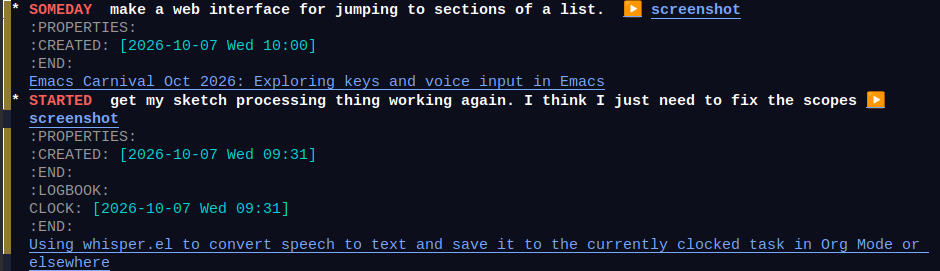
Then, when I'm looking at something else and I want to record a note, I can press <f9> to start the recording, and then C-<f9> to save it to my currently clocked task along with a link to whatever I'm looking at. (Update: Ooh, now I can save a screenshot too.)

(defvar my-whisper-targets
  '(my-whisper-save-text
    my-whisper-save-to-file)
  "*Where to save the target.

Nil means jump to the current clocked-in entry and insert it along with
a link, or prompt for a capture template if nothing is clocked in.

If this is set to a string, it should specify a key from
`org-capture-templates'. The text will be in %i, and you can use %a for the link.
For example, you could have a template entry like this:
\(\"c\" \"Contents to current clocked task\" plain (clock) \"%i%?\n%a\" :empty-lines 1)

If this is set to a function, the function will be called from the
original marker with the text as the argument. Note that the window
configuration and message will not be preserved after this function is
run, so if you want to change the window configuration or display a
message, add a timer.

If this is set to a list of functions, the functions are called in
sequence.  The first function is called with the text. The second
function is called with the result from the first function, and so on.")

(defun my-whisper-process ()
  "Process the transcription."
  (let ((text (string-trim (buffer-string))))
    (unless (string= text "")
      (erase-buffer)    ; stops further processing
      (my-whisper-process-text text))
    (setq my-whisper-skip-annotation nil))
  (remove-hook 'my-whisper-targets #'my-whisper-org-save-to-clocked-task))

(with-eval-after-load 'whisper
  (add-hook 'whisper-after-transcription-hook 'my-whisper-process 70))

(defun my-whisper-process-text (text)
  (save-window-excursion
    (with-current-buffer (if (markerp whisper--marker) (marker-buffer whisper--marker) (current-buffer))
      (when (markerp whisper--marker) (goto-char whisper--marker))
      (cond
       ((and my-whisper-targets (listp my-whisper-targets))
        (setq text (seq-reduce
                    (lambda (prev cur)
                      (funcall cur prev))
                    my-whisper-targets
                    text)))
       ((functionp my-whisper-targets)
        (setq text (funcall my-whisper-targets text)))
       (my-whisper-targets
        (setq org-capture-initial text)
        (org-capture nil my-whisper-targets)
        (org-capture-finalize)
        ;; Delay the display of the message because whisper--cleanup-transcription clears it
        (run-at-time 0.5 nil (lambda (text) (message "Captured: %s" text)) text))
       (t (setq text (my-whisper-org-save-to-clocked-task text))))))
  (when text
    (my-whisper-insert text)))

(defvar my-whisper-last-annotation nil "Last annotation so we can skip duplicates.")
(defvar my-whisper-skip-annotation nil)
(defvar my-whisper-target-markers nil "List of markers to send text to.")

(defun my-whisper-insert (text)
  (let ((markers
         (cond
          ((null my-whisper-target-markers)
           (list whisper--marker)) ; current point where whisper was started
          ((listp my-whisper-target-markers)
           my-whisper-target-markers)
          ((markerp my-whisper-target-markers)
           (list my-whisper-target-markers))))
        (orig-point (point))
        (orig-buffer (current-buffer)))
    (when text
      (mapcar (lambda (marker)
                (with-current-buffer (marker-buffer marker)
                  (save-restriction
                    (widen)

                    (when (markerp marker) (goto-char marker))
                    (when (and (derived-mode-p 'org-mode) (org-at-drawer-p))
                      (insert "\n"))
                    (whisper--insert-text
                     (concat
                      (if (looking-back "[ \t\n]\\|^")
                          ""
                        " ")
                      (string-trim text)))
                    ;; Move the marker forward here
                    (move-marker marker (point)))))
              markers)
      (when my-whisper-target-markers
        (goto-char orig-point))
      nil)))

(defun my-whisper-maybe-type (text)
  (when text
    (if (frame-focus-state)
        text
      (make-process :name "xdotool" :command
                    (list "xdotool" "type"
                          text))
      nil)))

(add-hook 'my-whisper-targets 'my-whisper-maybe-type 100)

(defun my-whisper-clear-markers ()
  (interactive)
  (setq my-whisper-target-markers nil))

(defun my-whisper-use-current-point (&optional add)
  (interactive (list current-prefix-arg))
  (if add
      (push (point-marker) my-whisper-target-markers)
    (setq my-whisper-target-markers (list (point-marker)))))

(defun my-whisper-run-at-point (&optional add)
  (interactive (list current-prefix-arg))
  (my-whisper-clear-markers)
  (whisper-run))

(keymap-global-set "<f9>" #'my-whisper-run-at-point)
(keymap-global-set "<kp-1>" #'whisper-run)

(defun my-whisper-jump-to-marker ()
  (interactive)
  (with-current-buffer (marker-buffer (car my-whisper-target-markers))
    (goto-char (car my-whisper-target-markers))))

(defun my-whisper-use-currently-clocked-task (&optional add)
  (interactive (list current-prefix-arg))
  (save-window-excursion
    (save-restriction
      (save-excursion
        (org-clock-goto)
        (org-end-of-meta-data)
        (org-end-of-subtree)
        (if add
            (push (point-marker) my-whisper-target-markers)
          (setq my-whisper-target-markers (list (point-marker))))))))

(defun my-whisper-run (&optional skip-annotation)
  (interactive (list current-prefix-arg))
  (require 'whisper)
  (add-hook 'my-whisper-targets #'my-whisper-org-save-to-clocked-task -10)
  (whisper-run)
  (when skip-annotation
    (setq my-whisper-skip-annotation t)))

(defun my-whisper-save-text (text)
  "Save TEXT beside `whisper--temp-file'."
  (when text
    (let ((link (org-store-link nil)))
      (with-temp-file (concat (file-name-sans-extension whisper--temp-file) ".txt")
        (when link
          (insert link "\n"))
        (insert text)))
    text))

(defun my-whisper-org-save-to-clocked-task (text)
  (when text
    (save-window-excursion
      (with-current-buffer (if (markerp whisper--marker) (marker-buffer whisper--marker) (current-buffer))
        (when (markerp whisper--marker) (goto-char whisper--marker))
        ;; Take a screenshot maybe
        (let* ((link (and (not my-whisper-skip-annotation)
                          (org-store-link nil)))
               (region (and (region-active-p) (buffer-substring (region-beginning) (region-end))))
               (screenshot-filename
                (when (or
                       (null link)
                       (not (string= my-whisper-last-annotation link))
                       (not (frame-focus-state))) ; not in focus, take a screenshot
                  (my-screenshot-current-screen (concat (file-name-sans-extension whisper--temp-file) ".png")))))
          (if (org-clocking-p)
              (save-window-excursion
                (save-restriction
                  (save-excursion
                    (org-clock-goto)
                    (org-end-of-subtree)
                    (unless (bolp)
                      (insert "\n"))
                    (insert "\n")
                    (if (and link (not (string= my-whisper-last-annotation link)))
                        (insert
                         (if screenshot-filename
                             (concat "(" (org-link-make-string
                                          (concat "file:" screenshot-filename)
                                          "screenshot") ") ")
                           "")
                         link
                         "\n")
                      (when screenshot-filename
                        (insert (org-link-make-string
                                 (concat "file:" screenshot-filename)
                                 "screenshot")
                                "\n")))
                    (when region
                      (insert "#+begin_example\n" region "\n#+end_example\n"))
                    (insert text "\n")
                    (setq my-whisper-last-annotation link)))
                (run-at-time 0.5 nil (lambda (text) (message "Added clock note: %s" text)) text))
            ;; No clocked task, prompt for a place to capture it
            (kill-new text)
            (setq org-capture-initial text)
            (call-interactively 'org-capture)
            ;; Delay the window configuration
            (let ((config (current-window-configuration)))
              (run-at-time 0.5 nil
                           (lambda (text config)
                             (set-window-configuration config)
                             (message "Copied: %s" text))
                           text config))))))))

(with-eval-after-load 'org
  (add-hook 'org-clock-in-hook #'my-whisper-org-clear-saved-annotation))

(defun my-whisper-org-clear-saved-annotation ()
  (setq my-whisper-org-last-annotation nil))

Here's an idea for a my-whisper-targets function that saves the recognized text with a timestamp.

(defvar my-whisper-notes "~/sync/stream/narration.org")
(defun my-whisper-save-to-file (text)
  (when text
    (let ((link (org-store-link nil)))
      (with-current-buffer (find-file-noselect my-whisper-notes)
        (goto-char (point-max))
        (insert "\n\n" (format-time-string "%H:%M ") text "\n" link "\n")
        (save-buffer)
        (run-at-time 0.5 nil (lambda (text) (message "Saved to file: %s" text)) text)))
    text))
; (setq my-whisper-targets #'my-whisper-save-to-file)
; (setq my-whisper-targets '(my-whisper-save-to-file my-whisper-org-save-to-clocked-task))

And now I can redo things if needed:

(defun my-whisper-redo ()
  (interactive)
  (setq whisper--marker (point-marker))
  (whisper--transcribe-audio))

I think I've just figured out my Pipewire setup so that I can record audio in OBS while also being able to do speech to text, without the audio stuttering. qpwgraph was super helpful for visualizing the Pipewire connections and fixing them.

systemctl --user restart pipewire
sleep 2
pactl load-module module-null-sink \
  sink_name="VirtualMicSink" sink_properties=device.description=VirtualMicSink
pactl load-module module-null-sink \
  sink_name="CombinedSink" sink_properties=device.description=CombinedSink
if pactl list short sources | grep -i pci-0000; then
  pactl load-module module-loopback \
    source="alsa_input.pci-0000_00_1f.3.analog-stereo" \
    sink="VirtualMicSink" \
    latency_msec=100 \
    adjust_time=1 \
    source_output_properties="node.description='SysToVMic' node.name='SysToVMic' media.name='SysVToMic'" \
    sink_input_properties="node.description='SysToVMic' node.name='SysToVMic' media.role='filter'"
    sink_input_properties=media.role=filter
  pactl load-module module-loopback \    source="alsa_output.pci-0000_00_1f.3.analog-stereo.monitor" \
    sink="CombinedSink" \
    node_name="SystemOutToCombined" \
    source_output_properties="node.description='SysOutToCombined' node.name='SysOutToCombined'" \
    sink_input_properties="node.description='SysOutToCombined' node.name='SysOutToCombined' media.role='filter'" \
    latency_msec=100 adjust_time=1
fi
if pactl list short sources | grep -i yeti; then
  pactl load-module module-loopback \
    source="alsa_input.usb-Blue_Microphones_Yeti_Stereo_Microphone_REV8-00.analog-stereo" \
    sink="VirtualMicSink" \
    latency_msec=100 \
    adjust_time=1 \
    source_output_properties="node.description='YetiToVMic' node.name='YetiToVMic' media.name='YetiToVMic'" \
    sink_input_properties="node.description='YetiToVMic' node.name='YetiToVMic' media.role='filter'"
  pactl load-module module-loopback \    source="alsa_output.usb-Blue_Microphones_Yeti_Stereo_Microphone_REV8-00.analog-stereo.monitor" \
    sink="CombinedSink" \
    source_output_properties="node.description='YetiOutToCombined' node.name='YetiOutToCombined' media.name='YetiOutToCombined' " \
    sink_input_properties="node.description='YetiOutToCombined' node.name='YetiOutToCombined' media.role='filter'" \
    latency_msec=100 adjust_time=1
fi
pactl load-module module-loopback \
  source="VirtualMicSink.monitor" \
  sink="CombinedSink" \
  source_output_properties="node.description='VMicToCombined' node.name='VMicToCombined' media.name='VMicToCombined'" \
  sink_input_properties="node.description='VMicToCombined' node.name='VMicToCombined' media.role='filter'" \
  latency_msec=100 adjust_time=1

pactl load-module module-null-sink \
  sink_name="ExtraSink1" sink_properties=device.description=ExtraSink1

pactl load-module module-loopback \
  source="ExtraSink1.monitor" \
  sink="CombinedSink" \
  source_output_properties="node.description='ExtraSink1ToCombined' node.name='ExtraSink1ToCombined' media.name='ExtraSink1ToCombined'" \
  sink_input_properties="node.description='ExtraSink1ToCombined' node.name='ExtraSink1ToCombined' media.role='filter'" \
  latency_msec=100 adjust_time=1

Here's a demo:

Screencast of using whisper.el to do speech-to-text into the current buffer, clocked-in task, or other function

Transcript

00:00:00 Inserting into the current buffer
Here's a quick demonstration of using whisper.el to log notes.
00:00:13 Inserting text and moving on
I can insert text into the current buffer one after the other.
00:00:31 Clocking in
If I clock into a task, I can add to the end of that clocked in task using my custom code by pressing C-<f9> or whatever my shortcut was. I can do that multiple times.
00:01:05 Logging a note from a different file
I can do that while looking at a different file.
00:01:15 I can look at an info page
I can do it looking at an info page, for example, and annotations will include a link back to whatever I was looking at.
00:01:33 Adding without an annotation (C-u)
I just added an optional argument so that I can also capture a note without saving an annotation. That way, if I'm going to say a lot of things about the same buffer, I don't have to have a lot of links that I need to edit out.
00:02:42 Saving to a different function
I can also have it save to a different function.

This is part of my Emacs configuration.
View org source for this post