
: Fixed ICS link
I chatted with Raymond Zeitler about Emacs, life, automation, Org Mode, Diary, and Calendar. There were a couple of cuts to get rid of accidentally shown passwords, but it was a great glimpse into someone's system for managing things.
View in the Internet Archive, watch or comment on YouTube, read the transcript online, download the transcript, download the audio, or email me.
Related links:
- https://www.emacswiki.org/emacs/RaymondZeitler (config is out of date)
- https://www.linkedin.com/in/raymondzeitler/ : Electrical Engineer | Electronic RF Components | Scripting & Automation | US Defense and Aerospace~ Modernizing your company’s legacy design tools
- Acting Historian, IEEE Connecticut Section
- https://codeberg.org/ZeitRa
- The rest of his Internet presence is either private (Facebook) or anonymous (two blogs, Github and Gitlab, Mastodon, Bluesky).
- Writing Calendar Files (GNU Emacs Manual) - cal-tex-cursor-week-iso
- elisp/next-spec-day.el at master · chenfengyuan/elisp · GitHub
You can add the iCal for upcoming Emacs Chat episodes to your calendar. https://sachachua.com/topic/emacs-chat/upcoming-emacs-chats.ics
Find more Emacs Chats or join the fun: https://sachachua.com/emacs-chat
Chapters:
- 0:00 Opening
- 0:58 Introduction
- 1:59 I love automating workflows
- 3:15 Org Mode switch
- 4:08 diary-float
- 6:48 Tip: Add links to task titles
- 6:59 diary-float
- 7:59 The difference between active timestamps and SCHEDULED
- 10:06 Including other diary files
- 11:26 cal-tex-cursor-week-iso, printing planner pages on index cards
- 14:59 Holidays
- 16:45 Making calendars for other people
- 17:27 Keeping track of when things were done on the house
- 18:49 My first customizations: backspace, buffers
- 20:32 Windows and super key
- 23:23 Org Mode class on Udemy, agenda custom commands
- 25:00 toggling tags
- 26:57 TODO states
- 27:21 Functions for Org Agenda
- 28:34 exeln, shellfn: executing things in DOS
- 30:22 Middle mouse click
- 31:59 Keybindings in other apps: Vivaldi
- 34:09 M-s M-w, eww-search-words
- 35:50 Saving links with org-store-link
- 38:29 How I got into Emacs
- 41:45 Maybe my own theme?
- 42:26 Other editors? Always Emacs
- 43:57 Package names
- 45:54 What's next? Maybe auto maintenance
- 48:31 Vibe-coding?
- 50:53 Where people can find me
- 52:02 Org Mode source blocks
- 52:49 Slideshows?
- 53:50 Emacs Chats?
- 56:33 Other resources that would be nice to have
Transcript
Transcript
0:00 Opening
Sacha: I'll go live if that's okay with you. Yeah, good to go? Raymond: Okay. Sacha: All right, going live. Raymond: Let me just stop sharing right now. Sacha: Hi everyone, this is Emacs Chat. Emacs Chat 23. Today I'm here with Raymond Zeitler who has been using Emacs for a long time. Your EmacsWiki page says since 2000. And I know for sure that you've been commenting on my blog since about 2008, probably even earlier, I don't know. Everything gets lost in the mists of time. I would love to chat with you about the things that you've learned over the years, what you're still fiddling with, and the things in your configuration or workflow that aren't obvious to people who are reading configurations. It's just Emacs Lisp, but it doesn't show people what you do with Emacs that makes you stick with it over all this time. 0:57 Introduction
Sacha: So yes, but of course, we should do a bit of context setting. You have a lot of different hats. You're a historian, you're an electrical engineer. How would you describe yourself? Raymond: Well, right now, I would say I'm an electrical engineer, but I spend most of my time, instead of designing stuff, I work on the workflow for the design. And I'm writing scripts, you know, to automate various parts of the design. Now, I just want to pause here because I hear like a 10-second delay. Sacha: Yes. Oh, you have the video open in another tab. Yeah, so the 10-second delay is there in case we need to panic, you know, in case you accidentally flash something you'd rather keep private. But it can be quite disconcerting to hear yourself talking at the same time that you're trying to say something. Raymond: Okay, I think I fixed that. Okay. 1:57 I love automating workflows
Raymond: Yes, so I'm an electrical engineer, but I also love to do scripting. Automating any kind of workflow is my favorite thing to do, and I would just love to go around and help people to find ways to automate the workflow. Basically, I was doing that ETL, you know, extract, transform, and load many years ago, I mean, dozens of years ago, and showing people how to do that too for them, and you know, when they look at me and they say, oh my god, thank you so much, I'm so glad... You know, it used to take me hours to do this. Automating a design flow is a good idea once you have all your script in place, that serves as your documentation. If there is a problem with the design, you can go back to the script and update it. So the next time, you're not going to have that problem, hopefully. Sacha: You've been learning Python recently, too, right? I can imagine that helps a lot with automation. Are you taking advantage of things like Org Mode as well for the things that you can partially automate? Raymond: Absolutely. Sacha: Tell us about that. Raymond: Oh, I figured that we should save for the last, because it could take the whole thing. 3:20 Org Mode switch
Raymond: But yes, I started using Org Mode after you jumped ship from Planner Mode. I know that you and John Wiegley were big on that, and I used to use Planner. And I delayed switching to Org Mode, but eventually I latched onto it really well. So one thing I used Org Mode for at home was for bill pay, you know, because you can schedule things recurring. So you got your mortgage, you can recur, you know, and the recurrence is well thought out. You know, you could have it scheduled exactly 30 days away or one month. 4:05 diary-float
Raymond: What I found recently, though, is you can use the diary: diary-float and diary-warning. Those functions can be used in Org Mode in place of the schedule. So that's really cool. I have a lot of meetings that occur, let's say, the second Wednesday of the month and stuff. There's really no way to easily do that out of the box with Org Mode. So that's fun to do. Let's see. I'm going to share my Org now, if you want. Sacha: Sure, go ahead. If that's okay with you. Raymond: Sure. Well, I deleted some of the stuff. You know, not all the files are there. Sacha: Thank you. It's always interesting to see, because a lot of times, when we're trying to demonstrate Org to people, we're like, okay, here's a small example. But when you see it in the context of someone's actual life, with the tons of reminders they have... Your agenda is very full, for example. I'm not the only one with things that are scheduled for over 100 days. Raymond: And actually, your talk isn't on here, so that's kind of strange. So, for example, I was talking about bills, right? I don't know if you can see that. Sacha: Yeah, I can see that. Raymond: It's not the same. Sacha: Yeah, I see. And you're using the logbook. You can keep notes in a task. You can put all the things there. Raymond: Yeah. So, you know, something like a mortgage or your utility, that's pretty standard. That's just +1m, you know, for the recurrence. Let's see. Yeah. Sacha: Yeah. So basically, you have the regular or repeat things, plus one month or plus one week for the things that can be expressed that way. But you also use diary-float for the things that are second Wednesday of the month. Raymond: Yes. So let me try a different Org file for that. Oh, everyone, I have to do this too. Sacha: Oh yeah, you can set a global font default scale thingy. I don't remember exactly how to do that, but... [cut due to passwords] I'll move your screen off the thing first while you talk, and then I'll move it back when you're ready. So we had a bit of a "Oh no, he's showing me like meeting passwords online." So if you saw that, which probably you didn't because 10 second delay, just ignore it. And then we'll go back and scrub things later. Let me know when it's safe to look again. Raymond: Okay, here we go. So here's a meeting. Sacha: Okay, okay. We got this. We got this. 6:48 Tip: Add links to task titles
Sacha: I also want to point out, I love how you're using links in the task title. You know, that did not occur to me to have the links right there so it's easy to get to from just the overview. 6:59 diary-float
Raymond: [cut due to passwords] ...which works really in a diary file. Sacha: All right. Let me move it back so people can see. Raymond: It works. This is great because it works in Org Mode too. If anyone doesn't know it, this is the month. And true just means that this meeting occurs every month. And I believe this means Monday. Sacha: No, Tuesday. Although... Your comment says Tuesday, yeah. Raymond: Yeah, Tuesday. So that's the second day of the week, with Sunday being zero. And then this is the week number, the second week. Second Tuesday of every month. And then you could just put the time there as well. Sacha: Yeah, yeah. I have actually personally never used this syntax, but I see people use it for things like Emacs meetups and they're like, okay, yeah, we meet every second Wednesday or whatever, but here's the thing that you can just put into your Org agenda and it'll work. 7:59 The difference between active timestamps and SCHEDULED
Raymond: But the problem with this, though, is that it doesn't obey the, you know, if you mark it done, it'll be marked done. So it won't show up again. So I'm actually starting to put these in my actual diary because you know, I don't really need to mark the meeting done. Sacha: You know, you can take out, just remove the scheduled keyword. You can have the active timestamp and it will show up on your calendar, but it doesn't have to be marked as done. And it'll just keep showing up whenever you need to. So this is the distinction between scheduled, which is actually not like a scheduled appointment, it's like a task that you're scheduling for a specific day, versus just using an active timestamp, which is the stuff within the angle brackets. It can be anywhere in your entry. It doesn't have to be the second line after your heading. Then it will show up in your agenda, but it's not going to keep showing up like the next day. It's not going to say it's overdue. It's just going to be for that day. Raymond: Okay. Yeah. There was somebody who tried to solve the problem, though. And they came up with next-spec-day, a function, but it's not possible to compile that with the modern Emacs. So I'm just happy with the way I have it now, though. Yeah. But when I first started using Emacs, the diary and the calendar were one of the first non-text editing uses that I had for it. And I'm really getting back into diary. I hope I don't show anything else. Sacha: Tell you what, I'm going to move your window away. Okay. And then you can do your thing and then I can move it back when you're comfy. Raymond: Okay. Sacha: Yeah, I know how to do this now. This is good. I have two monitors so I can control. Raymond: Where's my screen? Oh boy. So what I'm showing here Sacha: I put it back so people can see. 10:06 Including other diary files
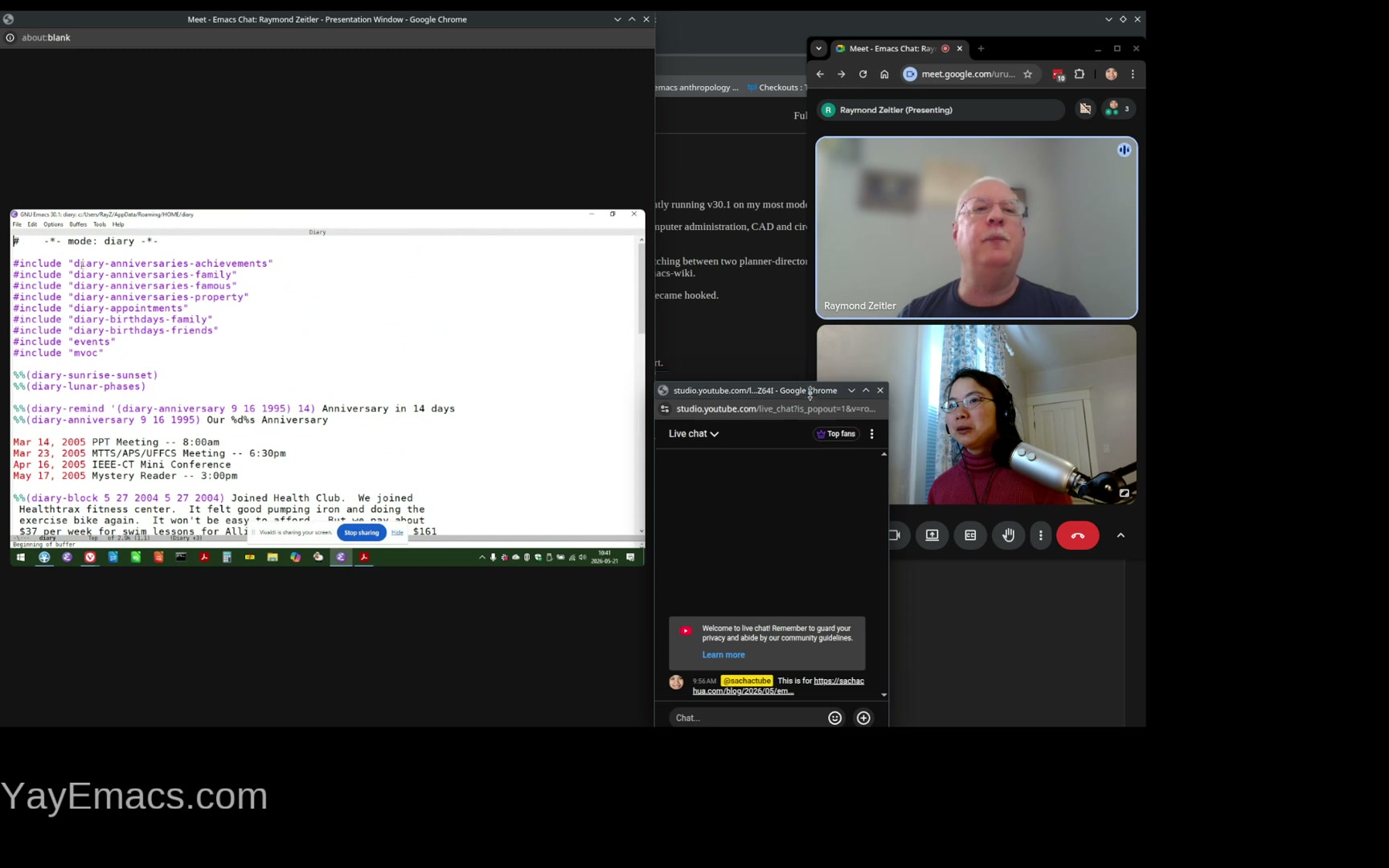 Raymond: My main diary is just diary. What I'm doing is I'm using includes, because I like to break it up into various files that I can comment them out if I don't want something so busy. The reason I'm doing that is because I was tooling around in calendar in the calendar functions and there's actually cal-tex-cursor functions that so when you go into calendar, for example... That's also small, right? Sacha: It's okay. Everyone has seen calendar. Well, most people have seen calendar at this point, so we know what the calendar is. Okay. What are we showing? What are we seeing? Raymond: So if I wanted to, let's say for next week, what I could do is create a, let's see, cursor... I forgot the command. Sacha: I'm surprised you don't have completion set up. Raymond: Yes.
 11:26 cal-tex-cursor-week-iso, printing planner pages on index cards
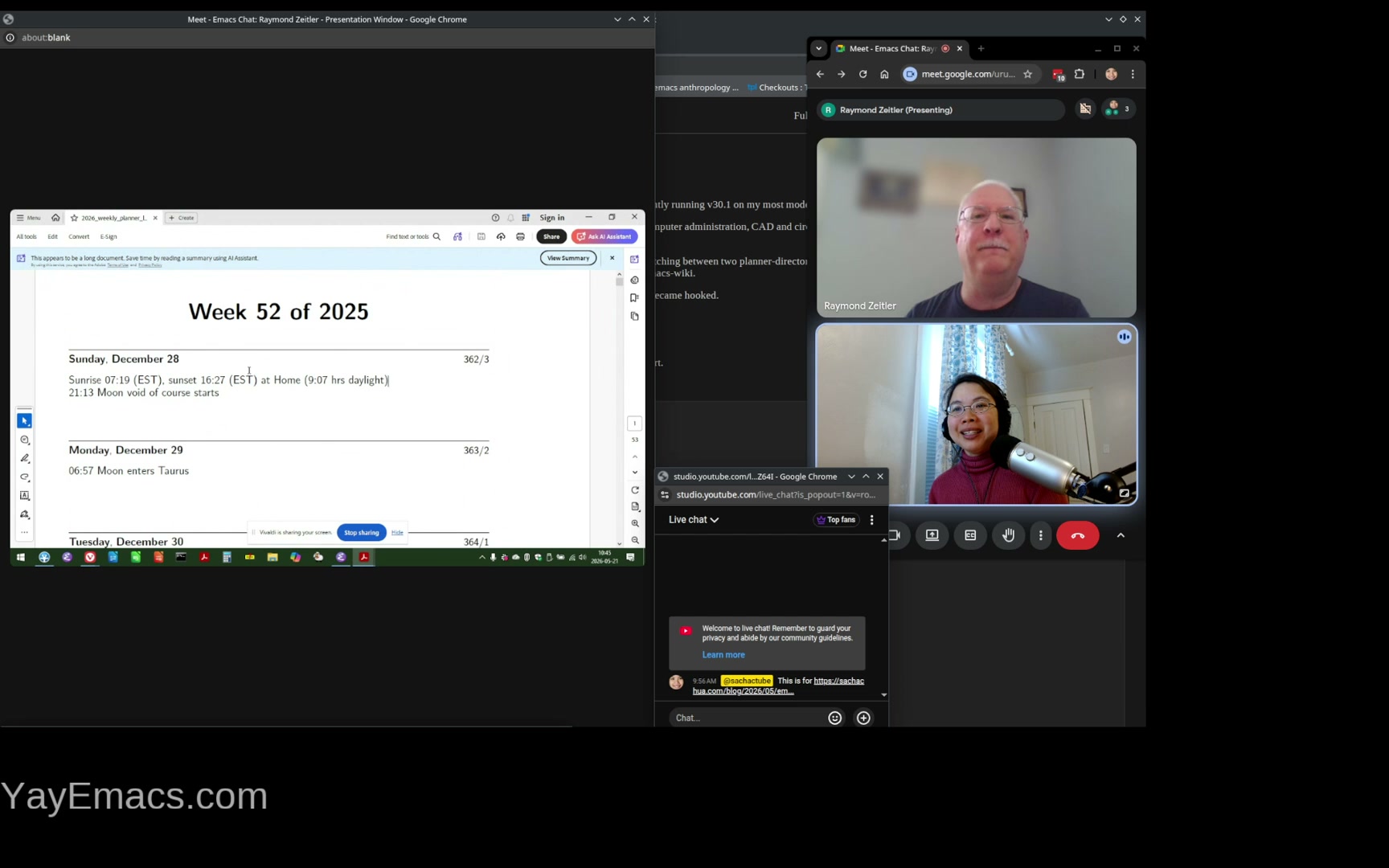 Raymond: Okay, so this is what I like to do. So this function, cal-tex-cursor-week-iso Sacha: It's okay. It's the curse of the live demo. Raymond: All right, I'll create mine. Sacha: Change cursor shape, huh... Raymond: All right, so for some reason that's not working. But what you end up doing is you can create a weekly planner, kind of like a page in a date book, and it will show everything from your diary if you want... Sacha: In a nice printed format or like a nice visual format. Raymond: Yeah, I have to... How do I get that? I don't know why it's not working here. So... Sacha: Certainly the layouts of things, the layouts of date planners is something that I sometimes envy about my paper planner days. Like you could see things. I also wanted to point out something that I hadn't considered. You were using diary for diary entries, it looks like also not just appointments and reminders, but also this is what happened that day. Ooh, that is pretty. Do you actually print these out or like read them on an e-reader or just look at them? Raymond: I did. Yeah, I found out that my printer can print double-sided on index cards. Sacha: Oh yeah, double-sided. Raymond: So I actually created my own little book here. So what's nice about this is, you know, when you go into a store to look for some planner, many of them, like half of them, don't even have the lunar phases. And let's see if this has a lunar phase. Sacha: So printing planner pages on index cards. Very cool. Raymond: So you've got your full moon there. And because I was very active in photography, nature photography in particular, and doing landscapes and stuff. So it's really helpful to know when the full moon is, more so sunrise and sunset, which I have here. Because you get, especially in the winter, you get great shots at around sunset. Yeah, so that was something that I was really interested in. Sacha: Oh, it's so cool. It's something I'd never considered using Emacs to generate your custom, you know, calendar planner thing that you then take offline because you're out there in the field. You're taking pictures. You don't want to open your laptop or look at your phone or whatever. It's just your index card. Nice. Raymond: And there's some astrology in there. Sacha: [cut due to password] We're back to streaming. Yeah, birthdays. Gotcha. Raymond: Birthdays. And then, so I'll just... I wonder if I could do this safely. Sacha: Give me a heads up, I'll move the screen off and then I can move it back when you give me the heads up again. Raymond: I'm pretty sure my .emacs is pretty... If anyone wants to see this and download it, it's on emacswiki.org. Just look for the page RaymondZeitler. Sacha: Yeah, it's in the related links now for the blog post. Gotcha.
 14:59 Holidays
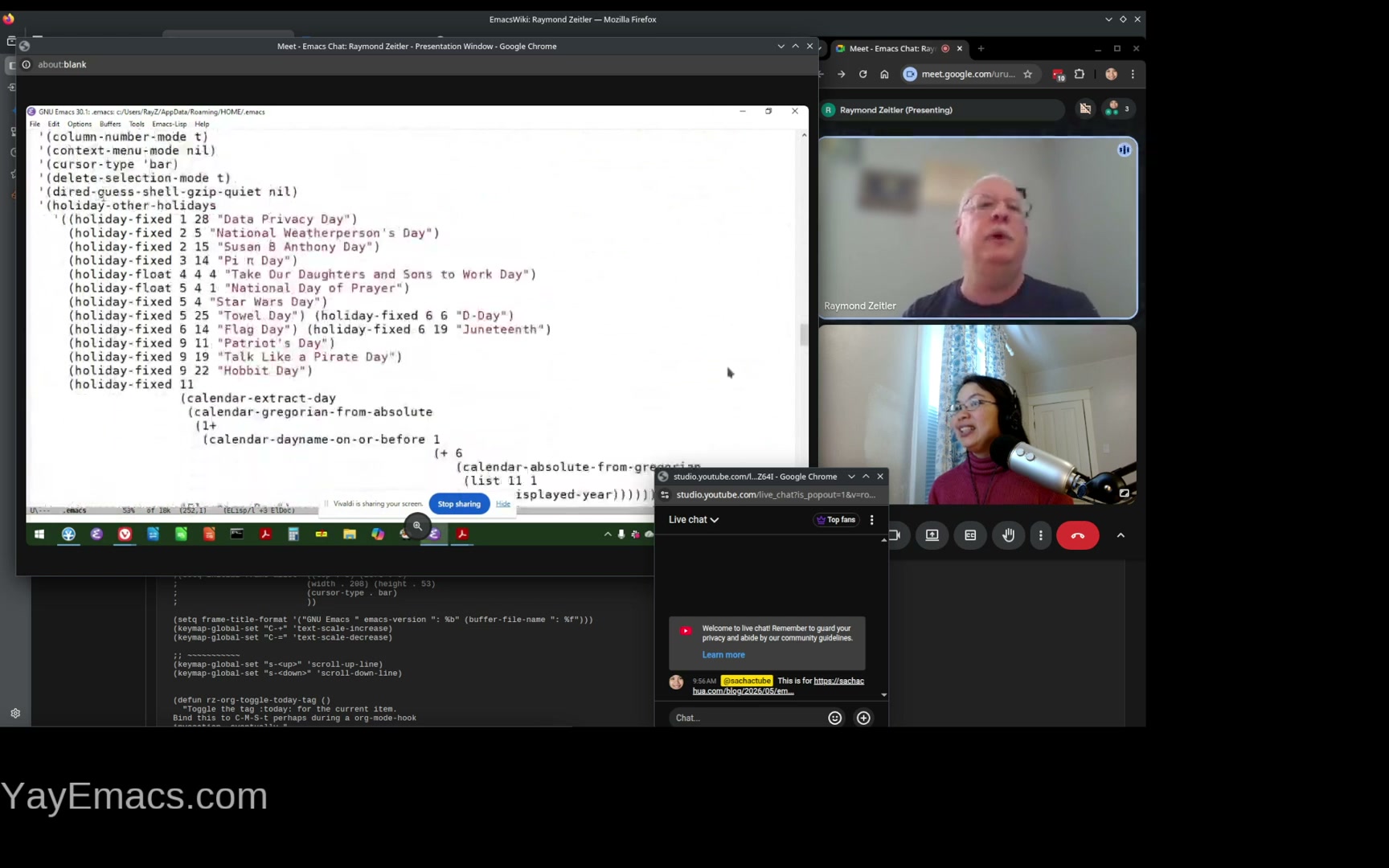 Raymond: So what I was looking for here is my list of holidays. So what you could do with... This is basically a calendar thing, but you can set up all your holidays. For example, Towel Day is coming up. It will be Monday for you Hitchhiker's Guide geeks. You've got your Star Wars Day, you've got Pi Day, which you won't find on a regular calendar, of course. And that's an atrocious thing here. Sacha: I was just admiring that. It's a very complicated expression, but you can do it. Raymond: You can, right. So that's what I came up for Election Day. And if anyone's a Seinfeld fan, you've got your Festivus. So that's a neat thing. Yeah, and don't worry about the longitude-latitude. Everyone knows where I am. Sacha: [another password hiccup] ... dealing with the panic, it's good. It's good practice. And also everyone is very nice, so afterwards, I'll just probably make this unlisted and then see if there's anything that actually needs scrubbing. But probably it's all good. Yes, so you've got calendar, you've got holidays, you print them out. Are there other ways that you use Emacs, kind of in this online-offline way? Are there any other things that you like to print out, or do you do the rest of the things in your computer? Raymond: It's all on computer, yeah. So the only thing that's printed out is the planner datebook. By planner, I mean this thing. Okay. So...
 16:45 Making calendars for other people
Raymond: Oh, yeah. Anyway, getting back to why I break up my diary into multiple files is eventually I may want to create these things for other people, right? Print out a date book for my wife, for example. So she's going to want to know when Towel Day is, right? Well, that's a different thing, but she's not going to want a lot of other things. Sacha: Yeah, it's very customizable. You can just say, okay, include these, you know, modules in the calendar. Yeah. Yeah. Yeah. Cool. Raymond: So, and then getting back to the diary again, yes. Sacha: I can move this. We're safe. Yeah. We're safe. Raymond: Okay. 17:27 Keeping track of when things were done on the house
Raymond: So one thing I like to do is keep track of when things were done on the house. Sacha: You've got a license plate? Raymond: No, there's really nothing bad here. For example, if you want to know when you have to register your car, you can put that in there and it'll show up on your little planner. So I thought that was pretty neat. Sacha: And I like that you can say a number of years ago, so it automatically keeps track of that. You can wish somebody a specific number of years, happy birthday, instead of just a generic happy birthday. You don't have to do math. Nice, nice. Diary, I think it's underutilized. Raymond: It is, yeah. And what I like about Emacs is that the people who are, you know, creating functions and adding to it use it and have really good design ideas. So, oh, this is, let's go back to something else here. Okay, so back to my .Emacs. Let's see. Let me just... In the interim, before we come up with something else to talk about, I'll just talk about some of the modifications. 18:49 My first customizations: backspace, buffers
Raymond: And by the way, when I first started using Emacs, I decided not to do anything. I'm a Windows user, so naturally you might want to use CUA mode, but I never did that. And the first customization I did was... For some reason the backspace key was doing the delete function. I think that was Emacs 19. So that was the one thing I changed. And then the other thing I changed is very soon I had multiple buffers. Like if you're using Emacs for any amount of time, even like 10 minutes, you'll have multiple buffers. And I was using a tabbed web browser at the time, so it's easy. To switch tabs by just pressing the Ctrl-Tab key or Shift-Ctrl-Tab key to switch between tabs. And I figured, let me do that with the buffers. And so that's somewhere in here. Sacha: Oh yeah, there's a control tab, control shift tab, next buffer, and previous buffer. Raymond: Yeah, so that was one of the first things besides the delete key modification that I did. But I'm also now, since I have multiple windows open as well, I'm using the windows... Next and Windows Prior. Next is, I think, the page down key, I believe. And Prior is the page up key. 20:33 Windows and super key
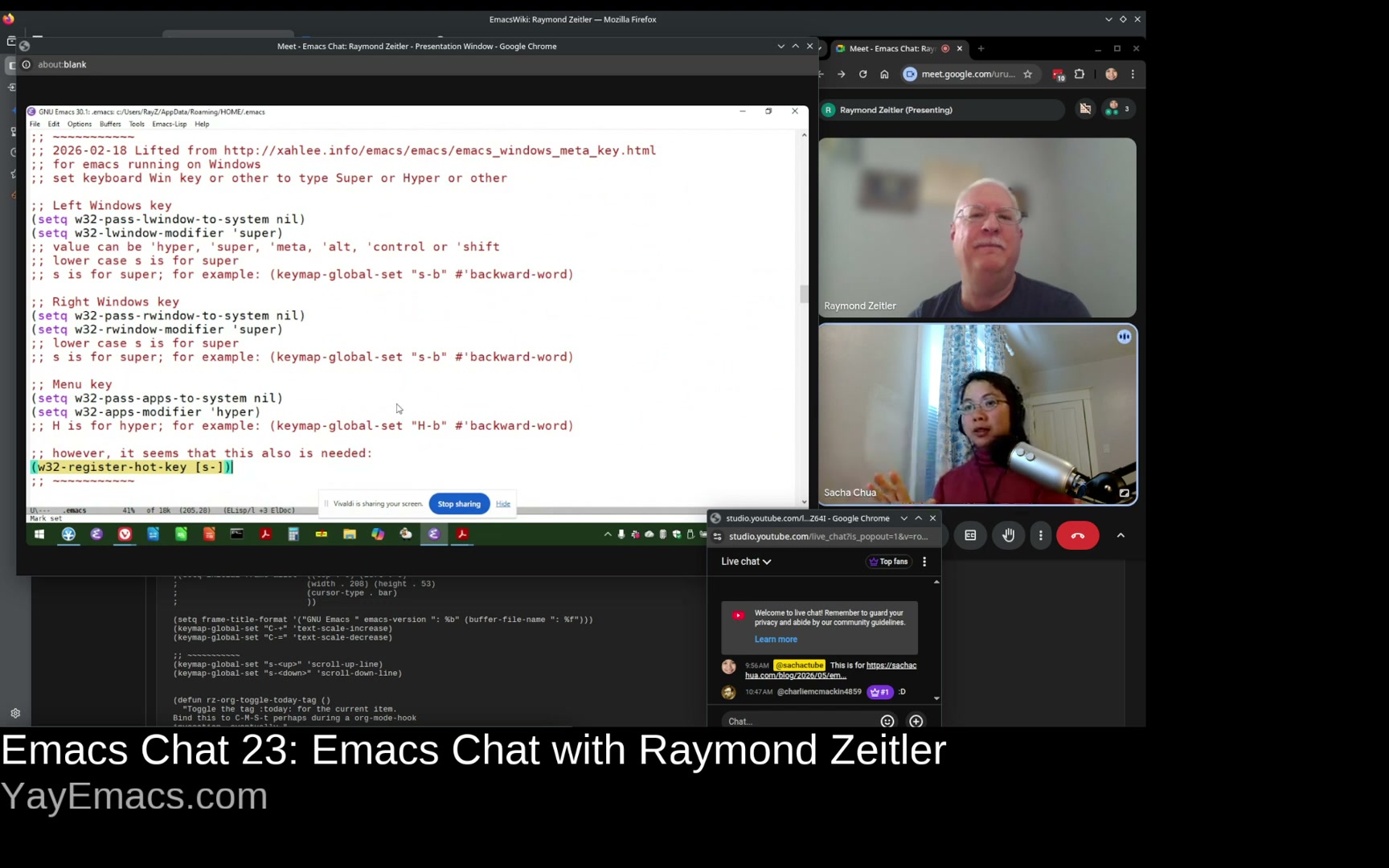 Raymond: And how you can get to use the Windows key is, I got that from Xah Lee's website. And where is that now? Sacha: Yeah, you make it the super key. I use Xmodmap but other people can use different things depending on their setup. Although lately I've been experimenting with using Kanata so that my modifiers are one-shot modifiers. I can tap the super key and then I can let go of it and then I can press whatever key is next so I don't have to hold them at the same time. Oh hey look at that it's actually an option! I didn't even know that it was. You can change it right from Emacs. Nice. Raymond: Yeah, so this is what I set up. I lifted this from the website. There's the URL. And if you're curious, you can go to that Emacs wiki website and see this. The only thing that I wasn't able to get this to work until I added this statement, which I found in Stack Overflow or something like that. Sacha: That is interesting. Yeah. All right. So does it mean that Emacs is entirely responsible for the Windows key? You don't do anything else with it outside Emacs? Raymond: Right. So yes, it intercepts the Windows key before Windows does somehow magically, which can be kind of frustrating because sometimes I do want to open the start menu from within Emacs and I'm pressing it and saying, why isn't this working? Sacha: This is where you just get used to having your own launchers within Emacs. Raymond: Yeah, yeah. Well, you know that you're a good Emacs user if you start using the Emacs key bindings in other programs. You know, how many times I've used C-y to paste something in, you know, my web browser. Oh, boy. Sacha: Yeah, it's not the C-y that gets me. It's the C-w because that closes your browser down. Raymond: Yeah, oh yes, that can be dangerous. But actually C-y can be bad too, because it's like the redo function in a lot of programs. So if you've undone something, and then you redo it, you can get very confused very quickly. Anyway, so this is a neat thing to do. Some people might want to try that. Sacha: Yeah, for sure. Having a super key means you can then go on and do other things with it. You can have all these key bindings because nothing binds to the super key. So you can have all the single character key bindings you like. Raymond: Exactly, yeah.
 23:23 Org Mode class on Udemy, agenda custom commands
Raymond: So I was taking, believe it or not, there's an Org Mode class on Udemy. And it's... Rainer König did it. I don't know if I pronounced his name right. But he inspired me to do custom commands. So for example, if I want to look at all my bills for the week, I would just press the b w. Sacha: Do you want me to move the window? Raymond: I don't know. Is there anything dangerous here? I'm not going to do it, but I'm just trying to point out my thing. Sacha: Yeah, yeah, yeah. Different agendas for slicing and dicing your Org data in different ways. Raymond: Yeah, yeah. Remember you pointed out earlier that my agenda was jam-packed with stuff. The way I manage that is I came up with a way to easily apply the today tag to all those things. And I came up with some functions somewhere which I bind to C-M-S-t. Let's see if I can find it. Sacha: That is interesting. So you're using a tag for the things you want to do today. Raymond: Yes. Sacha: Versus scheduling them, because if you schedule them for today, then they will still show up tomorrow. Raymond: Well, yes, that's true. 24:53 Toggling tags
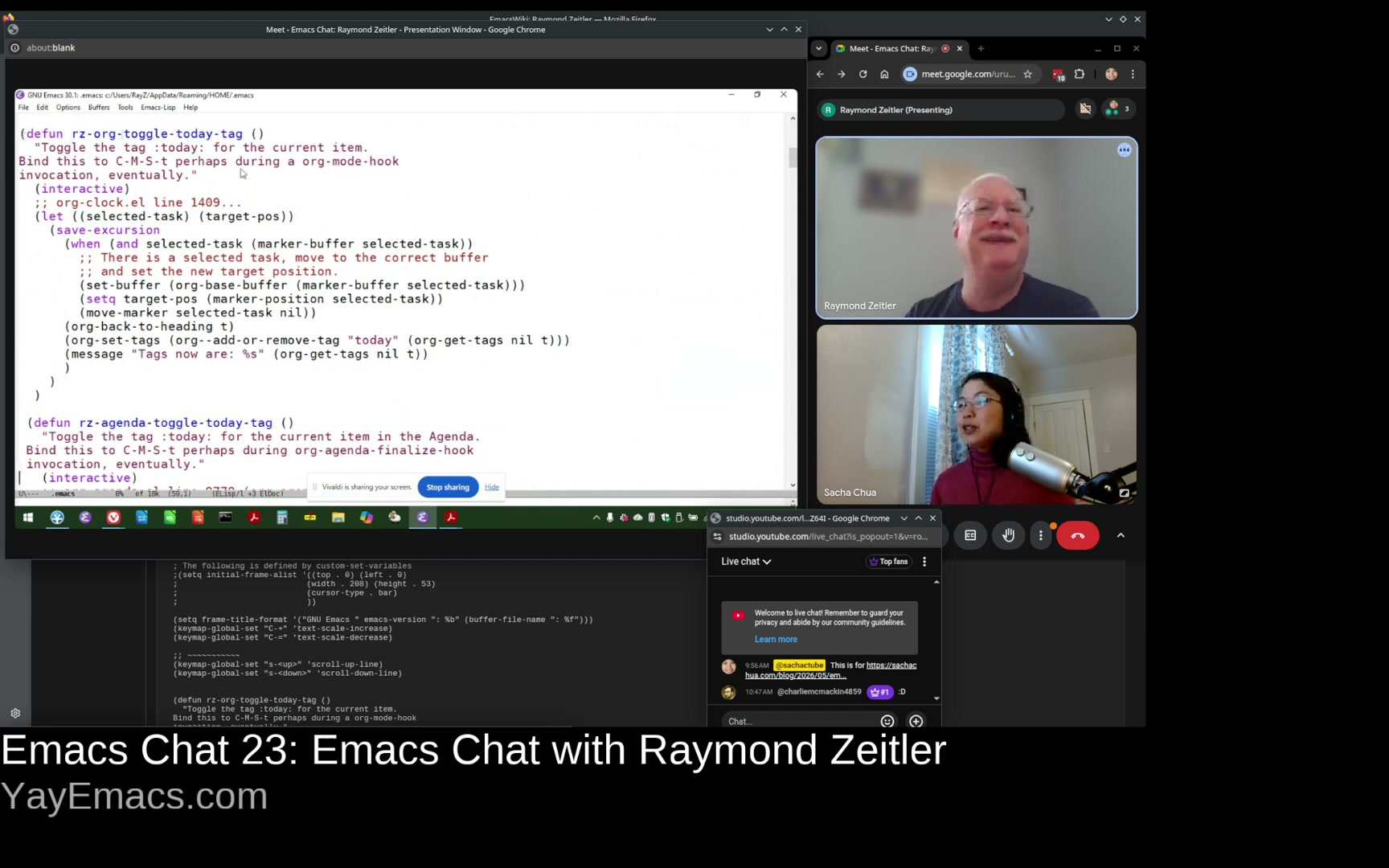 Raymond: So yes, so these are the two functions I came up with. Oh, you're toggling. What's that? Sacha: You toggle that. You have something that lets you add or remove a tag. Raymond: Yes, yes. Yes, exactly. And maybe I could demonstrate that without displaying too much stuff here. Okay, so here, so in the agenda, I'm a little bit worried about updating. See, okay, so I don't know if you can see it, but I just invoked it and then down here in a little. Sacha: Oh, yeah. Raymond: It says you have to press s r to save and refresh the screen. And the reason why I didn't automatically refresh and save files is because I think that's a dangerous thing. Sacha: Yeah, because you've been removing things. Okay, okay. But the idea there is you can turn the tag on and off from your agenda directly, which is interesting. Yeah, it's there. And you have a different view that shows you just the stuff you're focusing on for today. Raymond: And I have that bound to "C-c a .". This is going to be small. So there on the top are my things for today. Sacha: Yeah, so different ways of prioritizing. So your agenda is the stuff that you want to keep on your radar. And the today stuff is the stuff like, okay, you got some time. This is what you're actually going to work on. Raymond: Right, so. Sacha: Yeah, there are different ways to approach it. Some people have a much more minimalist, okay, if it's on the agenda, it's because I want to do it that day. And then they have a different view showing them the stuff that they want to keep on their radar. But the nice thing about Org Mode is that it accommodates all these different ways of working. Raymond: Yeah.
 26:56 TODO states
Raymond: And getting back to the Rainer's class on Org Mode, you know, it's not like the way Carsten Dominik set it up with the default tags of to-dos. What is it? To do, started, waiting. He does something a little bit different, but it works for him. So I think that's kind of cool too. 27:21 Functions for Org Agenda
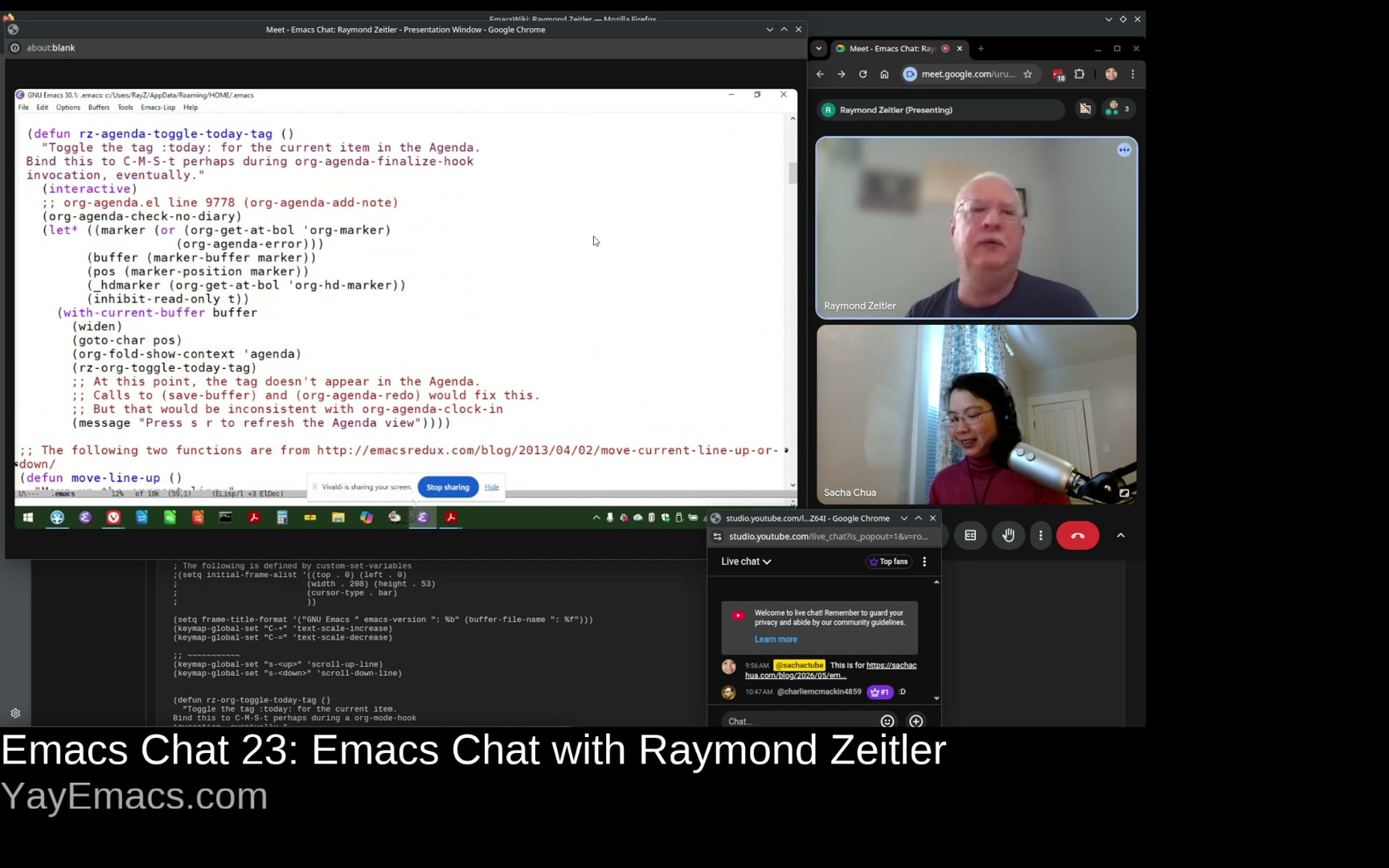 Raymond: And by the way, you need two functions. You need one that works in an Org file and another one in the agenda because they don't work the same way. Sacha: I have some functions that act that way, and I usually end up checking if the major mode is derived from the Org agenda. And then there's an with Org agenda. There's a macro that lets you run the code in the context of the task. So if you needed to kind of switch those together, it's possible. But you already have something that works, so it's fine. Raymond: Yeah, and it's easy because, you know, I copied this from some existing function like, you know, when you press Z, for example, it creates a note. So you can leverage that code and write your own code instead. Sacha: It's called org-agenda-with-point-at-orig-entry. It does the thing. You know, this part that you're doing at the moment with manually finding the marker and jumping to it and all that stuff. In the future, if you find yourself writing one of these agenda functions. Raymond: Yeah.
 28:34 exeln, shellfn: executing things in DOS
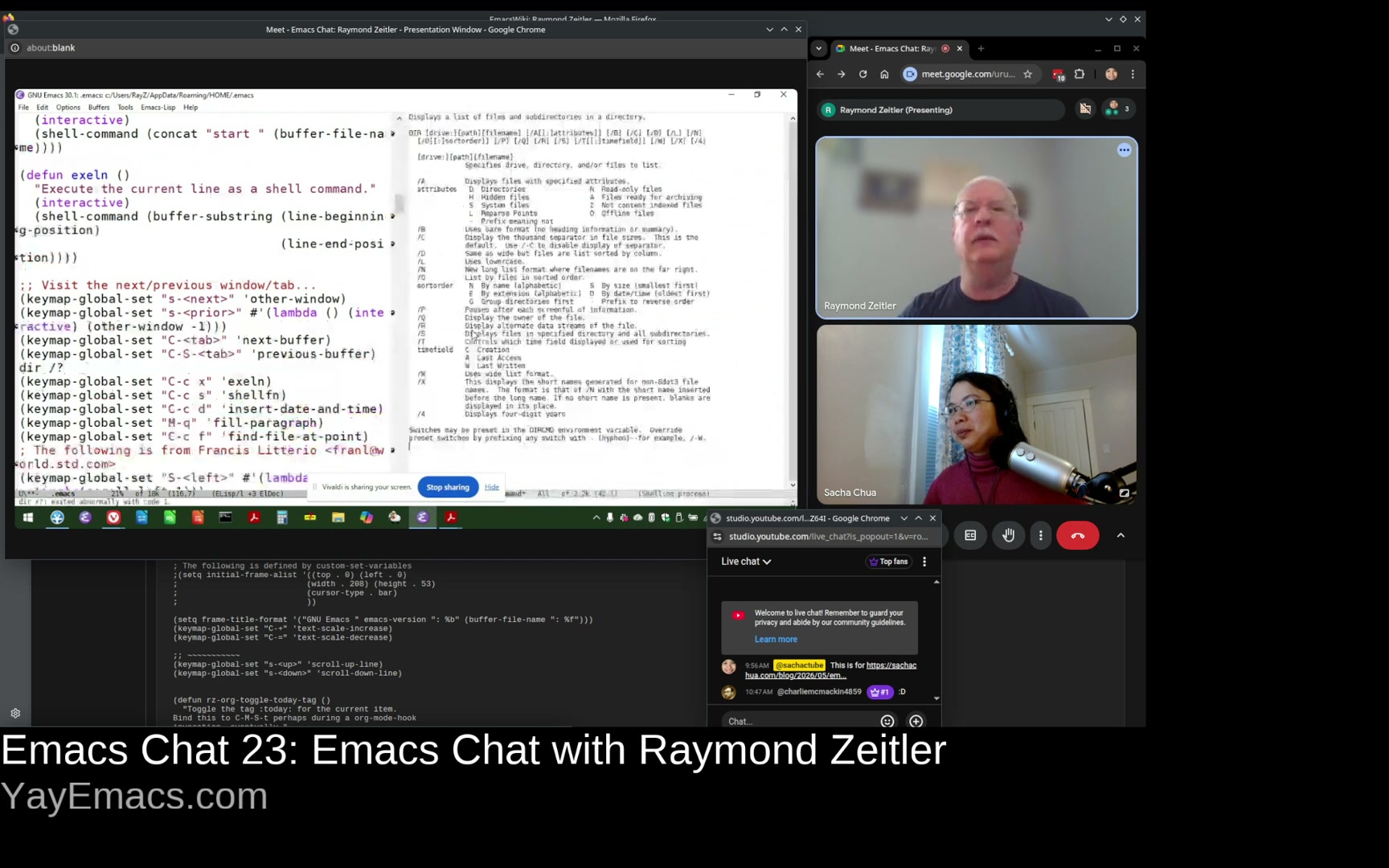 Raymond: So what else do I have here? Oh, so sometimes I just like to execute. So I do a lot of batch files or scripts, and I'll just do C-c x to send that particular line to the DOS prompt just to execute it. Sacha: Oh, execute line. Okay, so that's what EXELN means. That's cool. So it's basically you can evaluate things without having to switch and paste and switch and paste and all that stuff. Raymond: Yes. And just to demonstrate, if I wanted to do the dir command. Sacha: It's like an eval-last-sexp, but for DOS. Yeah, so this is... And hats off to you for, like, batch scripting with DOS. I'm very spoiled with my bash and zsh, but you're in Windows and you're making it work. Raymond: Yeah. Which is like a handicap, isn't it? And then I can just send the whole buffer to the command prompt, which I think now there's a function that don't really does that, you know, out of the box. Maybe not. And then if I wanted to insert the date, you know, just some easy stuff like that. Sacha: Yeah. Yeah. Yeah. I recently added this insert date and time thing as an abbrev, So I just type it and that frees up more of my key bindings for other things. Yeah. But it's surprising. You always find yourself wanting to refer to the time and that way you don't have to look.
 30:27 Middle mouse click
Raymond: I don't remember how Emacs treated the scroll wheel or the middle mouse button, but I found that this was very useful. I believe what you can do is click the mouse. Let's see what happens. It pasted what I had there. Sacha: Yeah, yeah. I think middle is usually paste, but it sounds like you've got it. Oh, okay. So, so you, you can scroll if you're dragging, but you can also click, just middle click to paste. Yes. Raymond: Yeah. So it's fun. There are some things that down-mouse-2 does, and I'm not able to do that now. I think, for example, spell checking, if you want to correct a word at point, I think the command is to do the mouse-2 button, but I no longer can do that. But that's okay. Sacha: Over 20 plus years of Emacs, I'm sure parts of your workflow have come in and out of viability as things change. I feel like Emacs does make more of an effort to keep things pretty stable for the most part, hence all the contortions that new Emacs development has to do in order to keep things working but also adapt to the times. 31:59 Keybindings in other apps: Vivaldi
Raymond: I think I mentioned before how I co-opted the ability to switch tabs. I got the idea from the web browser and incorporated it into Emacs. But I've started to do the opposite. So if you do C-k, which deletes anything from point to the end of the line... Sacha: Yeah, you've up-cased a bunch of things. Raymond: Yes, I am going to have to close this because I'm really scared now. Sacha: revert-buffer, maybe? Or undo? Raymond: Yes, I'm trying to do undo. That's what I meant to do. We're back. There we go. So, yeah, because I did C-x C-u instead of... whatever. So what I've decided to do then is if you're using a web browser and you're opening new tabs, which I do, so I am able to bind a key and I'm using control shift K to close all the tabs to the right of the current tab. So that's sort of like borrowing an Emacs keystroke and using it in my browser. [Sacha] How are you doing that? Are you using AutoHotkey or does Vivaldi let you do that automatically? into the Settings - Keyboard shortcuts... So actually, I don't know how to increase the size of this. Sacha: That's fine. We can see it. People can go open up Vivaldi if they're curious. But the idea there is you get used to these conveniences or these ideas from Emacs. And now you're like, OK, I want to make my other apps feel at least a little bit this way. Raymond: Yeah. Yeah, so. Sacha: Yeah? Raymond: And I still keep learning stuff about Emacs. 34:10 M-s M-w, eww-search-words
Raymond: Believe it or not, I didn't know that you could select a region and then do an internet search on it, right? Sacha: Today I am learning. How do you select a region and do an internet search on it? Raymond: So M-s M-w (Alt s and Alt w) is loading in EWW. And this is what Atomic Chrome Start Server is. And that's actually a Chrome extension that you can... Okay, so if I go to some... Okay, okay. Sacha: It is EWW Search Words. Okay, good. Cool. Raymond: So if I go to your website now and I want to type a comment, which I think I can do, right? Sacha: Oh, I switched to just doing comments through email. Because Disqus was getting all ads-y and annoying and tracking JavaScript and stuff. So now it's like every post has an email me if you have thoughts. Sometimes it has a Mastodon link if I've remembered to post it to Mastodon beforehand. Raymond: So... What I'm trying to do is find a window that I can type into. Sacha: There's a search box up there to the top. But basically, you're going to show us how you can take stuff from the browser and put it into Emacs for easier editing. Raymond: Yes. Sacha: All right. 35:50 Saving links with Org-store-link
Sacha: Charlie has a question. So Charlie asks, do you use Org Mode protocol at all for browser to Emacs interaction? If so, were there any complications to set it up on Windows? Raymond: I don't. Sacha: Is there like bookmarklets for capturing or doing things? Raymond: Yeah. So, oh yeah. So capture is just a wonderful tool. Okay. So I'm not sure I'm I can answer the question, but what I would say is, let's say if I wanted to... Alright, let's try this. This might not be too bad. So let's say I wanted to create a link to some ad. So no, I don't use EWW to capture the link. But I just learned out how you can do it. But if I wanted to go to another, all right, well, this is a silly example. But if I were to do just a help, Let's say, if I just wanted to find a place in the info, in info, if I do C-c-L, it'll create a link for me, and then if I wanted to here, put that link. So it's already there in the mode line. And I can have that there. So this will go, and I'll close this help. Sacha: Okay. Raymond: And then if I click this, it'll open back up. Sacha: So you use the org-store-link a lot. Do you use org-capture as well? Raymond: Yes. Sacha: I saw your keyboard, your key binding for it. But you don't necessarily have bookmarks or extensions in Vivaldi to do the capturing with the context from your browser. You'll just copy and paste the link manually. Raymond: Exactly. That sounds like fun, though. [Sacha] That's a nice thing about Emacs. There's always one more thing to tweak, one more thing to learn. You've been tweaking your Emacs for a long time, and yet there's still more to do, to fiddle with and explore. 38:24 How I got into Emacs
Raymond: Yeah if you can think way, way, way, back, how did you get into Emacs in the first place? So, you know, I was thinking about how my career, like the first half of my career, I've been using an IBM PC and MS-DOS, and it was all command line based. And as well, those machines were quite slow. So what we would often do is Write batch files and basically have things happen while we were away. Go and get a cup of coffee or leave for the day and come back the next day and hope it was done. I was working with text files for 20 years. I had a really good text editor. It was called Brief. And it had a lot of nice features. It was, of course... You could record and playback keystroke macros, right? Sounds familiar. It also had a scripting language. Of course, it had undo. But the nice thing I really liked about it is that you could do column editing, right? So you could delete columns of text, or add columns, or cut and paste and move them around, and stuff like that. Because if you're using a lot of csv files, it's really columnar in nature. I guess I can't pronounce that word. But when I moved to Windows, that text editor didn't work so well. It wasn't very happy in a multitasking environment And so I started looking around for stuff. I did find an editor actually that it had the same key bindings as brief, but it had one problem. And if you open, for example, if you opened a binary file, that had a null character, it would crash. So I don't know if that bothered me. So then I started looking around for another one. And then I guess it was in Usenet that somebody said, why don't you try Emacs? As if I heard of it and decided not to. So I did, and I really liked it. So maybe I'm going to go back and search for that conversation and thank the person. That'd be something I could put on my Org agenda. 41:05 Did it click for you right away or is it something that grew on you over time?
Sacha: Did it click for you right away or is it something that grew on you over time? I started right away with the tutorial And I said, ah, this is crazy to have to do. And I don't even know how to navigate with the original key bindings. So I expected to be able to use the arrow keys. And I don't think it was set up that way. But then I stuck with it. And like I said, I didn't adopt the CUA binding or anything like that. Yeah, and I just grew to learn it. 41:45 Maybe my own theme?
Sacha: I had thought about coming up with a theme for it, a different color theme. And I tried that for a while, but then when I would use a different mode, it just looked terrible. So I'm keeping the same mode now. doing is they'll take something like modus themes and then they can change the colors of it without necessarily having to make all the mappings of, okay, this thing in this mode, you should use this kind of face. So if you still want to have your customized colors, that might be an approach to consider. Raymond: Yeah. Going to stop sharing for a second. Sacha: Sure. 42:26 Other editors? Always Emacs
Sacha: Did you ever flirt with other editors again after getting into Emacs? Or has it basically been mostly Emacs for the last while? Raymond: Oh my gosh, how could you even say such a thing? No, it never occurred to me to do that. But some of the guys were using Notepad++, which, you know, mine is the only computer with Emacs. But if I go to another computer, they have No pad++. I would be using that. And it's nice. It has a tabbed interface so you can switch between files very easily. But I've never considered switching to something else. And even, you know, I took a vibe coding class. So they have you use VS code or anti-gravity or something like that. And I'm thinking, wouldn't it be nice if I could You know, switch to my Emacs editor and do the typing there and then switch back to anti-gravity. I don't know. But I hear some people are vibe coding with Emacs, so I might look into that. Sacha: Yeah, there's been an explosion of different ways that people are interacting with these systems. And of course, people are also totally welcome to keep using Emacs without it. But if people are curious, as the usual Emacs way of doing things, there are more than a handful of packages all with their different workflows. You'll find something that fits. Raymond: Yeah. 43:57 Package names
Raymond: I wanted to ask you, speaking about EWW, do people pronounce that ew? The thing about a lot of these packages, they have these wonderfully self-effacing names. There's one called Dismal. That's the acronym for it. And it's Dismode Ain't Lotus. It's basically a spreadsheet. So I was just curious about that. Sacha: I think we spend so much of our time reading rather than you know hearing or talking to people so then it's only in the middle of a conversation of a very rare conversation one can have about Emacs either on stream or in person when you're like okay is it Magit or magic you know do I say ew but that that seems so rude ew ew ew the Emacs web thing yeah sure Raymond: And that's pretty new, isn't it? That mode? Because I remember doing W3 and then WW3. Sacha: There was a w3m and elinks. I remember that too. Raymond: Links, I had a version of that on my, you know, like a DOS version of it, believe it or not. But it was very utilitarian, you know. Sacha: Yeah, yeah. Sometimes you just want to browse the web or get the information without all the clutter that goes on and, you know, just like all the layouts and the cookie pop ups and whatever. Just get me the stuff. Yeah. Yeah. Raymond: Well, I do think I'm going to be incorporating EWW more as I think it was Charles who said, you know, creating a link using C-c l to create that link and it basically copies what's around it. I do see the usefulness of that. 45:54 What's next? Maybe auto maintenance
Sacha: Yeah, yeah, because org-capture and org-store-link can just pick up the context for you and then it's so easy to go back to things afterwards. I've also heard good things about org-remark. So that's something that's on my to-do list as well. There are always all these things to be curious about and learn. What are you looking forward to exploring? So there's EWW. What's next for you in this Emacs journey? Raymond: Oh boy. I was thinking of using Org as a car maintenance tool. And as you know, Org is great for scheduling and projecting out things. The thing about auto maintenance, though, is a lot of times something has to be done at a certain mileage. Like every 5,000 miles, you have to rotate the tires, for example. If you're driving regularly, like maybe 100 miles a week, you could say, oh, that's going to happen in a year. But if you're driving as erratic, then you'll probably want a way to download your mileage from the car. Cars are basically just computers, aren't they? I mean, they're computers that we drive around, or sometimes they drive us around, frighteningly so. I'm sure someone is thinking about or has already come up with a link between a desktop computer and a car. Okay, I'm not seeing. Well, maybe. Maybe that's giving somebody an idea there. But maybe Lori Wired or something can come up with that. Sacha: And even, you know, even a manually scheduled reminder, hey, you know, just write down what your odometer says, and then some kind of logic that takes a look at that reading and says, okay, it's past this threshold, schedule this task. And have that done semi-automatically. Sounds really interesting. Because then you could have all sorts of things to say, all right, I have this manually scheduled recurring task to manually log something. But then it kicks off these processes that then surface all these other tasks that I should do. Could be fun. How would you do that? That sounds really cool. Raymond: So I don't know if I'll ever do that because I'm pretty lax with my car maintenance anyway. Sacha: It could be like every six months check to see whether, you know, it's time. Raymond: Yeah, yeah. 48:31 Vibe-coding?
Raymond: But I probably would try the vibe coding with Emacs eventually. You know, every so often I see it on Reddit or Stack Overflow. You know, somebody is trying this package or that package. Yeah, it might be worth trying. Sacha: What are the challenges that people sometimes find when it comes to vibe-coded stuff? It's great for the initial prototype, but once you start digging into it, it's hard to modify it yourself, so then you become dependent on it. And then, of course, the large language model can't quite get some things. How are you finding this so far? I mean, this is very early in your journey. I think you're still experimenting with it. But do you find that it's working out for you? How is it with Emacs? Raymond: It was just like you said, like it just can't get it. Like I told it, well, fix this because I don't like that format, and then it will do it differently. And then, no, but it changed something else that it was doing correctly, and I just couldn't get it to work. And the other thing is, so the course that I was taking, they wanted... Next.js And I just can't describe it. So I was trying to back up my computer one day after installing it, and it's doing on and on in like 20 minutes. Just because there's so many files and it's just crazy. So I thought it was fun to try it, but I think I'll just stick with what I know best. Sacha: In a way, I'm delighted. We've come full circle. Emacs is now the lightweight solution. It is a lot of fun. Emacs, less AI. AI is not quite at the fun point yet, I think. But I'm glad that there's still more to tinker with and explore. I have about eight minutes before the kiddo runs out and starts lunch break. 50:52 Where people can find me
Sacha: I'm guessing if people want to keep up with your adventures they can check your EmacsWiki page for updates. You have some code shared on Codeberg and you mentioned your LinkedIn profile which is in my thing, but how can people keep up with what you're learning? Raymond: I'm surprised that people would want to. Sacha: I want to. I do not have an auto to maintain, but I have a cargo bike that I've got to keep up with also. So I'm very interested in these mileage-based task reminders, if you work something out. Raymond: Yeah, I'm not pretty good about publishing stuff. I don't know. That's a good question. I'll come up with something. Maybe I'll be more diligent pushing my updates to the Lisp Codeberg repository. I don't know. Sacha: Sometimes it just takes somebody saying, your stuff is interesting. I'm telling you, your stuff is interesting. Raymond: Okay. Thank you so much. 52:02 Org Mode source blocks
Raymond: By the way, I am using source code blocks now. So like we talked earlier about executing the batch file, I can now put a little batch file inside a source code and execute it that way. Sacha: You have those links in your heading and in your Org task bodies. I've been enjoying using Elisp and Shell link types so that I can put in those partially automatable things. In my workflows, because sometimes you're like, I do have to do it manually. I just can't write a function to do everything. But at least they can document it step by step and say, okay, do this, run this code block, you know, just do all that stuff. 52:49 Slideshows?
Raymond: And the other thing I'd like to try to do is I know some people can create slideshows with Emacs. And so that looks like it would be worth pursuing. I'd like to try that. Sacha: Oh, yeah. Are you thinking of it for the history stuff that you're involved with or other things that you're teaching? Raymond: So I'm starting to present my photography as a slideshow. And I thought I would try that. And now I see that Emacs can support images. I don't know how it would work as an export, but I look into that now. Sacha: Yeah. And even, you know, the couple of times that I've wanted to use Emacs to create, you know, even just a PDF of these pictures, just being able to automate that instead of pasting and resizing, it's like, ugh, don't do that that way, just have the computer do it for you, and Emacs is great for it. 53:50 Emacs Chats?
Sacha: I've been meaning to ask you, what is your viewership with these Emacs chats? Raymond: Are you starting to see a lot of traction with that? Sacha: I have no idea. My goal here is just to get stuff out of interesting people's heads. Interesting stuff out of, yes, interesting people's heads. And I think mainly I'm using it as a way to keep improving my transcription workflow. I guess I like to train everything into text afterwards. That way it's searchable. But it's been really fun getting a sense of how people are using it because we all have such different workflows. And as I was saying in the beginning, you don't see that when you're looking at someone's config. You're like, okay, I see that the code that sets the key bindings, but how does it work together? And then seeing your Org file, I'm like, Oh yeah, why am I not putting the links right there so that I can just get to them from the agenda? Diary can do that? All that stuff is really, really interesting. It's been great revisiting it after such a long break, taking care of the kiddo. Now the kiddo is slightly more independent and even has moments where she's like, bye mom, I don't need any help. Like, okay, yes, I'm just going to do my Emacs thing. Raymond: Asking for the car keys yet or not? Sacha: No, no, no. Also no car, but someday she's going to, you know, and she actually already likes to bike to the park on her own. So she's 10. She's not at the car level yet, but definitely in the biking and walking by herself, she's keen on that. Gradually, independence for both of us and the ability to explore things. I'm really liking these Emacs chats. With you and Shay Arison, who's also been a long-time reader, it's like this continuation of a conversation we've been having over decades now. I can't wait to see where this goes next. I've picked up a lot that I, again, would not have really understood just by looking at your EmacsWiki page and I hope that other people watching can also get a sense of, like, this is what it looks like in use. Sometimes people think oh, I need to make a video that's going to be a snazzy demonstration of this really technical setup, but sometimes it's just the little things that make your life better. Raymond: Well, I really want to thank you for doing this, not just this Emacs chat, but just having your web page and organizing all the Emacs information. It's just been a wonderful resource. Sacha: Thank you. In the last two minutes I have before I get like, "mom!", 56:39 Other resources that would be nice to have
Sacha: what kind of resources would you like to see going forward? What would make your learning even better? Raymond: Well, you know, it's just, you know, just saying something that you did... For example, when you were... So when I visited your site and you showed how you could show the time in someone's native time zone, right? Which is a wonderful thing, right? But I had my own time thing that I was wondering. Like, I wanted to know if someone had a date, like May 21, what day of the week is that? I know that I can't go on a meeting on Tuesday. I'm trippable. So I figured out a way you could select it and send it to a custom search engine that searches on DuckDuckGo AI and says, what day of the week is this? And just include the date. And it tells you. Sacha: Yeah, yeah. It's nice to be able to modify things, not just in Emacs, but in browsers or anything else. And my personal approach for that date thing would be like, okay, I'm just going to do an insert date, like a C-c C-! in Org. Because if I type in, you know, the part of the date that will get it to show up, it will include the day of the week. But that only works in Emacs, of course. Everything should be in Emacs. So yeah, I guess one of these little workflows, oh, I just figured out something, sort of posts can ripple out into other people imagining other things that they can do. And on that note, I'm going to wrap this up very nicely. I will try to mark this as unlisted so I can see if I accidentally let any of your passwords slip past my 10-second panic window. You're okay with your coordinates. That's okay. Yeah. All right. Thank you so much, Ray. Raymond: Oh, thank you. Sacha: And I look forward to more conversations. Raymond: Yeah. Sacha: All right. Bye. Raymond: Bye bye.Chat
- charliemcmackin4859: :D
- charliemcmackin4859: do you use org-mode protocol at all for browser -> emacs interaction? If so, was there any complication to set it up on windows?
- charliemcmackin4859: I did slideshows a few times at a previous job with org-reveal. I liked it decently.
- mtendethecreator: Hello sacha
- phyzixlab: Thank you both. Great interview