linkarzu wins the clip-off thanks to his fancy AI-powered clipping process!
Here's a snippet from our conversation today.
He'll be posting more clips, and I'm also going to edit the transcript of the conversation.
Fun fun fun!
Additional notes:
- Substitution: I use
(add-hook 'substitute-post-replace-functions #'sacha-substitute-save-common-edits) to save the changes. sacha-substitute-save-common-edits
Edit text has functions like sacha-subed-fix-common-errors-in-text that apply those changes to my speech recognition results and sacha-subed-fix-common-errors-from-start that apply them to already-prepared transcripts.
- sachac/whisper.el has my fork of natrys/whisper.el to support voice commands. speech-input has a bunch of other things, too, and of course my Emacs config.
- I've been using phony to define more voice commands using a parser.
- Apparently I cannot spell when thinking out loud. It is Orgzly Revived, not ogrzly.
- This actually doesn't use generative AI in the sense of Gemini or Claude, except for the conversational French demo. I use a local speech recognition model (currently Orukeet) and local speech synthesis (Kokoro FastAPI), So depending on your feelings about large language models, the models might be small enough to be fine with you. Alternatively, there are classical approaches to both speech recognition and speech synthesis like kaldi and espeak-ng.
Transcript and screenshots
0:00 Voice commands that mishear
Sacha: It turns out I cannot say start streaming reliably. Sometimes I say start screaming. Linkarzu: Or like if I say Neovim, it doesn't get it. It says "New of him". I want to take a look at what you were sharing a moment ago. The speech to text, and it happens in real time, right? Sacha: Oh yeah, yeah. 0:20 How the live transcript works
Linkarzu: But I don't do stuff real-time the way that you're doing right now. The transcription happens when we're done with the call and the process starts automatically. And a few hours after, I have the clips in my dashboard that I can upload if I want, right? But it's not real-time and I'm like, oh, and I saw how you did it on your side and it's pretty accurate. Like, what's the magic? What are you doing there? You're sending it somewhere, right? Sacha: No, this is an entirely local model and I'm running it in a computer with hardly any GPU. So I'm actually just making it use CPU only for the speech recognition because I have a Lenovo P52 from 2018, I think. So it doesn't do this GPU thing very well. I think you're usually On a Mac, so you're spoiled for choices there. But speech recognition has gotten really good over the last few years. I'm using Orukeet at the moment. It's a multilingual model, so it can handle my poor French pronunciations just as fine as my English ones. I can press my keyboard shortcut. For example, I can say, this is a test during a chat with linkarzu. And then, because I've modified my dictionary, your channel name actually shows up properly. Oh, okay. Okay, okay, okay. We are talking about speech-to-text, dictation, all sorts of other things like that. Oh, where's my phone? Linkarzu: Okay, yeah, so it just puts it in. It's pretty accurate. It's extremely accurate. What's the name you said? Because I use Wispr Flow, a local model as well. I do the transcript locally on my Mac. Wispr Flow is what the AI decided to use and I'm like, oh, it gets it, but not... Sacha: Yeah, the model I'm currently using is called Orukeet. I think it's based on Parakeet, but it's been tweaked for more performance and less memory. But there are so many new models coming out. It's really quite interesting because every day or every other day, there's like, oh, try this new model. I'm not good enough to keep on top of all those changes. If I can manage to get the AI to generate me a server that has an OpenAI interface, I can plop it right into my Emacs setup and it will just work. So I'm happy with that. And this is fast enough that I can use it to think and then when I have the text, I can rearrange it however I'd like. 2:52 Playing with voice commands
Sacha: So for example, "prepare to fast forward." We're here. Linkarzu: I have a similar command. Let me see if it works. Hold on. You see my terminal right now, right? Yes. I don't know if you can see my screen. Virgin mode off. Sacha: Mm hmm. Yeah, yeah, yeah. I saw that. Linkarzu: It didn't work. But it changes my wallpaper and it changes my... Sacha: I have one too. Laser. Look, I changed my cursor to a laser so I can say, here's my mouse cursor, right? Linkarzu: Okay. Pretty cool. Sacha: Yeah, so the nice thing about it... Oh, it's still listening. Okay. Let me just turn off laser mode here. Oh, ah! Laser. Laser. Laser. Linkarzu: It happens to me as well. Sacha: Edit, retry. Laser. Yeah, okay, there you go. 3:51 Speech commands enable more shortcuts
Sacha: The nice thing about speech commands is that it opens up a whole lot of other ways to run commands without necessarily having to memorize keyboard shortcuts. And you can have more fun with it too. So for example, now I have this command. It turns out I cannot say "start streaming" reliably. Sometimes I say start screaming. Or at least that's... Well, I know sometimes I accidentally say that and sometimes that's what the speech recognition hears. So instead, my command for starting this stream, because of course Emacs controls my OBS through WebSockets, is "let's go live". And my command for stopping the stream is "over and out". And just because it's a little more fun to say, it becomes easier for me me to remember what I need to say in order to make this happen. 4:37 Does it handle hard words?
Linkarzu: Yeah, yeah, yeah. Now, why is it accurate? And you have a dictionary of like the difficult words. Like if I say Neovim, it doesn't get it. It says "New of him", or it just puts whatever it wants, whenever it wants. Sometimes it puts something random out there. What do you do for yours? Sacha: "Neovim is okay, I guess." Let's see if it does a thing. Yeah, it got that without my needing to correct things. Let's pick a harder word. Anti-disestablishmentarianism. Close enough. Okay, you know, that requires very little editing. What's a difficult word? Oh, actually, let's pick a different name. Sometimes it gets Prot's name wrong. "Prot does a lot of videos on Emacs." Oh, no, it got him too. If there was a thing that is difficult to say... What was that? Okay. "Heisenbug is making org.nvim." That one. Okay, here we go. "Heisenbug is making org.nvim." I mean, it's getting him. 5:51 Thanking sponsors and members
Linkarzu: Let me thank my YouTube members, the CEOs are shown on screen, web2three, web2trhee.com, TED, cpnllc.com, and also Gallo, these are the three CEOs, and I just want to thank the rest of the YouTube members, which are the ones that are shown here, so just appreciate each one of the members for supporting the channel, okay? 6:14 Fixing misrecognized words with a shortcut
Linkarzu: So, it's a local model, interesting. It is a local model. Do you feed it a dictionary at some point? Sacha: If I do need to change things... Okay, so if I need to change things, let's say for example, Orgzly Revived, you probably can't get that one. "I use Orgzly Revived on my phone to check my tasks." Oh yeah, so here, right? 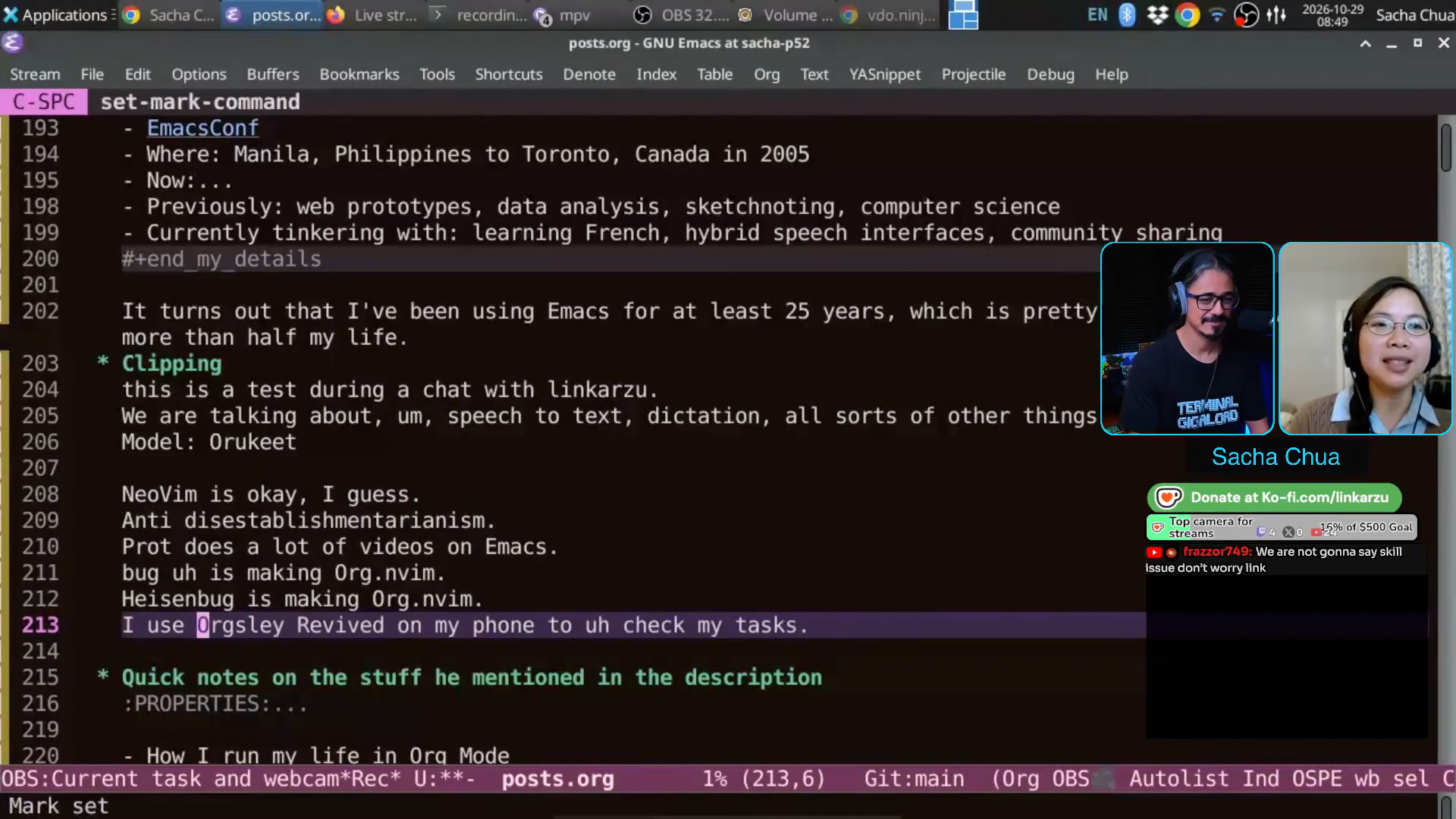 Sacha: It says Orgsley Revived. What is that even? But I can press Ctrl+; and it uses substitute.el.
 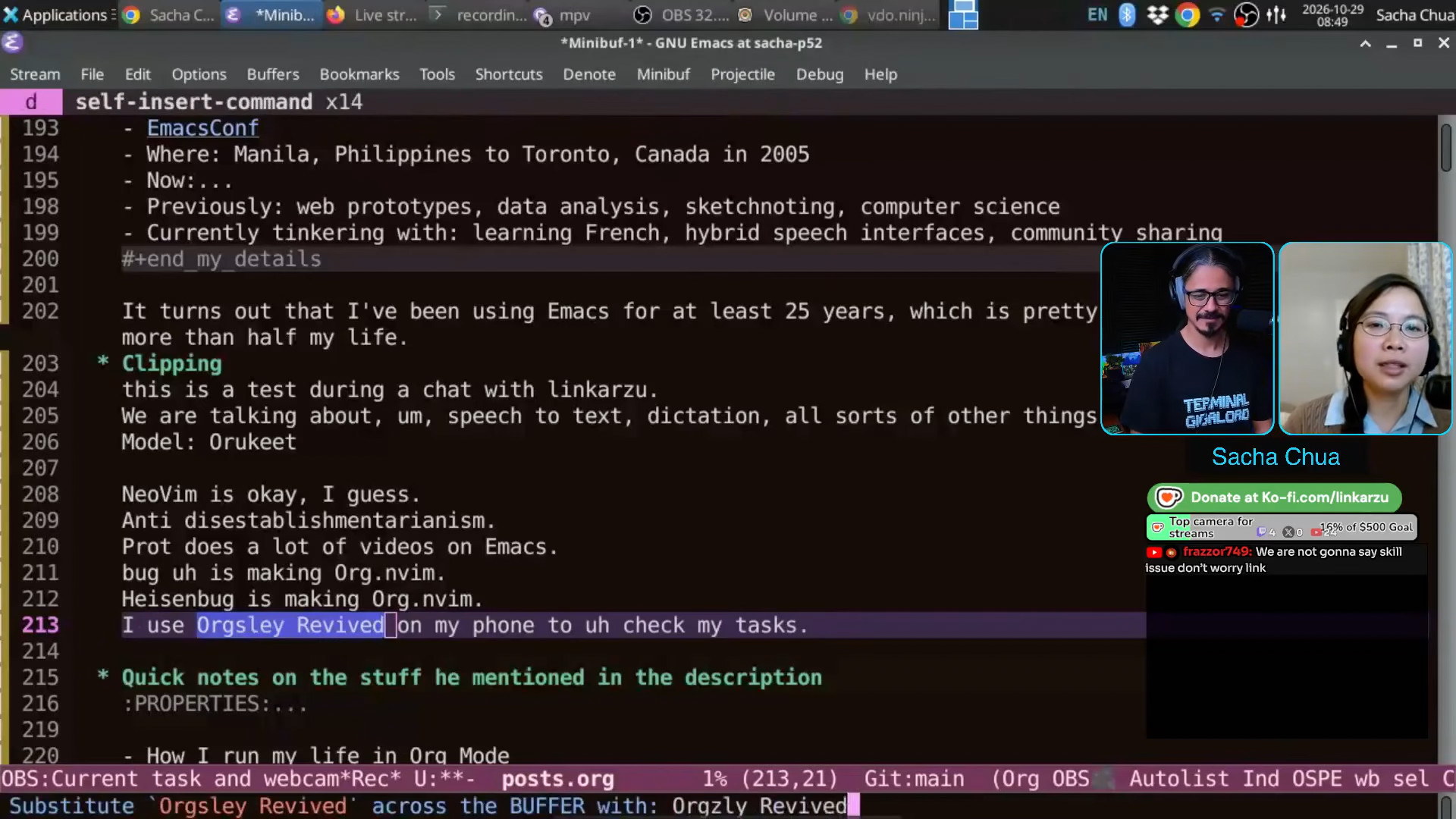 Sacha: Orgzly Revived here. And what that does, in addition to the substitutions that happen throughout the buffer, so for example, if I'm adding a transcript, it will change that all throughout the transcript. I've also added some code because this is Emacs, I can just do that. that saves this in common errors or commonly misrecognized words. And then when I recognize text, whether it's before a voice command or if I'm just doing this or whatever, it will apply all of those common fixes. Common edits.
 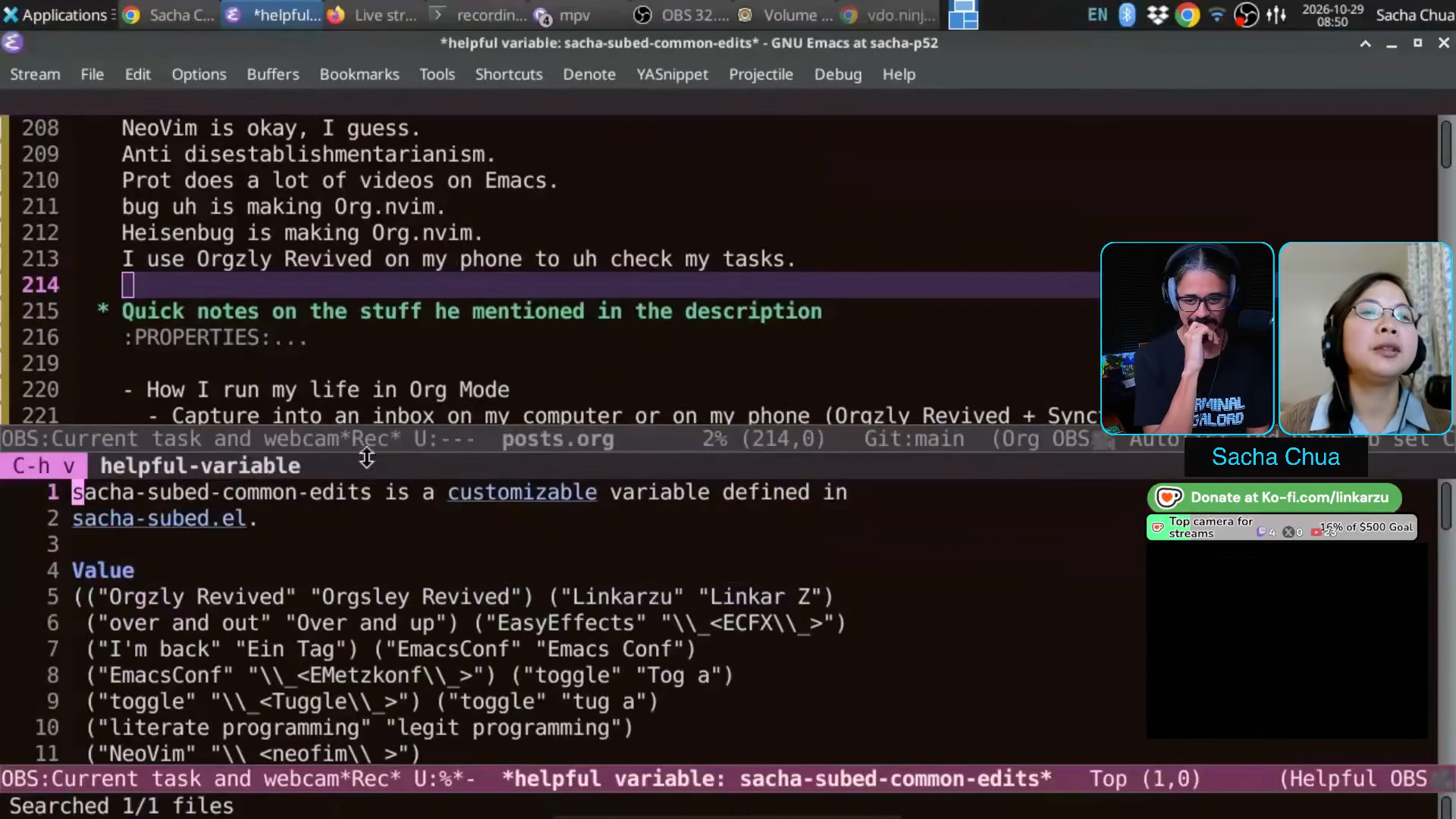 Sacha: Here we go. So it automatically adds it to this thing here, which gets saved automatically for me. And that's the change that I've just added. Linkarzu: Interesting. Pretty cool. Sacha: So it's really nice to have that kind of [dictionary] shortcut built into the way that I edit things. All I know is I just hit Ctrl+; and put in what it's supposed to be. And then it gets not only fixed in my current file, but in the future as well. Linkarzu: Yeah, I need to work on my transcript game.
 7:51 How the live transcript began
Sacha: Like many things in Emacs, this came out of a bunch of small, seemingly unrelated hacks. One was, I was having this conversation with a French tutor and I was like, man, I am having a hard time making sure... Like, he would switch into lecture mode and I was trying to have more conversation mode so I could practice some more, right? So I think I've got this right. Anyway, so I had a large language model generate a Python server, because sometimes I'm like, I just want a proof of concept for this. I don't necessarily know all the details of how to work with the Silero voice activity detection thing. Anyway, so make me a server that can listen to my audio devices in real time without messing up my actual microphone use if I'm on stream. Okay, so I have this Python server and then I wanted to visualize it within Emacs. I got that visualizing inside Emacs. Then I wanted to say, all right, you know, why don't I have speech recognition listening on this thing so that if I say something, it can check it off, like playing bingo, you know, if I say it, then it gives me a note that I've actually said that word or phrase. And so it could show me a list of the words or phrases that I still want to say in conversation. And then, as we're preparing for this conversation, I was like, you know what would be really cool is if I could have that speech recognition, which is running anyway, give me a transcript of the current conversation in a way that I can use it. I could then clip if I wanted to because sometimes I'll be doing a live stream and I'd be like, you know, that was a really cool demo and I should grab that. So that I can just grab the screenshot or put it into a blog post or just get a text or extract a clip out of it, turn it into a video, right? And so now I have this thing where, hang on a second, if I'm somewhere else, for example, it's easy for me to get to. 9:53 Prepare to fast forward
Sacha: I have a voice command for it. "Prepare to fast forward", which is of course a Spaceballs reference. It'll show me then this thing. And if we are... Let me load this real quick. It will show me the video that we have or at least the recording that I've got of it. That's on the right side. Here, this MPV is controlled by Emacs. If I go here... Let's say this one. So here's your waveform for it. If I play it back: "which is of course a Spaceballs reference", it'll show me then this thing. And I can copy the text if I wanted to, or I can extract this into its own video. 10:41 Talking with Emacs
 Linkarzu: What other tricks do you want to show us there? What other things do you want to share about, brag about your Emacs workflow? Sacha: It's really hard to say. I told you how M-x doctor was the beginning of my experience, right? Linkarzu: Your journey, yep. Sacha: Yes, yes. So this is the doctor. You can say things like, "I'm feeling happy today," as I said, right? And then it uses that to generate its response. But I have this conversation mode. "Yes, especially when I get to tinker with Emacs." And then, uh... "What happened when you get to tinker with Emacs?" Did that...? Does the TTS come through? Yeah, it does. And the reason I did this was because after I showed off my vocal commands to Emacs Paris, they were like, oh, you know, what if you can have a conversation? So I was like, OK, let's come back full circle to the thing that got me curious about Emacs in the first place, and voice enable that. And then, of course, this is a very old AI. It's much more interesting if you apply it to the new models. So if I want to, for example, practice French. This is one of my voice commands here. Then I can... Doctor: "What would happen? I would appreciate it if you would continue." Sacha: Okay, here we are. Then I might say, "Je parle avec linkarzu." And then I think... There you go. It will eventually... Maybe? Thank you.
 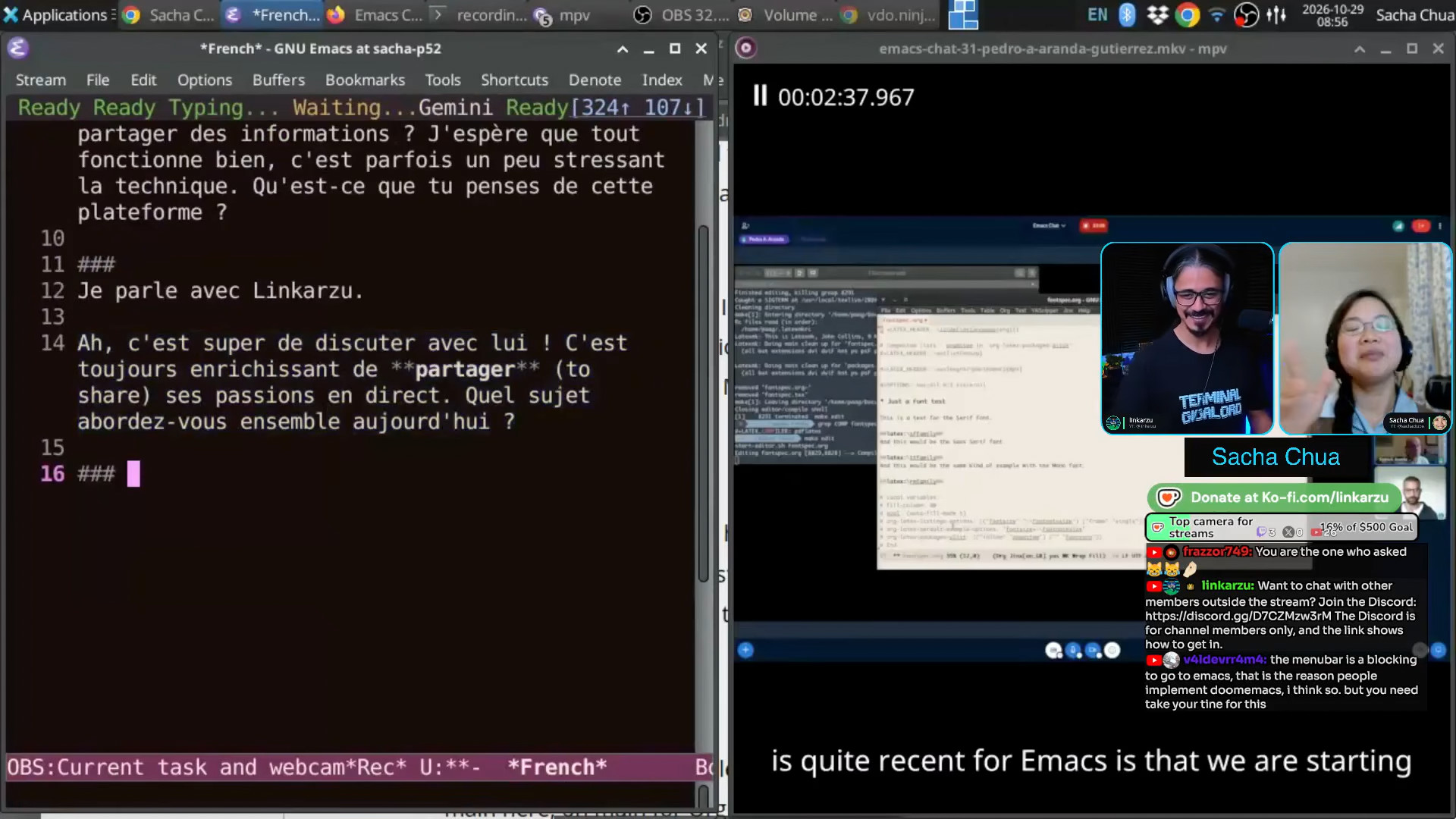 Gemini: "Ah, c'est super de discuter avec lui ! C'est toujours enrichissant de partager (to share) ses passions en direct. Quel sujet abordez-vous ensemble aujourd'hui?" Sacha: Alright, so this now uses a large language model. This one uses Gemini because gptel makes it super easy to plug in different models. So if I wanted to practice French, but I don't necessarily want to bug people because I take a while to think about my words and sometimes I'm looking stuff up, then at least I can simulate that kind of conversation. And there are a gazillion apps that will sell you a subscription to do this. But because it's here and it's plain text and I can control it, then I can more easily go through it afterwards and analyze the vocabulary or correct the things that it didn't get right, which I know is because of the speech recognition and not because of me or whatever, right? So it's so much fun to be able to tinker with Emacs to do what I wanted to do.
 13:19 Life in tiny time chunks
Linkarzu: How long do you spend sitting? Like do you spend sitting most of the day? Sacha: Most of the time, actually, I have to go help out the kiddo, right? So that keeps me away from the computer, which is one of the reasons why I've had to learn how to deal with very fragmented time. Not much time sitting in front of the computer to focus on something. Everything that I want to do has to be something that I can do in 5, 10, 15 minutes, maybe 30 minutes. There might be... At the moment, she is fairly independent, but I can still be interrupted by somebody who needs breakfast or somebody who needs a hug and whatever. So I need to be able to capture a thought, get it out of the way and work on things in tiny chunks. Linkarzu: I've seen my wife, how she handles things. And I'm like, man, it's a lot of mental overhead, you know? That's a whole other conversation to say, see, men are the ones that make progress, build their professional careers and wives, you know, usually take care of the kids. It's a huge sacrifice. What do you think? How do you feel about all that? Sacha: I signed up for it totally knowing what I was getting into. I was like, okay, there's a lot involved in being the default parent, right? The primary person who patches up. But I think partly because of Org Mode and Emacs, it's been very, very helpful to me to be able to say, "Yeah, that's a great idea. I'm going to write that down in my phone or on my computer" - usually on my phone back in the early parenting days. I'm away from my computer. I'm at the playground. So the fact that I can capture a note into Org Mode and then know that I can get back to it in several years when I have more free time, or that Org Mode can keep track of the deadlines that might be a year from now, like when I need to renew my passport, and just have that surface the reminder, at the right time with the notes on exactly what I need to do, and the links to wherever I need to go, I think that has been very, very helpful for me. 15:23 Capturing tasks on phone and computer
Linkarzu: Good point that you brought up because I don't know, quite a few days ago I just came up, well, the clanker came up with a method, we could say, of me just tapping it, saying something to it, and when I come to my computer, the task is there in Neovim, right? Yes. Because I forget, I'm outside, I'm like, okay, I have to remember this, I have to, I'm not gonna remember it, it's just gonna go away. So I do it on the phone, shows up in Neovim. It's a huge benefit. How do you do it Sacha: For my phone, I often just put it into Orgzly Revived, sometimes with dictation, sometimes just typing in a few keywords to help me remember. A lot of times, if I'm coming across... Linkarzu: Orgzly Revived, what is it? Sacha: (Hah, I clearly can't spell) ogrzly? Linkarzu: If you want to show it, I don't know. Sacha: It's on my phone. I'm gonna say, okay, because this is what, Orgzly. Linkarzu: Is it like an app? Sacha: Yeah, so I use an Android phone. And now there are actually a gazillion apps that talk Org Mode and can synchronize with your files and whatever. I'm currently still just using Orgzly Revived as an app on my phone with Syncthing, With Syncthing being the free synchronization that I can use to just get my files back and forth. But there are lots of other alternatives, so you can find something that fits you well. I am very tempted to figure out finally how to use Emacs native, because there's an Emacs port for Android. Especially if I can get my speech synthesis and speech recognition working on it. I think that would be amazing to have this kind of conversation with Emacs along the way. 17:05 Capturing tasks by voice
Sacha: And then on the computer, if I need to capture something quickly, oh, I can show you this one. Let's see. Okay. "Remind me to put together a quick description of my to-do workflow." And it will take that note and it will stick it into an inbox. 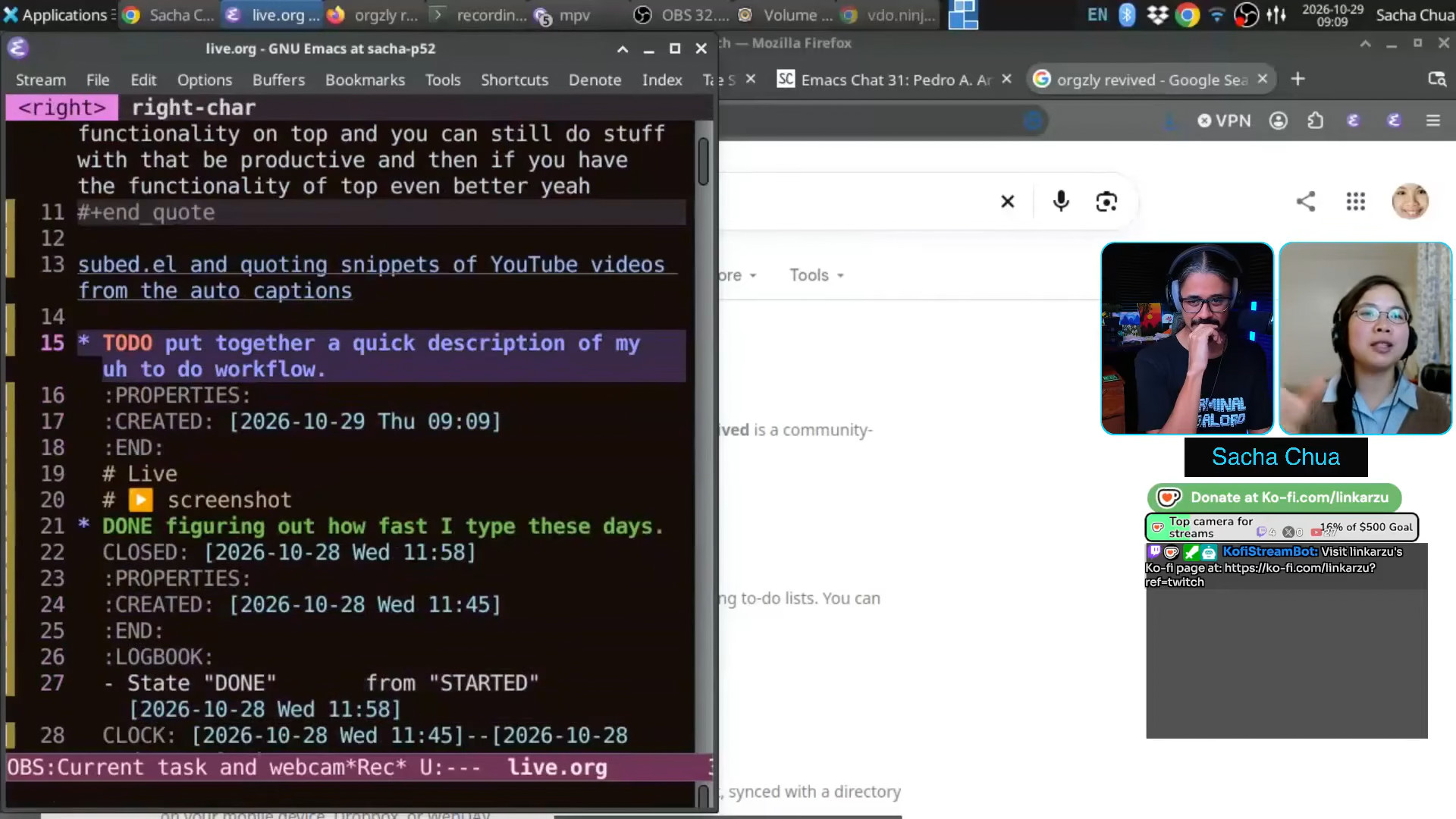 Sacha: Here I'm in live mode so my public tasks don't get mixed in with my private tasks. If I do an agenda, it should just be limited to the public stuff. Anyway, so the remind me created the note for me. It includes the audio in case the speech recognition didn't get anything right. And it includes a screenshot so that in case I'm doing this from a different application because my keyboard shortcut is global, I can still see the context and find that sort of stuff. So yeah.
 18:01 Building workflows out of little bits of time
Linkarzu: Quite interesting. Quite advanced. Quite complex. It must have taken you months, years to set all of this up. Sacha: As I said, I can only work in thirty minutes or so. So this one, I think was a 10, 15 minute hack. Okay. Little bits of time. This link here to whatever I was looking at, you got that free from Org Mode. This thing here with a recording, I got that because I already wanted to save my recordings anyway, so it was just a matter of adding a link to the file name that I already had saved. This screenshot, you know, another five minutes, because I already had Spectacle capturing the screenshot of both screens. So it's fairly simple. It will even work for things like, "remind me next month to follow up with linkarzu to see whether he's switched to Emacs." 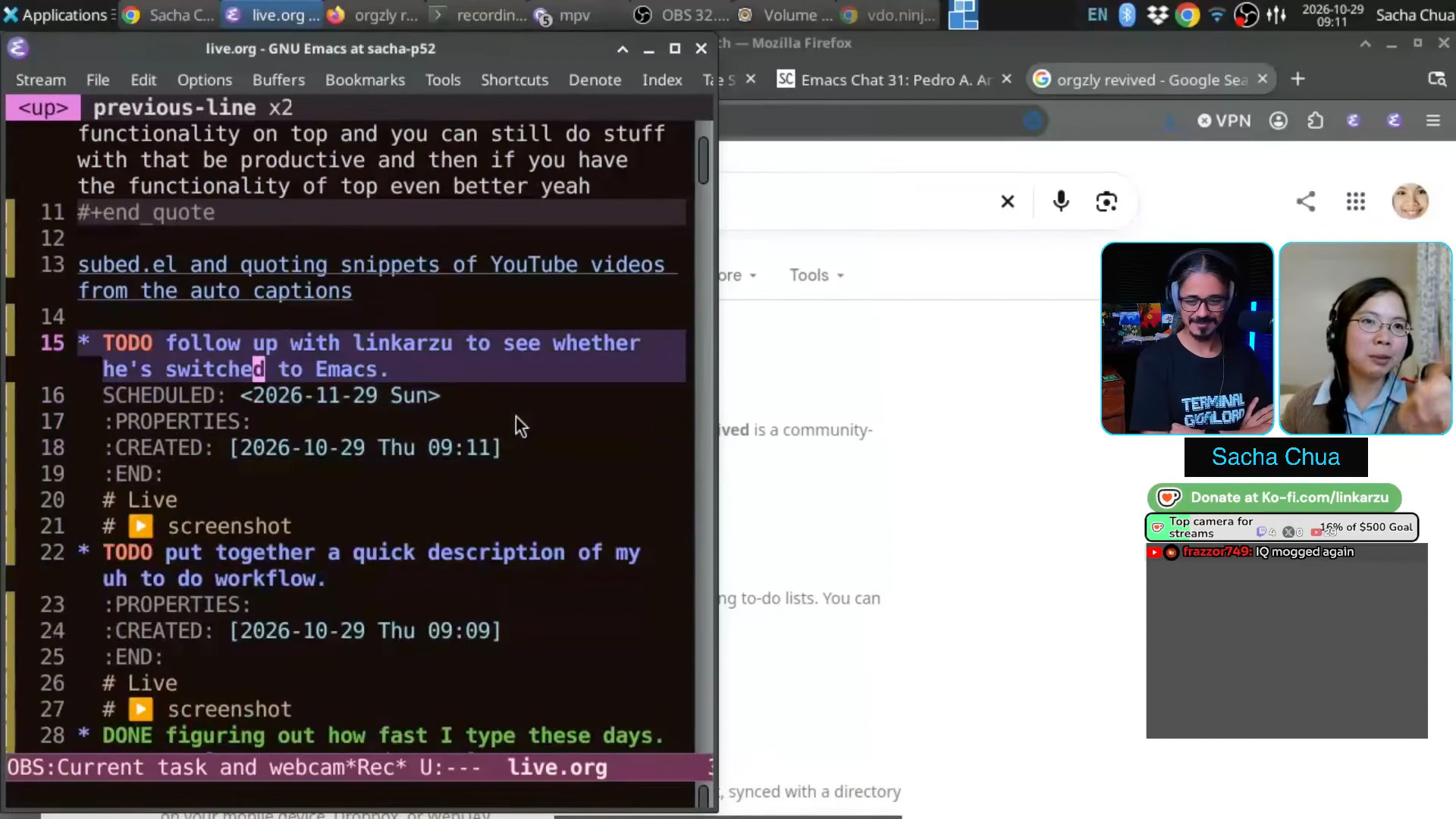 Sacha: So this one here, for example, it says, remind me next month, et cetera, et cetera. And it has scheduled it for next month. Linkarzu: That's pretty cool. Sacha: I'm not actually going to pressure you to switch the Emacs. You can keep using Neovim and just borrow all the interesting ideas. org.nvim is there, I can adapt it to do this, you know?
Download the VTT
He hasn't released a clip of this one yet, but this exchange was one of my favourite parts of the main conversation:
[Linkarzu]: I don't know if like that's a particularity of Neovim users, we're all toxic and we just hate each other.
[Sacha]: Yeah, maybe you should just come over to the Emacs community. We have hot chocolate.
[Linkarzu]: If you go to the Emacs subreddit,
it's like rainbows and butterflies.
There's not a lot of hate.
I always wonder why does that happen?
It's not moderators, you know,
it's just people.
Is it just because it's old people?
Like the professor,
he doesn't want to fight any more.
He's old enough.
He retired already.
He's just ready to pass to the next life.
So what, what?
[Sacha]: Hypothesis number two,
maybe your editor makes you grumpy.
That's at about 01:30:06 in this unlisted embed of the full conversation:
