Je veux vous présenter ma petite expériencede la reconnaissance vocalepour dicter dans Emacset pour les contrôler.J'utilise le modèle Orukeetpour la reconnaissance vocale parce qu'il estassez rapide et assez précis.Je l'intègre dans Emacs en utilisantmes bibliothèques sachac/whisper.el et speech-input.J'ai récemment créé des commandes vocalespour ajouter des éléments à ma liste de tâches.C'est étonnement utile parce que ça réduitla charge cognitive liée à la mémorisationdes raccourcis clavier.Je vais vous montrer cela.
0:37Ajouter des tâches
Je presse la touche zéro du pavé numériqueavant et après avoir dit« Rappelle-moi demain de préparerune présentation pour Emacs Parissur les commandes vocales. »La fonction crée une tâche dans ma boîte de réception.La tâche est planifiée pour demain.Il y a un lienvers l'enregistrement
1:09D'autres dates
« Rappelez-moi demain de préparer une présentationpour Emacs Paris sur les commandes vocales »,la capture d'écran etle contexte de tâche.Ça m'aident si j'ai été mal compriseou si j'ai besoin de contexte.De la même manière,je peux dire « Rappelle-moi la semaine prochainede faire la paperasse pour l'école. »« Rappelle-moi aujourd'hui de créerune vidéo sur mes commandes vocales. »
1:59Basculer à une tâche
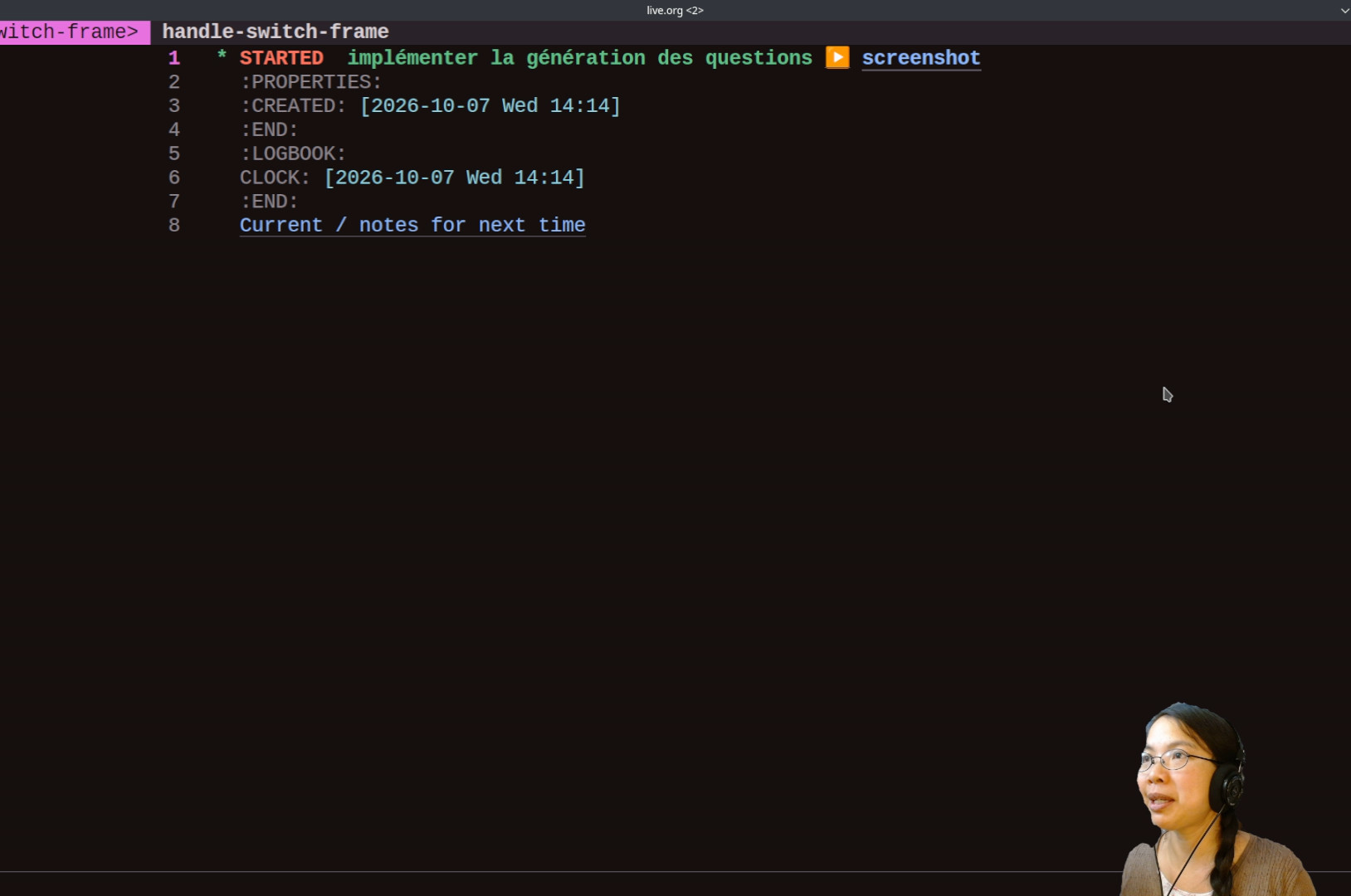
Je peux aussi créer une tâche et déclencherle suivi du temps (ou clock in).Par exemple, je peux dire« Commence à implémenter la génération des questions. »
2:15Retrouver le fil de mes pensées
Si je perds le fil de mes pensées :« j'en étais où ? »Ça m'affiche les tâches récentes.
2:27Je faisais quoi ?
« Je faisais quoi ? »Ça bascule sur la tâche actuelle.Voilà des commandes vocales pour ajouter des tâches.
October's Emacs Carnival theme "Are keyboards and M-x here to stay?" is a good nudge to think about the voice interface I've been experimenting with and where I want to take it.
Like Chris Maiorana, I love the way Emacs's M-x (execute-extended-command) allows me to call any command by name.
It means that I can call commands or come up with my own commands without worrying about assigning them to keyboard shortcuts or making sense of where to place them in a hierarchical menu.
With flexible completion via the vertico and orderless packages, I don’t even need to type in the full name of the command or remember the words in the right order.
If I still can’t remember the command, it’s easy enough to use defalias to make my own nickname for it.
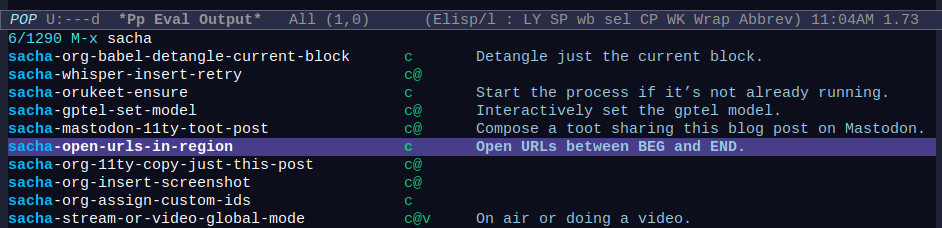
Figure 1: I can filter M-x to show just my custom commands
I tend to limit keyboard shortcuts to only my most common commands.
Everything else is hard to practise enough so that it sticks in my muscle memory.
Even with marginalia showing me keybindings when I use M-x and which-key showing me hints when I pause, it doesn’t sink in.
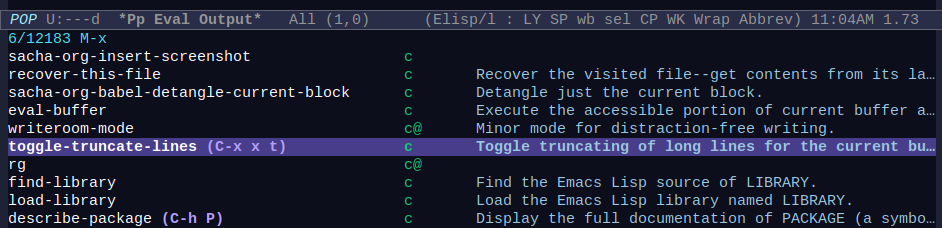
Figure 2: Marginalia shows keybindings
Maybe I could use key-quiz to drill a small number of keyboard shortcuts I’m actively working on learning, or modify help-quick-sections to show me reminders when I use C-h C-q (help-quick-toggle).
Getting one keyboard shortcut to do the right thing in different
contexts is great because it means fewer shortcuts to memorize. Sometimes I can do that by binding the right functions to different mode maps with bind-key, like the way my sacha-org-insert-link-dwim uses the right link syntax in Markdown or OddMuse too.
I also like the context-sensitive keyboard shortcuts I get from Embark.
I find myself using a handful of those regularly, and C-.
(embark-act) starts a bunch of shortcuts across different types of
things: i to insert, w to copy, and so on.
For example, I know C-x C-f (find-file) will let me select a file to open.
Instead of opening it, I can use C-. i to insert the filename into the buffer.
Simpler keyboard shortcuts help. I rarely use the numpad on my laptop keyboard, so those keys can be mapped to functions that don't need to be followed by lots of typing. For example, 0 is a large button. I use it to start and stop speech recognition. Actually, I bind f9 in Emacs to sacha-whisper-run-at-point, and I bind numpad-0 as a keyboard shortcut in KDE (my window manager) instead of just in Emacs so that it's available globally. I'm still on X11 instead of Wayland. The shell script xdotool-emacs focuses Emacs briefly and sends the keys, and the shortcut is set to /home/sacha/bin/xdotool-emacs key --clearmodifiers F9. I do that instead of using emacsclient because emacsclient starts a different buffer, and I might want to keep the context. My sacha-whisper-maybe-type function detects if Emacs is not the focused application and types the text if it isn't, which means I can use it as keyboard input for oher applications while still taking advantage of the corrections and commands I've defined in Emacs. An easy-to-press global shortcut means I can use it from anywhere, even when my foreground app is the browser or another application.
An additional modifier opens up more possibilities for keyboard shortcuts near the regular typing position. My Windows key acts like a Super modifier. I've set it up as a one-shot modifier with Kanata so that I can either hold it down to access more shortcuts or tap it to treat it like a leader key.
There are quite a few commands for which neither M-x nor keyboard shortcuts feel like the right fit: things I want to do faster or more fluidly than M-x, but which I don't do often enough to memorize a good shortcut for. I've been experimenting a bit with voice input, and I really like it.
I could use more practice speaking, since I don't talk to a lot of people in real life.
English: Videos and livestreams can be a way to share interesting things and start conversations. I want to organize my thoughts, improve my breathing, and reduce my stutters and false starts. That will make the audio more pleasant to listen to. Dictating to my computer gives me more practice. It also makes things easier to livestream if I can reuse my speech as input.
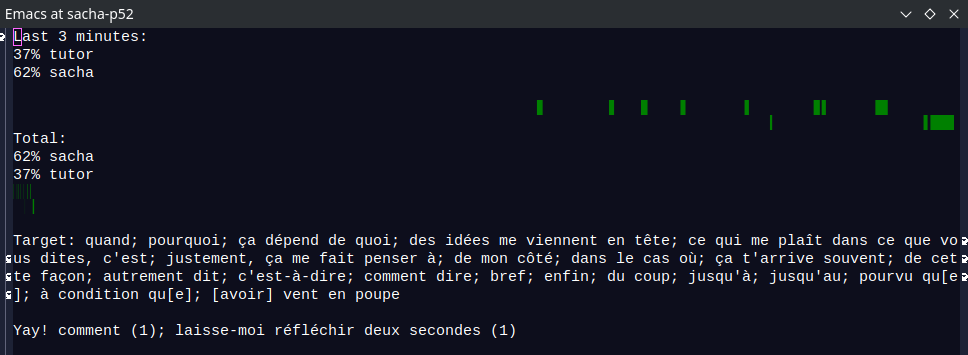
French: I like challenging my brain and I want to help the kiddo learn it too. Improving my speaking will also make it easier for me to listen to myself and close the feedback loop. Maybe I can even use speech recognition to give me feedback and increase motivation while speaking, like keeping track of words or phrases I want to use. When I use them in conversation, the buffer can cross them off the list, which lets me focus on the words remaining.
Figure 3: Screenshot showing balance and target words
Dictation can capture ideas quickly, with more natural wording, especially since typing sometimes gets messed up on my computer.
Voice interfaces might let me reduce some kinds of task friction or work hands-free. For example, I like setting timers by voice on my phone while cooking. It might be interesting to be able to dictate a draft while knitting or hand-sewing.
Brain fog is something I will likely need to deal with. I got a preview of it thanks to the sleep deprivation of early parenting. I know that brain fog is probably going to happen around menopause, it will probably also be part of aging, and it's a common symptom of long COVID which I might still end up getting despite my precautions. I could get into an accident and hurt my hands. I like Emacs and I want to be able to keep using it even if cognitive or physical changes make it harder to remember or use lots of keyboard shortcuts. If I start playing around with this now, the capabilities and the habits will be there when I need it.
Other people are already dealing with those kinds of physical or cognitive constraints, so things I figure out might be useful for other people.
A global shortcut for voice notes and commands let me quickly dash off a reminder before I take off. I don't have to find Emacs and go through my Org capture templates.
It's fun. I like saying "Prepare for take-off" and having Emacs get ready for a spontaneous stream by updating YouTube using my current Org Mode subtree title and description. I like seeing if my dictionary of substitutions can fix the commonly misrecognized words. Saying "I command you to…" to get Emacs to do a M-x command is totally inefficient but also playful, and silly things stick in my brain better thanks to the mnemonic advantage of humor. My brain likes that kind of novelty.
For context, I use Linux on a Lenovo P52 laptop (manufactured 2018, 64 GB RAM but hardly any GPU), and I have an Android phone. I like writing regular text, Emacs Lisp, and some Python and JavaScript. I'm slowly starting to have more focused time now that the kiddo is in virtual school, although it's still broken up by recess and lunch. I will probably have an increasing amount of focused time over the next few years.
I love the way voice reduces context shifts. For example, some of my most-used voice commands are:
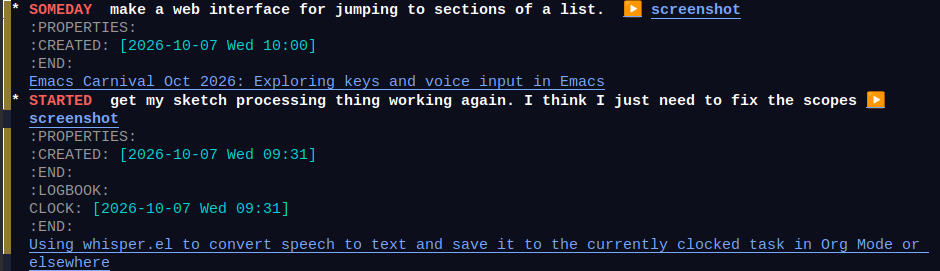
remind me [today/tomorrow/next week/next month/someday] to…: capture and schedule the task; include an Org link and screenshot for context, and link to the audio recording in case the text was misrecognized
Figure 4: Captured tasks have an audio recording, a screenshot, and a link
switch to…: capture the task and immediately clock into it
what was I doing?: jump to the current task
where was I?: show recently-clocked tasks
Figure 5: This is the same as C-u M-x org-clock-goto
I don't have to think about which keys I've configured in org-capture-templates. I just use a natural phrase.
I've defined "open …" to open things from my bookmarked links stored in an Org file. Because my numpad-0 keybinding works from anywhere, I can even use it to open sites or capture notes while looking at my browser.
Because Emacs can interact with lots of other applications, I can even experiment with controlling those applications by voice. For example, I use obs-websocket.el to control OBS for streaming or recording a video. Using "Let's go live" and "Over and out" to start or stop streaming or "Start recording" and "Stop recording" to manage the recording means I can do that without needing to find the right window. I stream with a 10-second delay so that there's a little bit of time to catch any private information that's been accidentally shared on the screen. My new "panic" command lets me discard that delay and interrupt the stream by using an OBS keyboard shortcut to kill the stream immediately, even if I'm probably not going to remember that exact keyboard shortcut when I'm stressed. It should be a little easier to remember that than a keyboard shortcut I hardly ever use or a menu item that is a really small target (and my Emacs might not even be my foreground app).
For regular dictation, I'm experimenting with having it automatically place each sentence on a new line or list item. This makes it easy to reorganize in Org. I can refill it into a paragraph when I'm done.
I still have to deal with the limits of my memory, of course.
I have a "what can I say" command that opens up an Org file with my notes. I keep this as a manual note instead of just dumping the contents of my sacha-whisper-commands variable so that I can prioritize the things I'm trying to build as habits.
I might want more complex grammar someday for things that regular expressions can't easily handle.
That's something other projects have done a good job of figuring out.
There's been a lot of good work on voice input over the years, especially since a number of Emacs users have a hard time with or would like to avoid repetitive stress injury. In addition to the innumerable projects that let you use Whisper or similar speech recognition engines to dictate prose, there are also a few projects that use a constrained vocabulary to more reliably control Emacs. Two projects in this area are based on the Talon voice control system: Voicemacs and Emacslisten.
The Talon community hub defines some Emacs commands. I think it simulates keyboard input and assumes that you have flx or some other fuzzy completion matching so that input like M-x t-d-on-e runs toggle-debug-on-error, as defined in community/apps/emacs/emacs_commands.csv. I seem to be having a hard time with getting orderless to do that with orderless-flex, so I'm just going to remove that column of the CSV from my emacs_commands.csv.
Voicemacs defines its commands in Python in the user's Talon config (see example). It feels fairly complex, like it assumes it's being cloned as your ~/.talon/user directory. It lets Emacs and Talon communicate via RPC to send additional context. It also extends some things like dired and company to make them more voice-friendly.
I'm new to both projects, so I'm not sure if I'm reading this right, but I think I might be able to use Emacslisten to define voice commands with Emacs Lisp, and then maybe someday use Voicemacs to provide richer context for some of those commands. For example, Voicemacs can list snippets, but I'm not quite sure how to use that yet.
It looks like I can use Talon for commands and my whisper.el setup for regular dictation at the same time. The Pipewire virtual sinks help with that, I think, since the programs don't have to have an exclusive lock on the audio device. This means that I can explore the kinds of vocabularies that people have set up while also taking advantage of greater accuracy and ease of correction in my whisper dictation workflow. I think I can use the Talon process socket to turn off recognition when I want to dictate using my whisper.el setup, and then I can turn it back on afterwards.
A note about the underlying speech recognition: Talon is cross-platform and free, but not open source. Subscribing to Talon (CAD 36/month) lets you use a Conformer + Whisper hybrid engine that uses whisper-large for more accuracy, but that's a bit on the expensive side for me. Dragonfly is a free open source engine that can use Kaldi or CMU Pocket Sphinx for speech recognition, but I'm not sure what the performance is like.
Interestingly, because Talon simulates keystrokes, using the commands from the community set means keys sometimes arrive out of order on my computer. "split solo" is supposed to run M-x delete-other-windows, but it sometimes ends up sending M-x delete-other-wnidows instead. This is the same sort of annoyance that gets in the way of typing quickly on my computer. Keystrokes get processed out of order when the CPU gets busy, which is part of the reason why I find dictation to be more reliable than typing sometimes. I should fix that someday, but my attempts so far aren't working. (I wonder if it has something to do with the GPU under Linux; maybe I should drop back down to CPU only since it turns out I can't use the GPU for much anyway.) Quick fix, let's try adding a brief delay in my settings.talon:
settings():
    # Adds a small pause (in ms) between each character typed
    insert_wait = 5

    # Ensures modifiers (Shift/Ctrl) don't un-latch too fast
    key_wait = 1.0
I think Voicemacs uses a sevver and and Emacslisten uses emacsclient to communicate with Emacs directly, so they probably won't run into this keystroke problem.
It might be interesting to see if I can port some of my simpler commands over to Emacslisten or straight Talon so that they're always active. Then I can slowly work on getting used to the other commands people find useful, or incorporating them into my setup.
I love shifting fluidly from one form of input to another, depending on what makes sense at that moment.
For example, I often start my thoughts by drawing on a light dotted grid using Noteful on my iPad. That lets me quickly cluster ideas spatially, drawing connections and highlighting words as I figure out what I want to say.
Then I use dictation and typing to sketch the outline, jumping around as thoughts occur to me. If I'm livestreaming at the same time, that helps me demonstrate things along the way and lets me benefit from people's questions. Dictation lets me explain things to people and capture the text at the same time.
I can move around with the keyboard, but it would be really cool to use voice for quick navigation between sections of my outline using either line numbers or words. I've implemented a "line" command that lets me jump to a line using the last two digits of its line number, since I probably won't have more than 100 lines visible on the screen at a time. For example, this line is currently 119, so referring to it as "nineteen" would work. I'd like to add more operations for editing the text. I think it would be great to be able to say "kill line 33" to delete that line or "move lines 16 to 20 after 27" to have it move those lines there.
I now have a sacha-whisper-one-sentence-per-line variable that splits up dictation if non-nil, so we'll see where those take me. Orukeet does a reasonable job of punctuating my sentences if I don't pause too much between phrases. My M-q re-wraps paragraphs between one sentence per line, one paragraph per line, and wrapping to fill-column, and it's probably the sort of thing that more voice commands would make even more convenient.
Maybe I can even use that spatial sense of a layout by touching buttons in an Emacs-served webpage on my tablet to direct my dictation to different places. Org-draw uses a similar Emacs web server approach to let you draw on another device and embed the results into an Org file, and there are also simpler HTTP servers (web-server, simple-httpd), so it's probably quite doable. I'm imagining something that takes the top-level items from my current nested list and makes them nice big buttons, so I could have something like "Introduction", "Keyboard", "Reasons", "Experiment", "Hybrid", and "Conclusion", and clicking on those could trigger a POST request to the server inside Emacs which moves my point accordingly. I might even have buttons for various commands. It sounds pretty straightforward to implement.
When my brain comes up with lots of interesting ideas, my org-capture voice commands let me choose which rabbit holes to postpone and which ones I want to dive into.
If I get interrupted by life, I can write on my phone while waiting for the kiddo. Orgzly Revived and Syncthing let me pick up where I left off.
As I get thoughts down, I can use keyboard shortcuts to rearrange things and then convert the list of sentences into paragraphs. I can easily turn text into links using my favourites.
I can imagine combining the audio clips from the text properties with the videos and screenshots to create a quick narrated clip that I can edit (using Emacs, of course), or publishing the narration so that people can listen to it if they like.
This combination of drawing + audio + text works better for me than any of those components alone. Visuals give me anchors for my thoughts. Audio helps with the braindump. Text permits precise, searchable details we can copy. Like George Jones, I find they all have their uses and their strengths.
When I try to dictate longer sections without that kind of visual support, I often lose my train of thought. I want to see where I've been and where I want to go. I don't trust LLMs to clean up that kind of rough transcript; the output doesn't quite resonate with me. I like keeping speech recognition constrained to sentences I can immediately check or reorganize, and I have the recordings as text properties so I can go back to that segment if I need to (at least during the current editing section). That way, I'm never left scratching my head and wondering what I meant.
I love that local speech recognition is getting better and better. I'm curious about whether small language models can do better turn detection to help compensate for my intra-phrase delays when I'm thinking of a word, and whether decision models can automatically classify a sentence into its place in my outline. I think it would be cool if embeddings or other language models could suggest related words or resources as I go along. Lots of interesting possibilities even with the technology that's already available.
This is a quick demonstration of using Orukeet as a speech recognition model inside Emacs. I'm recording this in real time on a Lenovo P52 laptop using only CPU. I can replay just one part of my recording. I can switch languages in the middle of recording too. Par exemple, maintenant je parle français. Seems promising.
sacha-whisper-continue - This lets me cue transcriptions of previous segments while continuing to record new ones. I like it because I tend to pause while thinking out loud. I can define the chunk that will get transcribed so that I don't end up with incomplete chunks or lost context.
I'm having fun exploring which things might actually be easier to do by voice than by typing. For example, after I wrote some code to expand yasnippets by voice, I realized that it was easier to:
press my shortcut,
say "okay, define interactive function",
and then press my shortcut again,
than to:
mentally say it,
get the first initials,
type in "dfi",
and press Tab to expand.
Another area where I do this kind of mental translation for keyboard shortcuts is when I categorize dozens of Emacs-related links each week for Emacs News. I used to do this by hand. Then I wrote a function to try to guess the category based on regular expressions (my-emacs-news-guess-category in emacs-news/index.org, which is large). Then I set up a menu that lets me press numbers corresponding to the most frequent categories and use tab completion for the rest. 1 is Emacs Lisp, 2 is Emacs development, 3 is Emacs configuration, 4 is appearance, 5 is navigation, and so on. It's not very efficient, but some of it has at least gotten into muscle memory, which is also part of why it's hard to change the mapping. I don't come across that many links for Emacs development or Spacemacs, and I could probably change them to something else, but… Anyway.
Figure 1: Screenshot of my menu for categorizing links
I wanted to see if I could categorize links by voice instead. I might not always be able to count on being able to type a lot, and it's always fun to experiment with other modes of input. Here's a demonstration showing how Emacs can automatically open the URLs, wait for voice input, and categorize the links using a reasonably close match. The *Messages* buffer displays the recognized output to help with debugging.
Screencast with audio: categorizing links by voice
When it detects that speech has ended, it use curl to send the WAV to an OpenAI-compatible server (in my case, Speaches with the Systran/faster-whisper-base.en model) for transcription, along with a prompt to try to influence the recognition.
It compares the result with the candidates using string-distance for an approximate match. It calls the code to move the current item to the right category, creating the category if needed.
Since this doesn't always result in the right match, I added an Undo command. I also have a Delete command for removing the current item, Scroll Up and Scroll Down, and a way to quit.
Initial thoughts
I used it to categorize lots of links in this week's Emacs News, and I think it's promising. I loved the way my hands didn't have to hover over the number keys or move between those and the characters. Using voice activity detection meant that I could just keep dictating categories instead of pressing keyboard shortcuts or using the foot pedal I recently dusted off. There's a slight delay, of course, but I think it's worth it. If this settles down and becomes a solid part of my workflow, I might even be able to knit or hand-sew while doing this step, or simply do some stretching exercises.
What about using streaming speech recognition? I've written some code to use streaming speech recognition, but the performance wasn't good enough when I tried it on my laptop (Lenovo P52 released in 2018, no configured GPU under Linux). The streaming server dropped audio segments in order to try to catch up. I'd rather have everything transcribed at the level of the model I want, even if I have to wait a little while. I also tried using the Web Speech API in Google Chrome for real-time speech transcription, but it's a little finicky. I'm happy with the performance I get from either manually queueing speech segments or using VAD and then using batch speech recognition with a model that's kept in memory (which is why I use a local server instead of a command-line tool). Come to think of it, I should try this with a higher-quality model like medium or large, just in case the latency turns out to be not that much more for this use case.
What about external voice control systems like Talon Voice or Cursorless? They seem like neat ideas and lots of people use them. I think hacking something into Emacs with full access to its internals could be lots of fun too.
A lot of people have experimented with voice input for Emacs over the years. It could be fun to pick up ideas for commands and grammars. Some examples:
What about automating myself out of this loop? I've considered training a classifier or sending the list to a large language model to categorize links in order to set more reasonable defaults, but I think I'd still want manual control, since the fun is in getting a sense of all the cool things that people are tinkering around with in the Emacs community. I found that with voice control, it was easier for me to say the category than to look for the category it suggested and then say "Okay" to accept the default. If I display the suggested category in a buffer with very large text (and possibly category-specific background colours), then I can quickly glance at it or use my peripheral vision. But yeah, it's probably easier to look at a page and say "Org Mode" than to look at the page, look at the default text, see if it matches Org Mode, and then say okay if it is.
Ideas for next steps
I wonder how to line up several categories. I could probably rattle off a few without waiting for the next one to load, and just pause when I'm not sure. Maybe while there's a reasonably good match within the first 1-3 words, I'll take candidates from the front of the queue. Or I could delimit it with another easily-recognized word, like "next".
I want to make a more synchronous version of this idea so that I can have a speech-enabled drop-in replacement that I can use as my y-or-n-p while still being able to type y or n. This probably involves using sit-for and polling to see if it's done. And then I can use that to play Twenty Questions, but also to do more serious stuff. It would also be nice to have replacements for read-string and completing-read, since those block Emacs until the user enters something.
I might take a side-trip into a conversational interface for M-x doctor and M-x dunnet, because why not. Naturally, it also makes sense to voice-enable agent-shell and gptel interactions.
I'd like to figure out a number- or word-based completion mechanism so that I can control Reddit link replacement as well, since I want to select from a list of links from the page. Maybe something similar to the way voicemacs adds numbers to helm and company or how flexi-choose.el works.
I'm also thinking about how I can shift seamlessly between typing and speaking, like when I want to edit a link title. Maybe I can check if I'm in the minibuffer and what kind of minibuffer I'm in, perhaps like the way Embark does.
It would be really cool to define speech commands by reusing the keymap structure that menus also use. This is how to define a menu in Emacs Lisp:
(easy-menu-define words-menu global-map
"Menu for word navigation commands."'("Words"
["Forward word" forward-word]
["Backward word" backward-word]))
That makes sense to reuse for speech commands. I'd also like to be able to specify aliases while hiding them or collapsing them for a "What can I say" help view… Also, if keymaps work, then maybe minor modes or transient maps could work? This sort of feels like it should be the voice equivalent of a transient map.
: I added the recognized text so that I can confirm what was translated. I also moved my-type-with-hint to learn-lang-type-with-hint.
When I'm writing a journal entry in French, I
sometimes want to translate a phrase that I can't
look up word by word using a dictionary.
Instead of switching to a browser, I can use an
Emacs function to prompt me for text and either
insert or display the translation.
The plz library makes HTTP requests slightly
neater.
I think it would be even nicer if I could use speech synthesis, so I can keep it a little more separate from my typing thoughts. I want to be able to say "Okay, translate …" or "Okay, … in French" to get a translation. I've been using my fork of natrys/whisper.el for speech recognition in English, and I like it a lot. By adding a function to whisper-after-transcription-hook, I can modify the intermediate results before they're inserted into the buffer.
But that's too easy. I want to actually type things myself so that I get more practice. Something like an autocomplete suggestion would be handy as a way of showing me a hint at the cursor. The usual completion-at-point functions are too eager to insert things if there's only one candidate, so we'll just fake it with an overlay. This code works only with my whisper.el fork because it supports using a list of functions for whisper-insert-text-at-point.
(defunmy-whisper-maybe-type-with-hints (text)
"Add this function to `whisper-insert-text-at-point'."
(let* ((hint (and text (org-find-text-property-in-string 'type-hint text)))
(original (and text (org-find-text-property-in-string 'type-original text))))
(if hint
(progn
(learn-lang-type-with-hint hint original)
nil)
text)))
Here's a demonstration of me saying "Okay, this is a test, in French.":
Screencast of using speech recognition to translate into French and provide a hint when typing
: I now use Orukeet as the speech recognition model because it's faster.
: Major change: I switched to my fork of natrys/whisper.el so that I can specify functions that change the window configuration etc.
: Change main function to sacha-whisper-run, use seq-reduce to go through the functions.
: Added code for automatically capturing screenshots, saving text, working with a list of functions.
: Added demo, fixed some bugs.
: Added note about difference from MELPA package, fixed :vc
I want to get my thoughts into the computer quickly, and talking might be a good way to do some of that. whisper.el gives me a convenient way to interact with a server compatible with OpenAI Whisper's API. (Experimenting with Orukeet for speech recognition) Note: This is not the same whisper package as the one on MELPA. Here is how I have it set up for reasonable performance on my Lenovo P52 with just the CPU, no GPU.
I've bound <f9> to the command whisper-run in Emacs, but I use my window manager's custom shortcuts to map <kp-0> to execute /home/sacha/bin/xdotool-emacs key --clearmodifiers F9, which sends <f9> to Emacs. (file:///home/sacha/bin/xdotool-emacs) That makes it a shortcut that works even in other applications.
I press <kp-0> to start recording, talk, and then press <kp-0> to stop recording. By default, it inserts the text into the buffer at the current point. I've set whisper-return-cursor-to-start to nil so that I can keep going.
Update : Il peut aussi comprendre le français. I used to have code to set the language in case the auto-recognition doesn't get it right, but now I'm using Orukeet as the speech recognition engine now, so it doesn't take a language setting.
;; Only works with my tweaks to whisper.el;; https://github.com/sachac/whisper.el/tree/whisper-insert-text-at-point-function
(with-eval-after-load'whisper
(setq whisper-insert-text-at-point
'(sacha-whisper-scratch-that
sacha-whisper-handle-commands
sacha-whisper-save-text
sacha-learn-lang-notice-bingo-words
; sacha-whisper-save-to-file
sacha-save-to-kill-ring-after-current
sacha-whisper-maybe-expand-snippet
sacha-speech-input-quantified-track
sacha-whisper-maybe-type
sacha-whisper-maybe-type-with-hints
sacha-whisper-insert
sacha-whisper-reset)))
(defvarsacha-whisper-last-annotation nil "Last annotation so we can skip duplicates.")
(defvarsacha-whisper-skip-annotation nil)
(defvarsacha-whisper-target-markers nil "List of markers to send text to.")
;;;###autoload
(defunsacha-whisper-insert (text)
(let ((markers
(cond
((null sacha-whisper-target-markers)
(list whisper--marker)) ; current point where whisper was started
((listp sacha-whisper-target-markers)
sacha-whisper-target-markers)
((markerp sacha-whisper-target-markers)
(list sacha-whisper-target-markers))))
(orig-point (point))
(orig-buffer (current-buffer)))
(when text
(mapcar (lambda (marker)
(with-current-buffer (marker-buffer marker)
(save-restriction
(widen)
(when (markerp marker) (goto-char marker))
(when (and (derived-mode-p 'org-mode) (org-at-drawer-p))
(insert "\n"))
(whisper--insert-text
(concat
(if (looking-back "[ \t\n]\\|^")
""" ")
(string-trim text)))
;; Move the marker forward here
(move-marker marker (point)))))
markers)
(when sacha-whisper-target-markers
(goto-char orig-point))
nil)))
;;;###autoload
(defunsacha-whisper-maybe-type (text)
"If Emacs is not the focused app, simulate typing TEXT.Add this function to `whisper-insert-text-at-point'."
(when text
(if (frame-focus-state)
text
(make-process :name"xdotool":command
(list "xdotool""type"
text))
nil)))
Here's an idea for a function that saves the recognized text with a timestamp.
(defvarsacha-whisper-notes"~/sync/stream/narration.org")
;;;###autoload
(defunsacha-whisper-save-to-file (text)
(when text
(let ((link (org-store-link nil)))
(with-current-buffer (find-file-noselect sacha-whisper-notes)
(goto-char (point-max))
(insert "\n\n" (format-time-string "%H:%M ") text "\n" (if link (concat link "\n") ""))
(save-buffer)
(run-at-time 0.5 nil (lambda (text) (message "Saved to file: %s" text)) text)))
text))
Let's add it to the kill ring, but not at the most recent slot. That way, it's easy for me to get to, but it doesn't overwrite anything that I've copied.
;;;###autoload
(defunsacha-save-to-kill-ring-after-current (text)
"Save TEXT to the kill ring, but not at the top spot."
(when text
(if kill-ring
(let ((temp (pop kill-ring)))
(kill-new text)
(push temp kill-ring))
(kill-new text)))
text)
I think I've just figured out my Pipewire setup so
that I can record audio in OBS while also being
able to do speech to text, without the audio
stuttering. qpwgraph was super helpful
for visualizing the Pipewire connections and fixing them.
Screencast of using whisper.el to do speech-to-text into the current buffer, clocked-in task, or other function
Transcript
0:00Inserting into the current buffer
Here's a quick demonstrationof using whisper.el to log notes.
0:13Inserting text and moving on
I can insert text into the current bufferone after the other.
0:31Clocking in
If I clock into a task,I can add to the end of that clocked in taskusing my custom codeby pressing C-<f9>or whatever my shortcut was.I can do that multiple times.
1:05Logging a note from a different file
I can do that while looking at a different file.
1:15I can look at an info page
I can do it looking at an info page, for example,and annotations will include a linkback to whatever I was looking at.
1:33Adding without an annotation (C-u)
I just added an optional argumentso that I can also capture a notewithout saving an annotation.That way, if I'm going to say a lot of thingsabout the same buffer,I don't have to have a lot of linksthat I need to edit out.
2:42Saving to a different function
I can also have it save to a different function.
And then I define a global shortcut in KDE that runs xdotool-emacs:
So now I can dictate into other applications or save into Emacs.
Which suggests of course that I should get it working with C-f9 as well, if I can avoid the keyboard shortcut loop…
[2025-01-30 Thu]: Fix timestamp format in toggle recording task.
I want to be able to use voice control to do
things on my phone while I'm busy washing dishes,
putting things away, knitting, or just keeping my
hands warm. It'll also be handy to have a way to
get things out of my head when the kiddo is
koala-ing me. I've been using my Google Pixel 8's
voice interface to set timers, send text messages,
and do quick web searches. Building on my recent
thoughts on wearable computing, I decided to spend
some more time investigating the Google Assistant
and Voice Access features in Android and setting
up other voice shortcuts.
I switched back to Google Assistant from Gemini so
that I could run Tasker routines. I also found out
that I needed to switch the language from
English/Canada to English/US in order for my
Tasker scripts to run instead of Google Assistant
treating them as web searches. Once that was
sorted out, I could run Tasker tasks with "Hey
Google, run {task-name} in Tasker" and
parameterize them with "Hey Google, run
{task-name} with {parameter} in Tasker."
Voice Access
Learning how to use Voice Access to navigate,
click, and type on my phone was straightforward.
"Scroll down" works for webpages, while "scroll
right" works for the e-books I have in Libby.
Tapping items by text usually works. When it
doesn't, I can use "show labels", "show numbers",
or "show grid." The speech-to-text of "type …"
isn't as good as Whisper, so I probably won't use
it for a lot of dictation, but it's fine for quick
notes. I can keep recording in the background so
that I have the raw audio in case I want to review
it or grab the WhisperX transcripts instead.
For some reason, saying "Hey Google, voice access"
to start up voice access has been leaving the
Assistant dialog on the screen, which makes it
difficult to interact with the screen I'm looking
at. I added a Tasker routine to start voice
access, wait a second, and tap on the screen to
dismiss the Assistant dialog.
<TaskerDatasr=""dvi="1"tv="6.3.13"><Tasksr="task24"><cdate>1737565479418</cdate><edate>1737566416661</edate><id>24</id><nme>Start Voice</nme><pri>1000</pri><Sharesr="Share"><b>false</b><d>Start voice access and dismiss the assistant dialog</d><g>Accessibility,AutoInput</g><p>true</p><t></t></Share><Actionsr="act0"ve="7"><code>20</code><Appsr="arg0"><appClass>com.google.android.apps.accessibility.voiceaccess.LauncherActivity</appClass><appPkg>com.google.android.apps.accessibility.voiceaccess</appPkg><label>Voice Access</label></App><Strsr="arg1"ve="3"/><Intsr="arg2"val="0"/><Intsr="arg3"val="0"/></Action><Actionsr="act1"ve="7"><code>30</code><Intsr="arg0"val="0"/><Intsr="arg1"val="1"/><Intsr="arg2"val="0"/><Intsr="arg3"val="0"/><Intsr="arg4"val="0"/></Action><Actionsr="act2"ve="7"><code>107361459</code><Bundlesr="arg0"><Valssr="val"><EnableDisableAccessibilityService><null></EnableDisableAccessibilityService><EnableDisableAccessibilityService-type>java.lang.String</EnableDisableAccessibilityService-type><Password><null></Password><Password-type>java.lang.String</Password-type><com.twofortyfouram.locale.intent.extra.BLURB>Actions To Perform: click(point,564\,1045)Not In AutoInput: trueNot In Tasker: trueSeparator: ,Check Millis: 1000</com.twofortyfouram.locale.intent.extra.BLURB><com.twofortyfouram.locale.intent.extra.BLURB-type>java.lang.String</com.twofortyfouram.locale.intent.extra.BLURB-type><net.dinglisch.android.tasker.JSON_ENCODED_KEYS>parameters</net.dinglisch.android.tasker.JSON_ENCODED_KEYS><net.dinglisch.android.tasker.JSON_ENCODED_KEYS-type>java.lang.String</net.dinglisch.android.tasker.JSON_ENCODED_KEYS-type><net.dinglisch.android.tasker.RELEVANT_VARIABLES><StringArray sr=""><_array_net.dinglisch.android.tasker.RELEVANT_VARIABLES0>%ailastboundsLast BoundsBounds (left,top,right,bottom) of the item that the action last interacted with</_array_net.dinglisch.android.tasker.RELEVANT_VARIABLES0><_array_net.dinglisch.android.tasker.RELEVANT_VARIABLES1>%ailastcoordinatesLast CoordinatesCenter coordinates (x,y) of the item that the action last interacted with</_array_net.dinglisch.android.tasker.RELEVANT_VARIABLES1><_array_net.dinglisch.android.tasker.RELEVANT_VARIABLES2>%errError CodeOnly available if you select &lt;b&gt;Continue Task After Error&lt;/b&gt; and the action ends in error</_array_net.dinglisch.android.tasker.RELEVANT_VARIABLES2><_array_net.dinglisch.android.tasker.RELEVANT_VARIABLES3>%errmsgError MessageOnly available if you select &lt;b&gt;Continue Task After Error&lt;/b&gt; and the action ends in error</_array_net.dinglisch.android.tasker.RELEVANT_VARIABLES3></StringArray></net.dinglisch.android.tasker.RELEVANT_VARIABLES><net.dinglisch.android.tasker.RELEVANT_VARIABLES-type>[Ljava.lang.String;</net.dinglisch.android.tasker.RELEVANT_VARIABLES-type><net.dinglisch.android.tasker.extras.VARIABLE_REPLACE_KEYS>parameters plugininstanceid plugintypeid </net.dinglisch.android.tasker.extras.VARIABLE_REPLACE_KEYS><net.dinglisch.android.tasker.extras.VARIABLE_REPLACE_KEYS-type>java.lang.String</net.dinglisch.android.tasker.extras.VARIABLE_REPLACE_KEYS-type><net.dinglisch.android.tasker.subbundled>true</net.dinglisch.android.tasker.subbundled><net.dinglisch.android.tasker.subbundled-type>java.lang.Boolean</net.dinglisch.android.tasker.subbundled-type><parameters>{"_action":"click(point,564\\,1045)","_additionalOptions":{"checkMs":"1000","separator":",","withCoordinates":false},"_whenToPerformAction":{"notInAutoInput":true,"notInTasker":true},"generatedValues":{}}</parameters><parameters-type>java.lang.String</parameters-type><plugininstanceid>b46b8afc-c840-40ad-9283-3946c57a1018</plugininstanceid><plugininstanceid-type>java.lang.String</plugininstanceid-type><plugintypeid>com.joaomgcd.autoinput.intent.IntentActionv2</plugintypeid><plugintypeid-type>java.lang.String</plugintypeid-type></Vals></Bundle><Strsr="arg1"ve="3">com.joaomgcd.autoinput</Str><Strsr="arg2"ve="3">com.joaomgcd.autoinput.activity.ActivityConfigActionv2</Str><Intsr="arg3"val="60"/><Intsr="arg4"val="1"/></Action></Task></TaskerData>
I can use "Hey Google, read aloud" to read a
webpage. I can use "Hey Google, skip ahead 2
minutes" or "Hey Google, rewind 30 seconds." Not
sure how I can navigate by text, though. It would
be nice to get an overview of headings and then
jump to the one I want, or search for text and
continue from there.
Autoplay an emacs.tv video
I wanted to be able to play random emacs.tv videos
without needing to touch my phone. I added
autoplay support to the web interface so that you
can open https://emacs.tv?autoplay=1 and have it
autoplay videos when you select the next random
one by clicking on the site logo, "Lucky pick", or
the dice icon. The first video doesn't autoplay
because YouTube requires user interaction in order
to autoplay unmuted videos, but I can work around
that with a Tasker script that loads the URL,
waits a few seconds, and clicks on the heading with AutoInput.
<TaskerDatasr=""dvi="1"tv="6.3.13"><Tasksr="task18"><cdate>1737558964554</cdate><edate>1737562488128</edate><id>18</id><nme>Emacs TV</nme><pri>1000</pri><Sharesr="Share"><b>false</b><d>Play random Emacs video</d><g>Watch</g><p>true</p><t></t></Share><Actionsr="act0"ve="7"><code>104</code><Strsr="arg0"ve="3">https://emacs.tv?autoplay=1</Str><Appsr="arg1"/><Intsr="arg2"val="0"/><Strsr="arg3"ve="3"/></Action><Actionsr="act1"ve="7"><code>30</code><Intsr="arg0"val="0"/><Intsr="arg1"val="3"/><Intsr="arg2"val="0"/><Intsr="arg3"val="0"/><Intsr="arg4"val="0"/></Action><Actionsr="act2"ve="7"><code>107361459</code><Bundlesr="arg0"><Valssr="val"><EnableDisableAccessibilityService><null></EnableDisableAccessibilityService><EnableDisableAccessibilityService-type>java.lang.String</EnableDisableAccessibilityService-type><Password><null></Password><Password-type>java.lang.String</Password-type><com.twofortyfouram.locale.intent.extra.BLURB>Actions To Perform: click(point,229\,417)Not In AutoInput: trueNot In Tasker: trueSeparator: ,Check Millis: 1000</com.twofortyfouram.locale.intent.extra.BLURB><com.twofortyfouram.locale.intent.extra.BLURB-type>java.lang.String</com.twofortyfouram.locale.intent.extra.BLURB-type><net.dinglisch.android.tasker.JSON_ENCODED_KEYS>parameters</net.dinglisch.android.tasker.JSON_ENCODED_KEYS><net.dinglisch.android.tasker.JSON_ENCODED_KEYS-type>java.lang.String</net.dinglisch.android.tasker.JSON_ENCODED_KEYS-type><net.dinglisch.android.tasker.RELEVANT_VARIABLES><StringArray sr=""><_array_net.dinglisch.android.tasker.RELEVANT_VARIABLES0>%ailastboundsLast BoundsBounds (left,top,right,bottom) of the item that the action last interacted with</_array_net.dinglisch.android.tasker.RELEVANT_VARIABLES0><_array_net.dinglisch.android.tasker.RELEVANT_VARIABLES1>%ailastcoordinatesLast CoordinatesCenter coordinates (x,y) of the item that the action last interacted with</_array_net.dinglisch.android.tasker.RELEVANT_VARIABLES1><_array_net.dinglisch.android.tasker.RELEVANT_VARIABLES2>%errError CodeOnly available if you select &lt;b&gt;Continue Task After Error&lt;/b&gt; and the action ends in error</_array_net.dinglisch.android.tasker.RELEVANT_VARIABLES2><_array_net.dinglisch.android.tasker.RELEVANT_VARIABLES3>%errmsgError MessageOnly available if you select &lt;b&gt;Continue Task After Error&lt;/b&gt; and the action ends in error</_array_net.dinglisch.android.tasker.RELEVANT_VARIABLES3></StringArray></net.dinglisch.android.tasker.RELEVANT_VARIABLES><net.dinglisch.android.tasker.RELEVANT_VARIABLES-type>[Ljava.lang.String;</net.dinglisch.android.tasker.RELEVANT_VARIABLES-type><net.dinglisch.android.tasker.extras.VARIABLE_REPLACE_KEYS>parameters plugininstanceid plugintypeid </net.dinglisch.android.tasker.extras.VARIABLE_REPLACE_KEYS><net.dinglisch.android.tasker.extras.VARIABLE_REPLACE_KEYS-type>java.lang.String</net.dinglisch.android.tasker.extras.VARIABLE_REPLACE_KEYS-type><net.dinglisch.android.tasker.subbundled>true</net.dinglisch.android.tasker.subbundled><net.dinglisch.android.tasker.subbundled-type>java.lang.Boolean</net.dinglisch.android.tasker.subbundled-type><parameters>{"_action":"click(point,229\\,417)","_additionalOptions":{"checkMs":"1000","separator":",","withCoordinates":false},"_whenToPerformAction":{"notInAutoInput":true,"notInTasker":true},"generatedValues":{}}</parameters><parameters-type>java.lang.String</parameters-type><plugininstanceid>45ce7a83-47e5-48fb-8c3e-20655e668353</plugininstanceid><plugininstanceid-type>java.lang.String</plugininstanceid-type><plugintypeid>com.joaomgcd.autoinput.intent.IntentActionv2</plugintypeid><plugintypeid-type>java.lang.String</plugintypeid-type></Vals></Bundle><Strsr="arg1"ve="3">com.joaomgcd.autoinput</Str><Strsr="arg2"ve="3">com.joaomgcd.autoinput.activity.ActivityConfigActionv2</Str><Intsr="arg3"val="60"/><Intsr="arg4"val="1"/></Action></Task></TaskerData>
Then I set up a Google Assistant routine with the
triggers "teach me" or "Emacs TV" and the action
"run Emacs TV in Tasker. Now I can say "Hey
Google, teach me" and it'll play a random Emacs
video for me. I can repeat "Hey Google, teach me"
to get a different video, and I can pause with
"Hey Google, pause video".
This was actually my second approach. The first
time I tried to implement this, I thought about
using Voice Access to interact with the buttons.
Strangely, I couldn't get Voice Access to click on
the header links or the buttons even when I had
aria-label, role="button", and tabindex
attributes set on them. As a hacky workaround, I
made the site logo pick a new random video when
clicked, so I can at least use it as a large touch
target when I use "display grid" in Voice Access.
("Tap 5" will load the next video.)
There doesn't seem to be a way to add custom voice
access commands to a webpage in a way that hooks
into Android Voice Access and iOS Voice Control,
but maybe I'm just missing something obvious when
it comes to ARIA attributes.
Open my Org agenda and scroll through it
There were some words that I couldn't get Google
Assistant or Voice Access to understand, like
"open Orgzly Revived". Fortunately, "Open Revived"
worked just fine.
I wanted to be able to see my Org Agenda. After
some fiddling around (see the resources in this
section), I figured out this AutoShare intent that
runs an agenda search:
I made a Google Assistant routine that uses "show
my agenda" as the trigger and "run search orgzly
revived in Tasker" as the action. After a quick
"Hey Google, show my agenda; Hey Google, voice
access", I can use "scroll down" to page through
the list. "Back" gets me to the list of notebooks,
and "inbox" opens my inbox.
When I'm looking at an Orgzly Revived notebook
with Voice Access turned on, "plus" starts a new
note. Anything that isn't a label gets typed, so I
can just start saying the title of my note (or use
"type …"). If I want to add the content, I have
to use "hide keyboard", "tap content", and then
"type …"). "Tap scheduled time; Tomorrow" works
if the scheduled time widget is visible, so I just
need to use "scroll down" if the title is long.
"Tap done; one" saves it.
Adding a note could be simpler - maybe a Tasker
task that prompts me for text and adds it. I could
use Tasker to prepend to my Inbox.org and then
reload it in Orgzly. It would be more elegant to
figure out the intent for adding a note, though.
Maybe in the Orgzly Android intent receiver
documentation?
When I'm looking at the Orgzly notebook and I say
part of the text in a note without a link, it
opens the note. If the note has a link, it seems
to open the link directly. Tapping by numbers also
goes to the link, but tapping by grid opens the
note.
I'd love to speech-enable this someday so that I
can hear Orgzly Revived step through my agenda and
use my voice to mark things as cancelled/done,
schedule them for today/tomorrow/next week, or add
extra notes to the body.
Add items to OurGroceries
W+ and I use the OurGroceries app. As it turns
out, "Hey Google, ask OurGroceries to add milk"
still works. Also, Voice Access works fine with
OurGroceries. I can say "Plus", dictate an item,
and tap "Add." I configured the cross-off action
to be swipes instead of taps to minimize
accidental crossing-off at the store, so I can say
"swipe right on apples" to mark that as done.
Track time
I added a Tasker task to update my personal
time-tracking system, and I added some Google
Assistant routines for common categories like
writing or routines. I can also use "run track
with {category} in Tasker" to track a less-common
category. The kiddo likes to get picked up and
hugged a lot, so I added a "Hey Google, koala
time" routine to clock into childcare in a more
fun way. I have to enunciate that one clearly or
it'll get turned into "Call into …", which
doesn't work.
Toggle recording
Since I was tinkering around with Tasker a lot, I
decided to try moving my voice recording into it.
I want to save timestamped recordings into my
~/sync/recordings directory so that they're
automatically synchronized with Syncthing, and
then they can feed into my WhisperX workflow. This
feels a little more responsive and reliable than
Fossify Voice Recorder, actually, since that one
tended to become unresponsive from time to time.
<TaskerDatasr=""dvi="1"tv="6.3.13"><Tasksr="task12"><cdate>1737504717303</cdate><edate>1738272248919</edate><id>12</id><nme>Toggle Recording</nme><pri>100</pri><Sharesr="Share"><b>false</b><d>Toggle recording on and off; save timestamped file to sync/recordings</d><g>Sound</g><p>true</p><t></t></Share><Actionsr="act0"ve="7"><code>37</code><ConditionListsr="if"><Conditionsr="c0"ve="3"><lhs>%RECORDING</lhs><op>12</op><rhs></rhs></Condition></ConditionList></Action><Actionsr="act1"ve="7"><code>549</code><Strsr="arg0"ve="3">%RECORDING</Str><Intsr="arg1"val="0"/><Intsr="arg2"val="0"/><Intsr="arg3"val="0"/></Action><Actionsr="act10"ve="7"><code>166160670</code><Bundlesr="arg0"><Valssr="val"><ActionIconString1><null></ActionIconString1><ActionIconString1-type>java.lang.String</ActionIconString1-type><ActionIconString2><null></ActionIconString2><ActionIconString2-type>java.lang.String</ActionIconString2-type><ActionIconString3><null></ActionIconString3><ActionIconString3-type>java.lang.String</ActionIconString3-type><ActionIconString4><null></ActionIconString4><ActionIconString4-type>java.lang.String</ActionIconString4-type><ActionIconString5><null></ActionIconString5><ActionIconString5-type>java.lang.String</ActionIconString5-type><AppendTexts>false</AppendTexts><AppendTexts-type>java.lang.Boolean</AppendTexts-type><BackgroundColor><null></BackgroundColor><BackgroundColor-type>java.lang.String</BackgroundColor-type><BadgeType><null></BadgeType><BadgeType-type>java.lang.String</BadgeType-type><Button1UnlockScreen>false</Button1UnlockScreen><Button1UnlockScreen-type>java.lang.Boolean</Button1UnlockScreen-type><Button2UnlockScreen>false</Button2UnlockScreen><Button2UnlockScreen-type>java.lang.Boolean</Button2UnlockScreen-type><Button3UnlockScreen>false</Button3UnlockScreen><Button3UnlockScreen-type>java.lang.Boolean</Button3UnlockScreen-type><Button4UnlockScreen>false</Button4UnlockScreen><Button4UnlockScreen-type>java.lang.Boolean</Button4UnlockScreen-type><Button5UnlockScreen>false</Button5UnlockScreen><Button5UnlockScreen-type>java.lang.Boolean</Button5UnlockScreen-type><ChronometerCountDown>false</ChronometerCountDown><ChronometerCountDown-type>java.lang.Boolean</ChronometerCountDown-type><Colorize>false</Colorize><Colorize-type>java.lang.Boolean</Colorize-type><DismissOnTouchVariable><null></DismissOnTouchVariable><DismissOnTouchVariable-type>java.lang.String</DismissOnTouchVariable-type><ExtraInfo><null></ExtraInfo><ExtraInfo-type>java.lang.String</ExtraInfo-type><GroupAlertBehaviour><null></GroupAlertBehaviour><GroupAlertBehaviour-type>java.lang.String</GroupAlertBehaviour-type><GroupKey><null></GroupKey><GroupKey-type>java.lang.String</GroupKey-type><IconExpanded><null></IconExpanded><IconExpanded-type>java.lang.String</IconExpanded-type><IsGroupSummary>false</IsGroupSummary><IsGroupSummary-type>java.lang.Boolean</IsGroupSummary-type><IsGroupVariable><null></IsGroupVariable><IsGroupVariable-type>java.lang.String</IsGroupVariable-type><MediaAlbum><null></MediaAlbum><MediaAlbum-type>java.lang.String</MediaAlbum-type><MediaArtist><null></MediaArtist><MediaArtist-type>java.lang.String</MediaArtist-type><MediaDuration><null></MediaDuration><MediaDuration-type>java.lang.String</MediaDuration-type><MediaIcon><null></MediaIcon><MediaIcon-type>java.lang.String</MediaIcon-type><MediaLayout>false</MediaLayout><MediaLayout-type>java.lang.Boolean</MediaLayout-type><MediaNextCommand><null></MediaNextCommand><MediaNextCommand-type>java.lang.String</MediaNextCommand-type><MediaPauseCommand><null></MediaPauseCommand><MediaPauseCommand-type>java.lang.String</MediaPauseCommand-type><MediaPlayCommand><null></MediaPlayCommand><MediaPlayCommand-type>java.lang.String</MediaPlayCommand-type><MediaPlaybackState><null></MediaPlaybackState><MediaPlaybackState-type>java.lang.String</MediaPlaybackState-type><MediaPosition><null></MediaPosition><MediaPosition-type>java.lang.String</MediaPosition-type><MediaPreviousCommand><null></MediaPreviousCommand><MediaPreviousCommand-type>java.lang.String</MediaPreviousCommand-type><MediaTrack><null></MediaTrack><MediaTrack-type>java.lang.String</MediaTrack-type><MessagingImages><null></MessagingImages><MessagingImages-type>java.lang.String</MessagingImages-type><MessagingOwnIcon><null></MessagingOwnIcon><MessagingOwnIcon-type>java.lang.String</MessagingOwnIcon-type><MessagingOwnName><null></MessagingOwnName><MessagingOwnName-type>java.lang.String</MessagingOwnName-type><MessagingPersonBot><null></MessagingPersonBot><MessagingPersonBot-type>java.lang.String</MessagingPersonBot-type><MessagingPersonIcons><null></MessagingPersonIcons><MessagingPersonIcons-type>java.lang.String</MessagingPersonIcons-type><MessagingPersonImportant><null></MessagingPersonImportant><MessagingPersonImportant-type>java.lang.String</MessagingPersonImportant-type><MessagingPersonNames><null></MessagingPersonNames><MessagingPersonNames-type>java.lang.String</MessagingPersonNames-type><MessagingPersonUri><null></MessagingPersonUri><MessagingPersonUri-type>java.lang.String</MessagingPersonUri-type><MessagingSeparator><null></MessagingSeparator><MessagingSeparator-type>java.lang.String</MessagingSeparator-type><MessagingTexts><null></MessagingTexts><MessagingTexts-type>java.lang.String</MessagingTexts-type><NotificationChannelBypassDnd>false</NotificationChannelBypassDnd><NotificationChannelBypassDnd-type>java.lang.Boolean</NotificationChannelBypassDnd-type><NotificationChannelDescription><null></NotificationChannelDescription><NotificationChannelDescription-type>java.lang.String</NotificationChannelDescription-type><NotificationChannelId><null></NotificationChannelId><NotificationChannelId-type>java.lang.String</NotificationChannelId-type><NotificationChannelImportance><null></NotificationChannelImportance><NotificationChannelImportance-type>java.lang.String</NotificationChannelImportance-type><NotificationChannelName><null></NotificationChannelName><NotificationChannelName-type>java.lang.String</NotificationChannelName-type><NotificationChannelShowBadge>false</NotificationChannelShowBadge><NotificationChannelShowBadge-type>java.lang.Boolean</NotificationChannelShowBadge-type><PersistentVariable><null></PersistentVariable><PersistentVariable-type>java.lang.String</PersistentVariable-type><PhoneOnly>false</PhoneOnly><PhoneOnly-type>java.lang.Boolean</PhoneOnly-type><PriorityVariable><null></PriorityVariable><PriorityVariable-type>java.lang.String</PriorityVariable-type><PublicVersion><null></PublicVersion><PublicVersion-type>java.lang.String</PublicVersion-type><ReplyAction><null></ReplyAction><ReplyAction-type>java.lang.String</ReplyAction-type><ReplyChoices><null></ReplyChoices><ReplyChoices-type>java.lang.String</ReplyChoices-type><ReplyLabel><null></ReplyLabel><ReplyLabel-type>java.lang.String</ReplyLabel-type><ShareButtonsVariable><null></ShareButtonsVariable><ShareButtonsVariable-type>java.lang.String</ShareButtonsVariable-type><SkipPictureCache>false</SkipPictureCache><SkipPictureCache-type>java.lang.Boolean</SkipPictureCache-type><SoundPath><null></SoundPath><SoundPath-type>java.lang.String</SoundPath-type><StatusBarIconString><null></StatusBarIconString><StatusBarIconString-type>java.lang.String</StatusBarIconString-type><StatusBarTextSize>16</StatusBarTextSize><StatusBarTextSize-type>java.lang.String</StatusBarTextSize-type><TextExpanded><null></TextExpanded><TextExpanded-type>java.lang.String</TextExpanded-type><Time><null></Time><Time-type>java.lang.String</Time-type><TimeFormat><null></TimeFormat><TimeFormat-type>java.lang.String</TimeFormat-type><Timeout><null></Timeout><Timeout-type>java.lang.String</Timeout-type><TitleExpanded><null></TitleExpanded><TitleExpanded-type>java.lang.String</TitleExpanded-type><UpdateNotification>false</UpdateNotification><UpdateNotification-type>java.lang.Boolean</UpdateNotification-type><UseChronometer>false</UseChronometer><UseChronometer-type>java.lang.Boolean</UseChronometer-type><UseHTML>false</UseHTML><UseHTML-type>java.lang.Boolean</UseHTML-type><Visibility><null></Visibility><Visibility-type>java.lang.String</Visibility-type><com.twofortyfouram.locale.intent.extra.BLURB>Title: my recordingAction on Touch: stop recordingStatus Bar Text Size: 16Id: my-recordingDismiss on Touch: truePriority: -1Separator: ,</com.twofortyfouram.locale.intent.extra.BLURB><com.twofortyfouram.locale.intent.extra.BLURB-type>java.lang.String</com.twofortyfouram.locale.intent.extra.BLURB-type><config_action_1_icon><null></config_action_1_icon><config_action_1_icon-type>java.lang.String</config_action_1_icon-type><config_action_2_icon><null></config_action_2_icon><config_action_2_icon-type>java.lang.String</config_action_2_icon-type><config_action_3_icon><null></config_action_3_icon><config_action_3_icon-type>java.lang.String</config_action_3_icon-type><config_action_4_icon><null></config_action_4_icon><config_action_4_icon-type>java.lang.String</config_action_4_icon-type><config_action_5_icon><null></config_action_5_icon><config_action_5_icon-type>java.lang.String</config_action_5_icon-type><config_notification_action>stop recording</config_notification_action><config_notification_action-type>java.lang.String</config_notification_action-type><config_notification_action_button1><null></config_notification_action_button1><config_notification_action_button1-type>java.lang.String</config_notification_action_button1-type><config_notification_action_button2><null></config_notification_action_button2><config_notification_action_button2-type>java.lang.String</config_notification_action_button2-type><config_notification_action_button3><null></config_notification_action_button3><config_notification_action_button3-type>java.lang.String</config_notification_action_button3-type><config_notification_action_button4><null></config_notification_action_button4><config_notification_action_button4-type>java.lang.String</config_notification_action_button4-type><config_notification_action_button5><null></config_notification_action_button5><config_notification_action_button5-type>java.lang.String</config_notification_action_button5-type><config_notification_action_label1><null></config_notification_action_label1><config_notification_action_label1-type>java.lang.String</config_notification_action_label1-type><config_notification_action_label2><null></config_notification_action_label2><config_notification_action_label2-type>java.lang.String</config_notification_action_label2-type><config_notification_action_label3><null></config_notification_action_label3><config_notification_action_label3-type>java.lang.String</config_notification_action_label3-type><config_notification_action_on_dismiss><null></config_notification_action_on_dismiss><config_notification_action_on_dismiss-type>java.lang.String</config_notification_action_on_dismiss-type><config_notification_action_share>false</config_notification_action_share><config_notification_action_share-type>java.lang.Boolean</config_notification_action_share-type><config_notification_command><null></config_notification_command><config_notification_command-type>java.lang.String</config_notification_command-type><config_notification_content_info><null></config_notification_content_info><config_notification_content_info-type>java.lang.String</config_notification_content_info-type><config_notification_dismiss_on_touch>true</config_notification_dismiss_on_touch><config_notification_dismiss_on_touch-type>java.lang.Boolean</config_notification_dismiss_on_touch-type><config_notification_icon><null></config_notification_icon><config_notification_icon-type>java.lang.String</config_notification_icon-type><config_notification_indeterminate_progress>false</config_notification_indeterminate_progress><config_notification_indeterminate_progress-type>java.lang.Boolean</config_notification_indeterminate_progress-type><config_notification_led_color><null></config_notification_led_color><config_notification_led_color-type>java.lang.String</config_notification_led_color-type><config_notification_led_off><null></config_notification_led_off><config_notification_led_off-type>java.lang.String</config_notification_led_off-type><config_notification_led_on><null></config_notification_led_on><config_notification_led_on-type>java.lang.String</config_notification_led_on-type><config_notification_max_progress><null></config_notification_max_progress><config_notification_max_progress-type>java.lang.String</config_notification_max_progress-type><config_notification_number><null></config_notification_number><config_notification_number-type>java.lang.String</config_notification_number-type><config_notification_persistent>true</config_notification_persistent><config_notification_persistent-type>java.lang.Boolean</config_notification_persistent-type><config_notification_picture><null></config_notification_picture><config_notification_picture-type>java.lang.String</config_notification_picture-type><config_notification_priority>-1</config_notification_priority><config_notification_priority-type>java.lang.String</config_notification_priority-type><config_notification_progress><null></config_notification_progress><config_notification_progress-type>java.lang.String</config_notification_progress-type><config_notification_subtext><null></config_notification_subtext><config_notification_subtext-type>java.lang.String</config_notification_subtext-type><config_notification_text><null></config_notification_text><config_notification_text-type>java.lang.String</config_notification_text-type><config_notification_ticker><null></config_notification_ticker><config_notification_ticker-type>java.lang.String</config_notification_ticker-type><config_notification_title>my recording</config_notification_title><config_notification_title-type>java.lang.String</config_notification_title-type><config_notification_url><null></config_notification_url><config_notification_url-type>java.lang.String</config_notification_url-type><config_notification_vibration><null></config_notification_vibration><config_notification_vibration-type>java.lang.String</config_notification_vibration-type><config_status_bar_icon><null></config_status_bar_icon><config_status_bar_icon-type>java.lang.String</config_status_bar_icon-type><net.dinglisch.android.tasker.RELEVANT_VARIABLES><StringArray sr=""><_array_net.dinglisch.android.tasker.RELEVANT_VARIABLES0>%errError CodeOnly available if you select &lt;b&gt;Continue Task After Error&lt;/b&gt; and the action ends in error</_array_net.dinglisch.android.tasker.RELEVANT_VARIABLES0><_array_net.dinglisch.android.tasker.RELEVANT_VARIABLES1>%errmsgError MessageOnly available if you select &lt;b&gt;Continue Task After Error&lt;/b&gt; and the action ends in error</_array_net.dinglisch.android.tasker.RELEVANT_VARIABLES1></StringArray></net.dinglisch.android.tasker.RELEVANT_VARIABLES><net.dinglisch.android.tasker.RELEVANT_VARIABLES-type>[Ljava.lang.String;</net.dinglisch.android.tasker.RELEVANT_VARIABLES-type><net.dinglisch.android.tasker.extras.VARIABLE_REPLACE_KEYS>StatusBarTextSize config_notification_title config_notification_action notificaitionid config_notification_priority plugininstanceid plugintypeid </net.dinglisch.android.tasker.extras.VARIABLE_REPLACE_KEYS><net.dinglisch.android.tasker.extras.VARIABLE_REPLACE_KEYS-type>java.lang.String</net.dinglisch.android.tasker.extras.VARIABLE_REPLACE_KEYS-type><net.dinglisch.android.tasker.subbundled>true</net.dinglisch.android.tasker.subbundled><net.dinglisch.android.tasker.subbundled-type>java.lang.Boolean</net.dinglisch.android.tasker.subbundled-type><notificaitionid>my-recording</notificaitionid><notificaitionid-type>java.lang.String</notificaitionid-type><notificaitionsound><null></notificaitionsound><notificaitionsound-type>java.lang.String</notificaitionsound-type><plugininstanceid>9fca7d3a-cca6-4bfb-8ec4-a991054350c5</plugininstanceid><plugininstanceid-type>java.lang.String</plugininstanceid-type><plugintypeid>com.joaomgcd.autonotification.intent.IntentNotification</plugintypeid><plugintypeid-type>java.lang.String</plugintypeid-type></Vals></Bundle><Strsr="arg1"ve="3">com.joaomgcd.autonotification</Str><Strsr="arg2"ve="3">com.joaomgcd.autonotification.activity.ActivityConfigNotify</Str><Intsr="arg3"val="0"/><Intsr="arg4"val="1"/></Action><Actionsr="act11"ve="7"><code>559</code><Strsr="arg0"ve="3">Go</Str><Strsr="arg1"ve="3">default:default</Str><Intsr="arg2"val="3"/><Intsr="arg3"val="5"/><Intsr="arg4"val="5"/><Intsr="arg5"val="1"/><Intsr="arg6"val="0"/><Intsr="arg7"val="0"/></Action><Actionsr="act12"ve="7"><code>455</code><Strsr="arg0"ve="3">sync/recordings/%filename</Str><Intsr="arg1"val="0"/><Intsr="arg2"val="0"/><Intsr="arg3"val="0"/><Intsr="arg4"val="0"/></Action><Actionsr="act13"ve="7"><code>38</code></Action><Actionsr="act2"ve="7"><code>657</code></Action><Actionsr="act3"ve="7"><code>559</code><Strsr="arg0"ve="3">Done</Str><Strsr="arg1"ve="3">default:default</Str><Intsr="arg2"val="3"/><Intsr="arg3"val="5"/><Intsr="arg4"val="5"/><Intsr="arg5"val="1"/><Intsr="arg6"val="0"/><Intsr="arg7"val="0"/></Action><Actionsr="act4"ve="7"><code>2046367074</code><Bundlesr="arg0"><Valssr="val"><App><null></App><App-type>java.lang.String</App-type><CancelAll>false</CancelAll><CancelAll-type>java.lang.Boolean</CancelAll-type><CancelPersistent>false</CancelPersistent><CancelPersistent-type>java.lang.Boolean</CancelPersistent-type><CaseinsensitiveApp>false</CaseinsensitiveApp><CaseinsensitiveApp-type>java.lang.Boolean</CaseinsensitiveApp-type><CaseinsensitivePackage>false</CaseinsensitivePackage><CaseinsensitivePackage-type>java.lang.Boolean</CaseinsensitivePackage-type><CaseinsensitiveText>false</CaseinsensitiveText><CaseinsensitiveText-type>java.lang.Boolean</CaseinsensitiveText-type><CaseinsensitiveTitle>false</CaseinsensitiveTitle><CaseinsensitiveTitle-type>java.lang.Boolean</CaseinsensitiveTitle-type><ExactApp>false</ExactApp><ExactApp-type>java.lang.Boolean</ExactApp-type><ExactPackage>false</ExactPackage><ExactPackage-type>java.lang.Boolean</ExactPackage-type><ExactText>false</ExactText><ExactText-type>java.lang.Boolean</ExactText-type><ExactTitle>false</ExactTitle><ExactTitle-type>java.lang.Boolean</ExactTitle-type><InterceptApps><StringArray sr=""/></InterceptApps><InterceptApps-type>[Ljava.lang.String;</InterceptApps-type><InvertApp>false</InvertApp><InvertApp-type>java.lang.Boolean</InvertApp-type><InvertPackage>false</InvertPackage><InvertPackage-type>java.lang.Boolean</InvertPackage-type><InvertText>false</InvertText><InvertText-type>java.lang.Boolean</InvertText-type><InvertTitle>false</InvertTitle><InvertTitle-type>java.lang.Boolean</InvertTitle-type><OtherId><null></OtherId><OtherId-type>java.lang.String</OtherId-type><OtherPackage><null></OtherPackage><OtherPackage-type>java.lang.String</OtherPackage-type><OtherTag><null></OtherTag><OtherTag-type>java.lang.String</OtherTag-type><PackageName><null></PackageName><PackageName-type>java.lang.String</PackageName-type><RegexApp>false</RegexApp><RegexApp-type>java.lang.Boolean</RegexApp-type><RegexPackage>false</RegexPackage><RegexPackage-type>java.lang.Boolean</RegexPackage-type><RegexText>false</RegexText><RegexText-type>java.lang.Boolean</RegexText-type><RegexTitle>false</RegexTitle><RegexTitle-type>java.lang.Boolean</RegexTitle-type><Text><null></Text><Text-type>java.lang.String</Text-type><Title><null></Title><Title-type>java.lang.String</Title-type><com.twofortyfouram.locale.intent.extra.BLURB>Id: my-recording</com.twofortyfouram.locale.intent.extra.BLURB><com.twofortyfouram.locale.intent.extra.BLURB-type>java.lang.String</com.twofortyfouram.locale.intent.extra.BLURB-type><net.dinglisch.android.tasker.RELEVANT_VARIABLES><StringArray sr=""><_array_net.dinglisch.android.tasker.RELEVANT_VARIABLES0>%errError CodeOnly available if you select &lt;b&gt;Continue Task After Error&lt;/b&gt; and the action ends in error</_array_net.dinglisch.android.tasker.RELEVANT_VARIABLES0><_array_net.dinglisch.android.tasker.RELEVANT_VARIABLES1>%errmsgError MessageOnly available if you select &lt;b&gt;Continue Task After Error&lt;/b&gt; and the action ends in error</_array_net.dinglisch.android.tasker.RELEVANT_VARIABLES1></StringArray></net.dinglisch.android.tasker.RELEVANT_VARIABLES><net.dinglisch.android.tasker.RELEVANT_VARIABLES-type>[Ljava.lang.String;</net.dinglisch.android.tasker.RELEVANT_VARIABLES-type><net.dinglisch.android.tasker.extras.VARIABLE_REPLACE_KEYS>notificaitionid plugininstanceid plugintypeid </net.dinglisch.android.tasker.extras.VARIABLE_REPLACE_KEYS><net.dinglisch.android.tasker.extras.VARIABLE_REPLACE_KEYS-type>java.lang.String</net.dinglisch.android.tasker.extras.VARIABLE_REPLACE_KEYS-type><net.dinglisch.android.tasker.subbundled>true</net.dinglisch.android.tasker.subbundled><net.dinglisch.android.tasker.subbundled-type>java.lang.Boolean</net.dinglisch.android.tasker.subbundled-type><notificaitionid>my-recording</notificaitionid><notificaitionid-type>java.lang.String</notificaitionid-type><plugininstanceid>da51b00c-7f2a-483d-864c-7fee8ac384aa</plugininstanceid><plugininstanceid-type>java.lang.String</plugininstanceid-type><plugintypeid>com.joaomgcd.autonotification.intent.IntentCancelNotification</plugintypeid><plugintypeid-type>java.lang.String</plugintypeid-type></Vals></Bundle><Strsr="arg1"ve="3">com.joaomgcd.autonotification</Str><Strsr="arg2"ve="3">com.joaomgcd.autonotification.activity.ActivityConfigCancelNotification</Str><Intsr="arg3"val="0"/><Intsr="arg4"val="1"/></Action><Actionsr="act5"ve="7"><code>43</code></Action><Actionsr="act6"ve="7"><code>394</code><Bundlesr="arg0"><Valssr="val"><net.dinglisch.android.tasker.RELEVANT_VARIABLES><StringArray sr=""><_array_net.dinglisch.android.tasker.RELEVANT_VARIABLES0>%current_time00. Current time</_array_net.dinglisch.android.tasker.RELEVANT_VARIABLES0><_array_net.dinglisch.android.tasker.RELEVANT_VARIABLES1>%dt_millis1. MilliSecondsMilliseconds Since Epoch</_array_net.dinglisch.android.tasker.RELEVANT_VARIABLES1><_array_net.dinglisch.android.tasker.RELEVANT_VARIABLES2>%dt_seconds2. SecondsSeconds Since Epoch</_array_net.dinglisch.android.tasker.RELEVANT_VARIABLES2><_array_net.dinglisch.android.tasker.RELEVANT_VARIABLES3>%dt_day_of_month3. Day Of Month</_array_net.dinglisch.android.tasker.RELEVANT_VARIABLES3><_array_net.dinglisch.android.tasker.RELEVANT_VARIABLES4>%dt_month_of_year4. Month Of Year</_array_net.dinglisch.android.tasker.RELEVANT_VARIABLES4><_array_net.dinglisch.android.tasker.RELEVANT_VARIABLES5>%dt_year5. Year</_array_net.dinglisch.android.tasker.RELEVANT_VARIABLES5></StringArray></net.dinglisch.android.tasker.RELEVANT_VARIABLES><net.dinglisch.android.tasker.RELEVANT_VARIABLES-type>[Ljava.lang.String;</net.dinglisch.android.tasker.RELEVANT_VARIABLES-type></Vals></Bundle><Intsr="arg1"val="1"/><Intsr="arg10"val="0"/><Strsr="arg11"ve="3"/><Strsr="arg12"ve="3"/><Strsr="arg2"ve="3"/><Strsr="arg3"ve="3"/><Strsr="arg4"ve="3"/><Strsr="arg5"ve="3">yyyy_MM_dd_HH_mm_ss</Str><Strsr="arg6"ve="3"/><Strsr="arg7"ve="3">current_time</Str><Intsr="arg8"val="0"/><Intsr="arg9"val="0"/></Action><Actionsr="act7"ve="7"><code>547</code><Strsr="arg0"ve="3">%filename</Str><Strsr="arg1"ve="3">%current_time.mp4</Str><Intsr="arg2"val="0"/><Intsr="arg3"val="0"/><Intsr="arg4"val="0"/><Intsr="arg5"val="3"/><Intsr="arg6"val="1"/></Action><Actionsr="act8"ve="7"><code>547</code><Strsr="arg0"ve="3">%RECORDING</Str><Strsr="arg1"ve="3">1</Str><Intsr="arg2"val="0"/><Intsr="arg3"val="0"/><Intsr="arg4"val="0"/><Intsr="arg5"val="3"/><Intsr="arg6"val="1"/></Action><Actionsr="act9"ve="7"><code>548</code><Strsr="arg0"ve="3">%filename</Str><Intsr="arg1"val="0"/><Strsr="arg10"ve="3"/><Intsr="arg11"val="1"/><Intsr="arg12"val="0"/><Strsr="arg13"ve="3"/><Intsr="arg14"val="0"/><Strsr="arg15"ve="3"/><Intsr="arg2"val="0"/><Strsr="arg3"ve="3"/><Strsr="arg4"ve="3"/><Strsr="arg5"ve="3"/><Strsr="arg6"ve="3"/><Strsr="arg7"ve="3"/><Strsr="arg8"ve="3"/><Intsr="arg9"val="1"/></Action></Task></TaskerData>
Overall, next steps
It looks like there are plenty of things I can do
by voice. If I can talk, then I can record a
braindump. If I can't talk but I can listen to
things, then Emacs TV might be a good choice. If I
want to read, I can read webpages or e-books. If
my hands are busy, I can still add items to my
grocery list or my Orgzly notebook. I just need to practice.
I can experiment with ARIA labels or Web Speech
API interfaces on a simpler website, since
emacs.tv is a bit complicated. If that doesn't let
me do the speech interfaces I'm thinking of, then
I might need to look into making a simple Android
app.
I'd like to learn more about Orgzly Revived
intents. At some point, I should probably learn
more about Android programming too. There are a
bunch of tweaks I might like to make to Orgzly
Revived and the Emacs port of Android.
Also somewhat tempted by the idea of adding voice
control or voice input to Emacs and/or Linux. If
I'm on my computer already, I can usually just
type, but it might be handy for using it
hands-free while I'm in the kitchen. Besides, exploring
accessibility early will also probably pay off
when it comes to age-related changes. There's the
ffmpeg+Whisper approach, there's a more
sophisticated dictation mode with a voice cursor,
there are some tools for Emacs tools for working
with Talon or Dragonfly… There's been a lot of
work in this area, so I might be able to find
something that fits.

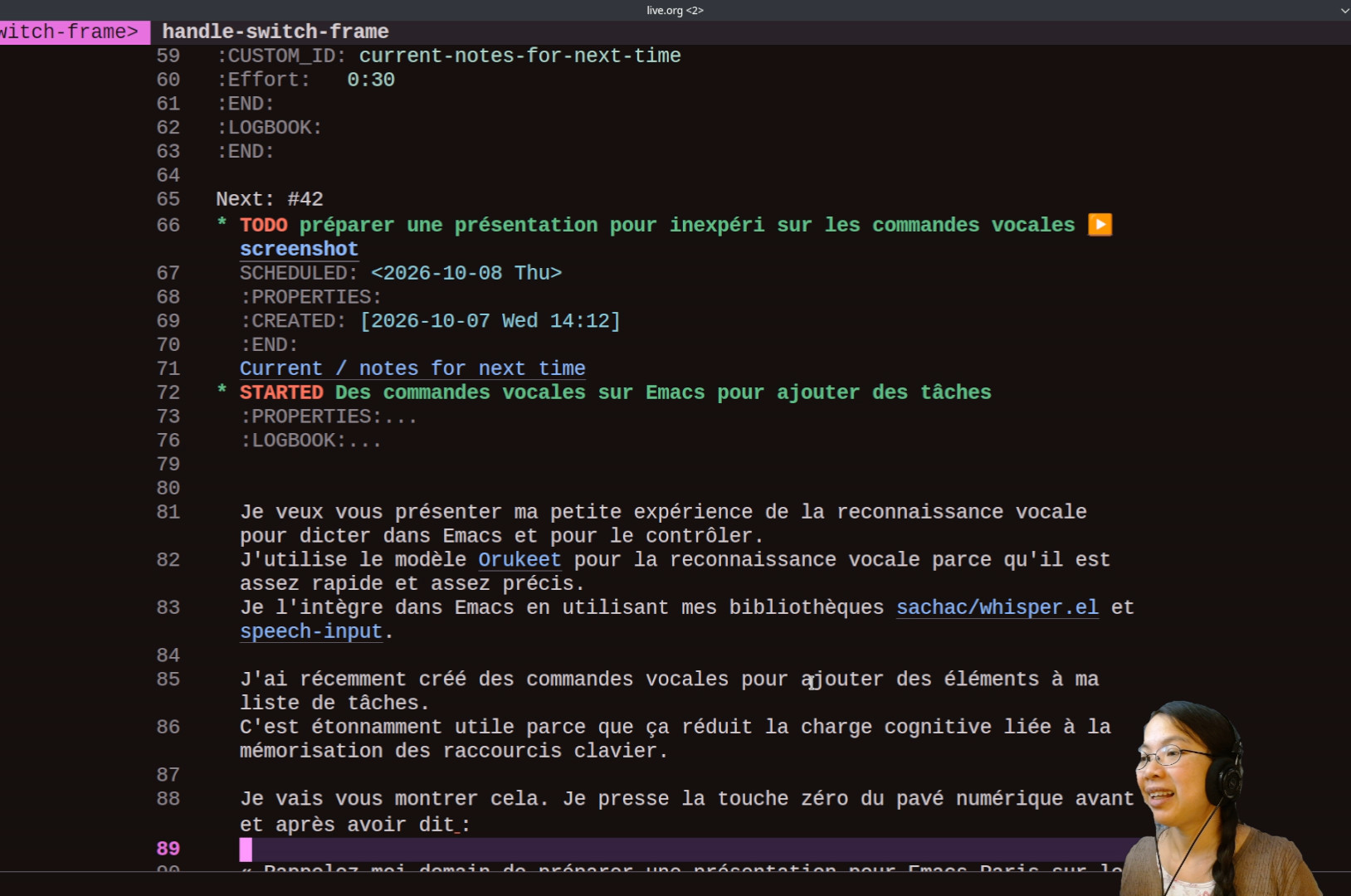 Je presse la touche zéro du pavé numérique avant et après avoir dit « Rappelle-moi demain de préparer une présentation pour Emacs Paris sur les commandes vocales. » La fonction crée une tâche dans ma boîte de réception. La tâche est planifiée pour demain. Il y a un lien vers l'enregistrement
 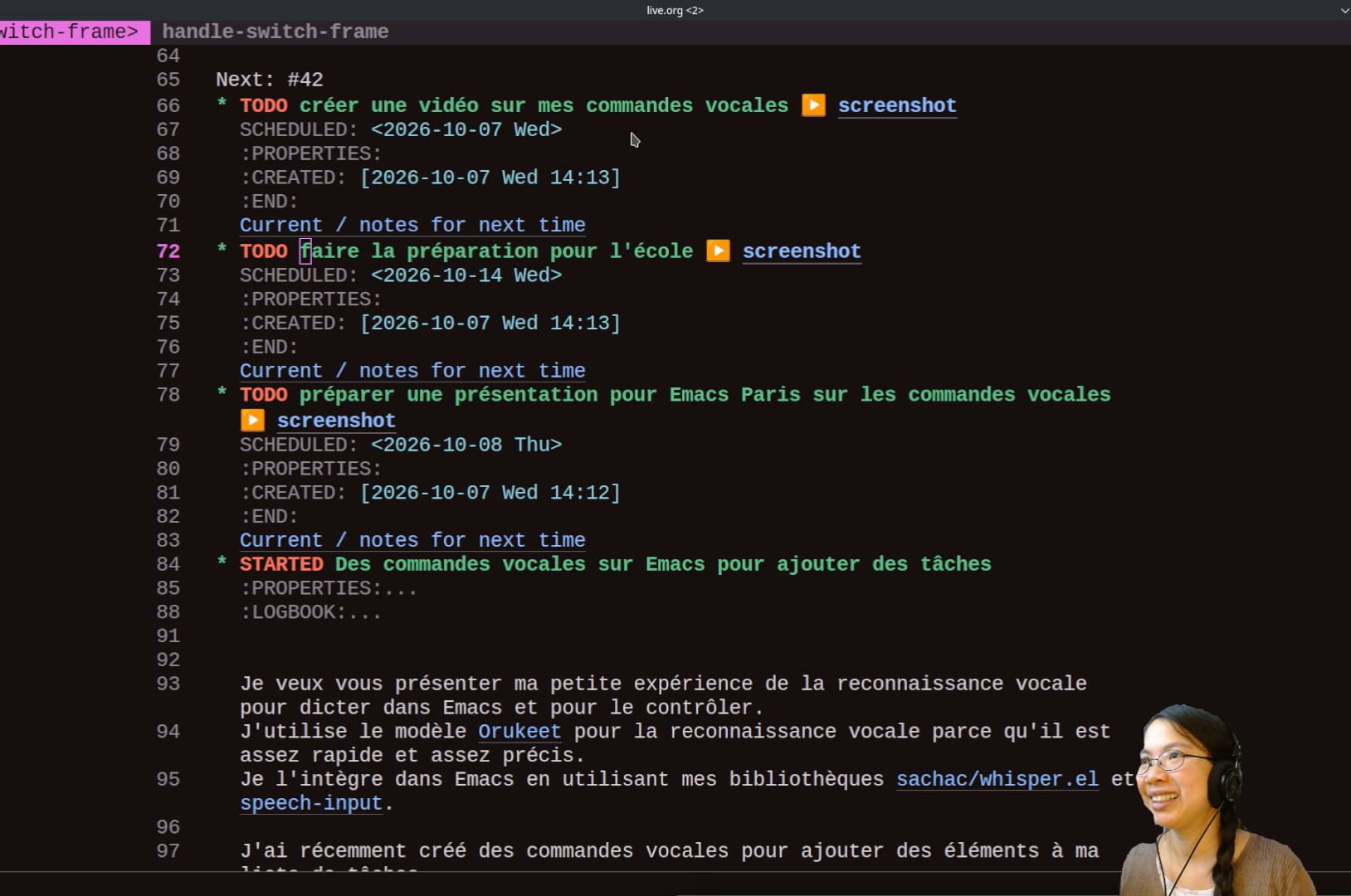 « Rappelez-moi demain de préparer une présentation pour Emacs Paris sur les commandes vocales », la capture d'écran et le contexte de tâche. Ça m'aident si j'ai été mal comprise ou si j'ai besoin de contexte. De la même manière, je peux dire « Rappelle-moi la semaine prochaine de faire la paperasse pour l'école. » « Rappelle-moi aujourd'hui de créer une vidéo sur mes commandes vocales. »
 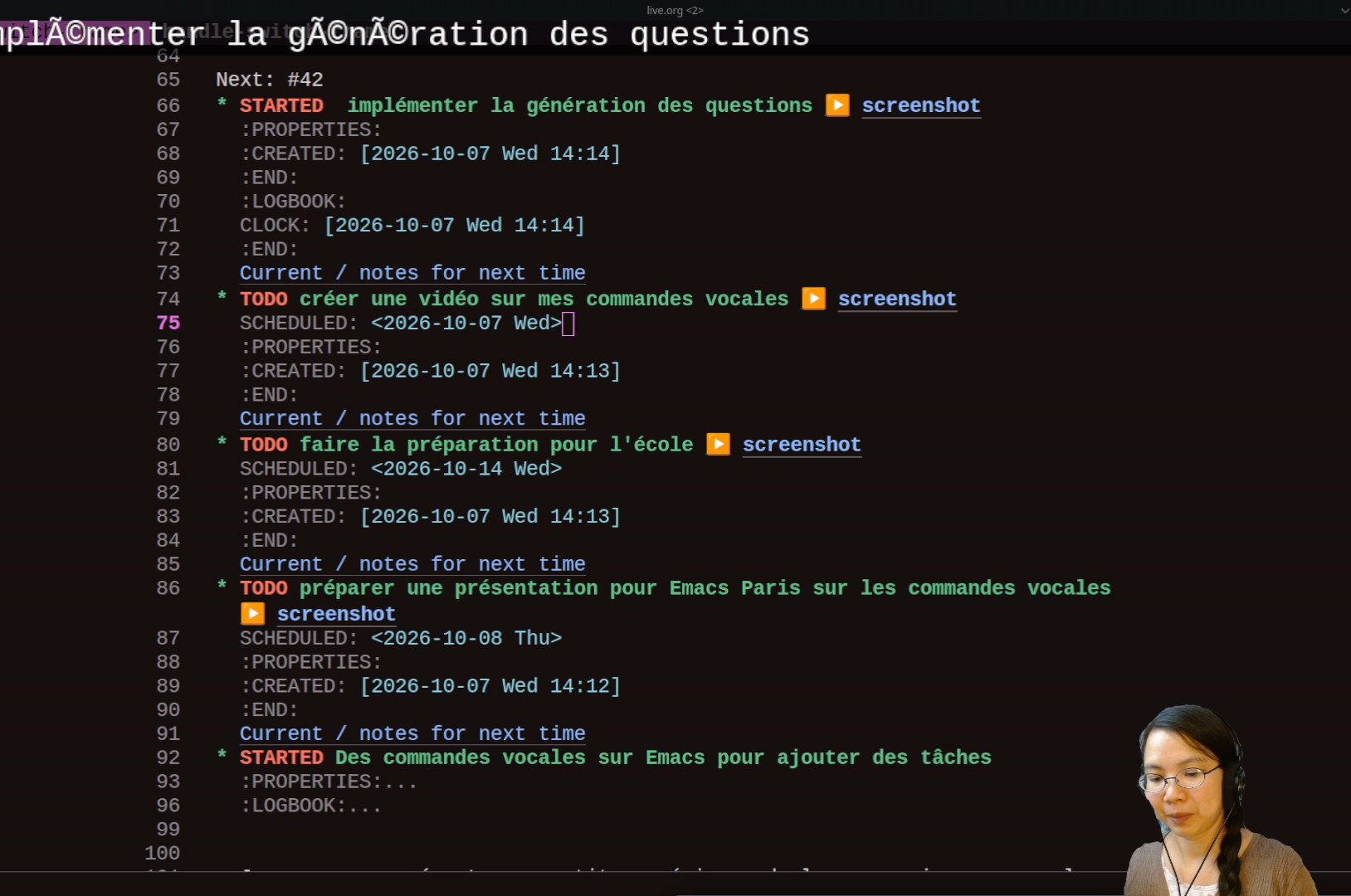 Je peux aussi créer une tâche et déclencher le suivi du temps (ou clock in). Par exemple, je peux dire « Commence à implémenter la génération des questions. »
 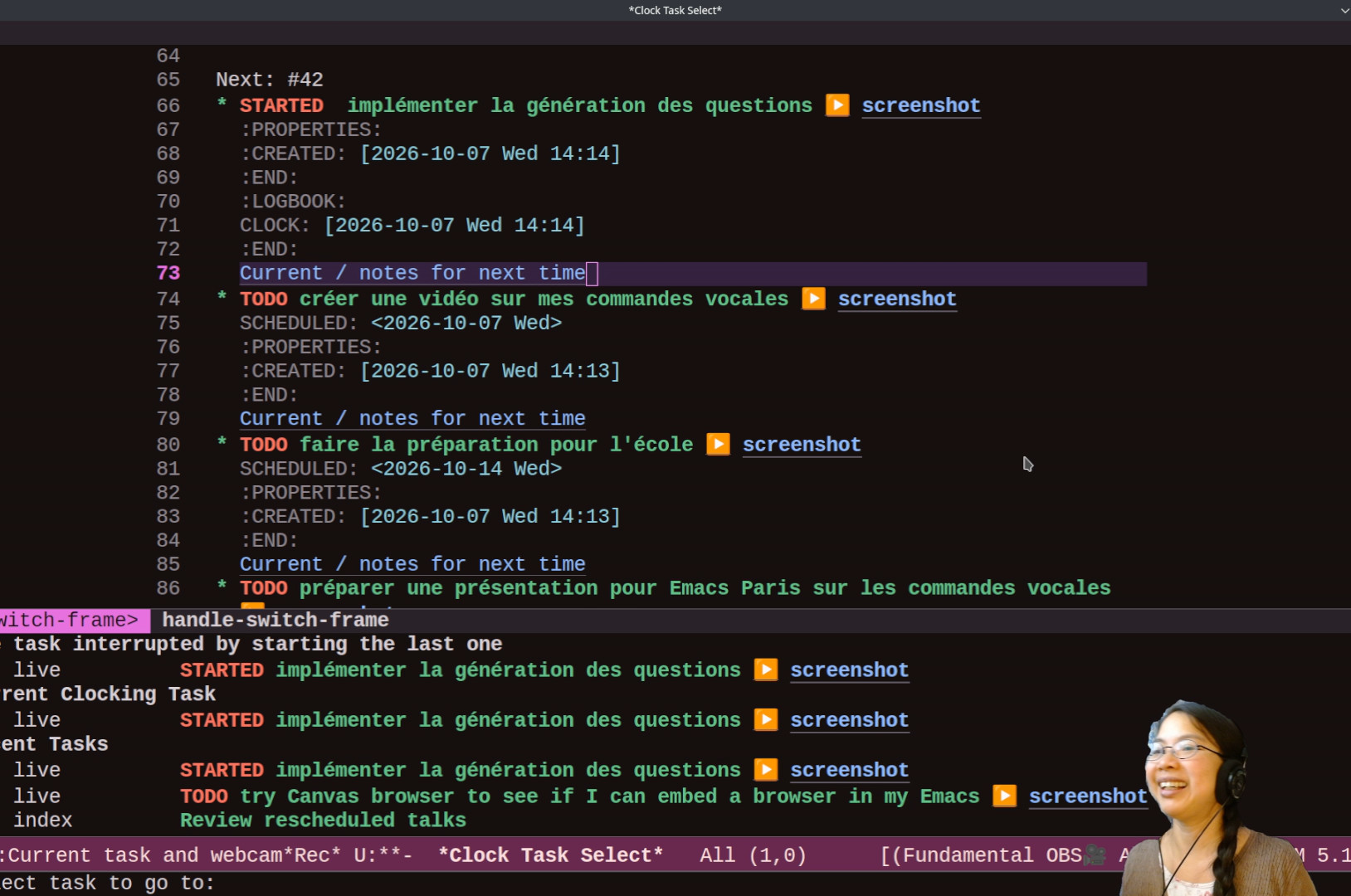 Si je perds le fil de mes pensées : « j'en étais où ? » Ça m'affiche les tâches récentes.
  « Je faisais quoi ? » Ça bascule sur la tâche actuelle. Voilà des commandes vocales pour ajouter des tâches.