I want to see if we can caption EmacsConf live presentations and Q&A
sessions, even if the automated captions need help with misrecognized
words. Now that I can get live speech into Emacs using the Deepgram
streaming API, I can process that information and send it to other
places. Here's a quick demonstration of appending live speech captions
to Etherpad:
I added an emacsconf-pad-append-text function to
emacsconf-pad.el that uses the appendText function.
Audio recording is handy for capturing thoughts as I wait, walk around, or do chores. But my wireless earbuds don't have a good mic, I rarely got back to reviewing the wall of text, and I don't trust speech recognition to catch all my words.
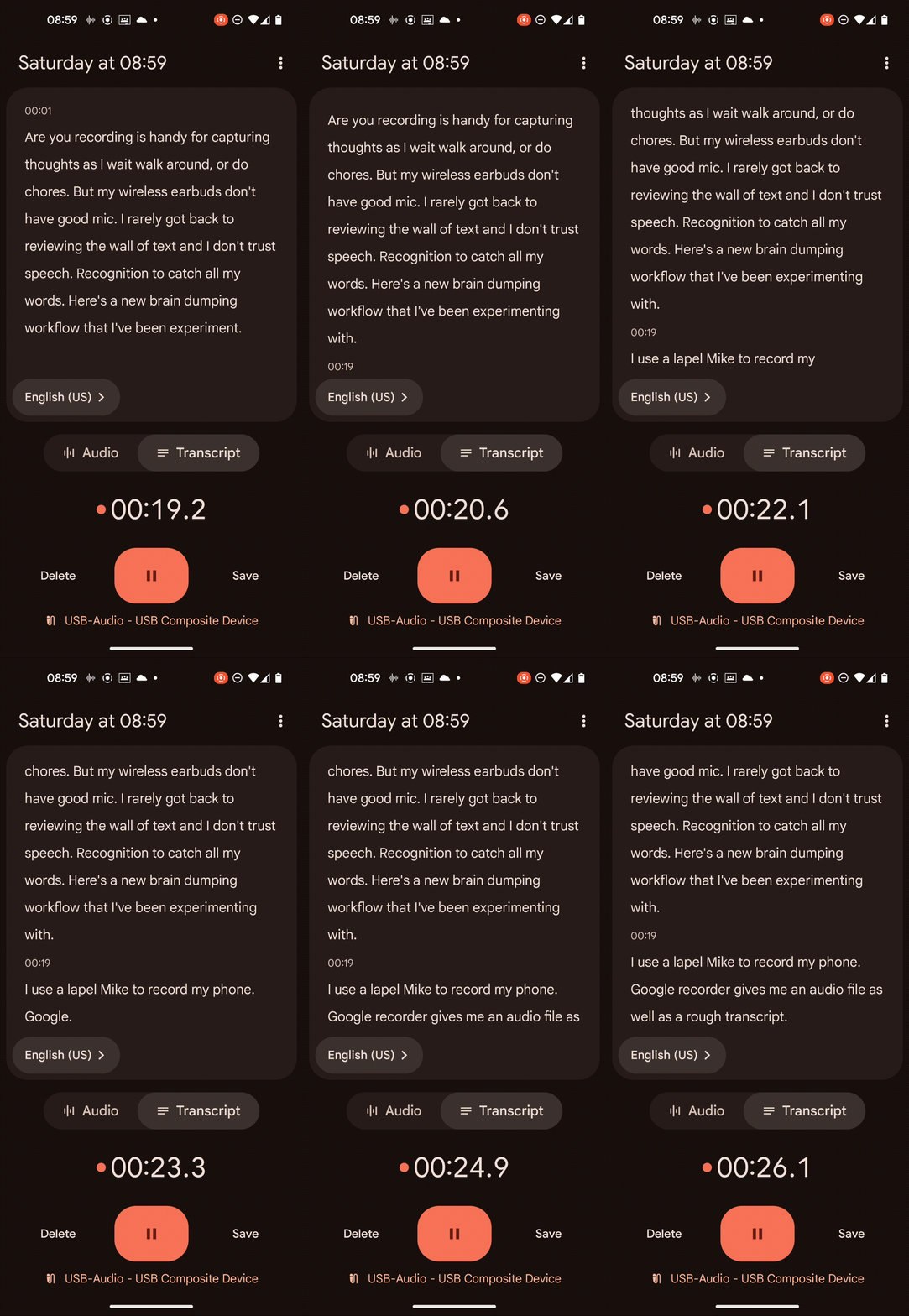
Here's a new brain-dumping workflow that I've been experimenting with, though. I use a lapel mic to record in my phone. Google Recorder gives me an audio file as well as a rough transcript right away.
Animated GIF showing Google Recorder 's real-time transcript
I copy those with Syncthing.
If I use keywords like "start" or "stop" along with things like "topic", "reminder", or "summary", then I can put those on separate lines automatically (my-transcript-prepare-alignment-breaks).
...
News. Miscellaneous little tasks that he doing. I do want to
finish that blog post about the playlist Just so that it's out.
Something else that people can, you know, refer to or that I can refer
to. Uh, And at some point I want to think about, This second brain
stuff.
So, right now, What's my current state? Uh,
START CHAPTER second brain STOP CHAPTER
Right now, I dumped everything into originally. In my inbox, if I come
across an interesting website. As usually in my phone. So then I share
it. As. Something links at those or four none. Uh, into my inbox.
...
I use subed-align to get the timestamps, and add the headings.
00:20:18.680-->00:20:24.679
So, right now, What's my current state? Uh,
NOTE CHAPTER: second brain00:20:24.680-->00:20:30.719
START CHAPTER second brain STOP CHAPTER
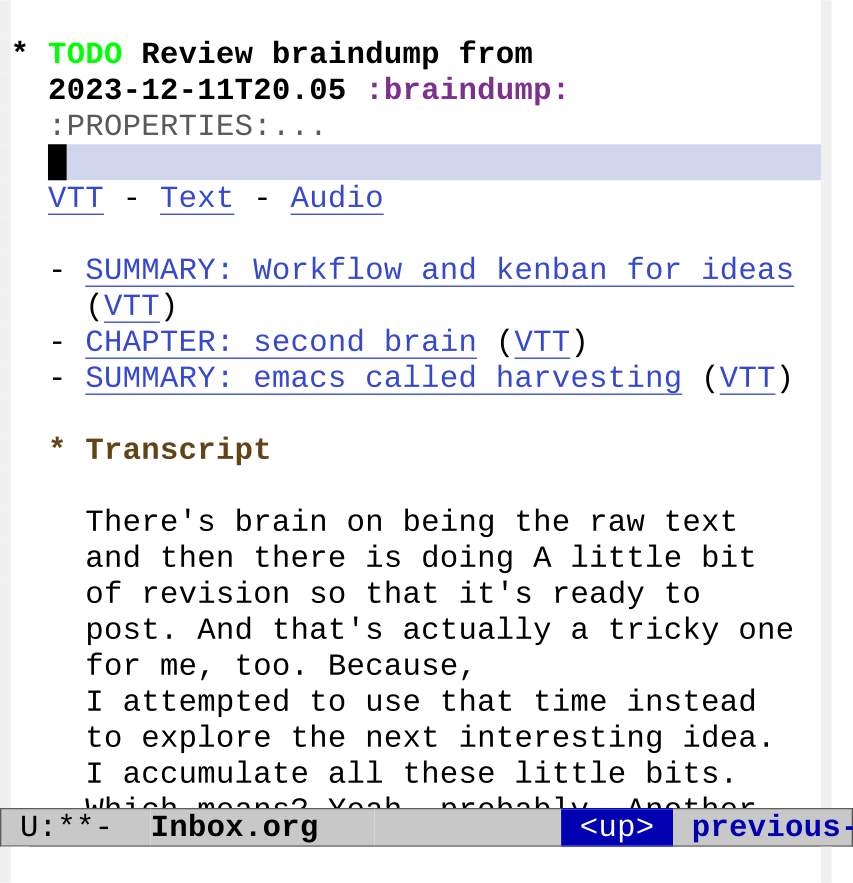
I can then create an Org Mode TODO item with a quick hyperlinked summary as well as my transcript.
Figure 1: Summary with headings and links
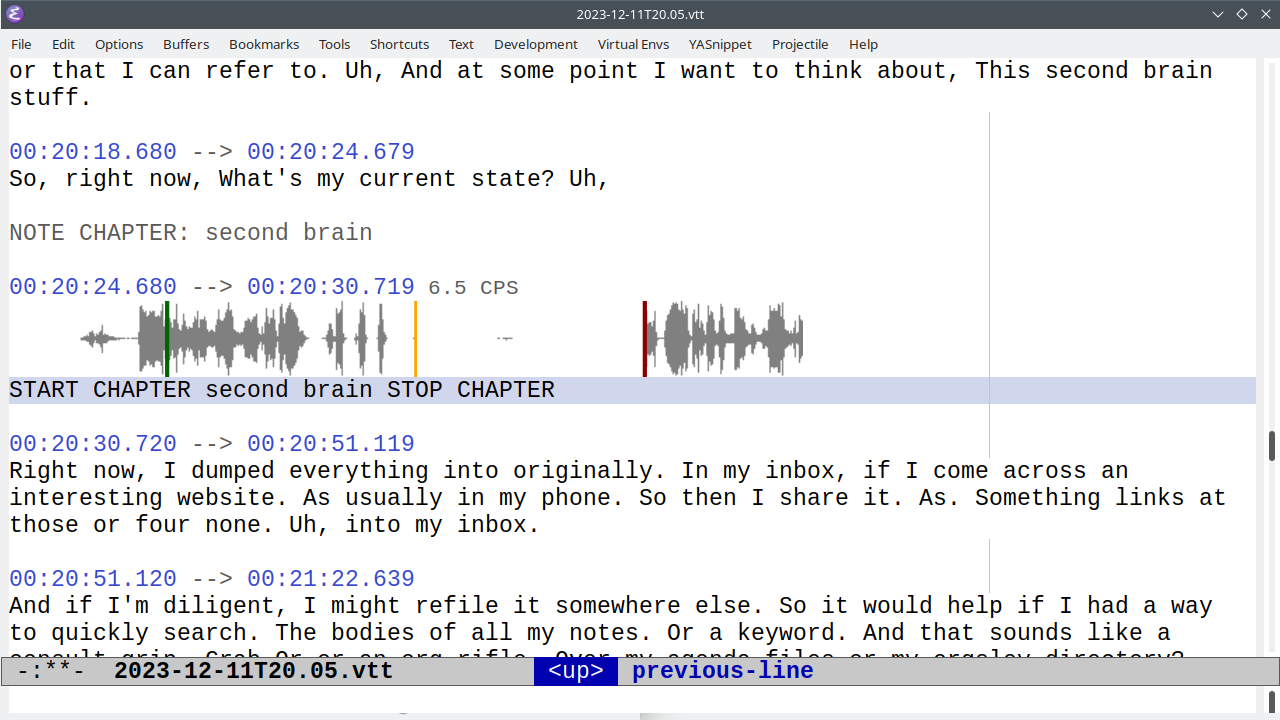
I can jump to the audio if there are misrecognized words.
Screenshot of jumping to the audioFigure 2: Following the link to the chapter in the VTT file
I can use subed-waveform to tweak the start and end times. (subed-waveform-show-current, then left-clicking to set the start or right-clicking to set the end, or using keybindings to adjust the start/stop).
Someday I'll write code to send sections to a better speech
recognition engine or to AI. In the meantime, this is pretty good.
Here's how the code works:
Recognizing keyword phrases
There are several things I want to do while dictating.
I want to mark different topics so that it's easy to find the section where I was talking about something.
I might want to set tags or priorities, or even schedule something (today, tomorrow, next week, next month).
I can also use commands to trigger different things, like sending the section to a better speech recognition engine.
By analyzing the text, I might be able to make my own command system.
So far, for starting keywords, I can use "start", "begin", or "open".
I pair that with one of these part keywords:
"section", "chapter", "topic", "summary": I use these pretty interchangeably at the moment. I want them to make a new Org heading.
"next steps": could be handy for being able to quickly see what to do next
"reminder":
"interruption": don't know what I'll use this for yet, but it might be useful to note this.
"tag", "keyword": maybe use this to add tags to the current section?
Then the code can extract the text until the matching "stop/close/end
<part>", assuming it happens within 50 words or so.
(my-transcript-close-keyword-distance-words)
Sometimes keywords get misrecognized. "Begin summary" sometimes
becomes "again summary" or "the game summary". I could try "open" and
"close". Commercial dictation programs like Dragon NaturallySpeaking
use "open" and "close" for punctuation, so that would probably work
fine. "Start" works well, but "end" doesn't because it can confused
with "and".
Sometimes an extra word sneaks in, either because I say it or because
the speech recognition tries too hard to guess. "Begin reminder" ends
up as "Begin a reminder." I changed from using regular expressions
that searched for just start-keyword + part-keyword to one that looked
for the start of the keyword phrase and then looked for the next
keyword within the next X words. (my-transcript-scan-for-part-keyword)
Recognizing phrases
(defvarmy-transcript-open-keywords'("start""begin""open"))
(defvarmy-transcript-close-keywords'("stop""end""close"))
(defvarmy-transcript-part-keywords'("summary""chapter""topic""section""action""idea""journal""reminder""command""interruption""note""next step""next steps""tags""tag""keywords""keyword"))
(defvarmy-transcript-part-keyword-distance-words 2 "Number of words to scan for part keyword.")
(defvarmy-transcript-close-keyword-distance-words 50 "number of words to scan for stop keyword.Put the keywords on the same line if found.")
(defunmy-transcript-scan-for-part-keyword (before-part &optional part-keywords within-distance before-distance)
"Look for BEFORE-PART followed by PART-KEYWORDS.There might be WITHIN-DISTANCE words between BEFORE-PART and PART-KEYWORDS,and the pair might be within BEFORE-DISTANCE from point.Distances are in words.Return (start end before-part part) if found, nil otherwise."
(setq before-part (pcase before-part
('start my-transcript-open-keywords)
('stop my-transcript-close-keywords)
('nil (append my-transcript-open-keywords my-transcript-close-keywords))
(_ before-part)))
(setq part-keywords (or part-keywords my-transcript-part-keywords))
(when (stringp part-keywords) (setq part-keywords (list part-keywords)))
(setq within-distance (or within-distance my-transcript-part-keyword-distance-words))
(setq before-distance (if (eq before-distance t)
(point-max)
(or before-distance my-transcript-close-keyword-distance-words)))
(let (result
start end
(before-point (save-excursion (forward-word before-distance) (point)))
before-word
part-word)
(save-excursion
(when (looking-at (regexp-opt before-part))
(setq before-word (match-string 0) start (match-beginning 0))
(when (re-search-forward (regexp-opt part-keywords) (save-excursion (forward-word within-distance) (point)) t)
(setq result (list start (match-end 0) before-word (match-string 0)))))
(while (and (not result)
(re-search-forward (regexp-opt before-part) before-point t))
(setq before-word (match-string 0) start (match-beginning 0))
(when (re-search-forward (regexp-opt part-keywords) (save-excursion (forward-word within-distance) (point)) t)
(setq result (list start (match-end 0) before-word (match-string 0)))))
(when result (goto-char (elt result 1)))
result)))
(ert-deftestmy-transcript-scan-for-part-keyword ()
(with-temp-buffer
(insert "some text start a reminder hello world stop there and do something stop reminder more text")
(goto-char (point-min))
(let ((result (my-transcript-scan-for-part-keyword 'start nil)))
(expect (elt result 2) :to-equal"start")
(expect (elt result 3) :to-equal"reminder"))
(let ((result (my-transcript-scan-for-part-keyword 'stop"reminder")))
(expect (elt result 2) :to-equal"stop")
(expect (elt result 3) :to-equal"reminder"))))
Splitting the lines based on keywords and oopses
Now I can use that to scan through the text. I want to put commands on
their own lines so that subed-align will get the timestamp for that
segment and so that the commands are easier to parse.
I also want to detect "oops" and split things up so that the start of
that line matches my correction after the "oops". I use
my-subed-split-oops for that, which I should write about in another
post. By putting the oops fragment on its own line, I can use
subed-align to get a timestamp for just that segment. Then I can
either use flush-lines to get rid of anything with "oops" in it. I
can even remove the subtitle and use subed-record-compile-media to
compile audio/video without that segment, if I want to use the audio
without rerecording it.
And the way I can help is by jotting words down in a mind map,
typing her sentences. Oops
typing, her sentences And generating, follow-up questions.
I also all-caps the keyword phrases so that they're easier to see when
skimming the text file.
Alignment breaks
(defunmy-transcript-prepare-alignment-breaks ()
"Split lines in preparation for forced alignment with aeneas.Split \"oops\" so that it's at the end of the line and theprevious line starts with roughly the same words as the nextline, for easier removal.Add a linebreak before \"begin/start\" followed by`my-transcript-part-keywords'.Add a linebreak after \"stop\" followed by`my-transcript-part-keywords'.Look for begin keyword ... stop keyword with at most`my-transcript-part-keyword-distance-words' between them and put them on oneline."
(interactive)
(let ((case-fold-search t) result close-result)
(my-split-oops)
;; break "begin/start keyword"
(goto-char (point-min))
(while (setq result (my-transcript-scan-for-part-keyword 'start nil nil t))
(goto-char (car result))
(delete-region (car result) (elt result 1))
(insert "\n" (upcase (concat (elt result 2) " " (elt result 3))) "\n"))
;; break stop
(goto-char (point-min))
(while (setq result (my-transcript-scan-for-part-keyword 'stop nil nil t))
(goto-char (car result))
(delete-region (car result) (elt result 1))
(insert (upcase (concat (elt result 2) " " (elt result 3))) "\n"))
;; try to get start and end sections on one line
(goto-char (point-min))
(while (setq result (my-transcript-scan-for-part-keyword 'start nil nil t))
(goto-char (elt result 1))
(setq stop-result (my-transcript-scan-for-part-keyword 'stop (elt result 3)))
(if stop-result
(progn
(goto-char (car stop-result))
(while (re-search-backward " *\n+ *" (car result) t)
(replace-match " ")))
;; no stop keyword; are we on an empty line? If so, just merge it with the next one
(when (looking-at "\n+ *")
(replace-match " "))))
;; remove empty lines
(goto-char (point-min))
(when (looking-at "\n+") (replace-match ""))
(while (re-search-forward "\n\n+" nil t)
(replace-match "\n"))
(goto-char (point-min))
(while (re-search-forward " *\n *" nil t)
(replace-match "\n"))))
(ert-deftestmy-transcript-prepare-alignment-breaks ()
(with-temp-buffer
(insert "some text start a reminder hello world stop there and do something stop reminder more text")
(goto-char (point-min))
(my-transcript-prepare-alignment-breaks)
(expect (buffer-string) :to-equal"some textSTART REMINDER hello world stop there and do something STOP REMINDERmore text")))
Preparing the VTT subtitles
subed-align gives me a VTT subtitle file with timestamps and text. I
add NOTE comments with the keywords and make subed: links to the
timestamps using the ol-subed.el that I just added.
Putting keyword phrases in comments
(defunmy-transcript-get-subtitle-note-based-on-keywords (sub-text)
(let ((case-fold-search t))
(when (string-match (concat "^"
(regexp-opt my-transcript-open-keywords)
" \\(" (regexp-opt my-transcript-part-keywords) "\\)\\(.+?\\)\\( "
(regexp-opt my-transcript-close-keywords) " "
(regexp-opt my-transcript-part-keywords) "\\)?$")
sub-text)
(concat (match-string 1 sub-text) ": " (match-string 2 sub-text)))))
(ert-deftestmy-transcript-get-subtitle-note-based-on-keywords ()
(expect (my-transcript-get-subtitle-note-based-on-keywords "BEGIN NEXT STEPS . Think about how dictation helps me practice slower speed. CLOSE NEXT STEPS")
:to-equal"NEXT STEPS: . Think about how dictation helps me practice slower speed.")
(expect (my-transcript-get-subtitle-note-based-on-keywords "START SUMMARY hello world STOP SUMMARY")
:to-equal"SUMMARY: hello world")
(expect (my-transcript-get-subtitle-note-based-on-keywords "START CHAPTER hello world again")
:to-equal"CHAPTER: hello world again")
)
Formatting the subtitles into Org Mode subtrees
The last step is to take the list of subtitles and format it into the subtree.
Formatting the subtree
;; todo: sort the completion? https://emacs.stackexchange.com/questions/55502/list-files-in-directory-in-reverse-order-of-date;;
(defunmy-transcript-insert-subtitles-as-org-tree (vtt-filename)
(interactive (list (read-file-name "VTT: " (expand-file-name "./" my-phone-recording-dir) nil t nil
(lambda (s) (string-match "\\.vtt$" s)))))
(let* ((subtitles
(mapcar (lambda (sub)
(unless (elt sub 4)
(setf (elt sub 4)
(my-transcript-get-subtitle-note-based-on-keywords (elt sub 3))))
sub)
(subed-parse-file vtt-filename)))
(start-date (my-transcript-get-file-start-time vtt-filename))
chapters tags
start-of-entry)
(setq start-of-entry (point))
(insert (format "* TODO Review braindump from %s :braindump:\n\n" (file-name-base vtt-filename)))
(org-entry-put (point) "CREATED"
(concat "[" (format-time-string
(cdr org-timestamp-formats)
(my-transcript-get-file-start-time
(file-name-nondirectory vtt-filename))) "]"))
(insert
(format "%s - %s - %s\n"
(org-link-make-string (concat "file:" (file-name-sans-extension vtt-filename) ".vtt")
"VTT")
(org-link-make-string (concat "file:" (file-name-sans-extension vtt-filename) ".txt")
"Text")
(org-link-make-string (concat "file:" (file-name-sans-extension vtt-filename) ".m4a")
"Audio")))
(save-excursion
(insert "** Transcript\n")
;; add each subtitle; add an ID in case we change the title
(mapc
(lambda (sub)
(when (elt sub 4)
(let ((note (my-transcript-get-subtitle-note-based-on-keywords (elt sub 3))))
(insert (concat "*** "
note " "
(org-link-make-string
(format "subed:%s::%s"
vtt-filename
(my-msecs-to-timestamp (elt sub 1)))
"VTT")
"\n\n"))
(org-entry-put (point) "CREATED"
(concat "[" (format-time-string
(cdr org-timestamp-formats)
(time-add start-date
(seconds-to-time (/ (elt sub 1) 1000.0)))) "]"))
(org-entry-put (point) "START" (my-msecs-to-timestamp (elt sub 2)))
(when (elt sub 4)
(when (string-match "command: .*recognize" (elt sub 4))
(save-excursion;; TODO: scope this to just the section someday
(goto-char start-of-entry)
(org-set-tags (append (list "recognize") (org-get-tags)))))
(when (string-match "command: .*outline" (elt sub 4))
(save-excursion
(goto-char start-of-entry)
(org-set-tags (append (list "outline") (org-get-tags)))))
(when (string-match "^time" (elt sub 4))
(insert "[" (org-format-time-string (cdr org-timestamp-formats)
(time-add start-date (seconds-to-time (/ (elt sub 1) 1000))))
"]\n"))
(when (string-match "command: .+\\(high\\|low\\)" (elt sub 4))
(save-excursion
(goto-char start-of-entry)
(org-priority (if (string= (downcase (match-string 1)) "high") ?A ?C))))
(when (string-match "\\(?:tags?\\|keywords?\\): \\(.+\\)" (elt sub 4))
(save-excursion
(goto-char start-of-entry)
(org-set-tags (append (split-string (match-string 1) " ") (org-get-tags))))))
(add-to-list 'chapters
(format "- %s (%s)"
(org-link-make-string (concat "id:" (org-id-get-create))
note)
(org-link-make-string
(format "subed:%s::%s"
vtt-filename
(my-msecs-to-timestamp (elt sub 1)))
"VTT")))))
(insert (elt sub 3) "\n"))
subtitles))
(when chapters
(insert (string-join (nreverse chapters) "\n") "\n"))))
(defunmy-transcript-get-file-start-time (filename)
(setq filename (file-name-base filename))
(cond
((string-match "^\\([0-9][0-9][0-9][0-9]-[0-9][0-9]-[0-9][0-9]T[0-9][0-9]\\.[0-9][0-9]\\)" filename)
(date-to-time (replace-regexp-in-string "\\."":" (match-string 0 filename))))
((string-match "^\\(?:Copy of \\)?\\([^ ][^ ][^ ]\\)[^ ]+ at \\([0-9]+\\)-\\([0-9]+\\)" filename)
(let* ((day (match-string 1 filename))
(hour (match-string 2 filename))
(min (match-string 3 filename))
(changed-time (file-attribute-modification-time
(file-attributes filename)))
(decoded-time (decode-time changed-time)))
;; get the day on or before changed-time
(if (string= (format-time-string "%a" changed-time) day)
(encode-time (append
(list
0
(string-to-number min)
(string-to-number hour))
(seq-drop decoded-time 3)))
;; synchronized maybe within the week after
(org-read-date t t (concat "-" day " " hour ":" min)))))))
Process a single transcript from the raw text file
So now we put that all together: rename the file using the calculated
start time, prepare the alignment breaks, align the file to get the
timestamps, and add the subtree to an Org file.
It would be nice to have it automatically keep track of the latest one
that's been processed, maybe via customize-save-variable. This still
needs some tinkering with.
[2023-12-26 Tue]: Reorganized code to call a list of functions and pass the recognition results. Added Etherpad. Took out the mode; will just use the functions. Related: getting live speech from Emacs into Etherpad
This is a quick demonstration of using Deepgram's streaming API to do
speech recognition live. It isn't as accurate as OpenAI Whisper but
since Whisper doesn't have a streaming API, it'll do for now. I can
correct misrecognized words manually. I tend to talk really quickly,
so it displays the words per minute in my modeline. I put the words
into an Org Mode buffer so I can toggle headings with avy and cycle
visibility. When I'm done, it saves the text, JSON, and WAV for
further processing. I think it'll be handy to have a quick way to take
live notes during interviews or when I'm thinking out loud. Could be
fun!
I'm still getting some weirdness when the mode turns on when I don't
expect it, so that's something to look into. Maybe I won't use it as a
mode for now. I'll just use my-live-speech-start and
my-live-speech-stop.
General code
(defvarmy-live-speech-buffer"*Speech*")
(defvarmy-live-speech-process nil)
(defvarmy-live-speech-output-buffer"*Speech JSON*")
(defvarmy-live-speech-functions'(my-live-speech-display-in-speech-buffer
my-live-speech-display-wpm
my-live-speech-append-to-etherpad)
"Functions to call with one argument, the recognition results.")
(defunmy-live-speech-start ()
"Turn on live captions."
(interactive)
(with-current-buffer (get-buffer-create my-live-speech-buffer)
(unless (process-live-p my-live-speech-process)
(let ((default-directory "~/proj/deepgram-live"))
(message "%s" default-directory)
(with-current-buffer (get-buffer-create my-live-speech-output-buffer)
(erase-buffer))
(setq my-live-speech-recent-words nil
my-live-speech-wpm-string "READY ")
(setq my-deepgram-process
(make-process
:command'("bash""run.sh")
:name"speech":filter'my-live-speech-json-filter:sentinel#'my-live-speech-process-sentinel:buffer my-live-speech-output-buffer)))
(org-mode))
(display-buffer (current-buffer))))
(defunmy-live-speech-stop ()
(interactive)
(if (process-live-p my-live-speech-process)
(kill-process my-live-speech-process))
(setq my-live-speech-wpm-string nil))
;; (define-minor-mode my-live-speech-mode;; "Show live speech and display WPM.;; Need to check how to reliably turn this on and off.";; :global t :group 'sachac;; (if my-live-speech-mode;; (my-live-speech-start);; (my-live-speech-stop);; (setq my-live-speech-wpm-string nil)));; based on subed-mpv::client-filter
(defunmy-live-speech-handle-json (line-object)
"Process the JSON object in LINE."
(run-hook-with-args 'my-live-speech-functions (json-parse-string line :object-type'alist)))
(defunmy-live-speech-process-sentinel (proc event)
(when (string-match "finished" event)
(my-live-speech-stop)
;(my-live-speech-mode -1)
))
(defunmy-live-speech-json-filter (proc string)
(when (buffer-live-p (process-buffer proc))
(with-current-buffer (process-buffer proc)
(let* ((proc-mark (process-mark proc))
(moving (= (point) proc-mark)))
;; insert the output
(save-excursion
(goto-char proc-mark)
(insert string)
(set-marker proc-mark (point)))
(if moving (goto-char proc-mark))
;; process and remove all complete lines of JSON (lines are complete if ending with \n)
(let ((pos (point-min)))
(while (progn (goto-char pos)
(end-of-line)
(equal (following-char) ?\n))
(let* ((end (point))
(line (buffer-substring pos end)))
(delete-region pos (+ end 1))
(with-current-buffer (get-buffer my-live-speech-buffer)
(my-live-speech-handle-json line)))))))))
# Based on streaming-test-suite# https://developers.deepgram.com/docs/getting-started-with-the-streaming-test-suiteimport pyaudio
import asyncio
import json
import os
import websockets
from datetime import datetime
import wave
import sys
startTime= datetime.now()
key= os.environ['DEEPGRAM_API_KEY']
live_json= os.environ.get('LIVE_CAPTIONS_JSON', True)
all_mic_data= []
all_transcripts= []
all_words= []
FORMAT= pyaudio.paInt16
CHANNELS= 1
RATE= 16000
CHUNK= 8000
audio_queue= asyncio.Queue()
REALTIME_RESOLUTION= 0.250
SAMPLE_SIZE= 0
defsave_info():
global SAMPLE_SIZE
base= startTime.strftime('%Y%m%d%H%M')
wave_file_path= os.path.abspath(f"{base}.wav")
wave_file= wave.open(wave_file_path, "wb")
wave_file.setnchannels(CHANNELS)
wave_file.setsampwidth(SAMPLE_SIZE)
wave_file.setframerate(RATE)
wave_file.writeframes(b"".join(all_mic_data))
wave_file.close()
withopen(f"{base}.txt", "w") as f:
f.write("\n".join(all_transcripts))
withopen(f"{base}.json", "w") as f:
f.write(json.dumps(all_words))
if live_json:
print(f'{{"msg": "🟢 Saved to {base}.txt , {base}.json , {base}.wav", "base": "{base}"}}')
else:
print(f"🟢 Saved to {base}.txt , {base}.json , {base}.wav")
# Used for microphone streaming only.defmic_callback(input_data, frame_count, time_info, status_flag):
audio_queue.put_nowait(input_data)
return (input_data, pyaudio.paContinue)
async defrun(key, method="mic", format="text", **kwargs):
deepgram_url= f'wss://api.deepgram.com/v1/listen?punctuate=true&smart_format=true&utterances=true&encoding=linear16&sample_rate=16000'async with websockets.connect(
deepgram_url, extra_headers={"Authorization": "Token {}".format(key)}
) as ws:
async defsender(ws):
try:
whileTrue:
mic_data=await audio_queue.get()
all_mic_data.append(mic_data)
await ws.send(mic_data)
except websockets.exceptions.ConnectionClosedOK:
await ws.send(json.dumps({"type": "CloseStream"}))
if live_json:
print('{"msg": "Closed."}')
else:
print("Closed.")
async defreceiver(ws):
global all_words
"""Print out the messages received from the server."""first_message=Truefirst_transcript=Truetranscript=""async for msg in ws:
res= json.loads(msg)
if first_message:
first_message=Falsetry:
# handle local server messagesif res.get("msg"):
if live_json:
print(json.dumps(res))
else:
print(res["msg"])
if res.get("is_final"):
transcript= (
res.get("channel", {})
.get("alternatives", [{}])[0]
.get("transcript", "")
)
if transcript !="":
if first_transcript:
first_transcript=Falseif live_json:
print(json.dumps(res.get("channel", {}).get("alternatives", [{}])[0]))
else:
print(transcript)
all_transcripts.append(transcript)
all_words= all_words + res.get("channel", {}).get("alternatives", [{}])[0].get("words", [])
# if using the microphone, close stream if user says "goodbye"if method =="mic"and"goodbye"in transcript.lower():
await ws.send(json.dumps({"type": "CloseStream"}))
if live_json:
print('{"msg": "Done."}')
else:
print("Done.")
# handle end of streamif res.get("created"):
save_info()
exceptKeyError:
print(f"🔴 ERROR: Received unexpected API response! {msg}")
# Set up microphone if streaming from micasync defmicrophone():
audio= pyaudio.PyAudio()
stream= audio.open(
format=FORMAT,
channels=CHANNELS,
rate=RATE,
input=True,
frames_per_buffer=CHUNK,
stream_callback=mic_callback,
)
stream.start_stream()
global SAMPLE_SIZE
SAMPLE_SIZE= audio.get_sample_size(FORMAT)
while stream.is_active():
await asyncio.sleep(0.1)
stream.stop_stream()
stream.close()
functions= [
asyncio.ensure_future(sender(ws)),
asyncio.ensure_future(receiver(ws)),
]
functions.append(asyncio.ensure_future(microphone()))
if live_json:
print('{"msg": "Ready."}')
else:
print("🟢 Ready.")
await asyncio.gather(*functions)
defmain():
"""Entrypoint for the example."""# Parse the command-line arguments.try:
asyncio.run(run(key, "mic", "text"))
except websockets.exceptions.InvalidStatusCode as e:
print(f'🔴 ERROR: Could not connect to Deepgram! {e.headers.get("dg-error")}')
print(
f'🔴 Please contact Deepgram Support (developers@deepgram.com) with request ID {e.headers.get("dg-request-id")}' )
returnexcept websockets.exceptions.ConnectionClosedError as e:
error_description= f"Unknown websocket error."print(
f"🔴 ERROR: Deepgram connection unexpectedly closed with code {e.code} and payload {e.reason}" )
if e.reason =="DATA-0000":
error_description="The payload cannot be decoded as audio. It is either not audio data or is a codec unsupported by Deepgram."elif e.reason =="NET-0000":
error_description="The service has not transmitted a Text frame to the client within the timeout window. This may indicate an issue internally in Deepgram's systems or could be due to Deepgram not receiving enough audio data to transcribe a frame."elif e.reason =="NET-0001":
error_description="The service has not received a Binary frame from the client within the timeout window. This may indicate an internal issue in Deepgram's systems, the client's systems, or the network connecting them."print(f"🔴 {error_description}")
# TODO: update with link to streaming troubleshooting page once available# print(f'🔴 Refer to our troubleshooting suggestions: ')print(
f"🔴 Please contact Deepgram Support (developers@deepgram.com) with the request ID listed above." )
returnexcept websockets.exceptions.ConnectionClosedOK:
returnexceptExceptionas e:
print(f"🔴 ERROR: Something went wrong! {e}")
save_info()
returnif__name__=="__main__":
sys.exit(main() or 0)
The Python script sends the microphone stream to Deepgram and prints
out the JSON output. The Emacs Lisp code starts an asynchronous
process and reads the JSON output, displaying the transcript and
calculating the WPM based on the words. run.sh just loads the venv for
this project (requirements.txt based on the streaming text suite) and
then runs app.py, since some of the Python library versions conflict
with other things I want to experiment with.
I also added
my-live-speech-wpm-string to my mode-line-format manually using
Customize, since I wanted it displayed on the left side instead of
getting lost when I turn keycast-mode on.
I'm still a little anxious about accidentally leaving a process
running, so I check with ps aux | grep python3. Eventually I'll
figure out how to make sure everything gets properly stopped when I'm
done.