0:00 Linux is the library that Emacs uses to talk to my hardware
Sacha: At the moment, Linux is the library that Emacs uses to talk to my hardware. 0:05 Highlight: AI churn
Sacha: I'm going to sit out all the AI churn. I'll figure that out. And then I will check back in next year, a couple of years, maybe never, and see if there's anything else I can help with. 0:17 Highlight: Maybe your editor makes you grumpy
Sacha: Hypothesis number two. Maybe your editor makes you grumpy. 0:21 Highlight: Words are hard
Sacha: Turns out I cannot say start streaming reliably. Sometimes I say start screaming. 0:26 Highlight: shelling out to Emacs from Vim
Sacha: And the guy hemmed and hawed and eventually admitted that he had actually shelled out the Emacs to run the code and evaluate it and then get the image, get the layout back and then put it in Vim. 0:39 Highlight: My husband
Sacha: I came here for my masters and stuck around because of my husband who is coincidentally a Neovim user. 0:46 Highlight: automation
Sacha: I find myself automating things that really aren't technically justified by how often I do it, but because all those little bits of code add up and they become useful in a combinatorial way. 1:00 Highlight: Thumbnail: my daughter rates it 0 out of 5
Sacha: So you got like a zero out of five. Linkarzu: A zero out of five. And it's one of my favorite ones, Sacha, come on. 1:14 Sacha's idea for monitoring six EmacsConf calls at once
Sacha: In fact, I have EmacsConf coming up, right? And sometimes we get to the point of having six simultaneous conversations. I might have to actually monitor all of them. So I'm thinking of making myself a little overlay that lets me tab to the different web conferences and then do something fancy with the audio stream so I can isolate it and maybe have some speech recognition running on all of them in the background so that if somebody says, "Help, Sacha!", I can just pop them right up. Linkarzu: Oh yeah, quite interesting. So I don't like doing an intro and all of that stuff, so thank you for being here. Sacha, this is the first time that you've been on the channel, right? Sacha: Yeah, yeah. I mean, you've had plenty of time, so you've certainly crossed over into the Emacs community and things like that. But I'm not sure, am I the oldest Emacs user you've had so far? Linkarzu: The Professor, he's like 80 years old. But you're not talking about age, your age, but you're talking about Emacs, right? Sacha: [He would] definitely have been using it for longer than I am. I'm a relative newbie compared to those folks, right? Linkarzu: No, I was just playing. I always play that he's like 80 years old, but no, he's not. You know the Professor by any chance? Sacha: I came across some of your videos with him. Linkarzu: Okay. That is why I found out about you. Because he was like, you should check Sacha Chua's blog. And I was like, who is Sacha? You know, because I knew Prot, I knew, you know, the system crafters, DistroTube, stuff like that. But he is the one that mentioned Sacha. And I was like, okay... How do you pronounce your name, by the way? Is it Sacha? Sacha? Am I saying it wrong? Sacha: Sacha Chua. Linkarzu: Sacha Chua. Okay, okay. So, the professor is definitely not 80. 3:07 frazzor749
Linkarzu: You see what frazzor749... frazzor749 is an Emacs user, the guy in chat there. Sacha: Oh yeah! Yeah, yeah, frazzor749. Linkarzu: I'm going to convert him to Neovim. Sacha: No, he's been helping me with French. Leave him alone. He's mine. Linkarzu: Okay, you know him? You know him? Sacha: Hands off. 3:27 Intro
Linkarzu: Okay, let me just play a little video of what I know about you. You're going to see it in the background. It's going to be a little bit confusing, okay? But this is just so that people have a little bit of context on who Sacha is, okay? Sacha: I'll try not to laugh too much. Linkarzu: Okay, so what do I know about Sacha? She has a YouTube channel. You have close to 5000 subscribers, right? Also, you have a blog, which is pretty popular out there. You do EmacsConf, which I don't know what it is. I'm curious to hear about it a little bit more. And I've seen your livestreams. I've seen that you speak in French. So I'm like, is French her main language? Is English her main language? You've been doing Emacs for, you mentioned, 25 years. Is that right? Sacha: Yeah, it's about... Linkarzu: Okay, okay. And I heard about you because of the professor. He mentioned your blog in one of the live streams we had. And I think that's about it. I don't know, like, a lot more. And that's what this call is for, you know, to get to know you a little bit more. Like, on the Neovim side of things, I don't know if a lot of people know you. On the Emacs side of things, you seem to be pretty popular. So... You want to share a little bit about you. Like, who is Sacha? You can share your screen if you want. You can share your blog post if you have some notes or something like that. It's up to you. Sacha: I think you've already covered all the basics. 5:07 Weekly news
Sacha: I've been enjoying playing around with Emacs for the past 25 years and I love putting together a weekly newsletter. I'm going to try to convince you or someone in your community to put together a newsletter like that for Vim because it's such a great way to come across all the interesting things that people are sharing. 5:27 EmacsConf
Sacha: Because I also want to encourage people to get cool demos out of their head and off their computers and into a form other people can watch. I help organize EmacsConf, which is a yearly Emacs party. We're just sharing the cool things that we've come up with and meeting people with similar interests. It's all online. And then I get to turn all of those into captions so that people can search them afterwards. It's a lot of fun. Linkarzu: Is it like a live stream? Is it like a video thing? Or what is it? Sacha: Yeah, we're live streaming on December 12 and 13. We have two days of two tracks. That's how much people want to talk about Emacs. It's kind of like NeovimConf, except we actually run everything on time. Linkarzu: Oh! Who copied who? Did you copy Neovim or Neovim copied? Sacha: No, this iteration has been since 2019. The first one was in 2013. So this one's been running since 2019 completely online and completely free. Linkarzu: And where can we watch it? Is it in your channel or is there an official YouTube channel? Sacha: All right. So we have like this whole thing, right? It can be watched using entirely free and open source software. If you go to https://emacsconf.org, you can find all the details. So people can watch it using MPV or VLC or whatever. We'll stream it over Icecast. But of course, since a lot of people come through YouTube, I'll also restream it through the EmacsConf channel. Linkarzu: Oh, so it has a YouTube channel, EmacsConf. Sacha: Yes, which we don't actually talk about much, but if you search for it, you'll find it. Linkarzu: Where is it? Is it here? Sacha: I do not need to tell you how to use YouTube to search for things. Linkarzu: Oh! Oh, man. Okay. Let me see. Sacha: Now that it's possible to use Canvas inside Emacs to play things, people have been playing Doom in Emacs. I'm pretty sure someone could probably write a player to watch EmacsConf from within Emacs, which I think would be super cool. Linkarzu: Oh, really? Okay, it's crazy. I think, well, people have been playing Doom on Neovim. Like, we won that one, I think. Okay, let me see. EmacsConf, so it has its own YouTube channel. So, okay. This is all the previous events, right? Interesting. Sacha: Yeah, those are my notes and how it's run. It's surprising... Going back to Neovim... There was a NeovimConf and there hasn't been one, what's up with that? Come on, you know, you can do it again. Although actually I should probably be bugging Prime and TJ about that, maybe? Anyway, so our experience with EmacsConf is that it's totally possible to run a very fun online conference about a text editor for a shoestring budget and totally volunteer labor. Worth a try. Linkarzu: Okay. When was the last NeovimConf? By the way, you're right. Linkarzu: Last year, I think there was no, there was not a NeovimConf. I'm not exactly sure when the last one was. I don't know. Sacha: Maybe it's because you lost bashbunni and then everyone gave up hope. Linkarzu: Right? That is actually true. And who is invited for this EmacsConf, the next one? Sacha: Everyone! We actually get a lot of people who are interested in other editors as well, and sometimes they present things too. I can probably squeeze an extra talk into the schedule if I really need, you know, if someone comes up with a really good one. But in the past, we've had talks about Guilemacs, remacs, which is a Rust port, things like that too. 9:20 Cross-pollination
Sacha: But of course most of it is Emacs and Org Mode. I have this afternoon of very interesting Org Mode talks and I want to attend all of them. As I mentioned, bashbunni is speaking there, but also Ihor Radchenko, the current maintainer of Org Mode has a talk on how he deals with an overwhelming task inbox and lots of stresses and how he makes sense of that in Org. And now that heisenbug is working on org.nvim, a lot of the workflow things might be easy to translate into your setup. Linkarzu: Exactly. What do you think about that betrayal? I asked Prot, you know, because Heisenbug is betraying Emacs. Sacha: No, no, I think it's wonderful. I think it's fantastic to have more people be able to take these interesting workflow ideas and experiment with them in the environment that they particularly like or are familiar with. So yeah, I mean, you tried Emacs, you gave it a a fair shake over several weeks. You're finding that your local maximum of enjoying how you've set up your Neovim shortcuts and your environment and all that stuff still works out better for you. That's fantastic. I'd love to see if there are any cool ideas that you want to steal from either the things that you've explored or from a conversation or anywhere else that you can translate into your environment. Then we can then go steal those ideas back with extra icing on top, which the Emacs community loves to do on a regular basis. Linkarzu: Yeah, I see that a lot. Stuff porting over either from Emacs to Neovim or from Neovim to Emacs, you know? Like, yeah. I think it's cool, you know? I also agree to that, 100%. If Neovim becomes better, Emacs becomes better and the other way around, right? Sacha: Yeah, absolutely. And you know it's entirely possible that once people get used to using org.nvim and they're like capturing new notes and tasks from their mail, because you have notmuch.nvim, and their feed reader, because you also have a feed reader inside nvim, and then they're like, oh you know I want to do this from my whatever it is and either you'll be able to vibe-code or actually write such a plugin, or you'll be like, you know, why don't I just use that other editor that already has five different implementations of this? Linkarzu: Yeah, I think that is a good entry point into Emacs. The org.nvim plugin, it's going to help with friction. People that are in Neovim are going to start wondering, okay, what else is Emacs capable of, right? And they will probably finally do the switch. 12:01 Not Emacs vs Neovim; it's about what we can imagine
Sacha: And really, it's not so much an Emacs versus Neovim thing, right? It's more about what can we imagine? What can we try out? How can we build our tools to reduce the friction and make more things possible and more fun? Linkarzu:
Yeah, 100%.
And I have a question for you. Sacha: Yes. 12:20 What's the catch?
Linkarzu: I live in the third world, and we have a saying here, if it sounds too good to be true, it probably is not. Like, what's the catch with Emacs? Why do you do all this? Like, what do you gain out of all of this work that you put into Emacs? And why do you do it? Sacha: It tickles my brain. It's just fun. Ever since I started, I've been fascinated by how I can both shape the tools to fit my quirks, fit the strange things that no software company is ever going to anticipate, and also, I've always been fascinated by how other people do this too. 13:05 Unix Power Tools
Sacha: I came from a third world too, right? I grew up in Manila. And as a 17 or 18 year old student, I was trying to read through all the computer science books in the very, very small university library. Well, it's a big university library for the Philippines, but the computer science section was only so big because it's hard to order books when you're far away. And one of those books was Unix Power Tools. They had a chapter on Emacs, of course, and one of the things in it was just this throwaway mention of, oh yeah, if you have plenty of time to waste, check out M-x doctor. And I was like, what? Back then I was, like, what kind of editor has this kind of stuff in it? As I've gotten to know people and their customizations and the things that they've built to support their lives, I've just become more and more fascinated by what people can do with it. So I do a lot of things for free for Emacs because it's a wonderful community. 14:02 What is Meta x?
Linkarzu: Okay. What is M-x, by the way? Sacha: M-x is the totally old way of saying Alt X because apparently there were fancy keyboards where the Alt key was called Meta back then. And so M-x or Alt X is the way you call commands by name if you don't remember the keyboard shortcut or if they don't have a keyboard shortcut in the first place. Linkarzu: Okay. 14:24 Searching handwritten sketches: Evernote to ripgrep
Linkarzu: In the video that played at the beginning when I was talking about what I know about you, one of your most popular videos is Evernote. Like, what's up with that? You know? I guess it started before Emacs, right? Sacha: No, no, that was actually in between. So around the time that I was doing a lot of drawings, I wanted to figure out if there was a way that I could search through my drawings. Evernote at that time had a way to just dump all of your sketches into it. Then it would do the optical character recognition on handwriting, so I could theoretically search for text and see which sketches of mine had that text in it. I find that writing on a tablet or on paper scanned in is a great way to explore a thought non-linearly, because my mind likes to jump all over the place. I wanted to be able to search them. I couldn't figure out how to do the OCR of handwriting all the way back then, because this was, what, 2018 or something? Actually, older than that. Much, much older than that, I think. So I used Evernote for that. But then, of course, Evernote got worse, like many subscription services do. I haven't used it in ages. But now I can use either Google Cloud Vision to do the OCR of my handwriting to get the text out of it, or I can use speech recognition to just blergh all the text in my sketch and then have the plain text that I can just ripgrep through or search through. Linkarzu: I'm interested in that. You're going to demo the speech-to-text thing that you set up, right? You have something... Oh yeah, I totally can. Okay. 16:03 Manila to Toronto
Linkarzu: Now, you mentioned that you grew up in Manila, right? Manila, where do you live right now in case that you want to share it? I'm not sure if that's private or... Sacha: I don't know. I live in Toronto now. I came here for my master's and stuck around because of my husband who is coincidentally a Neovim user. Somehow we managed to get along. Yes, yes. So I'm here in Toronto and I have learned to put up with winter. Linkarzu: Okay. And for how long have you been there in Toronto? Sacha: I moved here in 2005. Actually, my main reason for staying here was the Toronto Public Library, which is amazing. And then of course, I met my husband afterwards. Linkarzu: He's from Canada? Sacha: Yes. He's from Canada. Linkarzu: Okay. 16:50 Not about converting people, but about finding the tools that fit you best
Linkarzu: Now with all of this power and influence that you have, why haven't you turned him to the, to the Emacs side? Is it because Neovim is better? Sacha: No, it's because it's not about that, right? It's about figuring out what kind of tool fits you really well. For us, for example, he picked up using Ledger from me. I like using the Ledger command line tool, also by John Wiegley, to manage my finances. That's something he uses as well, because it's plain text. But he can do that within Vim perfectly fine. 17:23 What do I do right now?
Linkarzu: Okay, okay. You went there for your masters. What do you do if you want to share with us? What do you do right now? Sacha: I'm retiring today! I'm wrapping up my consulting contract. So over the past 14 years, I've been on this four-year experiment with semi-retirement. Sorry, five-year experiment with semi-retirement. It got interrupted by parenting, and so it just kept extending, in which the little bit of consulting that I was doing was mostly focused on coming up with web prototypes, doing some data analysis. The data analysis part, my proudest moment was figuring out this complicated common table expression in PostgreSQL so that you could do this recursive query and report by organizational chart. Fancy stuff. Anyway, so this and that, some JavaScript and HTML and whatever, to basically take whatever crazy ideas my client had and see what I could do to automate it or build it on top of this other person's system, the vendor's system, which was poorly documented but still had a REST API. Anyway, that sort of stuff. 18:38 Learning French
Sacha: And then for the rest of the time, just tinkering around with Emacs, writing things, learning French. It's not my main language. You can probably tell because of my terrible pronunciation, but that's okay. I'm working on it. And I'm learning that because my daughter is learning that in school. I figured it's good for her to have someone to talk to. So there are many things to keep me busy. 18:57 Sitting out the AI churn
Linkarzu: Oh, okay, okay. So you do consulting then, right? Sacha: I did consulting. I am now experimenting with not doing any consulting. I'm going to sit out all the AI churn, you know, you all figure that out. Then I will check back in next year, a couple of years, when maybe never, and see if there's anything else I can help with. In the meantime, I can just hack on the things that I want to hack on. Linkarzu: Okay. What are you going to do? YouTube? Emacs? What's the plan? Sacha: Have fun? We like biking. We like going outside. I like writing and drawing. I can always find things to tinker with in Emacs. Coming up with ideas for things to do is never really a problem. It's more like... Trying to finish enough of those things so I can post them and make them something that other people might be able to learn from or build on, right? Linkarzu: Yeah, yeah, okay. I had something for you. I had a question for you. I just... Hold on, let me think. Let me think. Oh, you were talking about something. Oh, but before we continue, Sacha, just... 20:10 Thanking YouTube members
Linkarzu: Let me thank my YouTube members. The CEOs are shown on the screen. @web2three, https://web2three.com, Ted, https://cpnllc.com, and also Gallo. These are the three CEOs. And I just want to thank the rest of the YouTube members, which are the ones that are shown here. So just appreciate each one of the members for supporting the channel. Okay, so back to this here. That's just my little announcement that I do there on every live stream. Sacha: All right. So, what do you want to go into? Linkarzu: Yeah. I want to take a look at what you were sharing a moment ago. The speech-to-text, and it happens in real time, right? Sacha: All right. 21:00 Backstory of real-time speech-to-text transcript
Sacha: Like many things in Emacs, this came out of a bunch of small seemingly unrelated hacks. One was I was having this conversation with a French tutor and I was like, man, I am having a hard time making sure... Like, he would switch into lecture mode and I was trying to have more conversation mode so I could practice some more, right? So I think I've got this right. Hang on a second... Stats... Linkarzu: You let me know when I switch to your screen. Sacha: Okay. Feel free to share my screen. Linkarzu: Okay. Let's see here. There we go. Sacha: Anyway, so I had a large language model generate a Python server because sometimes I'm like, I just want a proof of concept for this. I don't necessarily know all the details of how to work with the Silero voice activity detection thing. Anyway, so make me a server that can listen to my audio devices in real time without messing up my actual microphone use if I'm on stream. Okay, so I have this Python server, and then I wanted to visualize it within Emacs. Okay, I got that visualizing inside Emacs. And then I wanted to say, all right, you know, why don't I have speech recognition listening on this thing so that if I say something, it can check it off. Like playing Bingo, you know, if I say it, then it gives me a note that I've actually said that word or phrase. And so it could show me a list of the words or phrases that I still want to say in conversation. And then as we were preparing for this conversation, I was like, you know what would be really cool is if I could have that speech recognition, which is running anyway, give me a transcript of the current conversation in a way that I could then clip if I wanted to, because sometimes I'll be doing a live stream and I'd be like, You know, that was a really cool demo and I should grab that so that I can just grab the screenshot or put it into a blog post or just get a text or extract a clip out of it, turn it into a video, right? And so now I have this thing where, hang on a second. If I'm somewhere else, for example, it's easy for me to get to. 23:15 Demo: real-time transcript and instant replay in Emacs
Sacha: I have a voice command for it. Prepare to fast forward. Which is of course a [Spaceballs] reference. It'll show me then this thing. And if we are... Let me load this real quick. And it will show me the video that we have, or at least the recording that I've got of it. That's on the right side here. This MPV is controlled by Emacs. And if I go here. Let's say this one. 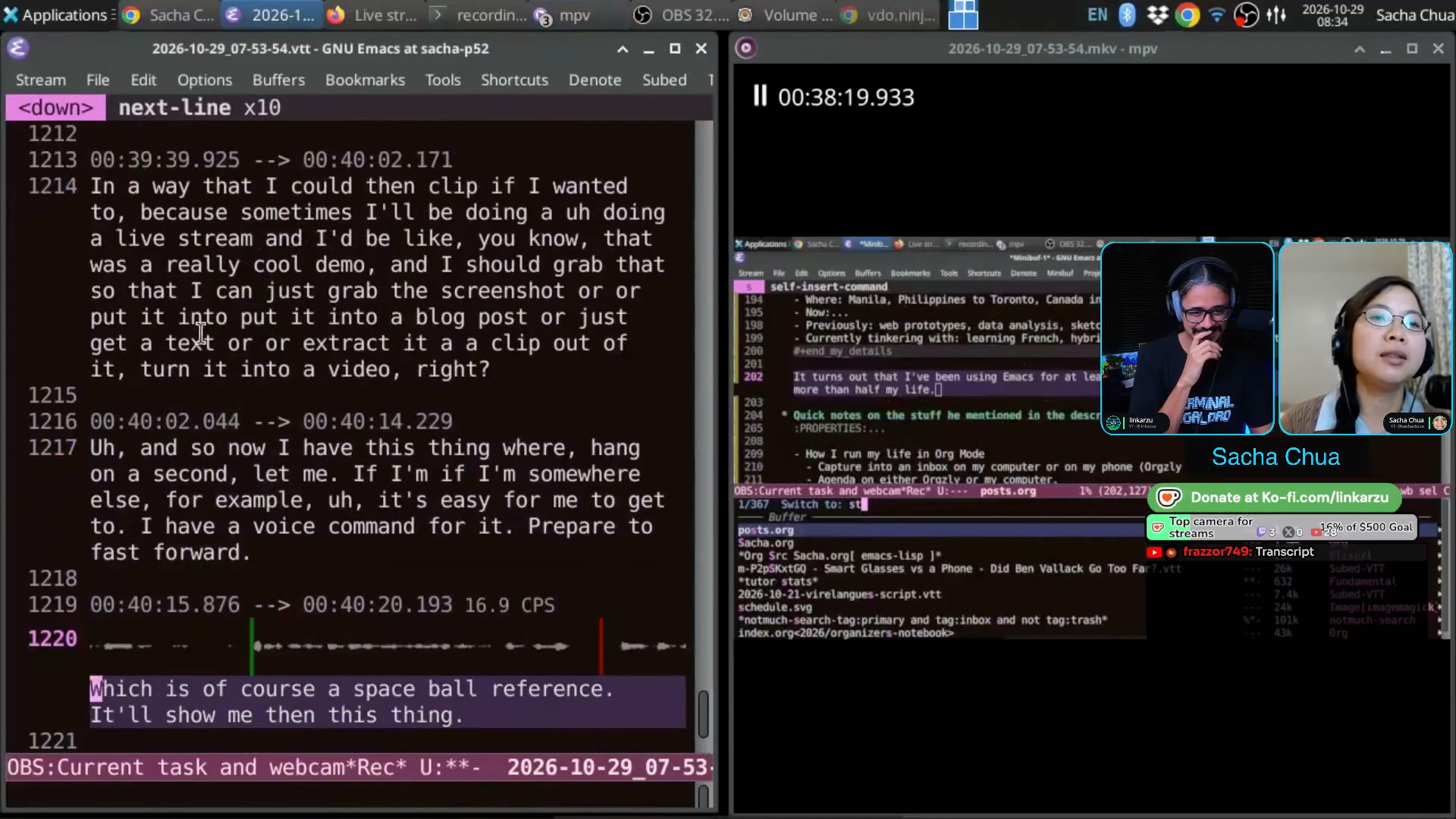 Sacha: So here's your waveform for it. If I play it back, which is of course the Spaceball reference, it will show me then this thing. I can copy the text if I wanted to, or I can extract this into its own video.
 24:03 Demo: Video editing witin Emacs
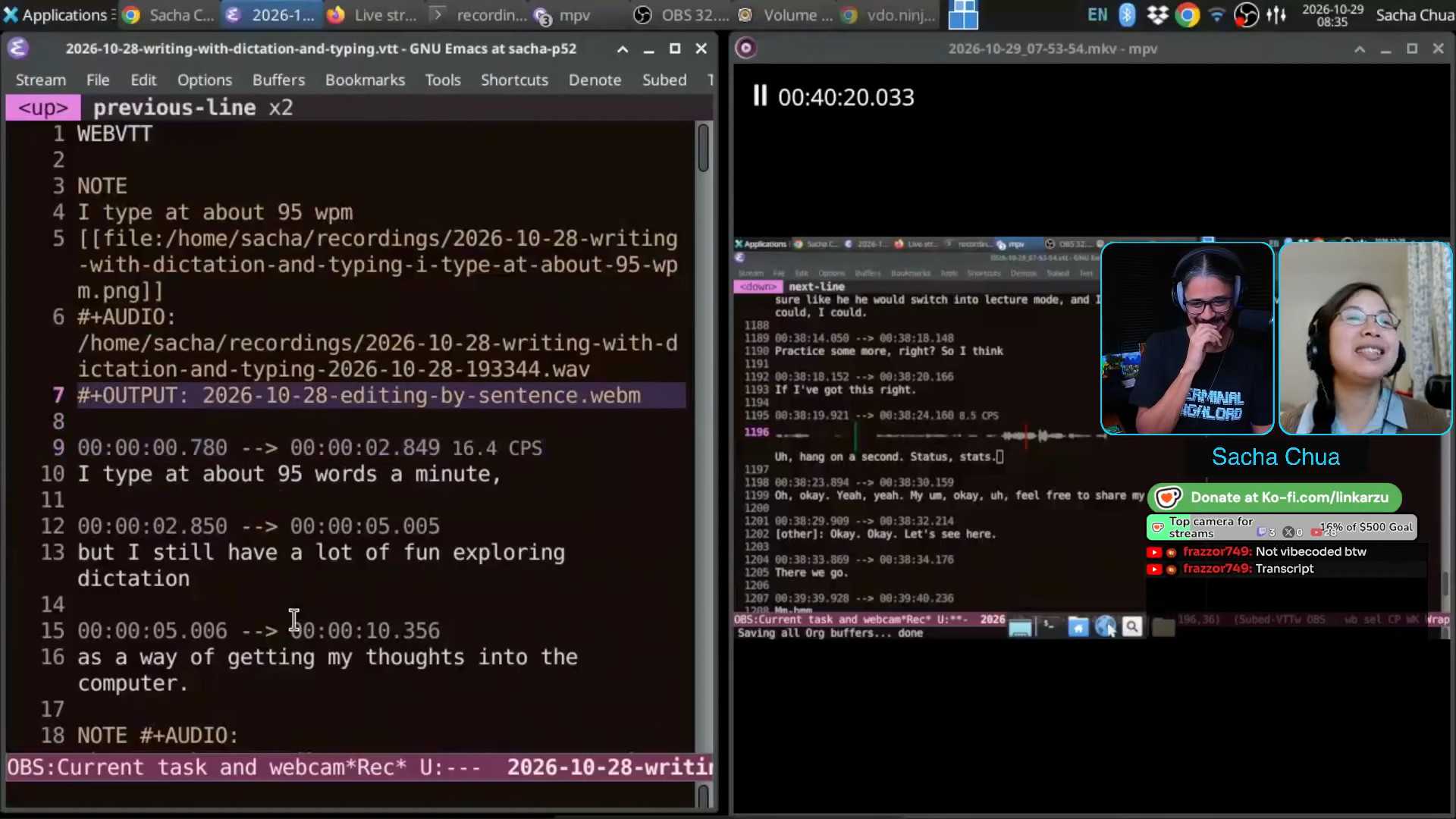 Sacha: Of course I do my editing within Emacs. This is what my video editing looks like within Emacs. I can just copy and paste the subtitle cues that I want. I tell it where I want the output to be. I tell it what audio that I want to use in case I've replaced it. Here, for example, I'm using the same audio as well as the video from a previous live stream recorded session. and then I can just reorder things, clip things, change the timestamps here. If I want to cut from there onwards, sample bits of it and so on, it's something I can do. Linkarzu: Can you remove words as well or just entire sentences? Sacha: One way to do that is to split at that point. So for example, if I want to remove definitely, let's load this one so we can see where I am. I can follow along here. So this is my livestream from yesterday. "My bottleneck is definitely thinking speed." So here's definitely, right? This is the start of "definitely thinking speed". If I split here, and I split at the end of "thinking speed", I can say let's skip this. And I think, assuming I haven't broken... "My bottleneck is thinking speed." Linkarzu: Okay. Yeah. Just a little tail there, but I get it. Sacha: Yeah. It's just a matter of choosing the right timestamp. "Thinking speed." Linkarzu: So that is pretty interesting and based. So you do all of your videos in Emacs, edit all of them there. Sacha: Yeah, pretty much. Well, it started because in 2020, I think, I wanted to make a presentation for EmacsConf. And I wanted to record my audio and then just add the visuals on top of it. But I don't like clicking the mouse because I'm on a Lenovo ThinkPad. The tiny little pointer is handy, but... if I use a separate mouse, it's annoying. Anyway. Clicking is annoying, especially since I'm so used to being able to automate everything with keyboard shortcuts. So I said, why don't I use Emacs for video editing and audio editing? So what I can do then is I can take my audio recording... Or actually, I can record from Emacs itself and then I can edit it to remove the oopses and the false starts and change all the things that I want to. Then I can add the images or videos that I want for each clip and it will automatically speed up or slow down the video to fit the duration of the audio. So if I'm saying, you know, this is a quick preview of the conference schedule, et cetera, then it speeds up the scrolling automatically so I don't have to worry about doing it fast enough if I want to. I can also tell it to play this original speed. That has just grown since then. Every time I want to do something else... Like now I'm thinking, you know what would be really cool is if I could add a title card very easily, right? So let me go to, let me start a new thing here. WebVTT. So if I want to say, I want to add a title card that says "Hello world", right? Oh, I need to actually save it. Let's save it as, hang on a sec. Breathe, Sacha. It's okay. test.vtt. Yeah, that one. Okay. All right. So now I have a test.
 27:51 Demo: generating video title cards from WebVTT in Emacs
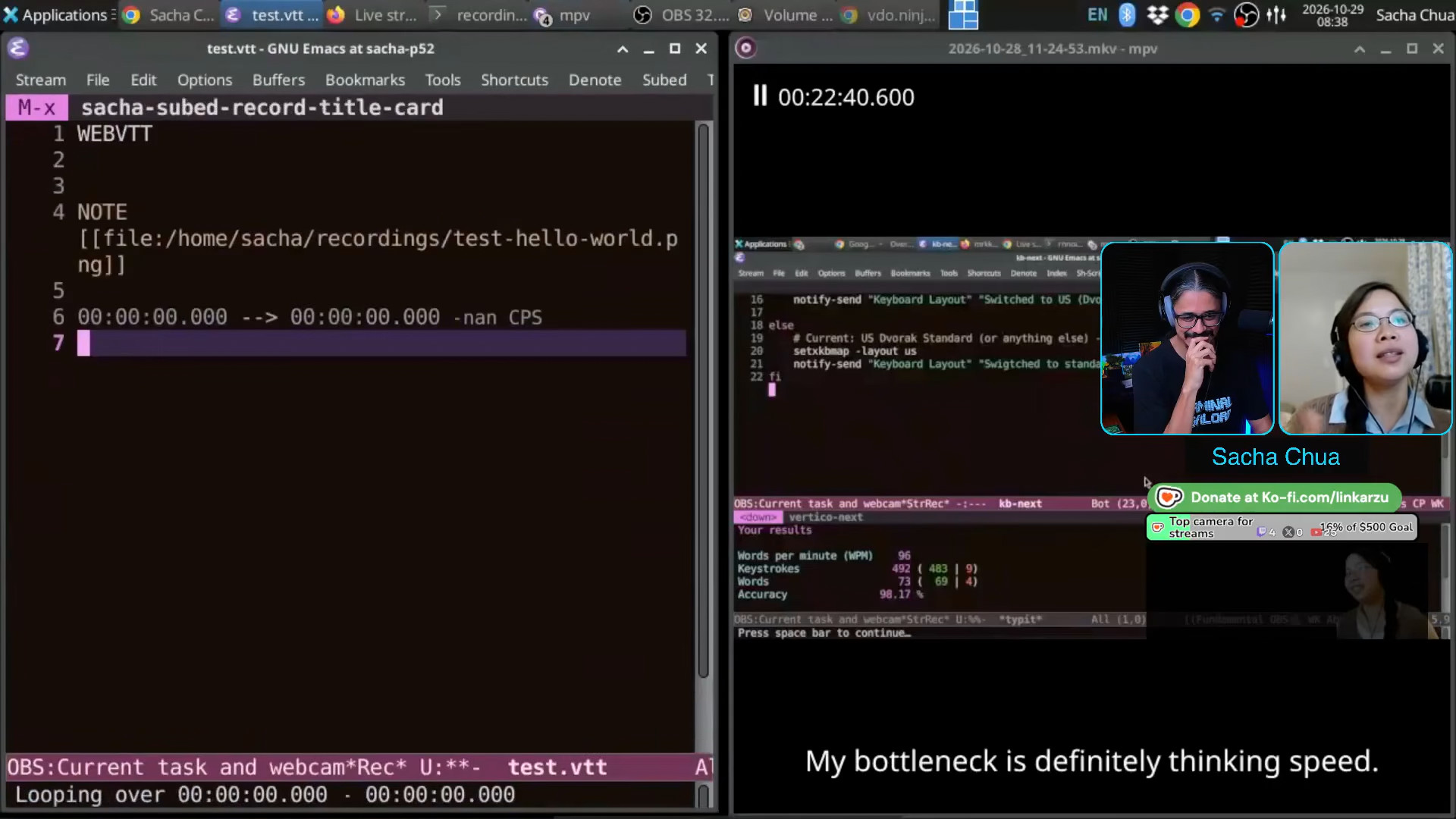 Sacha: If I say Hello World, then it just calls ImageMagick to create this file here. If I open that file, it's super simple.
 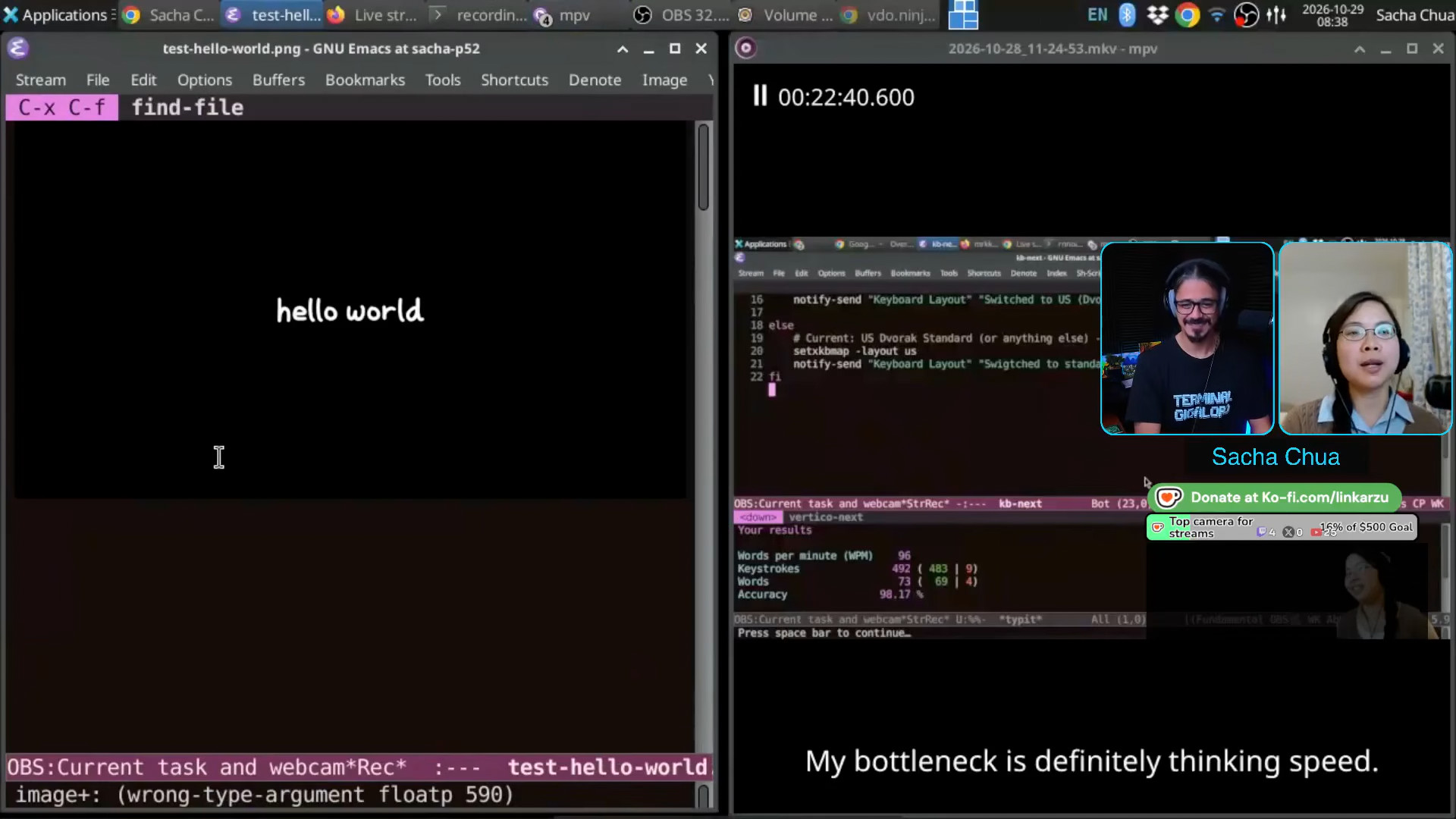 Sacha: It's just white text and a black background using my custom font, because I went to the trouble of figuring out how to make a font with my handwriting and then kern it using Org Mode. Because why not? Linkarzu: Okay. Sacha: That's ready. Then I can pop that in and I can say, you know, this is a test here. Let’s do a
 subed-record here. "This is a test here." And then that audio here, it becomes a whole thing. If I compile this, I think it will just make a thing. Let's put it into #+OUTPUT: test.webm, sure. All right. mpv test.webm "This is a test here." Linkarzu: I see. Pretty cool. Have you seen... 29:06 fframes, generative AI
Sacha: If I can figure out how to get fframes, that thing that you're using... If I can figure out how to get that working, that might be interesting too. Although, I have to say, I'm very attached to my stick figures and the way that I like to draw things. And I have tried using generative models to say, "Okay, here's my sketch. Can you animate this SVG, move things around or whatever." It keeps trying to rewrite things to plain text. I'm like, no, I want my actual paths. So I have to fiddle with it some more. In the meantime, however, I can animate things myself, thank you very much. Like, for example, this... animate... let's go with that one. 29:49 Demo: Stepping through SVGs in Emacs
Sacha: "Some things that work really well." This is within Emacs again. I can just highlight the different things. 29:56 I draw on an iPad with Noteful
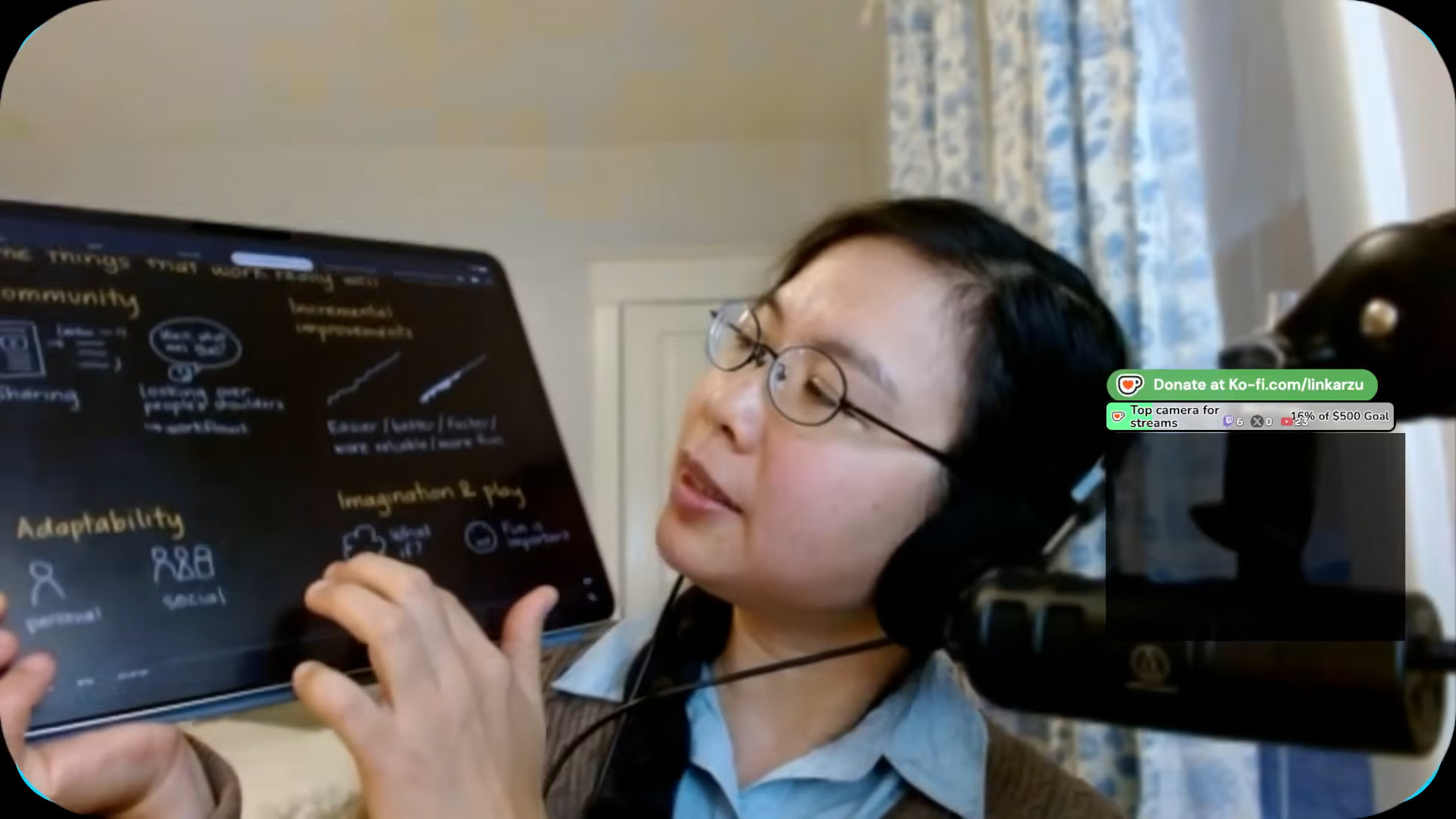 Linkarzu: How do you do your drawings, by the way? Like, do you have like a tablet or something? Sacha: Oh yeah, yeah. I use Noteful on an iPad. I used to draw using Krita on a Lenovo X230 tablet PC, but at the moment I can just use the iPad with Noteful. Currently I'm drawing in dark mode because you have a dark mode channel, so I have things like my sketches.
 30:20 Light themes and dark themes
Linkarzu: Emacs users like to flashbang people, right? They like the white? Is it to tell apart from the Neovim community? What's up with the white themes? Sacha: I mean, I tend to use dark mode now most of the time too, because I figure most people will be watching my stream when late at night they're just relaxing or whatever. But I guess different people work with different setups. I do like the way that with modus-themes and all the other themes in Emacs, it's super easy to pick one of these dark themes and just go with it. Linkarzu: Okay. 30:58 Art and stick figures
Linkarzu: So you do it on the iPad then. I have to convince my wife that we need an iPad for the family. I don't know how to draw. I'm pretty bad. Sacha: I don't really know how to draw either, but somehow people have paid me to do so. I don't know what's going on there. But yeah, I'm really only drawing stick figures. It's fine. Linkarzu: Okay. Yeah, no, my drawing is like, you have no idea. I lack creativity when it comes to that. My wife paints. She paints pretty good stuff. My daughter paints. Well, these are my daughter's paintings, the ones that are back here. I guess you cannot see them. You can see them there in the background. She's learning, you know, but me... Nice! Sacha: I see very vivid colors. Linkarzu: Yeah, she loves rainbows and a lot of vivid colors, but I can't. I'm pretty bad at it. Now, how do you do this speech-recognition thing because I do something similar. 31:58 Linkarzu's video editing workflow
Linkarzu: Let me tell you a bit about what I do with my video workflow. I got tired of editing videos. I'm done. Like, it is a time consuming process coming up with clips. You've been there, right? You have been doing that for quite a long time, way longer than me, right? I just got tired and I was like, I don't want to do this anymore. Never, ever, ever again. I need to come up with a method that allows me to create clips out of a live stream. All of it, AI. AI did all of it for me. It hasn't been easy. It's been months. I've been stuck for months. But I don't do stuff real time the way that you're doing right now. The transcription happens when we're done with the call and the process starts automatically and a few hours after I have the clips in my dashboard that I can upload if I want, right? But it's not real time. I saw how you did it on your side and it's pretty accurate. Like, what's the magic? What are you doing there? You're sending it somewhere, right? 33:05 Local CPU-only speech recognition in Emacs
Sacha: No, no, this is an entirely local model and I'm running it in a computer with hardly any GPU. So I'm actually just making it use CPU only for the speech recognition because I have a Lenovo P52 from 2018, I think. So it doesn't do this GPU thing very well. I think you're usually on a Mac, so you're spoiled for choices there. But speech recognition has gotten really good over the last few years. And I'm using Orukeet at the moment. It's a multilingual model, so it can handle my poor French pronunciations just as fine as my English ones. I can press my keyboard shortcut. For example, I can say, "This is a test during a chat with Linkarzu." Then, because I've modified my dictionary, your channel name actually shows up properly. "We are talking about speech-to-text, dictation, all sorts of other things like that." Where's my phone? It's pretty accurate. Linkarzu: It's extremely accurate. What's the name you said? Because I use Wispr Flow, a local model as well. I do the transcript locally on my Mac. Wispr Flow is what the AI decided to use. And I'm like, oh, it gets it. But not... Sacha: Yeah. The model I'm currently using is called Orukeet. I think it's based on Parakeet, but it's been tweaked for more performance and less memory. But there are so many new models coming out. It's really quite interesting because every day or every other day, there's like, oh, try this new model. I'm not good enough to keep on top of all those changes. If I can manage to get the AI to generate me a server that has an OpenAI interface, I can plop it right into my Emacs setup and it will just work. So I'm happy with that. This is fast enough that I can use it to think. Then, when I have the text, I can rearrange it however I'd like. For example, "prepare to fast forward." We're here. 35:15 Sharing speech commands
Linkarzu: I have a similar command. Let me see if it works. Hold on. You see my terminal right now, right? Yes. I don't know if you can see my screen. Let me see if it works. Hold on. Virgin mode off. Sacha: Yeah, yeah, yeah. I saw that. Linkarzu: It didn't work. It changes my wallpaper and it changes my... Sacha: I have one too. Laser. Look. I changed my cursor to a laser so I can say, here's my mouse cursor, right? Linkarzu: Okay, pretty cool. Sacha: Yeah. So the nice thing about it... Oh, it's still listening. Let me just turn off laser mode here. Laser. Laser. Laser. Linkarzu: It happens to me as well. Sacha: Edit retry. Laser. Okay, there you go. 36:14 Speech commands and more shortcuts
Sacha: The nice thing about speech commands is that it opens up a whole lot of other ways to run commands without necessarily having to memorize keyboard shortcuts. 36:23 Having fun with speech commands
Sacha: You can have more fun with it too. So for example, now I have this command. It turns out I cannot say "start streaming" reliably. Sometimes I say "start screaming." I know sometimes I accidentally say that, and sometimes that's what the speech recognition hears. So instead my command for starting to stream (because of course Emacs controls my OBS through websockets) is "let's go live". My command for stopping the stream is "over and out", just because it's a little more fun to say. It becomes easier for me to remember what I need to say in order to make this happen. Linkarzu: Yeah, yeah. 37:01 Dictionaries for correcting speech recognition
Linkarzu: Now, why is it accurate? And how do you do, you have a dictionary of the difficult words? Like if I say Neovim, it doesn't get it. It says Neovim, or it just puts whatever it wants, whenever it wants. Sometimes it puts something random out there. What do you do for yours? Sacha: Neovim is okay, I guess. Let's see if it does a thing. Yeah, it got that without my needing to correct things. Let's make a harder word. Anti-disestablishmentarianism. Close enough. Okay, you know, that requires very little editing. What is a difficult word? Oh, actually, let's make a different name. Sometimes it gets Prot's name wrong. Prot does a lot of videos on Emacs. Oh no, it got him too. Linkarzu: Yeah, yeah, yeah. Sacha: If there was a thing that is difficult to say... heisenbug is making org.nvim. That one. Okay, here we go. heisenbug is making org.nvim. I mean, it's getting him, so... Linkarzu: Okay, yeah, yeah, yeah. I get it. So, it's a local model. Interesting. 38:19 Demo: Adding a misrecognized term to my common edits dictionary
Linkarzu: Do you feed it a dictionary at some point? Sacha: It is a local model. If I do need to change things... Let's say for example, okay, "Orgzly Revived". It probably can't get that one. "I use Orgzly Revived on my phone to check my tasks." Oh yeah, so here, right? It says "Orgsley Revived." What is that even? 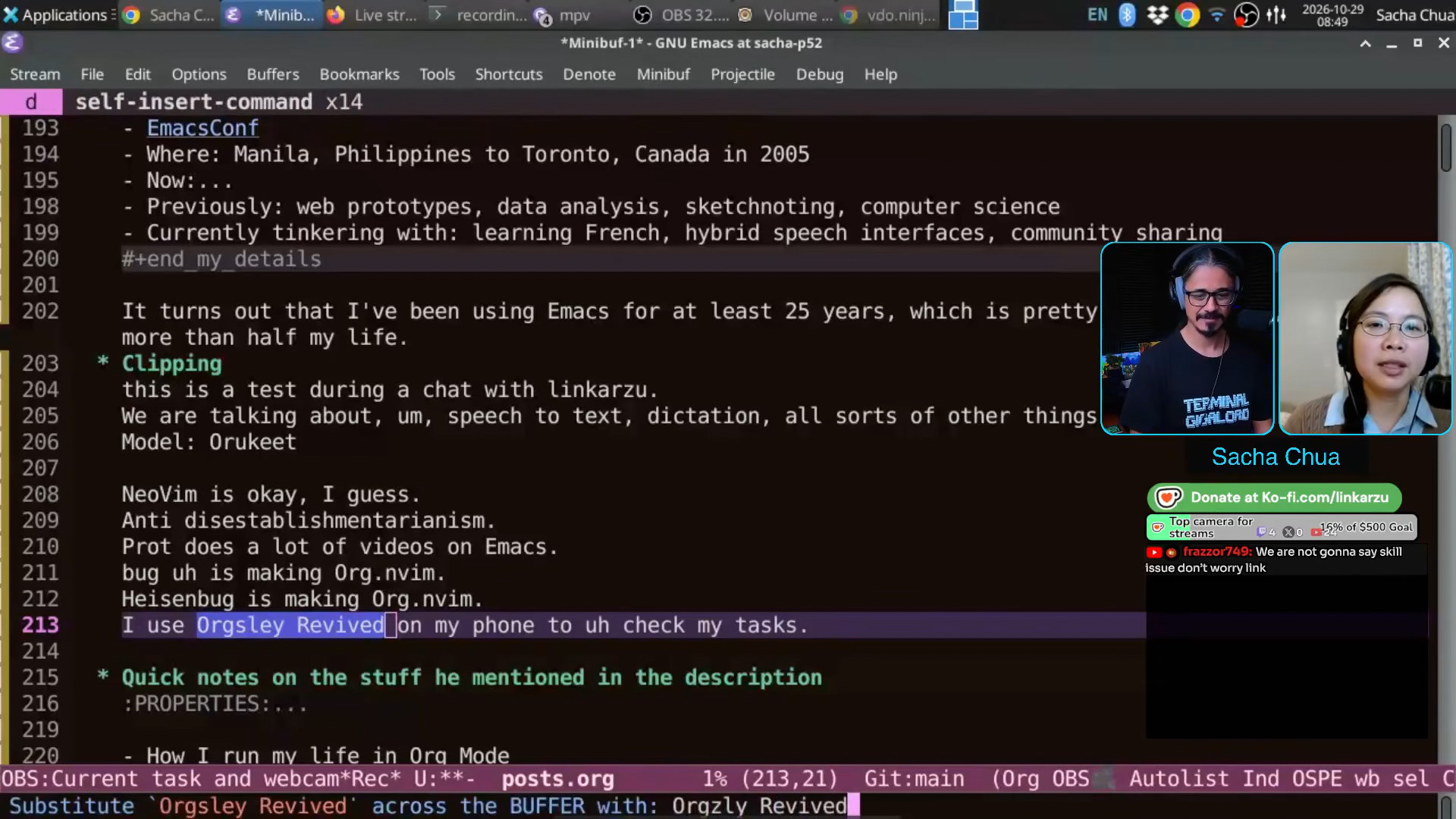 Sacha: But I can press
 C-; and it uses substitute. "Orgzly Revived" here. What that does, in addition to the substitutions that happen throughout the buffer, so for example, if I'm adding a transcript, it will change that all throughout the transcript. I've also added some code (because this is Emacs, I can just do that) that saves this in common errors or commonly misrecognized words. And then when I recognize text, whether it's before a voice command or if I'm just doing this or whatever, it will apply all of those common fixes, common edits. Here we go. 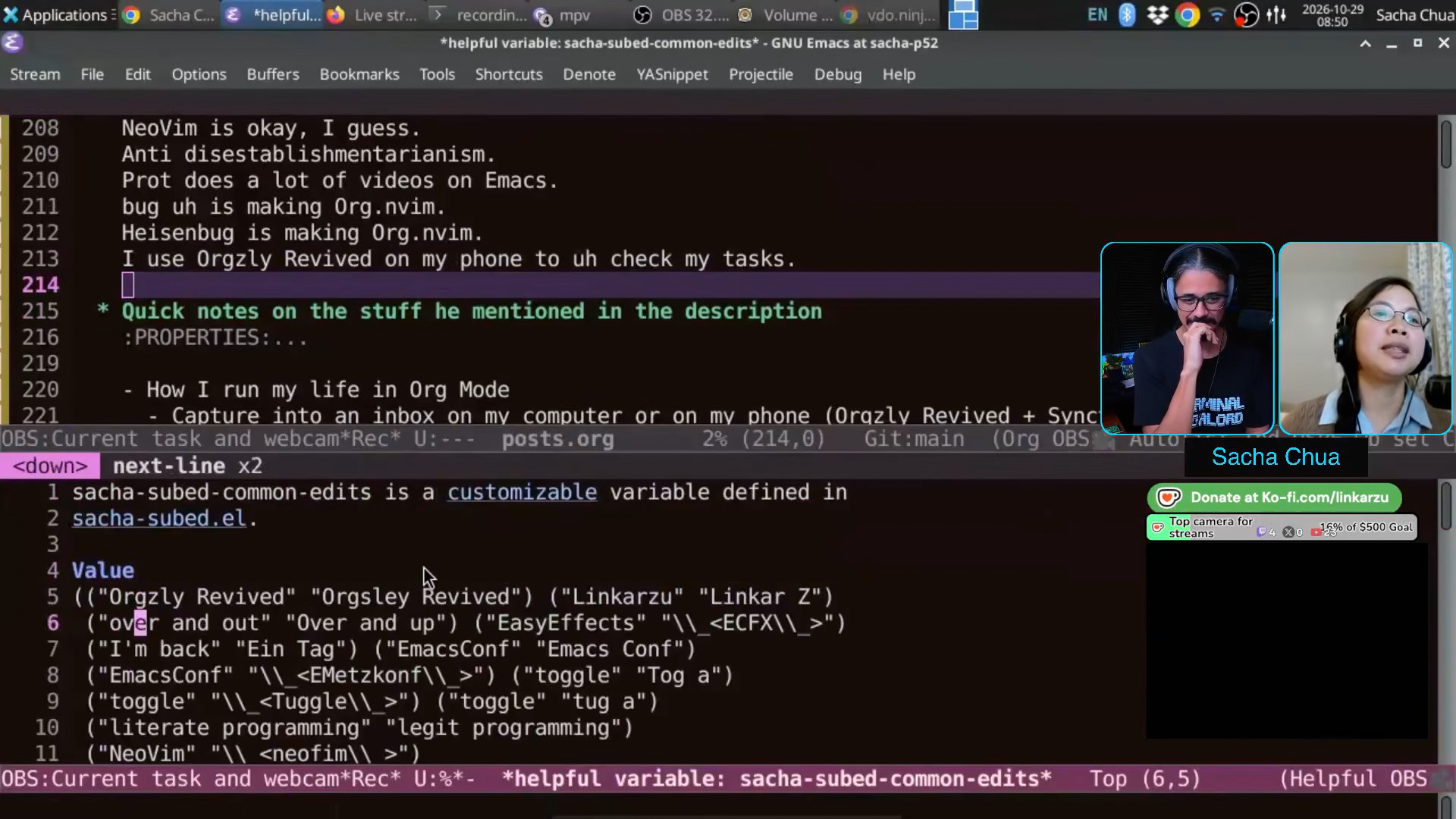 Sacha: So it automatically adds it to this thing here which gets saved automatically for me. And that's the change that I've just added. Linkarzu: Interesting. Pretty cool. Sacha: It's really nice to have that kind of [dictionary] shortcut built into the way that I edit things. All I know is I just hit
 C-; and put in what it's supposed to be. Then it gets not only fixed in my current file, but in the future as well. Linkarzu: Yeah, I need to work on my transcript game. Local models? Sacha: Oh, yeah, it's so cool. 39:57 Turning video transcripts into searchable blog posts
Sacha: One of the reasons why I love transcripts is that it's so much easier to search, right? Whenever I do an interview or whatever, the fun part for me is actually going over the transcript and turning it into something that I can use. Let me show you proj/yay-emacs/index.org. So these are, for example, my recent chats. In order to include the transcript in my blog post about this, all I need to say is captions, and I give it the link to the transcript. And that turns into... Hang on a second. Let me... I should have a C-. b here. Was it this one? Okay, so that turns into this kind of blog post. Right? You have the embedded video. You have the chapters. Clicking on the chapter link will advance to that. 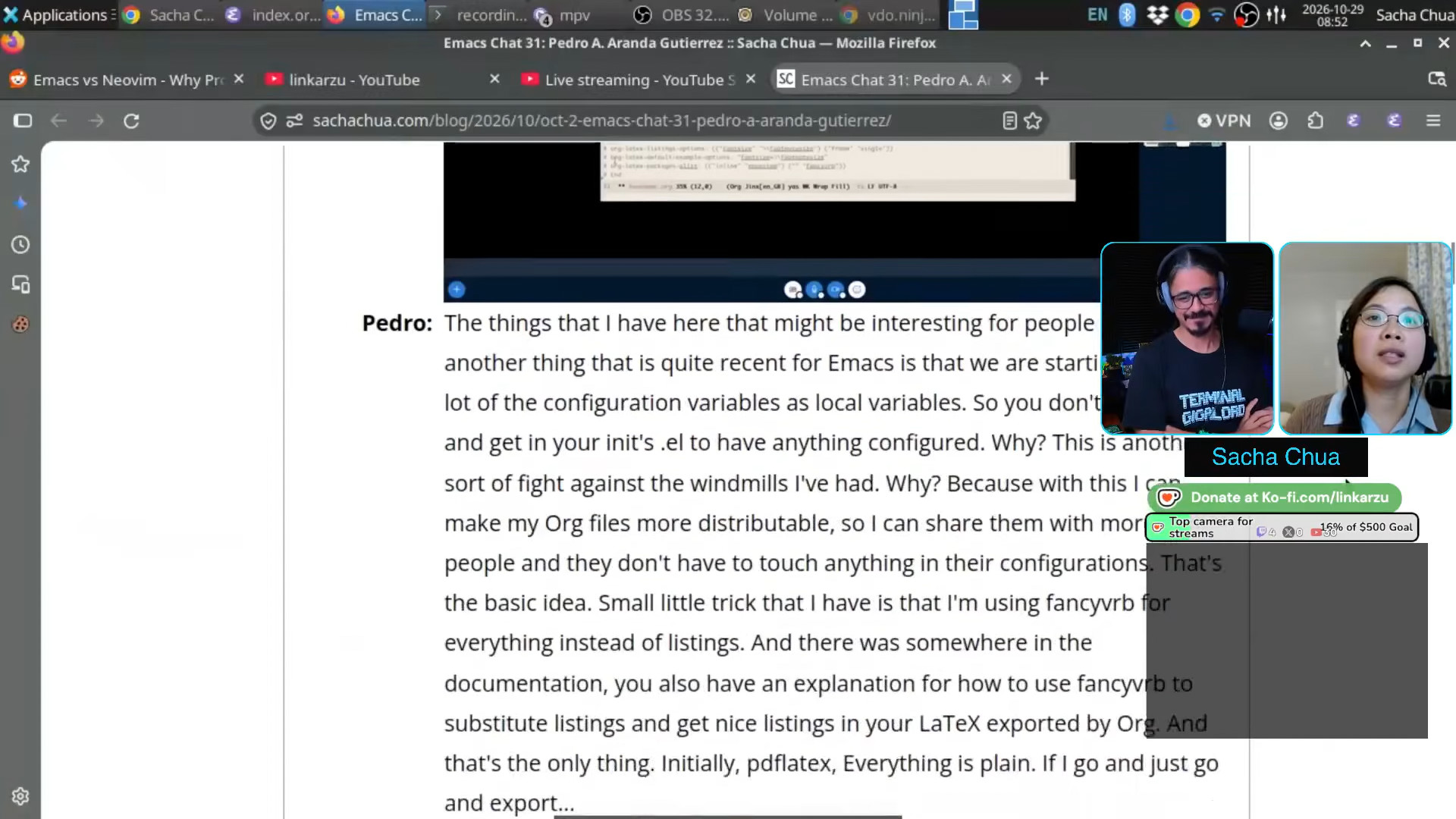 Sacha: And then you have the whole transcript right here. with screenshots. So then people who don't want to listen through an entire hour-long video can just jump to the interesting parts themselves. I think these ones also go back to the video up there, which someday I'm going to figure out how to make a nice sticky display for. Clearly I need to fix that because it's not actually on that thing over there. Theoretically, if I'm publishing it right, this time I think I've been trying to host the videos on the Internet Archive so people you have to watch on YouTube if they don't want to. But yes, so the idea there is the video gives you so much text that you can then share. Linkarzu: Yeah. Or edit a video way faster. Before I came up with this automated thing for creating my clips, I used to do that in DaVinci, you know, because DaVinci has like a transcript feature and you can... but I'd just rather not touch it at all.
 42:07 Demo: Saving and cropping screenshots from a video at a timestamp
Sacha: Screenshots are super easy for me to do because Emacs, of course. So like, for example, if I wanted here, If I wanted to take a different screenshot here, I can say save screenshot. And then it takes the screenshot and it does that thing. If I wanted to crop it, I can say crop to this and crop to that. Linkarzu: Oh, okay. Sacha: Actually I can say, just crop the screenshot. If I say screenshot crop, it will crop the screenshot. If I just say crop, it will crop the whole video to that section. Linkarzu: Oh, I see. I see what you're saying. That specific segment only, right? Sacha: Yeah. So text as a medium for video editing, it's actually really powerful. Linkarzu: Yeah, exactly. Yep, 100% agree. What other tricks do you want to show us there? What other things do you want to brag about your Emacs workflow? Sacha: It's really hard to say. I told you how doctor was the beginning of my of my experience. Yes, yes. 43:22 Demo: M-x doctor with speech in and out
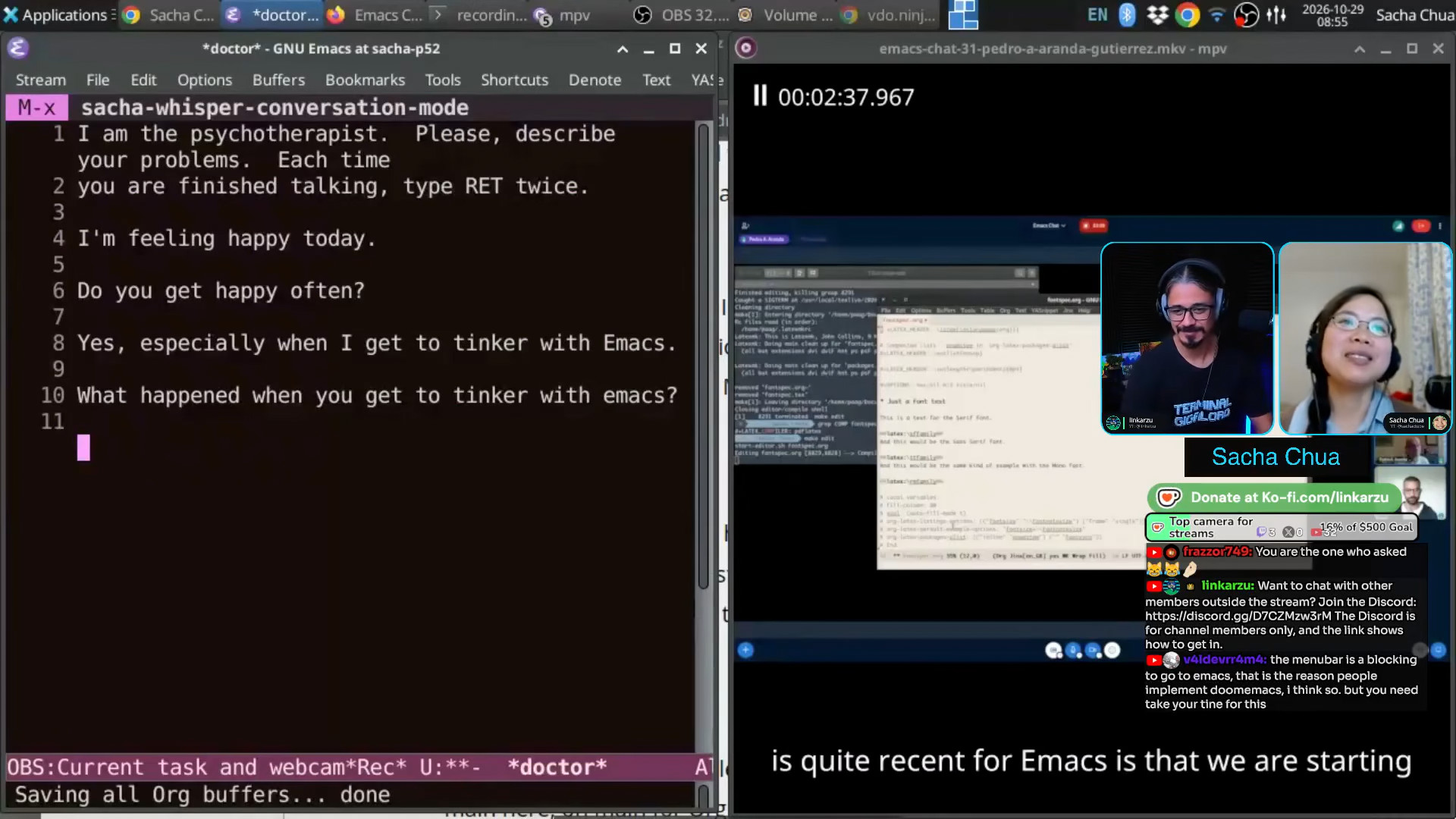 Sacha: So this is a doctor. You can say things like, I'm feeling happy today, as I said, right? And then it uses that to generate its response. But I have this conversation mode. Yes, especially when I get to tinker with Emacs. And then... What happened when you get to tinker with Emacs? Does the TTS come through? Yeah, it does. The reason I did this was because after I showed off my vocal commands to Emacs Paris, they were like, oh, you know, what if you can have a conversation? So I was like, okay, let's come back full circle to the thing that got me curious about Emacs in the first place and voice enable that. And then, of course, this is a very old AI.
 44:09 Demo: speech-enabled conversation with a large language model in French
Sacha: It's much more interesting if you apply it to the new models. So if I want to, for example, practice French. This is one of my voice commands here. Computer: "I would appreciate it if you would continue." Okay, here we are. Then I might say, "Je parle avec Linkarzu." And then I think, there you go. It will eventually, maybe? C'est toujours enrichissant de partager, toucher ses passions en direct. Quels sujets abordez-vous ensemble aujourd'hui ? Sacha: All right. So this now uses a large language model. This one uses Gemini because gptel makes it super easy to plug in different models. So, if I wanted to practice French but I don't necessarily want to bug people because I take a while to think about my words and sometimes I'm looking stuff up, then at least I can simulate that kind of conversation. There are gazillion apps that will sell you a subscription to do this. But because it's here and it's plain text and I can control it, then I can more easily go through it afterwards and analyze the vocabulary or correct the things that it didn't get right, which I know is because of the speech recognition and not because of me or whatever. So it's so much fun to be able to tinker with Emacs to do what I wanted to do. Linkarzu: Yeah, pretty powerful. 45:46 Linux setup: XFCE, X11 and Emacs on top
Linkarzu: I have a question about your operating system. What did you go with? I see this is Linux. I would assume it's Linux, right? Of course, it must be Linux. Sacha: This is Linux. I used to be in Kubuntu because I liked KDE, but when I recently upgraded to the latest version of Ubuntu, then I broke everything. I was like, okay, this Wayland stuff is getting in the way of the automation that I like doing. So I'm back to X11. I was like, hey, let's try something a little more lightweight. This is the XFCE Window Manager at the moment. I'm still settling into it. There are lots of little things that I'm learning how to configure, but yeah, just Linux. Linkarzu: Okay, Linux, Kubuntu. Why did you decide to go with that distro? Is there a specific reason or no? Sacha: No, it's more like, well, my husband happened to have an install USB lying around. I used to be on Debian unstable, and then I switched to Ubuntu. It's just one of those things that I haven't bothered enough about to change, on account of changing requires me to go reinstall a lot of things and then get my Emacs working the way that I want it to do again. Sacha: At the moment, Linux is the library that Emacs uses to talk to my hardware. Linkarzu: Yeah, it's just the base, right? You just want something where you can run Emacs on, right? Sacha: Yes. 47:18 Automating other apps with Emacs; X11 versus Wayland for automation
Sacha: I want something where I can let Emacs control as much of my computer as possible. So for example, when I set up the BigBlueButton web conference rooms for EmacsConf, I do that in Firefox because I can have Emacs control Firefox so that it can click through the different screens and set all the moderator access codes or whatever else and confirm the settings. I don't have to do that kind of clicking and typing myself. Linkarzu: Okay. And you mentioned that you switched back to X11 because Wayland was getting in the way. Can you share a little bit more about that? I'm not a Linux user. I'm a Mac OS user. But I know about the words that you're mentioning because all of the guests that I bring over talk about it and I'm like, okay, so they're like, okay, got it. So what happened there? Sacha: I think it's just a different security model, right? So for Wayland, which is one of the like the window system compositors(?), how stuff shows up on your screen. The way that it's conceptualized is every application is sandboxed, so it shouldn't be able to mess around with other applications' windows, which is more secure. Great. But I actually do want my Emacs to mess around with other people's windows, and I want things to be... Linkarzu: Emacs is the king, right? Emacs has to be able to do anything it wants, right? Sacha: Yeah, yeah. And I want that to happen without a gazillion prompts. "Are you sure you want to let..." Yes, I want it to do the typing so that I don't have to do the typing. So yeah, it's pretty good. Maybe someday X11 will totally shut down and then I'll have to move. But I can give people a few more years or whatever to figure out the automation and accessibility parts that I would need in order to do that kind of automation. Linkarzu: Okay, okay. So you're in Kubuntu, you're on X11. 49:15 Just a regular laptop keyboard
Linkarzu: Then I also wanted to ask you, do you use like one of these special keyboards that all the cool kids use or are you just a normal keyboard? Sacha: I'm just on my laptop. Yeah. I'm going to tilt the screen down and mess things up. See, that's it. That's the thing. Linkarzu: The laptop keyboard. Has it ever caused any issues for you? Like hand pain, wrist pain or something like that? Sacha: No, the only wrist pain I got was from lifting my daughter the wrong way, which gave me the de Quervain's tenosynovitis. Do not pick up your kids without paying attention to how you do it. Linkarzu: Because you hold them like this, right? That happened to my wife as well. Sacha: Yeah, yeah, yeah. 49:56 Using Emacspeak to deal with laptop screen failure
Sacha: But I've been interested in accessibility for a while. Also partially because of... So, okay, so here's what happened. In about third or fourth year of university, I was also on a laptop, and my screen stopped working occasionally. It would glitch out, and I could not see. I mean, it would be super low contrast, and you could see things if you look at it from the right angle, but it would just glitch out like that. I could plug in an external monitor, sure, but I can't plug in an external monitor in the middle of class. I'm not going to lug a monitor around, right? And while I did experiment with a head-mounted display as part of my curiosity into wearable computing, that is also fairly obvious and large and awkward. You know that smart glasses video that you had? Okay, now they can pass off as glasses, right? But back then it was a huge Borg-like thing. But fortunately, Emacs has Emacspeak. So I was using speech synthesis to code and to take notes and do all those other things, which was fantastic. It actually worked. It worked so well that I was like, you know what? I could use this to listen to manuals and write notes and look up things while I'm walking around because all I need is a portable keyboard. They make one-handed keyboards. And a pair of earphones, and nobody can tell that I'm actually reading, well, having read to me some kind of... This is me going through the Emacs manual while walking around, right? Anyway, so, accessibility. The text-to-speech part is very interesting and there are a lot of people who are using Emacs even if they're blind or visually-impaired. all this stuff is actually surprisingly useful also for people who aren't. 51:45 Anticipating physical and cognitive challenges
Sacha: The speech recognition stuff I think will be very helpful in case something happens to my hands. People have accidents or people get sick. My mom has Parkinson's, so her tremors make it really hard for her to type or tap things. It's amazing that we can keep modifying the tools to make this kind of speech input, voice commands a lot easier. There's also physical decline and there's cognitive decline. I've had to deal with brain fog as part of the sleep deprivation of early parenting. So I know my ability to memorize things and my ability to type while I'm talking is nowhere near what I would have in an ideal world. It's great to be able to modify my computing environment to adapt to these changes and to the changes that I anticipate. 52:37 Describing Emacspeak
Linkarzu: Oh, and you mentioned Emacspeak. So what is it then? It's just accessibility option in Emacs that reads your screen or something? Sacha: It can read a whole thing. It can read character by character to give you audio feedback. You can go by word or by sentence as you're navigating around the text. I don't have it set up in this one, but I think I have a different profile where I have it set up, because by default, when you launch it, it reads all of Emacs to you. It doesn't just say the text. It will also give you auditory icons. So for example, if something is bold, you can have it say it in a different voice. If something is italicized, you can have it say it in a higher pitch or something else. If there are icons, it can play sounds instead of those icons. So it gives people who are blind this much richer experience. I love the fact that Emacs has these things with all these different kinds of needs. I've used it. It's great. I found that when I was using it, I could listen to things at 300 words a minute or even higher, and I would still understand. 53:51 Linkarzu adjusts his electric sitting/standing desk
Linkarzu: I'm sorry. It's just my desk going down because I try to... Sacha: I thought you were like genuflecting in front of Emacs is awesome. Linkarzu: Yeah, I just try to, you know, adopt different positions throughout the day. There's a question. Oh yeah, for sure. You do it as well? 54:13 Parenting and fragmented time
Linkarzu: How long do you spend sitting? Like, do you spend sitting most of the day? Sacha: Most of the time, actually, I have to go help out the kiddo, right? So that keeps me away from the computer, which is one of the reasons why I've had to learn how to deal with very fragmented time. Not much time sitting in front of the computer to focus on something. Everything that I want to do has to be something that I can do in 5, 10, 15 minutes, maybe 30 minutes. At the moment, she's fairly independent, but I can still be interrupted by somebody who needs breakfast or somebody who needs a hug and whatever. So I need to be able to capture a thought, get it out of the way and work on things in tiny chunks. Linkarzu: I've seen my wife, how she handles things and I'm like, man... It's a lot of mental overhead. That's a whole other conversation. Men are the ones that make progress, build their professional careers, and wives usually take care of the kids. It's a huge sacrifice. What do you think? How do you feel about all that? Sacha: I signed up for it totally knowing what I was getting into. I was like, okay, there's a lot involved in being the default parent, right? The primary person who patches up [owies]... 55:35 Org Mode helps me stay sane
Sacha: But I think partly because of Org Mode and Emacs, it's been very helpful to me to be able to say, "Yeah, that's a great idea. I'm going to write that down in my phone or on my computer. Usually on my phone back in early parenting days, because I'm away from my computer, I'm at the playground or whatever else, right? So the fact that I can capture a note into Org Mode and then know that I can get back to it in several years when I have more free time or that Org Mode can keep track of the deadlines that might be a year from now, like when I need to renew my passport and just have that surface the reminder at the right time, with the notes on exactly what I need to do and the links to wherever I need to go. I think that has been very, very helpful for me. 56:20 Capturing tasks while away from the computer: Linkarzu uses speech
Linkarzu: Good point that you brought up. Quite a few days ago, I just came up... Well, the clanker came up with a method, we could say, of me just tapping it, saying something to it, and when I come to my computer, the task is there in Neovim. Right? Because I forget. I'm outside. I have to remember this. I'm not going to remember it. It's just going to go away. So I do it on the phone, shows up in Neovim, and it's a huge benefit. How do you do it? 56:52 I use Orgzly Revived, sometimes with dictation
Sacha: For my phone, I often just put it into Orgzly Revived, sometimes with dictation, sometimes just typing in a few keywords to help me remember. A lot of times it's, you know, if I'm coming across... Orgzly Revived? Linkarzu: What is it? Sacha: O-G-R-Z-L-Y. [clearly can't spell on stream] Linkarzu: If you want to show it, I don't know. Sacha: It's on my phone. Linkarzu: Is it like an app? Sacha: Yeah. So I use an Android phone. Now there are actually a gazillion apps that talk Org Mode and can synchronize with your files and whatever. I'm currently still just using Orgzly Revived as an app on my phone with Syncthing. Syncthing being the free synchronization that I can use to just get my files back and forth. But there are lots of other alternatives, so you can find something that fits you well. 57:45 I want to get the hang of Emacs's Android port
Sacha: I am very tempted to figure out, finally, how to use Emacs native, because there's an Emacs port for Android. Especially if I can get my speech synthesis and speech recognition working on it, I think that would be amazing to have this kind of conversation with Emacs along the way. 58:02 Demo: Speech commands on my computer: Remind me...
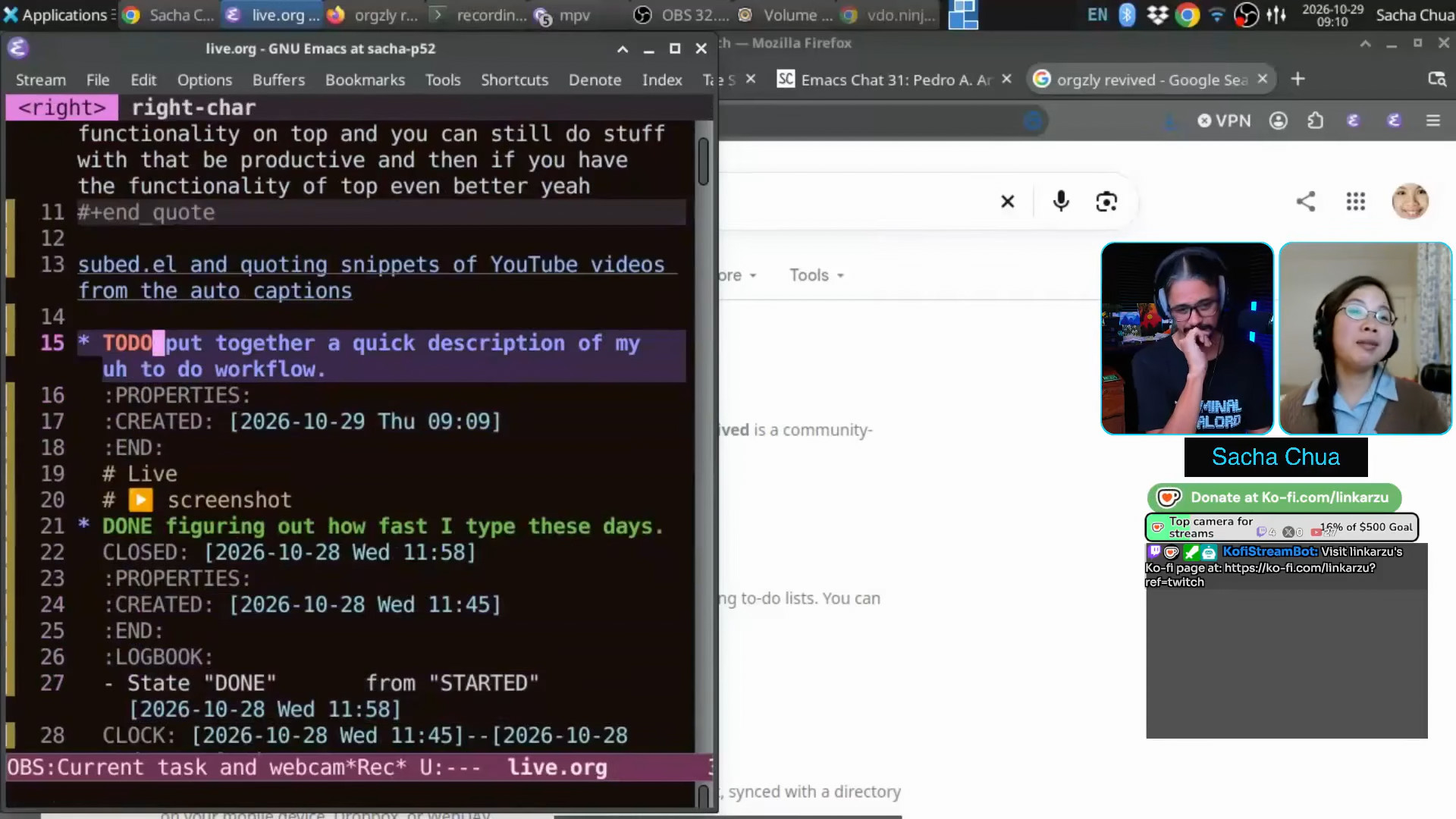 Sacha: And then on the computer, if I need to capture something quickly, ooh, I can show you this one. Let's see. "Remind me to put together a quick description of my to-do workflow." It will take that note and it will stick it into an inbox. Here I'm in live mode so my public tasks don't get mixed in with my private tasks. If I do an agenda, it should just be limited to the public stuff. Anyway, so the "Remind me" created the note for me. It includes the audio in case the speech recognition didn't get anything right. It includes a screenshot so that in case I'm doing this from a different application, because my keyboard shortcut is global, I can still see the context and go find that sort of stuff. Linkarzu: Quite interesting, quite advanced, quite complex. It must have taken you months, years to set all of this up. Sacha: As I said, I can only work in like 30 minutes or so. So this one, I think was a 10, 15 minute hack. Little bits of time. This link here to whatever I was looking at, you got that free from Org Mode. This thing here with the recording, I got that because I already wanted to save my recordings anyway. So it was just a matter of adding a link to the file name that I already had saved. This screenshot, you know, another five minutes because I already had Spectacle capturing the screenshot of both screens. So it's fairly simple. It will even work for things like, remind me next month to follow up with Linkarzu to see whether he's switched to Emacs.
 59:50 My Emacs configuration keeps growing
Linkarzu: I mean your entire Emacs config. Has it taken you years to adapt it? Sacha: It just keeps growing, right? I have an idea. It takes me 5, 15, 10 minutes to put it in and then it just accretes. I can't make very big changes because If I try to work on something big and then I get interrupted, the Ovsiankina effect makes me very grumpy. I have an unfinished task and it's like nagging at me. So it has to be always small chunks, but Emacs makes it super easy to work in those tiny, tiny chunks. So this one here, for example, it says, remind me next month, et cetera, et cetera. And it has scheduled it for next month. Linkarzu: That's pretty cool. Sacha: I'm not actually going to pressure you to switch to Emacs. You can keep using Neovim and just borrow all the interesting ideas. Linkarzu: Org.nvim is there. I can adapt it to do this, you know. There's a question in chat. I ignore chat unless they bring the coin, okay? But there is one question that I will allow this peasant in. in our conversation. 1:01:01 What about EXWM, the Emacs X11 window manager?
Linkarzu: frazzor749 is asking, we were talking about window managers. What about EXWM when we were talking about Wayland and all that stuff? Sacha: There are window managers written in Emacs Lisp and people who use EXWM really like it. There's actually even an EWM as well right now, I think. I remember playing around with it a couple of times. Maybe I should check it out again. The first time that I played around with it, my laptop was even older than this one and not as capable. So maybe now that I am on a 2018 laptop, it might work better for me. Because it is nice to be able to... It would be great to be able to just press C-x b and switch to another application just like I switch to other buffers. Linkarzu: Yep. Moving on to other topics. 1:01:55 AI and the Emacs community
Linkarzu: How do you feel about all of this new world that we're in, AI-related stuff? I've seen that it's evolving quite fast and software is changing. The way that we look at software is changing. It used to be something that only a small set of people could do in the past. Now, people like me or anyone else, even frazzor749, can vibe-slop solutions and have them up in minutes. Does that make you feel something? Does that make you feel sad, happy? How do you feel about all this? Sacha: I love seeing the comments from people who are like, "You know, I had a hard time getting started with Emacs before, but now I can ask an LLM to generate me something or explain to me, explain something to me and I can get it working." So that's great. But I also like the fact that the people who do not want any of this stuff to happen to their particular Emacs can get together and find each other and say, you know what, if Emacs adopts AI more than I'm comfortable with, I commit to figuring things out the human way and continue to build it without that. So I love the fact that there are choices and people can make a choice that fits them. Linkarzu: Okay. Sacha: It's very exciting to see the ideas that people come up with. Linkarzu: Okay. And you also have the choice? Sacha: Yeah. Sometimes it's hard to read the code because it's super long. Like, you have that example from someone on your chat, right? Okay, you can generate a 3000 line module, but really you might only need 200 and that 200 is a lot easier to read. Maybe it was 300. Okay. Linkarzu: No, he said 3000. He said 3000. Sacha: No, no, no. His final, going from 3000 to something like 200 to 300 lines. Because if you know what else is out there and how you can hook into it, then it doesn't have to build everything from scratch. Linkarzu: We also have Prot as an option because he does his coaching sessions. You can learn about Emacs with Prot. We're going to put his link somewhere in here. I always leave the link in all of my video descriptions and all that stuff. How do you feel about AI? What do you think is going to happen in the future? Have you ever thought about it? How do you see software? Sacha: I have no idea what's going to happen in the near future. I know there's a lot of froth and a lot of like weird pressure from other people to use it or not use it or whatever. I think the business world has sort of tied itself in knots. We're just going to have to see how all of that stuff works out. In terms of using it myself, I use a very limited set of functionalities. Just the things that I can understand, again, 5 to 15, 30 minutes at a time. I am not at the point where I can just trust the agent to run by itself and come back tomorrow with results. 1:05:09 Using large language models when learning a language
Sacha: I'm trying to learn French. I don't need anything fancy. I just need to know how to make my paragraph less grammatically terrible. The nice thing about large language models is that it tries to bring it towards that average, right? It can explain things or at least... There are a number of times that even with my beginner level, I can say, you know, that doesn't seem right. Then I can go and dig up the actual explanation and compare it against human examples, and ask my tutor, whom I meet twice a week and pay actual money to. But the fact that I can do this at 11 p.m. or whenever I'm free is helpful when it comes to getting that kind of instant feedback. 1:05:58 LLMs for troubleshooting
Sacha: I use it for troubleshooting sometimes because I'm like, I don't know what this error message is. Doing the exact search is not going to get me the right answer. But how would I start to understand this? What questions would I ask? That's sort of helpful there. 1:06:13 LLMs for proofs of concepts
Sacha: And for proofs of concept where, you know, I do not know enough about FFmpeg or Matplotlib or Python's internals to do some of the things that I want to do off the top of my head. So I'm like, okay, I will see. If I tried myself and I'm not getting anywhere, then I can say, okay, generate me a thing. And then I can try to see, okay, how is it doing that? Why is it doing that? And build on that. I like to keep things within one or two screens that I can actually read. Linkarzu: Okay, okay, okay. Yep, I started like that as well. I didn't trust it too much at the beginning, but it's been progressing and I think you just get more dependent on it, you know, and more and more and more and, you know, but it's gotten better. Do you use a specific model? Sacha: I use Gemini when I feel like it. The usage levels are quite high in the free tier. Sometimes I'll use Claude as well. My daughter has a subscription to Claude. We pay for a subscription to Claude for my daughter because she likes generating interactive stories to help her learn French vocabulary. Linkarzu: Okay, okay. Sacha: Which is great because then it can phrase everything in Pokémon terms. So that's easier for her to pay attention to. When she's asleep or when she's watching Pokémon, then I can use it without stepping on her budget. Stepping on her usage, right? 1:08:03 Kids' obsessions: Harry Potter, Pokemon, Wings of Fire
Linkarzu: Is she into Harry Potter, your daughter, or not at all? Sacha: Only briefly. Pokemon remains her current main interest. She is the sort of person who reads the entire wiki and stuffs all of the factoids into her brain. Linkarzu: Oh, my daughter is in her Harry Potter phase right now. My wife bought all the books. I don't know, it's seven books, I think. Right? And the condition is, once you read a book, we can watch the movie, right? She's read like four, I think, and they're huge books and I'm like, man, that's tough. But she's in that phase right now. Sacha: Yeah. The novel series that my daughter is currently looping over is Wings of Fire. She's been into it before. So now we've checked out all the books from the library. I love the library. It saves me so much money. So she's reading that. There are graphic novels as well. It's great because then, you know, it makes it... There are graphic novels for the first seven or so books. I've also checked out the graphic novels in French. I get to read them and learn things. She's reading it. Because we're so familiar with the story... I like to learn about the things that my daughter is interested in. So for example, when she was into Rubik's cubes, I learned how to cube too. I played around with using Org Mode to help me learn cubing. She's into Minecraft. We play Minecraft together. Now she's into Wings of Fire and we read that together too. 1:09:39 Claude and animating my sketches based on a reverse-engineered format
Linkarzu: Okay. Now you mentioned that you use Claude sometimes. How do you feel about it? Have you tried the latest Opus 5.5 one? And if you compare it to other models, do you feel a difference? Do you feel that it's like really smart or it's like, nah, what do you think? Sacha: Well, let me give an example of something I was playing around with recently. So I mentioned that I use Noteful on my iPad to sketch. One of the things that I've always been curious about is what can I do with the stroke data since it's recorded it somewhere. I came across another person's repository where they had used a large language model, probably Claude even, to reverse-engineer the format in order to create something where you give it your notebook, your handwritten notebook, and it will generate quizzes and summaries and etc, and then put that back in the notebook so it looks handwritten, so that you can do the quiz on the iPad with a pencil and all that. The repository had a description of the reverse engineered format. So, on my phone, I said, can you take a look at this repository and see if you can use the reverse-engineered format in order to take the notebook and create an SVG using centerline strokes instead of fills? The way that the export usually works is you export a PDF, but when you get it into an SVG editor, it's all paths with fills in them. But I want strokes so that if I want to animate it, I can animate it in the direction I was drawing, instead of the character just appearing. It did that. I gave it some files and it actually showed me also some videos of it animating, so that I could visually verify that it was doing what I wanted it to do. Theoretically, there are some Python scripts that I might try out later on. I like the fact that I can do that sort of thing from my phone to try things out. At the same time, also, it's fine for the things that I don't know much about. But for Emacs, it's like Prot said, this is the fun part. For him, it's his video game, right? For the stuff that I like to hack, I want to actually go do the digging around and come across the things that I wouldn't have even thought to ask for. 1:11:57 Differences between models?
Linkarzu: And do you feel like Claude is smarter than other models? Or you don't feel that too much of a difference? Sacha: I did more of a comparison back some time ago when we were deciding whether to go with a Gemini subscription or a Claude subscription from my daughter as an incentive for her keeping her grades up and doing stuff. We trust her to manage it reasonably well. We've had these conversations about AI usage and she's very proud of the fact that she doesn't use it for doing her homework, even though apparently in grade 5, some of her classmates are already getting reminded by their teacher not to do that, right? Anyway, so we generated some samples of creative writing based on the prompts that she had. We did a blind comparison, and she liked Claude more. So that was her reason for doing that. For me, in terms of the small generation tasks that I trust the AI with or I ask the large language model to do, there hasn't been that much of a difference. I'm sure people doing fancy agentic workflows will have different experiences. 1:13:12 Looking ahead at AI and programming
Linkarzu: Yeah, I've noticed how it, how smart it got and that's the reason why I was asking and it makes me excited, but it makes me kind of worried as well at the same time. I don't want to be pessimistic but you know, I see how good it got in the past few months and it makes me think: how better is it going to get? Like, what am I going to be needed for then, like, in a couple of months, a couple of years, you know? So, I don't know. I'm in that phase right now. It's exciting because I can do way more stuff. But what's going to be the point then, in a couple of years? So, I don't know. It's just me, baby, thinking about it. Sacha: There are a lot of people dealing with uncertainty and existential crises and I have no idea what that future is going to look like. Although to be fair, people in other industries that people in IT have automated away have had to deal with that kind of existential crisis before. So it's our turn now, I guess. I'm semi-retired and professionally irrelevant, so I can step out here and just wait for the dust to settle, right? Linkarzu: Yeah, you have it figured out already, I guess. Like the professor, he's 80, he's retired already. Like he can just go to Hawaii, drink his piña coladas and just enjoy life, you know. But we're still working and still trying to figure things out. Yeah, I don't know. 1:14:46 AI-generated code, slop PRs and the Lisp Curse in Emacs
Sacha: What's important to me is to help us figure these things out together. For example, I'm focused on the Emacs community and there are big debates about "Should we allow it? How should we help make sure that package maintainers aren't overloaded, they're not overwhelmed with a lot of slop PR requests?" It's great to have all these announcements of new packages, but if it's just entirely generated, then it tends to fall off and not get maintained. In the Emacs community, because it's so easy to build something for yourself, we've always had this challenge of making something that other people can use anyway. So there's an essay with the title, I think, The Lisp Curse, or if you search for those keywords, The Lisp Curse, you'll find it. It talks about the fact that because it's so powerful, it's hard for people to come together and decide on something. With large language models and the ease of generating code, that's basically the same problem scaled up. Which is something that we're used to in the sense that many times something that's tailored to you, that's customized to fit you, it works really well for you, but it's hard to translate to somebody else. Just like if you're prompting a large language model to create an app for you, it might not necessarily be something that somebody else can just pick up and run with. It might not necessarily be something that you're going to use for six months or a year. It might just be something that you use today, and it gets your problem solved today, and that's okay. For me, the fact that people are exchanging these ideas and they're asking what ifs and they can actually get to the point where there's code to help them test those what ifs and help them refine their ideas... That part is exciting and I'm curious to see what people do with it. At the same time, the people who want to stay with the code that they can read and understand... When they read the code of other people, even... If they read the code of other people, which is something I love doing, you get the sense of what other people are thinking about things. The kinds of needs that shape this code to be what it is. The little choices that they make in their variable names or the way that things fit together. I think that's also a wonderful thing that I don't want to lose if it's just generated really, really long libraries that are not doing things as beautifully as they could be. I'm glad that there are people who try things out and also disclose that they've used AI to generate things. I'm also glad that there are people who are manually crafting things that they love. Linkarzu: You get to know them really well, right? When you see their code, it's like, oh, I know this person. I know him better than talking to the person, okay? 1:17:40 Maintainers and large language models
Linkarzu: How do you feel about maintainers on the Emacs side of things with all of the code that can be easily generated right now and having to deal with that? I don't know if you maintain any packages or not, but I would assume you know that big package maintainers must be going through a really difficult phase right now, because everyone is sending PRs, everyone has great ideas and they need to filter, go through all of that code and clean it up. How do you feel about all that? They need to triage all that, right? Do you have any thoughts on Emacs maintainers in all of this slop? Sacha: I was a little amused by the exchange in Org Mode, where I think John Wiegley was proposing something that was partially generated by a large language, or actually maybe entirely generated by a large language model. And it was there as a kind of an example. And after some back and forth, Ihor started using an LLM to review it. We're definitely experimenting with how to deal with this kind of thing where the changes might be harder to understand because the volume is higher, the logic is harder to talk through. But not being a maintainer of any very popular projects myself, I have no idea the kind of things that people are going through. I do know that it is something that we want to be thoughtful about because maintainers are volunteers. We don't want people to burn out. We also don't want contributors to burn out. We want people to be able to experiment and communicate thoughtfully and kindly. Linkarzu: Okay. Now, two more questions that I have for you and I'll let you go. The first one that I have is... Where is this thing? Hold on. Where is this thing? 1:19:44 Thumbnails
Linkarzu: What did you think about the thumbnail that we came up with? Sacha: You know, some people in the community were like, "Uh, what's up with that thumbnail?" Linkarzu likes to have fun with his AI-generated thumbnails. But my daughter would like to say that she's never seen me do the [eyebrow] thing. Also, she feels that the AI makes my eyes too big and she's not used to seeing my braid on that side. Linkarzu: Okay. That's good. Sacha: So you got like a zero out of five. Linkarzu: A zero out of five, and it's one of my favourite ones, Sacha, come on. Like, man, I don't know. Sacha: I'm not sure I've ever made that face. I tried a couple of times afterwards, but I think I just looked very confused. Linkarzu: What are these guys doing? Yeah, my channel is really random. I don't know why people still follow it, but AI helps me with ideas that I have. I had this idea in mind and I was like... I can bring those. Okay, that's enough with the thumbnail. Now, the final thing before I let you go is what would you recommend someone new into Emacs? What would you tell them? Hey, go and learn this. Go and read my blog post. What do you think? Someone just watching this video not knowing what Emacs is but they were captivated by the wild things that you do in Emacs and they're going to be, like, I want to be that Chad. I want to be the Giga Stacey. Because it's Giga Chad and Giga Stacey I think is the female version of it. So what would you say to them? 1:21:39 Advice for Emacs beginners: connect with people
Sacha: I would say go connect with people. Now, it's very difficult sometimes to find an Emacs user in your physical location, but there are meetups and there's Reddit and there's like, you know, there's EmacsConf and there are virtual meetups, as I mentioned, there are mailing lists, there's IRC channels. It's because Emacs can be really overwhelming if you're learning it by yourself. There are all sorts of things that you might not even know to ask for or explore, because you don't even know it's possible. For me, learning Emacs in the community has been really helpful. I feel like I've barely scratched the surface, because I'm always being inspired by other people who are sharing the cool projects that they're working on or the ideas that they're building by themselves or with assistance. Definitely, large language models can help with some of it, but it's still limited to what you can ask. So if you can hook up with the blog posts or with the IRC channels and all these other ways to connect with the Emacs community, I think that makes Emacs learning a lot more fun and a lot more effective. As you mentioned, Prot does have a coaching service, so that might be an excellent way to start. If your budget doesn't extend to €10 an hour, then you can always try IRC or other places through the meetups. People often bring their questions there as well and learn from the kinds of cool things that people are sharing. Linkarzu: Okay, amazing, Sacha. Sacha: Which actually brings me to stuff that I want to pick your brain about before I let you go either. 1:23:16 The Neovim community could use a blog aggregator like Planet Emacslife
Sacha: The Neovim community does YouTube really well, which is cool. But there's one Reddit post asking, hey, is there a Planet Emacslife equivalent for Vim? Basically an aggregator that brings together Vim blogs or what's going on in this conference stuff. I would like the Neovim community to be more vibrant and better connected. I mean, not that you really need that help. You've got way more users than the Emacs community and that's fine. But it'd be really interesting to see people sharing blog posts and sharing cool ideas. There's r/neovim, but you know, there's got to be so much more that people can share with each other and bounce ideas off each other and have those kinds of conversations about. Linkarzu: You have a really good point. 1:24:03 Why Emacs News
Linkarzu: This is why you do your blog posts. Is that right? Like you try to aggregate all of the different Emacs-related news, videos, articles, whatever, anything Emacs-related, you put it in your blog post. Sacha: Yeah, it's... It's kind of like having a water cooler, right, if you have a place where you can bump into other people. And that Emacs News there, which is the second link on this page title, that takes me just about an hour or two to put together, depending on how distracted I am by all the cool ideas that I come across. I've done this on livestream so people can laugh at my "Ooh, shiny!". It's built on top of a fair bit of automation. I just upvote links on Reddit. The calendar comes in automatically. The stuff on the blog posts comes in automatically. I just categorize things so that people who are interested in a particular subject area don't have to wade through 60 to 70 links. They can focus on one category if they want to. But it should not be impossible to do something like this for Vim. I'm sure that maybe, especially with org.nvim and other things, maybe people will post more notes, because literate programming is an excellent way to make things clear to yourself and to other people. 1:25:16 Neovim and Emacs community cultures
Linkarzu: Hate? It's like, I don't know, there's a lot of crazy people on the Neovim subreddit. I don't know if that's a particularity of Neovim users. We're all toxic and we just hate each other. Sacha: Yeah, maybe you should just come over to the Emacs community. We have hot chocolate. Linkarzu: Now, I have gone to the Emacs side of things. Apart from frazzor749, I think he's an Emacs user because he's abusive. That's in Spanish. I don't know how to translate it. He's mean. He's mean to me. But if you go to the Emacs subreddit, it's like rainbows and butterflies. Everyone's like... There's not a lot of hate and it's something that... I always wonder why does that happen? Like, it's not moderators, it's just people. Is it just because it's old people? Like the professor, he doesn't want to fight anymore. He's old enough. He's just, he retired already. He's just ready to pass to the next life. Sacha: Hypothesis number two, maybe your editor makes you grumpy. Linkarzu: Right? It could be. Sacha: I don't know. When I talk to people, they say, "Working on Emacs, tweaking my Emacs is fun. It's relaxing. It's what I do because I enjoy doing it." I don't know. I think for Emacs, because we're so used to feeling like our customizations are actually very personal... They're us figuring out how to build up tools so they support us better. We have no idea whether it'll work for somebody else, but if it's useful, here, have it. It's a gift. For me, the feeling of being in the Emacs community is, it just feels like we're sharing all these things that we've figured out for ourselves in the hopes that it might help somebody else. And it pays off often enough that... I might share something and then several years later someone will come across the same blog post and say, oh yeah, I took that idea, I built on top of it, and now you can do mind maps in Emacs, because yes, why not? I was like, wow, that's amazing. So for us, there's always been a community of sharing, and knowing that there's no guarantee it'll work for anyone else, but it's amazing if it does. Linkarzu: Uh-huh. Or is there a cult and people are all connected and when someone is misbehaving, they get punished publicly? Like Prot in the thumbnail, it's like, it's time you get punished, my boy. Sacha: I was trying to find that bashbunni video clip where she says, something along the lines of, "It's not a cult, but have you heard about our Lord and Savior Org Mode?" It's fun. I've met some of the nicest people in the Emacs community. I love the fact that this little corner of the internet is about sharing what works for you and imagining what could be even better and being inspired by what other people are doing with their lives. So that part is really cool. I hope that you have or can develop something like that for Neovim as well. I think that, you know, you've definitely got the videos and the reacts going. It'll be interesting to see if blog posts could make things more searchable. And for you, you have a lot of text that comes out of your videos. You could certainly get started with that. For us, we also have code. Because it's a lot about personalization and configuration, right? So we have this long tradition of literate programming and sharing the snippets of your config with an explanation in it. I'm curious to see what that could happen, what that could do with the Vim community as well. Linkarzu: Yeah, you have a point.  Linkarzu: There's this dotfyle thing that came up like some years ago, but I think it's just mainly an automated thing that pulls up GitHub repos. I don't think it has like an actual person that is behind it, pulling up news and aggregating all the stuff. There needs to be a human that does this, that adds the touch and adds the love that you do on the Emacs side of things. I'm not willing to take that job. I don't know if someone on the Neovim community is willing to do it, because, yeah.
 1:30:01 Not just about plugins, but also workflows and stories
Sacha: It's not just about the plugins or the code, right? For me, what's really interesting are the workflows that people have around it. You can look at someone's keyboard shortcuts, but it's when they tell a story of how they're doing it or when they show a video, but then you're like, wait, wait, back up a little bit. How did you do that thing, right? A lot of the times, we learn about our tools best when we're looking over the shoulder of somebody else who's using it, and we're seeing the kinds of things that they might completely forget to mention because to them, they already take it for granted. I love that kind of sharing that people have in meetups, at conferences, in video comments, in blog posts, where we're just sharing, okay, this is what I've figured out about how to use things. If you have any other questions... Often it's like, what font is that? Linkarzu: What font is that? That's a common one. What color scheme is that? Sacha: People share. Linkarzu: Okay. All right, Sacha. Amazing. 1:31:02 Planning an Emacs and Neovim panel with Prot
Linkarzu: Do you have any other topics before we wrap it up or something else that you would like to discuss? Because I've been asking all the questions and you can ask whatever you want as well. Sacha: I'm already thinking of several follow-up things that I want to explore before our next conversation. We'll probably have another conversation in the future. Linkarzu: With Prot, right? We can have a conversation with Prot. I was thinking as well. about Neovim versus Emacs. Because I did that video, I think it was over a year ago. There were four guests, right? The people in the comments were like, but you should have invited Prot. You should have invited Prot or the SystemCrafters guy, you know? Now I can have eight guests. Imagine four on the Emacs side of things and four on the Neovim side of things. The powerful ones, you know? That would be... Sacha: It's not even really Neovim versus Emacs who's got the best tool. I think it's more like, okay, you've got Neovim stuff. That's cool. And you've got Emacs stuff. That's cool. How can we inspire each other? How can we be like, oh, that's a great idea. I've got something similar. That's a little like this. I'm going to yoink your idea and smoosh it into this one. Then we're going to see what we can make this. I think that kind of back and forth would be amazing. Even in preparation for this conversation, I've had a lot of fun tinkering with my video editing workflow, with the conversations, the live transcriptions, the animation of SVGs in Emacs, the reordering of group elements inside an SVG so that I don't have to use Inkscape to manually order things, I can just use Org Mode and shuffle items around in the list in order to get my SVG to animate in the order that I wanted to. Oh, and I have this thing now also now where I can give it a YouTube URL and it opens a transcript for that video, so that I can clip things out of your most recent stuff directly from your YouTube channel without having to download it or run the transcription myself because YouTube has auto subs and chapters, thank you. So yeah, I've had a lot of fun preparing for this conversation and I think as we get more people talking and exchanging ideas, we'll have even more ideas to explore. Linkarzu: Yeah. I always do the versus thing, but it's not a versus. If you go and take a look at that old video, there was not like a debate, like, my tool is better than yours. It was friendly. It was a pretty friendly conversation. Sacha: I want Neovim to thrive and all the other Vim variants and all the other editors that people come up with, because people are always choosing these tools for their reasons and they're perfectly wonderful reasons. I want to see what extent we can take it, right? How awesome can it get? And then of course, if there's a really awesome idea, chances are someone in Emacs is going to be like, oh yeah, I can do that in about 15 lines of Emacs Lisp. Linkarzu: Oh yeah. Spicy takes there. Sacha: Who knows, right? Sometimes it might be that we'll call out to something. Bastien Guerry was telling me, and I'm going to see if I remember this correctly, because he was telling me this anecdote in French, which I only partially understand. He was telling me that he was at a TupperVim community meeting. They were sharing Vim tips and he was like, "Oh, that's a really nice table. How did you get it to display so nicely?" And the guy hemmed and hawed and eventually admitted that he had actually shelled out to Emacs to run the code and evaluate it and then get the layout back and then put it in Vim. It's totally possible to borrow ideas and use them back and forth, even to the extent of calling the other plugin in order to just get the stuff done. Linkarzu: Yeah, I see that a lot. People are switching between two. Like, there's some people that switch to Helix for some reason. I don't know if you've heard about Helix. It's fine, whatever. But I've seen that crossover a lot. People switch from Neovim to Emacs, then they go from Emacs to Neovim and they're like this. That cross-pollination, is that how you say it? Helps both tools, right? Sacha: And it's plain text and you can ship things back and forth. If you are a large-language-model-using person, you can just use AI to translate code back and forth to... Who knows, we'll see. If you want to use emacsclient or an embedded process or whatever else, that's also totally cool. Whatever gets a job done and whatever lets you explore that idea, right? Linkarzu: Yep, yep, yep. One final thought that I have. What do you think about editors and terminals? Because people say like, okay, maybe I live in a bubble, you know, but on Twitter... Yeah, I think we live in a bubble. And that's what I get surrounded with. 1:36:10 AI agents versus Emacs as an interface toolkit
Linkarzu: But people is like, why do you still use a terminal, right? Now it's all about agents. Why do you use an editor in this day and age, right? There's a lot of people that actually don't use them because they are full agentic now. What do you think the future looks like for Emacs and Neovim and terminals? Neovim needs a terminal, right? So it's like that's what gives it superpowers as well. Do you have any thoughts you want to share on that? Sacha: I like the way that Emacs gives me kind of an interface toolkit if I want to edit videos as text or if I want to look at my agenda or if I want to make a buffer with buttons that I can click on. It gives me a bit more of that richness and flexibility that going with either a conversational chat agent interface doesn't, or I would have to have the agent generate me a whole interface and then I would have to tell it, okay, but I want it to behave this way, and then I wouldn't be able to integrate it as easily with the rest of my stuff. I don't think, for me at least, that agents are quite there yet. I'll give you an example. 1:37:32 Example: managing the schedule for EmacsConf
Sacha: So I'm organizing EmacsConf, right, and I need to keep track of the schedules that I've emailed speakers because that way I can tell if I've changed the schedule whether I need to email them again with a new schedule, right? Makes sense. Because I also do my email within Emacs, I can set it up so that when I send the email, not when I've composed the email, because if I've composed the email using my mail merge but then I get distracted and I change my mind, it doesn't actually get sent yet, right? Only after I send the email will it go and update that specific talk's details in my Org Mode file with all of my conference talk information, naturally. And then that will be saved for the next time that I move the schedule around. Now I guess theoretically someone could have an agent that says okay I give you access to my email, I give you access to the conference schedule web system or whatever database, and then I want you to update the database in case this happens, but it would be a lot more opaque to me. I wouldn't be able to say, I want to do that but I also want these other things to happen and I want the SVG to show up and I want the wiki to be changed. There's a lot of moving parts, and it's a lot harder for me to think of how to get in there and change things in case there's a bug or in case I wanted to see what else is possible. I like the fact that Emacs lets me build these interfaces using keyboard shortcuts and voice commands now, and all these other things. It feels like it's all together, and I don't have to keep reinventing the wheel. 1:39:09 Workflows for planning livestreams
 Linkarzu: Yeah, yep. I do kind of something similar. This is the way that I schedule live streams now, you know? I have a snippet, Neovim. So I just type something here, live stream with a guest, open terminal, or if it's a solo live stream, that's going to add my snippets. And I just fill it up and I have a key map that I execute. It schedules the live stream, sends emails to the guests, if there are guests, you know? Sacha: Yeah, I got that too. Linkarzu: You have that? So it's one of the things that I'm... Sacha: Do you have it also update your YouTube stream description through API? Linkarzu: Yeah, the title, the description is right here. Sacha: Yeah. What else do I have in mine? Mine, I have it do the time zone conversions because I really suck at time zone conversions. Linkarzu: I choose UTC and I tell guests, you know? UTC it is. Sacha: But I also like including the gazillion time zone translations in the description so that people don't have to do the UTC conversion themselves. So based on the timestamp for the event, I have this thing that allows me to pick up the time zone translations, because I use that for EmacsConf and then I just generalize it so I can use it for everything. That can go into the YouTube description. Then I have the same entry get turned into the blog post afterwards because I can publish that with a transcript and the screenshots as I showed you before. Linkarzu: Okay. Automation. It's all about automation. Sacha: It is. It absolutely is. Oh, and the thing that I have which also lets me copy the chat and then if I paste it in, then I can have it reformatted so that it looks nicer because otherwise when you paste it in, there's lots of spaces and stuff. But that's a fairly easy text transformation thing, so you should be able to do something like that just fine.
 1:41:04 Speech synthesis in Emacs: whispering slide hints
Linkarzu: Let me show you something cool as well. heisenbug, can you please send us a speech to text command in chat? Sacha: Oh, yeah, I saw that one. Linkarzu: You should be able to hear it as well. You've seen it? Sacha: Yeah, I've heard that before in your other videos, which is actually... So one time I was giving an in-person presentation with Emacs, well, about Emacs at one of the DemoCamps, back when DemoCamp was a thing. Because I wasn't entirely sure about my ability to remember what my next slide was going to be about, I had Emacs do the speech synthesis of a hint for my next slide in the [background], in my earbuds -- earphones, back then. And someone was like, "Is Emacs telling you what to say?" Because speech synthesis is another channel that you can use to get information. So that's very cool. 1:41:59 Speech synthesis and chat
Sacha: I have been tempted to come up with something similar because I sometimes forget to check chat. But it's possible, for example, to have it say, okay, say it out to me first and then maybe I'll hit a keyboard shortcut and then it will say it again on the main channel that will go out in the stream. Linkarzu: So it's safe. Yeah. It becomes a mess because... I have it limited to members now. Only members can send the say command. When I was in the early testing phase, I enabled it for everyone. Guess what? The bots found it and they started sending say commands. Like it's going to happen, you know, and it's just going to run out of control. Sacha: The other reason why you can have that, right... So you have the chat and you have the TTS so that you know that something has happened in the chat, but then you can trigger it to play in the channel when you want to, possibly with a completion interface. You can select which utterance you want to have at the right time. So if people are having questions, you know that the question is there, but you can pick which question you want to focus on first, or you can wait for the natural pause in the conversation in order to have your speech synthesis. Linkarzu: Yeah, that's a good idea. It makes sense. Sacha: Yeah, right. So this back and forth brainstorming, it's totally possible to implement it in either way. I would end up implementing it in Emacs, of course, because then it can hook into all of my other stuff. But you can certainly implement it in whatever it is that you're using to listen to the TTS. Is that https://socialstream.ninja maybe? Linkarzu: SocialStream. Yep, yep, yep. 1:43:36 Comparing text-to-speech models
Linkarzu: I send it to Gemini. That's why it sounds accurate. I think Gemini is a pretty good one for that. Sacha: Yeah, it's pretty good. Yeah, for local speech-to-text, I've been using Kokoro. Linkarzu: But it sounds a little bit robotic, right? Yep, yep. Sacha: Yeah. Gemini is pretty good. There are so many different options now. It's fantastic. 1:44:01 Using speech synthesis as another information channel
Sacha: It does give you the other channel. Back a long time ago, in fourth year university, so 2003 or 2002, I was monitoring IRC. I had a lot of fun hanging out in IRC. I set up my Emacspeak so that if somebody mentioned me in the channel, it would say something. I could then go and study, but I had this thing of distraction. If someone wanted to talk to me specifically, I could hear about it. Likewise, having it announce things like "compilation is done" meant that during the nights where I was staying up late and catching little micro-naps while waiting for my code to finish, I could just have that micro-nap and then wake up when the ding or the announcement went off. 1:44:52 Automation
Linkarzu: Oh, yeah. Like I say, automation. Once you try automating stuff like Emacs, Neovim... I think that's why we love the tools so much, because they just allow you to do whatever you want to do. There's no limits. No. You can do that. Up to you, up to whatever you want to do, right? Sacha: Yeah. And the nice thing about this, even if you're just smoothing things over a little at a time... It's very tempting to fall down the rabbit hole, right? You spend the next two hours tweaking something. This is my life, right? But it is also possible to try to be slightly disciplined about it and say, okay, I'm going to just modify one thing. I'm going to write one function or whatever, make this one little bit better. Then the next time you do it, you do another little bit. So there's that XKCD automation grid of when it makes sense to automate something. I find myself automating things that really aren't technically justified by how often I do it. But because all those little bits of code add up and they become useful in a combinatorial way... It's not just linearly adding up. Each little bit of code becomes a piece I can use somewhere else, for a purpose that's completely unexpected at that moment. It becomes so powerful. Linkarzu: Yeah, it does. If I need to prepare for a livestream, there's a lot of applications that you need to open. You need to open OBS. I need to open Chrome where the conversation between the two of us is happening. I need to open Socialstream. I need to open 10 or more than 10 applications. So I automated that. Even YouTube Studio is open. All of it, because it's annoying, but it's... Yeah, yeah. Sacha: I have a "Prepare to go live." It does it automatically for me too. It brings up the live streaming dashboard. It double-checks all these other things. Then it copies the description over in case I'm doing a spontaneous live stream. Then I can verify that and then I can say, okay, "Let's go live." Linkarzu: All right, Sacha. Amazing conversation. Thank you very much. 1:47:07 Clipping
Linkarzu: We're going to see if the editing workflow works. We're going to see a clip of this later today. Hopefully. We're going to see who gets it out first. That's a race. Sacha: Oh, I'm allowed to clip yours? Linkarzu: Yeah. You can clip it. It's fine. It's completely fine. Sacha: All right. Linkarzu: You're going to win. Emacs. Sacha: I already have my real-time transcript. Linkarzu: You already won. Yeah. Sacha: I don't know. I trust your editing chops, but I love being able to pull things out. I do want to make sure that all the cool things that people can build on will be available as text. I will go and edit the transcript and then you can use that too. Linkarzu: Okay. Amazing. Sacha, thank you very much. Hope you have a wonderful day. Thanks chat as well. Talk to you later. Sacha: All right. Okay. Bye.


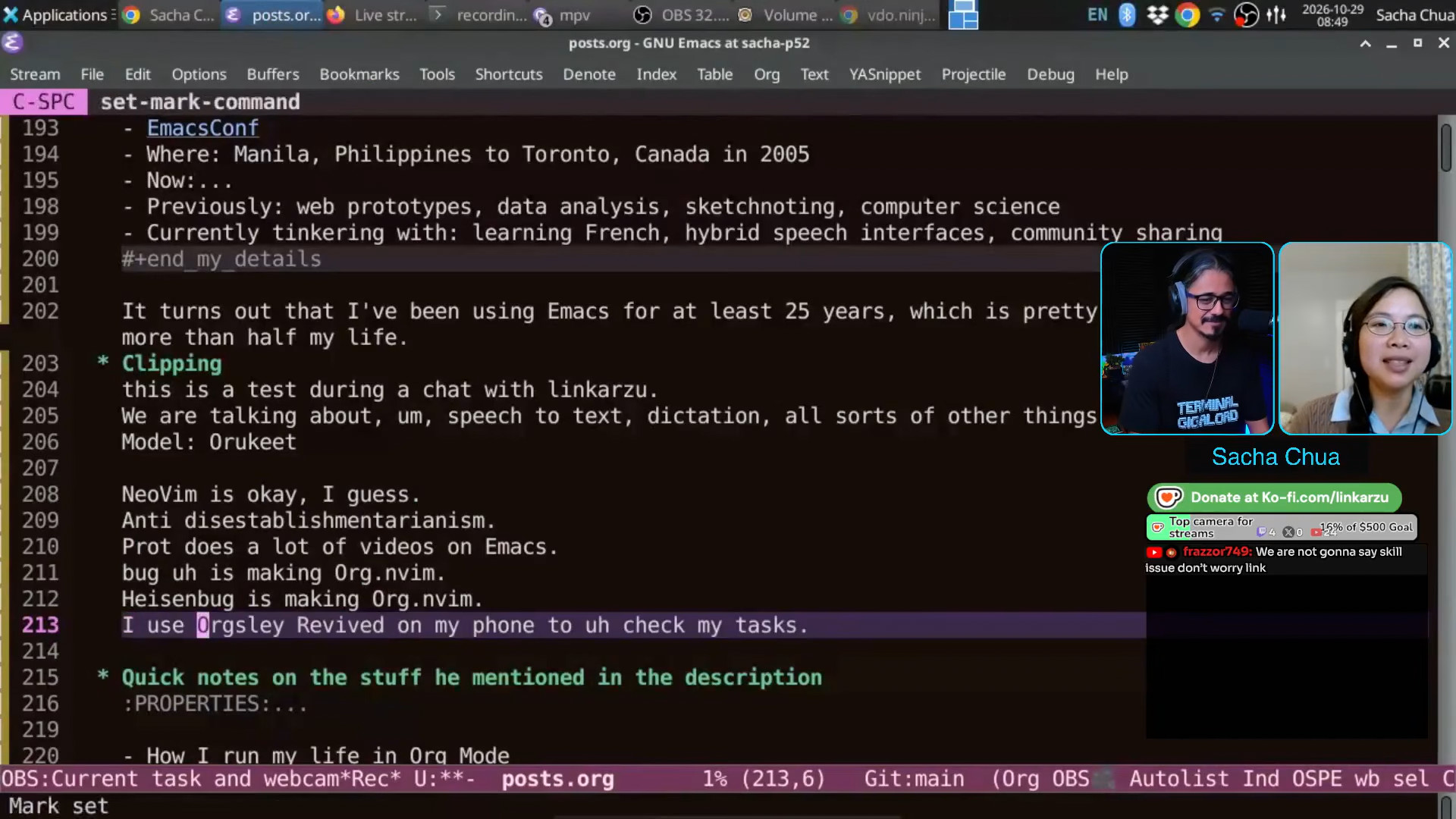
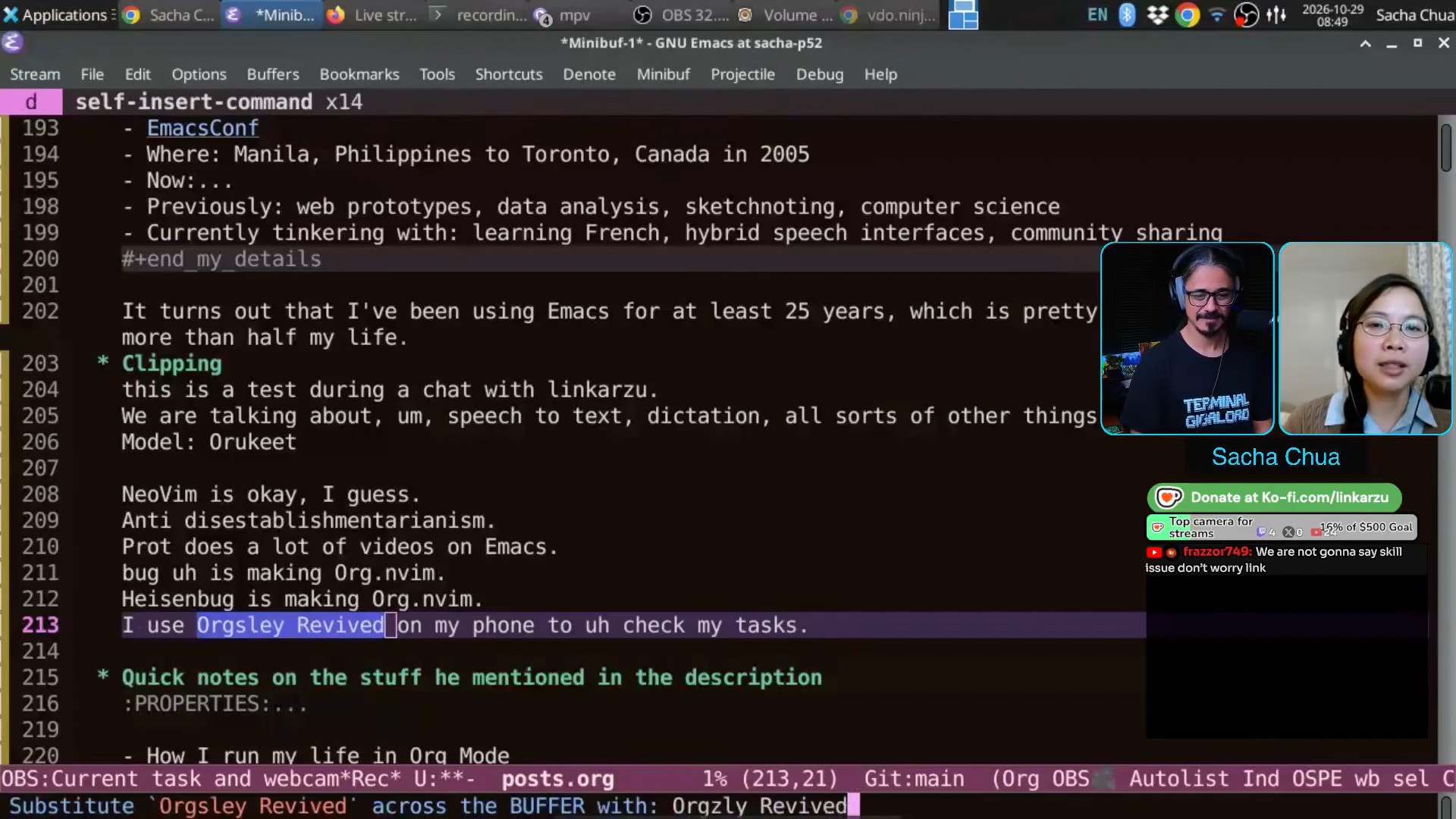
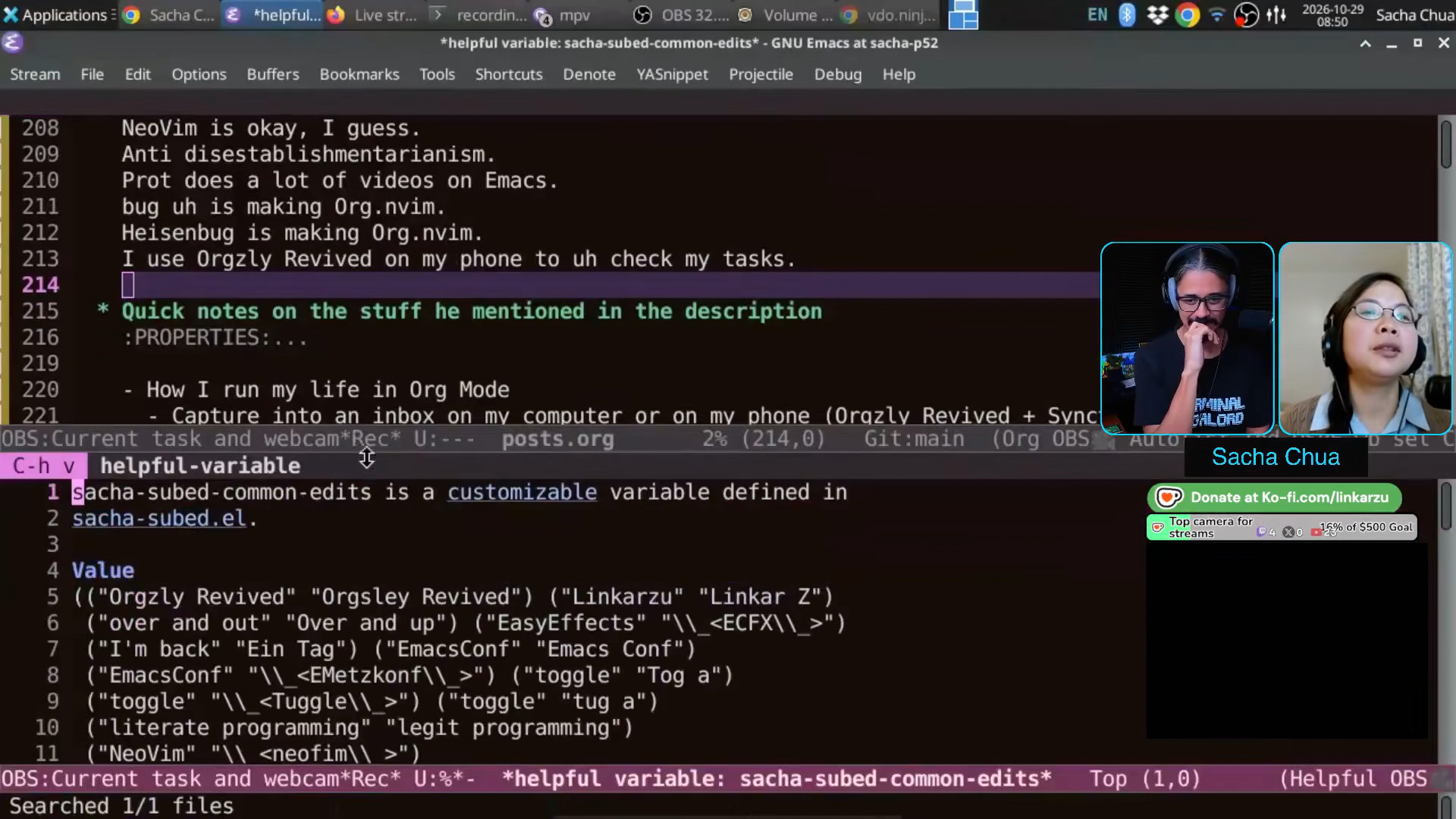

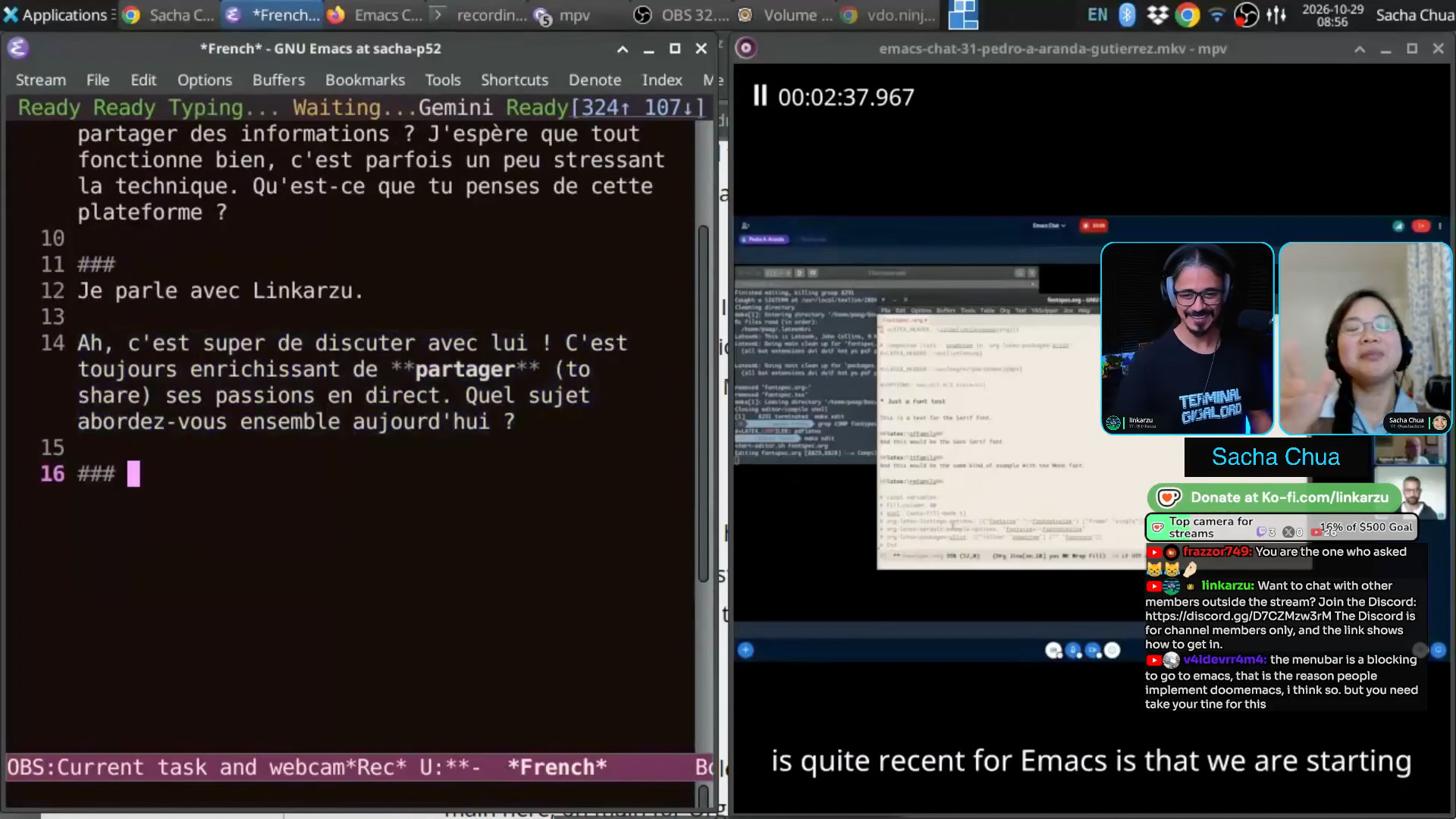
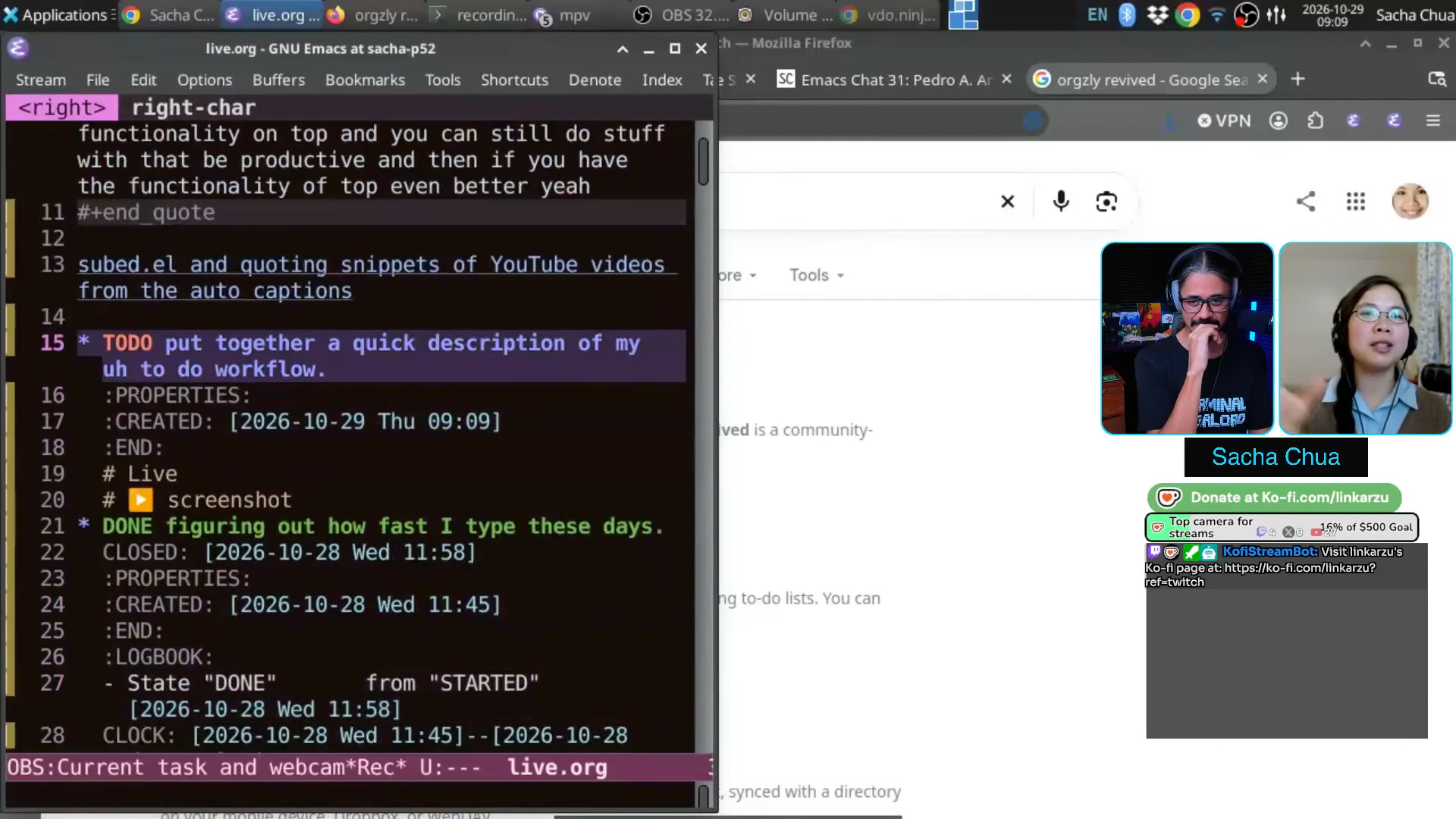
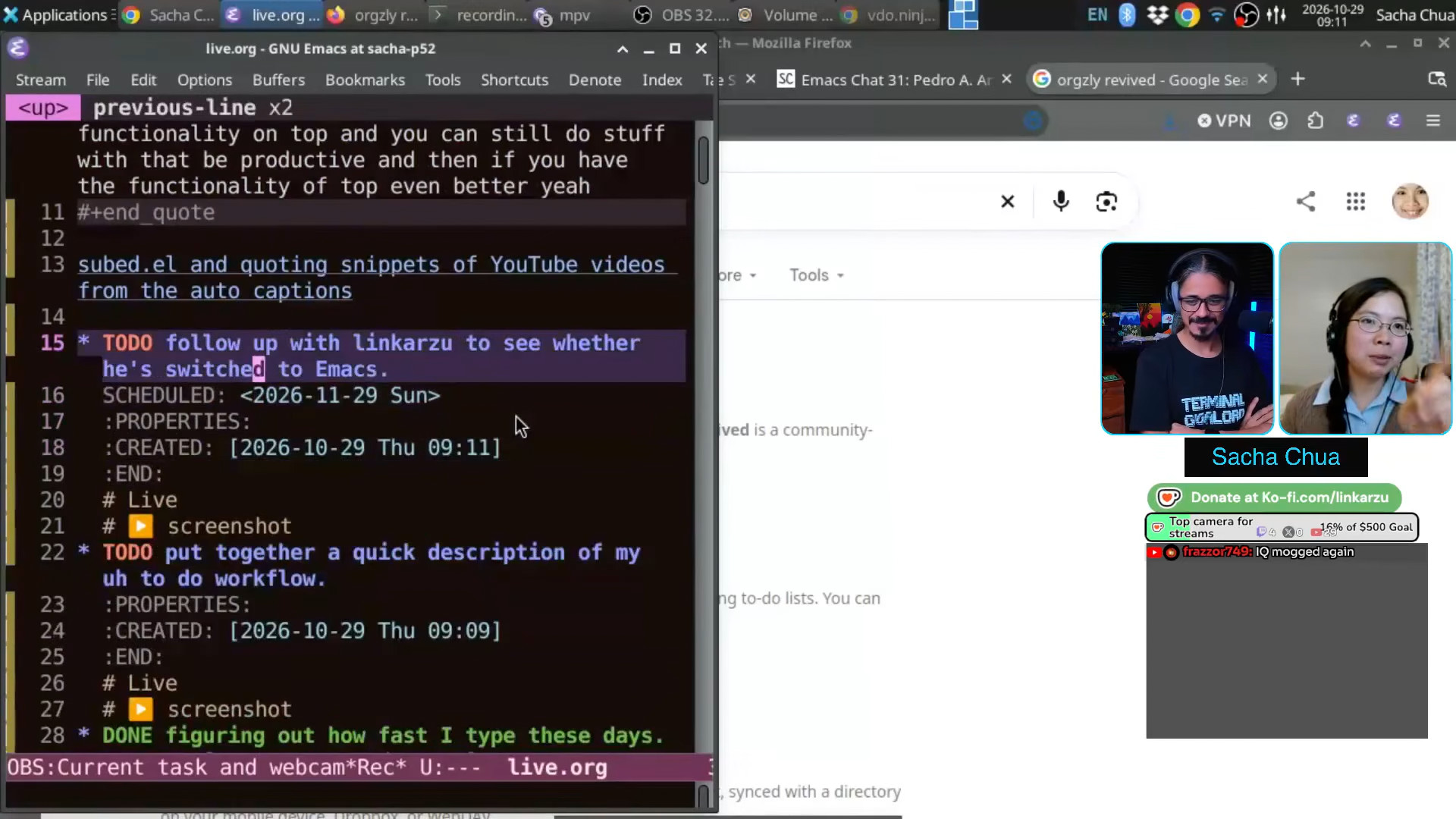


%20--%20drawing%20icons.jpeg)
%20--%20drawing%20icons.jpeg)


%20--%20drawing%20icons.jpeg)
%20p46-61%20--%20drawing%20icons.jpeg)


