Categories: geek » emacs » org

View topic page - RSS - Atom - Subscribe via email

YE11: Fix find-function for Emacs Lisp from org-babel or scratch

| org, emacs, elisp, stream, yay-emacs

Watch on Internet Archive, watch/comment on YouTube, download captions, or email me

Where can you define an Emacs Lisp function so that you can use find-function to jump to it again later?

  • A: In an indirect buffer from Org Mode source block with your favorite eval function like eval-defun
    • C-c ' (org-edit-special) inside the block; execute the defun with C-M-x (eval-defun), C-x C-e (eval-last-sexp), or eval-buffer.

          (defun my-test-1 () (message "Hello"))
      
  • B: In an Org Mode file by executing the block with C-c C-c

      (defun my-test-2 () (message "Hello"))
    
  • C: In a .el file

    file:///tmp/test-search-function.el : execute the defun with C-M-x (eval-defun), C-x C-e (eval-last-sexp), or eval-buffer

  • D: In a scratch buffer, other temporary buffer, or really any buffer thanks to eval-last-sexp

    (defun my-test-4 () (message "Hello"))

Only option C works - it's gotta be in an .el file for find-function to find it. But I love jumping to function definitions using find-function or lispy-goto-symbol (which is bound to M-. if you use lispy and set up lispy-mode) so that I can look at or change how something works. It can be a little frustrating when I try to jump to a definition and it says, "Don't know where blahblahblah is defined." I just defined it five minutes ago! It's there in one of my other buffers, don't make me look for it myself. Probably this will get fixed in Emacs core someday, but no worries, we can work around it today with a little bit of advice.

I did some digging around in the source code. Turns out that symbol-file can't find the function definition in the load-history variable if you're not in a .el file, so find-function-search-for-symbol gets called with nil for the library, which causes the error. (emacs:subr.el)

I wrote some advice that searches in any open emacs-lisp-mode buffers or in a list of other files, like my Emacs configuration. This is how I activate it:

(setq sacha-elisp-find-function-search-extra '("~/sync/emacs/Sacha.org"))
(advice-add 'find-function-search-for-symbol :around #'sacha-elisp-find-function-search-for-symbol)

Now I should be able to jump to all those functions wherever they're defined.

(my-test-1)
(my-test-2)
(my-test-3)
(my-test-4)

Note that by default, M-. in emacs-lisp-mode uses xref-find-definitions, which seems to really want files. I haven't figured out a good workaround for that yet, but lispy-mode makes M-. work and gives me a bunch of other great shortcuts, so I'd recommend checking that out.

Here's the source code for the find function thing:

(defvar sacha-elisp-find-function-search-extra
  nil
  "List of filenames to search for functions.")

;;;###autoload
(defun sacha-elisp-find-function-search-for-symbol (fn symbol type library &rest _)
  "Find SYMBOL with TYPE in Emacs Lisp buffers or `sacha-find-function-search-extra'.
Prioritize buffers that do not have associated files, such as Org Src
buffers or *scratch*. Note that the fallback search uses \"^([^ )]+\" so that
it isn't confused by preceding forms.

If LIBRARY is specified, fall back to FN.

Activate this with:

(advice-add 'find-function-search-for-symbol
 :around #'sacha-org-babel-find-function-search-for-symbol-in-dotemacs)"
  (if (null library)
      ;; Could not find library; search my-dotemacs-file just in case
      (progn
        (while (and (symbolp symbol) (get symbol 'definition-name))
          (setq symbol (get symbol 'definition-name)))
        (catch 'found
          (mapc
           (lambda (buffer-or-file)
             (with-current-buffer (if (bufferp buffer-or-file)
                                      buffer-or-file
                                    (find-file-noselect buffer-or-file))
               (let* ((regexp-symbol
                       (or (and (symbolp symbol)
                                (alist-get type (get symbol 'find-function-type-alist)))
                           (alist-get type find-function-regexp-alist)))
                      (form-matcher-factory
                       (and (functionp (cdr-safe regexp-symbol))
                            (cdr regexp-symbol)))
                      (regexp-symbol (if form-matcher-factory
                                         (car regexp-symbol)
                                       regexp-symbol))

                      (case-fold-search)
                      (regexp (if (functionp regexp-symbol) regexp-symbol
                                (format (symbol-value regexp-symbol)
                                        ;; Entry for ` (backquote) macro in loaddefs.el,
                                        ;; (defalias (quote \`)..., has a \ but
                                        ;; (symbol-name symbol) doesn't.  Add an
                                        ;; optional \ to catch this.
                                        (concat "\\\\?"
                                                (regexp-quote (symbol-name symbol)))))))
                 (save-restriction
                   (widen)
                   (with-syntax-table emacs-lisp-mode-syntax-table
                     (goto-char (point-min))
                     (if (if (functionp regexp)
                             (funcall regexp symbol)
                           (or (re-search-forward regexp nil t)
                               ;; `regexp' matches definitions using known forms like
                               ;; `defun', or `defvar'.  But some functions/variables
                               ;; are defined using special macros (or functions), so
                               ;; if `regexp' can't find the definition, we look for
                               ;; something of the form "(SOMETHING <symbol> ...)".
                               ;; This fails to distinguish function definitions from
                               ;; variable declarations (or even uses thereof), but is
                               ;; a good pragmatic fallback.
                               (re-search-forward
                                (concat "^([^ )]+" find-function-space-re "['(]?"
                                        (regexp-quote (symbol-name symbol))
                                        "\\_>")
                                nil t)))
                         (progn
                           (beginning-of-line)
                           (throw 'found
                                   (cons (current-buffer) (point))))
                       (when-let* ((find-expanded
                                    (when (trusted-content-p)
                                      (find-function--search-by-expanding-macros
                                       (current-buffer) symbol type
                                       form-matcher-factory))))
                         (throw 'found
                                 (cons (current-buffer)
                                       find-expanded)))))))))
           (delq nil
                 (append
                  (sort
                   (match-buffers '(derived-mode . emacs-lisp-mode))
                   :key (lambda (o) (or (buffer-file-name o) "")))
                  sacha-elisp-find-function-search-extra)))))
    (funcall fn symbol type library)))

I even figured out how to write tests for it:

(ert-deftest sacha-elisp--find-function-search-for-symbol--in-buffer ()
  (let ((sym (make-temp-name "--test-fn"))
        buffer)
    (unwind-protect
        (with-temp-buffer
          (emacs-lisp-mode)
          (insert (format ";; Comment\n(defun %s () (message \"Hello\"))" sym))
          (eval-last-sexp nil)
          (setq buffer (current-buffer))
          (with-temp-buffer
            (let ((pos (sacha-elisp-find-function-search-for-symbol nil (intern sym) nil nil)))
              (should (equal (car pos) buffer))
              (should (equal (cdr pos) 12)))))
      (fmakunbound (intern sym)))))

(ert-deftest sacha-elisp--find-function-search-for-symbol--in-file ()
  (let* ((sym (make-temp-name "--test-fn"))
         (temp-file (make-temp-file
                     "test-" nil ".org"
                     (format
                      "#+begin_src emacs-lisp\n;; Comment\n(defun %s () (message \"Hello\"))\n#+end_src"
                      sym)))
         (sacha-elisp-find-function-search-extra (list temp-file))
         buffer)
    (unwind-protect
        (with-temp-buffer
          (let ((pos (sacha-elisp-find-function-search-for-symbol nil (intern sym) nil nil)))
            (should (equal (buffer-file-name (car pos)) temp-file))
            (should (equal (cdr pos) 35))))
      (delete-file temp-file))))
This is part of my Emacs configuration.
View Org source for this post

Extract PDF highlights into an Org file with Python

Posted: - Modified: | org

: Updated screenshot. I finished reading all the pages and ended up with 202 highlights, so I'm going to have fun updating my config with those notes!

I've been trying to find a good workflow for highlighting interesting parts of PDFs, and then getting that into my notes as images and text in Emacs. I think I've finally figured out something that works well for me that feels natural (marking things.

I wanted to read through Prot's Emacs configuration while the kiddo played with her friends at the playground. I saved the web page as a PDF and exported it to Noteful. The PDF has 481 pages. Lots to explore! It was a bit chilly, so I had my gloves on. I used a capacitative stylus in my left hand to scroll the document and an Apple Pencil in my right hand to highlight the parts I wanted to add to my config or explore further.

Back at my computer, I used pip install pymupdf to install the PyMuPDF library. I poked around the PDF in the Python shell to see what it had, and I noticed that the highlights were drawings with fill 0.5. So I wrote this Python script to extract the images and text near that rectangle:

import fitz
import pathlib
import sys
import os

BUFFER = 5

def extract_highlights(filename, output_dir):
    doc = fitz.open(filename)
    s = "* Excerpts\n"
    for page_num, page in enumerate(doc):
        page_width = page.rect.width
        page_text = ""
        for draw_num, d in enumerate(page.get_drawings()):
            if d['fill_opacity'] == 0.5:
               rect = d['rect']
               clip_rect = fitz.Rect(0, rect.y0 - BUFFER, page_width, rect.y1 + BUFFER)
               img = page.get_pixmap(clip=clip_rect)
               img_filename = "page-%03d-%d.png" % (page_num + 1, draw_num + 1)
               img.save(os.path.join(output_dir, img_filename))
               text = page.get_text(clip=clip_rect)
               page_text = (page_text
                            + "[[file:%s]]\n#+begin_quote\n[[pdf:%s::%d][p%d]]: %s\n#+end_quote\n\n"
                            % (img_filename,
                               os.path.join("..", filename),
                               page_num + 1,
                               page_num + 1, text))
        if page_text != "":
            s += "** Page %d\n%s" % (page_num + 1, page_text)
    pathlib.Path(os.path.join(output_dir, "index.org")).write_bytes(s.encode())

if __name__ == '__main__':
    if len(sys.argv) < 3:
        print("Usage: list-highlights.py pdf-filename output-dir")
    else:
        extract_highlights(sys.argv[1], sys.argv[2])

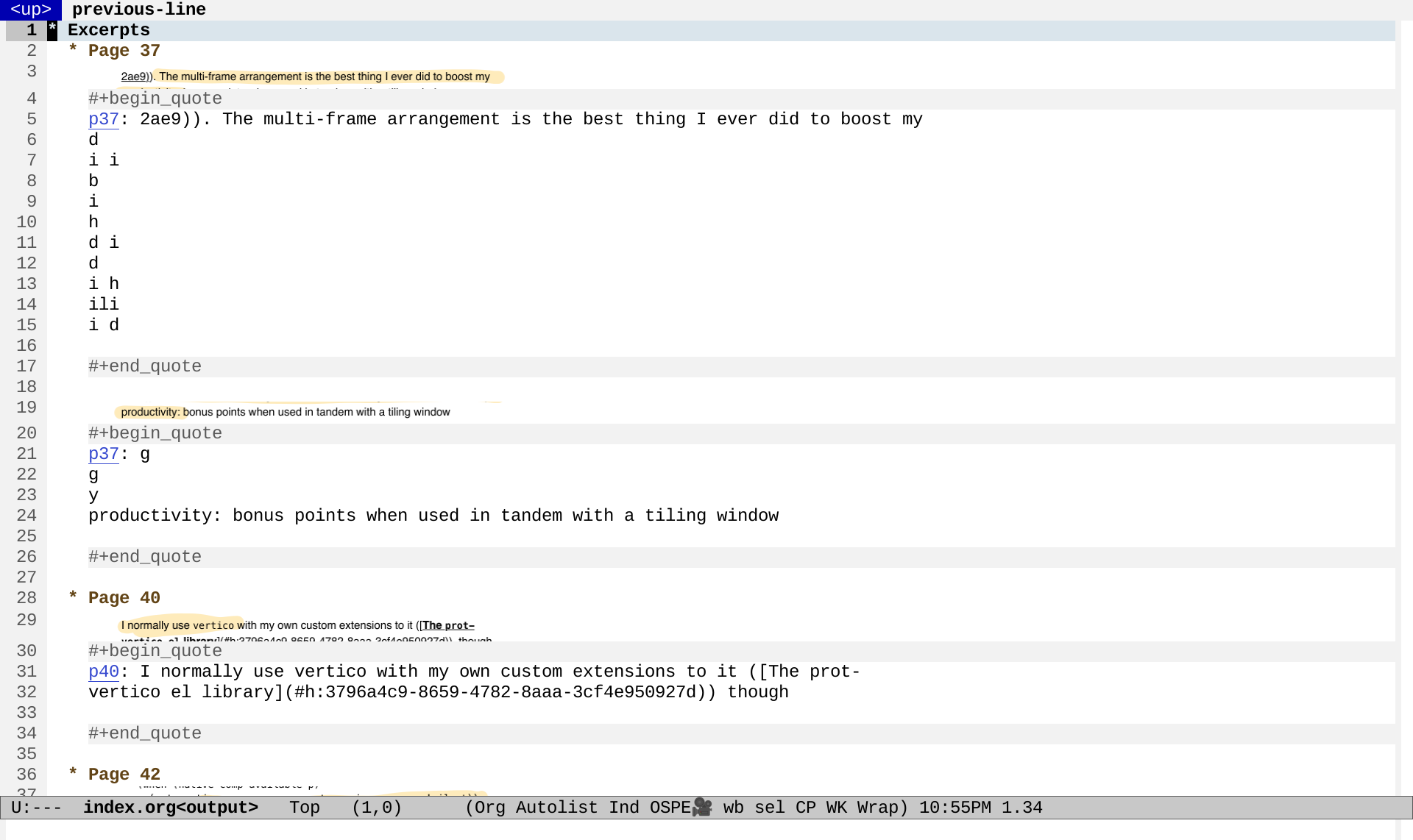
After I opened the resulting index.org file, I used C-u C-u C-c C-x C-v (org-link-preview) to make the images appear inline throughout the whole buffer. There's a little extra text from the PDF extraction, but it's a great starting point for cleaning up or copying. The org-pdftools package lets me link to specific pages in PDFs, neat!

2026-04-06-22-55-35.png
Figure 1: Screenshot of Org Mode file with link previews

To set up org-pdftools, I used:

(use-package org-pdftools
  :hook (org-mode . org-pdftools-setup-link))

Here's my quick livestream about the script with a slightly older version that had an off-by-one bug in the page numbers and didn't have the fancy PDF links. =)

View Org source for this post

Categorizing Emacs News items by voice in Org Mode

| speech, speech-recognition, emacs, org

I'm having fun exploring which things might actually be easier to do by voice than by typing. For example, after I wrote some code to expand yasnippets by voice, I realized that it was easier to:

  1. press my shortcut,
  2. say "okay, define interactive function",
  3. and then press my shortcut again,

than to:

  1. mentally say it,
  2. get the first initials,
  3. type in "dfi",
  4. and press Tab to expand.

Another area where I do this kind of mental translation for keyboard shortcuts is when I categorize dozens of Emacs-related links each week for Emacs News. I used to do this by hand. Then I wrote a function to try to guess the category based on regular expressions (my-emacs-news-guess-category in emacs-news/index.org, which is large). Then I set up a menu that lets me press numbers corresponding to the most frequent categories and use tab completion for the rest. 1 is Emacs Lisp, 2 is Emacs development, 3 is Emacs configuration, 4 is appearance, 5 is navigation, and so on. It's not very efficient, but some of it has at least gotten into muscle memory, which is also part of why it's hard to change the mapping. I don't come across that many links for Emacs development or Spacemacs, and I could probably change them to something else, but… Anyway.

2026-03-23_20-38-33.png
Figure 1: Screenshot of my menu for categorizing links

I wanted to see if I could categorize links by voice instead. I might not always be able to count on being able to type a lot, and it's always fun to experiment with other modes of input. Here's a demonstration showing how Emacs can automatically open the URLs, wait for voice input, and categorize the links using a reasonably close match. The *Messages* buffer displays the recognized output to help with debugging.

Screencast with audio: categorizing links by voice

This is how it works:

  1. It starts an ffmpeg recording process.
  2. It starts Silero voice activity detection.
  3. When it detects that speech has ended, it use curl to send the WAV to an OpenAI-compatible server (in my case, Speaches with the Systran/faster-whisper-base.en model) for transcription, along with a prompt to try to influence the recognition.
  4. It compares the result with the candidates using string-distance for an approximate match. It calls the code to move the current item to the right category, creating the category if needed.

Since this doesn't always result in the right match, I added an Undo command. I also have a Delete command for removing the current item, Scroll Up and Scroll Down, and a way to quit.

Initial thoughts

I used it to categorize lots of links in this week's Emacs News, and I think it's promising. I loved the way my hands didn't have to hover over the number keys or move between those and the characters. Using voice activity detection meant that I could just keep dictating categories instead of pressing keyboard shortcuts or using the foot pedal I recently dusted off. There's a slight delay, of course, but I think it's worth it. If this settles down and becomes a solid part of my workflow, I might even be able to knit or hand-sew while doing this step, or simply do some stretching exercises.

What about using streaming speech recognition? I've written some code to use streaming speech recognition, but the performance wasn't good enough when I tried it on my laptop (Lenovo P52 released in 2018, no configured GPU under Linux). The streaming server dropped audio segments in order to try to catch up. I'd rather have everything transcribed at the level of the model I want, even if I have to wait a little while. I also tried using the Web Speech API in Google Chrome for real-time speech transcription, but it's a little finicky. I'm happy with the performance I get from either manually queueing speech segments or using VAD and then using batch speech recognition with a model that's kept in memory (which is why I use a local server instead of a command-line tool). Come to think of it, I should try this with a higher-quality model like medium or large, just in case the latency turns out to be not that much more for this use case.

What about external voice control systems like Talon Voice or Cursorless? They seem like neat ideas and lots of people use them. I think hacking something into Emacs with full access to its internals could be lots of fun too.

A lot of people have experimented with voice input for Emacs over the years. It could be fun to pick up ideas for commands and grammars. Some examples:

What about automating myself out of this loop? I've considered training a classifier or sending the list to a large language model to categorize links in order to set more reasonable defaults, but I think I'd still want manual control, since the fun is in getting a sense of all the cool things that people are tinkering around with in the Emacs community. I found that with voice control, it was easier for me to say the category than to look for the category it suggested and then say "Okay" to accept the default. If I display the suggested category in a buffer with very large text (and possibly category-specific background colours), then I can quickly glance at it or use my peripheral vision. But yeah, it's probably easier to look at a page and say "Org Mode" than to look at the page, look at the default text, see if it matches Org Mode, and then say okay if it is.

Ideas for next steps

I wonder how to line up several categories. I could probably rattle off a few without waiting for the next one to load, and just pause when I'm not sure. Maybe while there's a reasonably good match within the first 1-3 words, I'll take candidates from the front of the queue. Or I could delimit it with another easily-recognized word, like "next".

I want to make a more synchronous version of this idea so that I can have a speech-enabled drop-in replacement that I can use as my y-or-n-p while still being able to type y or n. This probably involves using sit-for and polling to see if it's done. And then I can use that to play Twenty Questions, but also to do more serious stuff. It would also be nice to have replacements for read-string and completing-read, since those block Emacs until the user enters something.

I might take a side-trip into a conversational interface for M-x doctor and M-x dunnet, because why not. Naturally, it also makes sense to voice-enable agent-shell and gptel interactions.

I'd like to figure out a number- or word-based completion mechanism so that I can control Reddit link replacement as well, since I want to select from a list of links from the page. Maybe something similar to the way voicemacs adds numbers to helm and company or how flexi-choose.el works.

I'm also thinking about how I can shift seamlessly between typing and speaking, like when I want to edit a link title. Maybe I can check if I'm in the minibuffer and what kind of minibuffer I'm in, perhaps like the way Embark does.

It would be really cool to define speech commands by reusing the keymap structure that menus also use. This is how to define a menu in Emacs Lisp:

(easy-menu-define words-menu global-map
  "Menu for word navigation commands."
  '("Words"
     ["Forward word" forward-word]
     ["Backward word" backward-word]))

and this is how to set just one binding:

(keymap-set-after my-menu "<drink>"
  '("Drink" . drink-command) 'eat)

That makes sense to reuse for speech commands. I'd also like to be able to specify aliases while hiding them or collapsing them for a "What can I say" help view… Also, if keymaps work, then maybe minor modes or transient maps could work? This sort of feels like it should be the voice equivalent of a transient map.

The code so far

(defun my-emacs-news-categorize-with-voice (&optional skip-browse)
  (interactive (list current-prefix-arg))
  (unless skip-browse
    (my-spookfox-browse))
  (speech-input-cancel-recording)
  (let ((default (if (fboundp 'my-emacs-news-guess-category) (my-emacs-news-guess-category))))
    (speech-input-from-list
     (if default
         (format "Category (%s): " default)
       "Category: ")
     '(("Org Mode" "Org" "Org Mode")
       "Other"
       "Emacs Lisp"
       "Coding"
       ("Emacs configuration" "Config" "Configuration")
       ("Appearance" "Appearance")
       ("Default" "Okay" "Default")
       "Community"
       "AI"
       "Writing"
       ("Reddit" "Read it" "Reddit")
       "Shells"
       "Navigation"
       "Fun"
       ("Dired" "Directory" "Dir ed")
       ("Mail, news, and chat" "News" "Mail" "Chat")
       "Multimedia"
       "Scroll down"
       "Scroll up"
       "Web"
       "Delete"
       "Skip"
       "Undo"
       ("Quit" "Quit" "Cancel" "All done"))
     (lambda (result text)
       (message "Recognized %s original %s" result text)
       (pcase result
         ("Undo"
          (undo)
          (my-emacs-news-categorize-with-voice t))
         ("Skip"
          (forward-line)
          (my-emacs-news-categorize-with-voice))
         ("Quit"
          (message "All done.")
          (speech-input-cancel-recording))
         ("Reddit"
          (my-emacs-news-replace-reddit-link)
          (my-emacs-news-categorize-with-voice t))
         ("Scroll down"
          (my-spookfox-scroll-down)
          (my-emacs-news-categorize-with-voice t))
         ("Scroll up"
          (my-spookfox-scroll-up)
          (my-emacs-news-categorize-with-voice t))
         ("Delete"
          (delete-line)
          (undo-boundary)
          (my-emacs-news-categorize-with-voice))
         ("Default"
          (my-org-move-current-item-to-category
           (concat default ":"))
          (undo-boundary)
          (my-emacs-news-categorize-with-voice))
         (_
          (my-org-move-current-item-to-category
           (concat result ":"))
          (undo-boundary)
          (my-emacs-news-categorize-with-voice))))
     t)))

It uses Spookfox to control Firefox from Emacs:

(defun my-spookfox-scroll-down ()
  (interactive)
  (spookfox-js-injection-eval-in-active-tab "window.scrollBy(0, document.documentElement.clientHeight);" t))

(defun my-spookfox-scroll-up ()
  (interactive)
  (spookfox-js-injection-eval-in-active-tab "window.scrollBy(0, -document.documentElement.clientHeight);"))

(defun my-spookfox-background-tab (url &rest args)
  "Open URL as a background tab."
  (if spookfox--connected-clients
      (spookfox-tabs--request (cl-first spookfox--connected-clients) "OPEN_TAB" `(:url ,url))
    (browse-url url)))

It also uses these functions for categorizing Org Mode items:

(defun my-org-move-current-item-to-category (category)
    "Move current list item under CATEGORY earlier in the list.
  CATEGORY can be a string or a list of the form (text indent regexp).
  Point should be on the next line to process, even if a new category
  has been inserted."
    (interactive (list (completing-read "Category: " (my-org-get-list-categories))))
    (when category
      (let* ((col (current-column))
             (item (point-at-bol))
             (struct (org-list-struct))
             (category-text (if (stringp category) category (elt category 0)))
             (category-indent (if (stringp category) 2 (+ 2 (elt category 1))))
             (category-regexp (if (stringp category) category (elt category 2)))
             (end (elt (car (last struct)) 6))
             (pos (point))
             s)
        (setq s (org-remove-indentation (buffer-substring-no-properties item (org-list-get-item-end item struct))))
        (save-excursion
          (if (string= category-text "x")
              (org-list-send-item item 'delete struct)
            (goto-char (caar struct))
            (if (re-search-forward (concat "^ *- +" category-regexp) end t)
                (progn
                  ;; needs a patch to ol.el to check if stringp
                  (org-list-send-item item (point-at-bol) struct)
                  (org-move-item-down)
                  (org-indent-item))
              (goto-char end)
              (org-list-insert-item
               (point-at-bol)
               struct (org-list-prevs-alist struct))
              (let ((old-struct (copy-tree struct)))
                (org-list-set-ind (point-at-bol) struct 0)
                (org-list-struct-fix-bul struct (org-list-prevs-alist struct))
                (org-list-struct-apply-struct struct old-struct))
              (goto-char (point-at-eol))
              (insert category-text)
              (org-list-send-item item 'end struct)
              (org-indent-item)
              (org-indent-item))
            (recenter))))))

(defun my-org-guess-list-category (&optional categories)
  (interactive)
  (require 'cl-lib)
  (unless categories
    (setq categories
          (my-helm-org-list-categories-init-candidates)))
  (let* ((beg (line-beginning-position))
         (end (line-end-position))
         (string (buffer-substring-no-properties beg end))
         (found
          (cl-member string
                     categories
                     :test
                     (lambda (string cat-entry)
                       (unless (string= (car cat-entry) "x")
                         (string-match (regexp-quote (downcase (car cat-entry)))
                                       string))))))
    (when (car found)
      (my-org-move-current-item-to-category
       (cdr (car found)))
      t)))

For the speech-input functions, experimental code is at https://codeberg.org/sachac/speech-input .

View Org source for this post

Org Mode: Export HTML, copy files, and serve the results via simple-httpd so that media files work

Posted: - Modified: | emacs, org

: Update Oh, ignore all of this! For some reason, when I export the regular Org Mode way, my media files work. Maybe it was just a weird hiccup!

In Org Mode, when you use "Export to HTML - As HTML file and open", the resulting HTML file is loaded using a file:// URL. This means you can't load any media files. In my post about pronunciation practice, I wanted to test the playback without waiting for my 11ty-based static site generator to churn through the files.

simple-httpd lets you run a web server from Emacs. By default, the httpd-root is ~/public_html and httpd-port is 8085, but you can configure it to be somewhere else. Here I set it up to create a new temporary directory, and to delete that directory afterwards.

(use-package simple-httpd
  :config
  (setq httpd-root (make-temp-file "httpd" t))
  :hook
  (httpd-stop . my-simple-httpd-remove-temporary-root)
  (kill-emacs . httpd-stop))
;;;###autoload
(defun my-simple-httpd-remove-temporary-root ()
  "Remove `httpd-root' only if it's a temporary directory."
  (when (file-in-directory-p httpd-root temporary-file-directory)
    (delete-directory httpd-root t)))

The following code exports your Org buffer or subtree to a file in that directory, copies all the referenced local files (if they're newer) and updates the links in the HTML, and then serves it via simple-httpd. Note that it just overwrites everything without confirmation, so if you refer to files with the same name, only the last one will be kept.

(with-eval-after-load 'ox
  (org-export-define-derived-backend 'my-html-served 'html
    :menu-entry
    '(?s "Export to HTML and Serve"
         ((?b "Buffer"  my-org-serve-buffer)
          (?s "Subtree" my-org-serve-subtree)))))
;;;###autoload
(defun my-org-serve-buffer (&optional async _subtreep visible-only body-only ext-plist)
  (my-org-export-and-serve nil))

;;;###autoload
(defun my-org-serve-subtree (&optional async _subtreep visible-only body-only ext-plist)
  (my-org-export-and-serve t))

;; Based on org-11ty--copy-files-and-replace-links
;; Might be a good idea to use something DOM-based instead
(defun my-html-copy-files-and-replace-links (info &optional destination-dir)
  (let ((file-regexp "\\(?:src\\|href\\|poster\\)=\"\\(\\(file:\\)?.*?\\)\"")
        (destination-dir (or destination-dir (file-name-directory (plist-get info :file-path))))
        file-all-urls file-name beg
        new-file file-re
        unescaped)
    (unless (file-directory-p destination-dir)
      (make-directory destination-dir t))
    (unless (file-directory-p destination-dir)
      (error "%s is not a directory." destination-dir))
    (save-excursion
      (goto-char (point-min))
      (while (re-search-forward file-regexp nil t)
        (setq file-name (or (match-string 1) (match-string 2)))
        (unless (or (string-match "^#" file-name)
                    (get-text-property 0 'changed file-name))
          (setq file-name
                (replace-regexp-in-string
                 "\\?.+" ""
                 (save-match-data (if (string-match "^file:" file-name)
                                      (substring file-name 7)
                                    file-name))))
          (setq unescaped
                (replace-regexp-in-string
                 "%23" "#"
                 file-name))
          (setq new-file (concat
                          (if info (plist-get info :permalink) "")
                          (file-name-nondirectory unescaped)))
          (unless (org-url-p file-name)
            (let ((new-file-name (expand-file-name (file-name-nondirectory unescaped)
                                                   destination-dir)))
              (condition-case err
                  (when (or (not (file-exists-p new-file-name))
                            (file-newer-than-file-p unescaped new-file-name))
                    (copy-file unescaped new-file-name t))
                (error nil))
              (when (file-exists-p new-file-name)
                (save-excursion
                  (goto-char (point-min))
                  (setq file-re (concat "\\(?: src=\"\\| href=\"\\| poster=\"\\)\\(\\(?:file://\\)?" (regexp-quote file-name) "\\)"))
                  (while (re-search-forward file-re nil t)
                    (replace-match
                     (propertize
                      (save-match-data (replace-regexp-in-string "#" "%23" new-file))
                      'changed t)
                     t t nil 1)))))))))))

;;;###autoload
(defun my-org-export-and-serve (&optional subtreep)
  "Export current org buffer (or subtree if SUBTREEP) to HTML and serve via simple-httpd."
  (interactive "P")
  (require 'simple-httpd)
  (httpd-stop)
  (unless httpd-root (error "Set `httpd-root'."))
  (unless (file-directory-p httpd-root)
    (make-directory httpd-root t))
  (unless (file-directory-p httpd-root)
    (error "%s is not a directory." httpd-root))
  (let* ((out-file (expand-file-name (concat (file-name-base (buffer-file-name)) ".html")
                                     httpd-root))
         (html-file (org-export-to-file 'my-html-served out-file nil subtreep)))
    ;; Copy all the files and rewrite all the links
    (with-temp-file out-file
      (insert-file-contents out-file)
      (my-html-copy-files-and-replace-links
       `(:permalink "/") httpd-root))
    (httpd-start)
    (browse-url (format "http://localhost:%d/%s"
                        httpd-port
                        (file-name-nondirectory html-file)))))

Now I can use C-c C-e (org-export-dispatch), select the subtree with C-s, and use s s to export a subtree to a webserver and have all the media files work. This took 0.46 seconds for my post on pronunciation practice and automatically opens the page in a browser window. In comparison, my 11ty static site generator took 5.18 seconds for a subset of my site (1630 files copied, 214 files generated), and I haven't yet hooked up monitoring it to Emacs, so I have to take an extra step to open the page in the browser when I think it's finished. I think exporting to HTML and serving it with simple-httpd will be much easier for simple cases like this, and then I can export to 11ty once I'm done with the basic checks.

This is part of my Emacs configuration.
View Org source for this post

Comparing pronunciation recordings across time

Posted: - Modified: | french, emacs, org, subed
  • : Added reconstructions from today and moved more of the code to sachac/learn-lang.
  • : Added updates from today.
  • : Added reference audio for the second set.
  • : I added pronunciation segments for the new set of tongue-twisters I got on Mar 13.
  • : I added a column for Feb 20, the first session with the sentences. I also added keyboard shortcuts (1..n) for playing the audio of the row that the mouse is on.

2026-02-20: First set: Maman peint un grand lapin blanc, etc.

My French tutor gave me a list of sentences to help me practise pronunciation.

I can fuzzy-match these with the word timing JSON from WhisperX, like this.

Extract all approximately matching phrases
(subed-record-extract-all-approximately-matching-phrases
   sentences
   "/home/sacha/sync/recordings/2026-02-20-raphael.json"
   "/home/sacha/proj/french/analysis/virelangues/2026-02-20-raphael-script.vtt")
Sentences
  • Maman peint un grand lapin blanc.
  • Un enfant intelligent mange lentement.
  • Le roi croit voir trois noix.
  • Le témoin voit le chemin loin.
  • Moins de foin au loin ce matin.
  • La laine beige sèche près du collège.
  • La croquette sèche dans l'assiette.
  • Elle mène son frère à l'hôtel.
  • Le verre vert est très clair.
  • Elle aimait manger et rêver.
  • Le jeu bleu me plaît peu.
  • Ce neveu veut un jeu.
  • Le feu bleu est dangereux.
  • Le beurre fond dans le cœur chaud.
  • Les fleurs de ma sœur sentent bon.
  • Le hibou sait où il va.
  • L'homme fort mord la pomme.
  • Le sombre col tombe.
  • L'auto saute au trottoir chaud.
  • Le château d'en haut est beau.
  • Le cœur seul pleure doucement.
  • Tu es sûr du futur ?
  • Trois très grands trains traversent trois trop grandes rues.
  • Je veux deux feux bleus, mais la reine préfère la laine beige.
  • Vincent prend un bain en chantant lentement.
  • La mule sûre court plus vite que le loup fou.
  • Luc a bu du jus sous le pont où coule la boue.
  • Le frère de Robert prépare un rare rôti rouge.
  • La mule court autour du mur où hurle le loup.

Then I can use subed-record to manually tweak them, add notes, and so on. I end up with VTT files like 2026-03-06-raphael-script.vtt. I can assemble the snippets for a session into a single audio file, like this:

I wanted to compare my attempts over time, so I wrote some code to use Org Mode and subed-record to build a table with little audio players that I can use both within Emacs and in the exported HTML. This collects just the last attempts for each sentence during a number of my sessions (both with the tutor and on my own). The score is from the Microsoft Azure pronunciation assessment service. I'm not entirely sure about its validity yet, but I thought I'd add it for fun. * indicates where I've added some notes from my tutor, which should be available as a title attribute on hover. (Someday I'll figure out a mobile-friendly way to do that.)

Calling it with my sentences and files
(learn-lang-subed-record-summarize-segments
 sentences
 '(("/home/sacha/proj/french/analysis/virelangues/2026-02-20-raphael-script.vtt" . "Feb 20")
 ;("~/sync/recordings/processed/2026-02-20-raphael-tongue-twisters.vtt" . "Feb 20")
        ("~/sync/recordings/processed/2026-02-22-virelangues-single.vtt" . "Feb 22")
        ("~/proj/french/recordings/2026-02-26-virelangues-script.vtt" . "Feb 26")
        ("~/proj/french/recordings/2026-02-27-virelangues-script.vtt" . "Feb 27")
        ("~/proj/french/recordings/2026-03-03-virelangues.vtt" . "Mar 3")
        ("/home/sacha/sync/recordings/processed/2026-03-03-raphael-reference-script.vtt" . "Mar 3")
        ("~/proj/french/analysis/virelangues/2026-03-06-raphael-script.vtt" . "Mar 6")
        ("~/proj/french/analysis/virelangues/2026-03-12-virelangues-script.vtt" . "Mar 12"))
 "~/proj/french/analysis/virelangues/clip"
 #'learn-lang-subed-record-get-last-attempt
 )
Feb 20 Feb 22 Feb 26 Feb 27 Mar 3 Mar 3 Mar 6 Mar 12 Text
▶️ 63* ▶️ 96 ▶️ 95 ▶️ 94 ▶️ 83 ▶️ 83* ▶️ 81* ▶️ 88 Maman peint un grand lapin blanc.
▶️ 88* ▶️ 95 ▶️ 99 ▶️ 99 ▶️ 96 ▶️ 89* ▶️ 92* ▶️ 83 Un enfant intelligent mange lentement.
▶️ 84* ▶️ 97 ▶️ 97 ▶️ 96 ▶️ 94 ▶️ 95* ▶️ 98* ▶️ 99 Le roi croit voir trois noix.
▶️ 80* ▶️ 85 ▶️ 77 ▶️ 94 ▶️ 97   ▶️ 92* ▶️ 88 Le témoin voit le chemin loin.
▶️ 72* ▶️ 97 ▶️ 95 ▶️ 77 ▶️ 92   ▶️ 89* ▶️ 86 Moins de foin au loin ce matin.
▶️ 79* ▶️ 95 ▶️ 76 ▶️ 95 ▶️ 76 ▶️ 90* ▶️ 90* ▶️ 79 La laine beige sèche près du collège.
▶️ 67* ▶️ 99 ▶️ 85 ▶️ 81 ▶️ 85 ▶️ 99* ▶️ 97* ▶️ 97 La croquette sèche dans l'assiette.
▶️ 88* ▶️ 99 ▶️ 100 ▶️ 100 ▶️ 98 ▶️ 100* ▶️ 99* ▶️ 100 Elle mène son frère à l'hôtel.
▶️ 77* ▶️ 87 ▶️ 99 ▶️ 93 ▶️ 87   ▶️ 87* ▶️ 99 Le verre vert est très clair.
▶️ 100* ▶️ 94 ▶️ 100 ▶️ 99 ▶️ 99 ▶️ 99* ▶️ 100* ▶️ 100 Elle aimait manger et rêver.
▶️ 78* ▶️ 98 ▶️ 99 ▶️ 98 ▶️ 98 ▶️ 92*   ▶️ 88 Le jeu bleu me plaît peu.
▶️ 78* ▶️ 97 ▶️ 85 ▶️ 95 ▶️ 85     ▶️ 85 Ce neveu veut un jeu.
▶️ 73* ▶️ 95 ▶️ 95 ▶️ 96 ▶️ 97     ▶️ 100 Le feu bleu est dangereux.
▶️ 87* ▶️ 76 ▶️ 65 ▶️ 97 ▶️ 85 ▶️ 74* ▶️ 85* ▶️ 96 Le beurre fond dans le cœur chaud.
▶️ 84* ▶️ 43 ▶️ 85 ▶️ 79 ▶️ 75     ▶️ 98 Les fleurs de ma sœur sentent bon.
▶️ 70* ▶️ 86 ▶️ 79 ▶️ 76 ▶️ 87 ▶️ 84   ▶️ 98 Le hibou sait où il va.
▶️ 92* ▶️ 95 ▶️ 86 ▶️ 92 ▶️ 98 ▶️ 99*   ▶️ 94 L'homme fort mord la pomme.
▶️ 83* ▶️ 73 ▶️ 69 ▶️ 81 ▶️ 60 ▶️ 96*   ▶️ 81 Le sombre col tombe.
▶️ 39* ▶️ 49 ▶️ 69 ▶️ 56 ▶️ 69 ▶️ 96*   ▶️ 94 L'auto saute au trottoir chaud.
▶️ 82 ▶️ 84 ▶️ 85 ▶️ 98 ▶️ 94 ▶️ 96*   ▶️ 99 Le château d'en haut est beau.
▶️ 89 ▶️ 85 ▶️ 75 ▶️ 91 ▶️ 52 ▶️ 75* ▶️ 70* ▶️ 98 Le cœur seul pleure doucement.
▶️ 98*   ▶️ 99 ▶️ 99 ▶️ 95 ▶️ 93* ▶️ 97* ▶️ 99 Tu es sûr du futur ?
    ▶️ 97 ▶️ 93 ▶️ 92 ▶️ 85*   ▶️ 90 Trois très grands trains traversent trois trop grandes rues.
    ▶️ 94 ▶️ 85 ▶️ 97 ▶️ 82*   ▶️ 92 Je veux deux feux bleus, mais la reine préfère la laine beige.
    ▶️ 91 ▶️ 79 ▶️ 87 ▶️ 82*   ▶️ 94 Vincent prend un bain en chantant lentement.
    ▶️ 89 ▶️ 91 ▶️ 91 ▶️ 84*   ▶️ 92 La mule sûre court plus vite que le loup fou.
    ▶️ 91 ▶️ 93 ▶️ 93 ▶️ 92*   ▶️ 96 Luc a bu du jus sous le pont où coule la boue.
    ▶️ 88 ▶️ 71 ▶️ 94 ▶️ 86*   ▶️ 92 Le frère de Robert prépare un rare rôti rouge.
    ▶️ 81 ▶️ 84 ▶️ 88 ▶️ 67*   ▶️ 94 La mule court autour du mur où hurle le loup.

Pronunciation still feels a bit hit or miss. Sometimes I say a sentence and my tutor says "Oui," and then I say it again and he says "Non, non…" The /ʁ/ and /y/ sounds are hard.

I like seeing these compact links in an Org Mode table and being able to play them, thanks to my custom audio link type. It should be pretty easy to write a function that lets me use a keyboard shortcut to play the audio (maybe using the keys 1-9?) so that I can bounce between them for comparison.

If I screen-share from Google Chrome, I can share the tab with audio, so my tutor can listen to things at the same time. Could be fun to compare attempts so that I can try to hear the differences better. Hmm, actually, let's try adding keyboard shortcuts that let me use 1-8, n/p, and f/b to navigate and play audio. Mwahahaha! It works!

2026-03-14: Second set: Mon oncle peint un grand pont blanc, etc.

Update 2026-03-14: My tutor gave me a new set of tongue-twisters. When I'm working on my own, I find it helpful to loop over an audio reference with a bit of silence after it so that I can repeat what I've heard. I have several choices for reference audio:

  • I can generate an audio file using text-to-speech, like a local instance of Kokoro TTS, or a hosted service like Google Translate (via gtts-cli), ElevenLabs, or Microsoft Azure.
  • I can extract a recording of my tutor from one of my sessions.
  • I can extract a recording of myself from one of my tutoring sessions where my tutor said that the pronunciation is alright.

Here I stumble through the tongue-twisters. I've included reference audio from Kokoro, gtts, and ElevenLabs for comparison.

(my-subed-record-analyze-file-with-azure-and-references
 (subed-record-keep-last
  (subed-record-filter-skips
   (subed-parse-file
    "/home/sacha/proj/french/analysis/virelangues/2026-03-13-raphael-script.vtt")))
 "~/proj/french/analysis/virelangues-2026-03-13/2026-03-13-clip")
Gt Kk Az Me ID Comments All Acc Flu Comp Conf  
👂🏼 👂🏼 👂🏼 ▶️ 1 X: pont 93 99 90 100 86 Mon oncle peint un grand pont blanc. {pont}
👂🏼 👂🏼 👂🏼 ▶️ 2 C'est mieux 68 75 80 62 87 Un singe malin prend un bon raisin rond.
👂🏼 👂🏼 👂🏼 ▶️ 3 Ouais, c'est ça 83 94 78 91 89 Dans le vent du matin, mon chien sent un bon parfum.
👂🏼 👂🏼 👂🏼 ▶️ 4 ok 75 86 63 100 89 Le soin du roi consiste à joindre chaque coin du royaume.
👂🏼 👂🏼 👂🏼 ▶️ 5 Ouais, c'est ça, parfait 83 94 74 100 88 Dans un coin du bois, le roi voit trois points noirs.
👂🏼 👂🏼 👂🏼 ▶️ 6 Ouais, parfait 90 92 87 100 86 Le feu de ce vieux four chauffe peu.
👂🏼 👂🏼 👂🏼 ▶️ 7 Ouais 77 85 88 71 86 Deux peureux veulent un peu de feu.
👂🏼 👂🏼 👂🏼 ▶️ 8   77 78 75 83 85 Deux vieux bœufs veulent du beurre.
👂🏼 👂🏼 👂🏼 ▶️ 9 Ouais, parfait 92 94 89 100 89 Elle aimait marcher près de la rivière.
👂🏼 👂🏼 👂🏼 ▶️ 10 Ok, c'est bien 93 98 89 100 90 Je vais essayer de réparer la fenêtre.
👂🏼 👂🏼 👂🏼 ▶️ 11 Okay 83 87 76 100 89 Le bébé préfère le lait frais.
👂🏼 👂🏼 👂🏼 ▶️ 12   77 92 70 86 90 Charlotte cherche ses chaussures dans la chambre.
👂🏼 👂🏼 👂🏼 ▶️ 13 Okay 91 90 94 91 88 Un chasseur sachant chasser sans son chien est-il un bon chasseur ?
👂🏼 👂🏼 👂🏼 ▶️ 14 Ouais 91 88 92 100 91 Le journaliste voyage en janvier au Japon.
👂🏼 👂🏼 👂🏼 ▶️ 15 C'est bien (X: dans un) 91 88 94 100 88 Georges joue du jazz dans un grand bar. {dans un}
👂🏼 👂🏼 👂🏼 ▶️ 16 C'est bien 88 87 94 88 85 Un jeune joueur joue dans le grand gymnase.
👂🏼 👂🏼 👂🏼 ▶️ 17   95 94 96 100 91 Le compagnon du montagnard soigne un agneau.
👂🏼 👂🏼 👂🏼 ▶️ 18   85 88 84 86 89 La cigogne soigne l’agneau dans la campagne.
👂🏼 👂🏼 👂🏼 ▶️ 19 grenouille 71 80 68 75 86 La grenouille fouille les feuilles dans la broussaille.

And comparing clips over time:

(learn-lang-subed-record-summarize-segments
 (split-string (org-file-contents "~/proj/french/analysis/virelangues-2026-03-13/phrases.txt") "\n")
 '(("/home/sacha/proj/french/analysis/virelangues/2026-03-13-raphael-script.vtt" . "Mar 13")
   ("/home/sacha/proj/french/analysis/virelangues-2026-03-13/2026-03-20-raphael-script.vtt" . "Mar 20")
   ("/home/sacha/proj/french/analysis/virelangues-2026-03-13/2026-03-24-raphael-script.vtt" . "Mar 24")
   ("/home/sacha/proj/french/analysis/virelangues-2026-03-13/2026-03-27-script.vtt" . "Mar 27"))
 "~/proj/french/analysis/virelangues-2026-03-13/all-"
 #'learn-lang-subed-record-get-last-attempt)
Mar 13 Mar 20 Mar 24 Mar 27 Text
▶️ 93* ▶️ 89 ▶️ 71* ▶️ 88 Mon oncle peint un grand pont blanc.
▶️ 68* ▶️ 82* ▶️ 90* ▶️ 91 Un singe malin prend un bon raisin rond.
▶️ 83* ▶️ 89* ▶️ 93* ▶️ 95 Dans le vent du matin, mon chien sent un bon parfum.
▶️ 75* ▶️ 84* ▶️ 86* ▶️ 90 Le soin du roi consiste à joindre chaque coin du royaume.
▶️ 83* ▶️ 88* ▶️ 96 ▶️ 97 Dans un coin du bois, le roi voit trois points noirs.
▶️ 90* ▶️ 90* ▶️ 90* ▶️ 99 Le feu de ce vieux four chauffe peu.
▶️ 77* ▶️ 77* ▶️ 84* ▶️ 89 Deux peureux veulent un peu de feu.
▶️ 77 ▶️ 80* ▶️ 71* ▶️ 52 Deux vieux bœufs veulent du beurre.
▶️ 92* ▶️ 88* ▶️ 100* ▶️ 96 Elle aimait marcher près de la rivière.
▶️ 93* ▶️ 87* ▶️ 98* ▶️ 94 Je vais essayer de réparer la fenêtre.
▶️ 83* ▶️ 85* ▶️ 93* ▶️ 97 Le bébé préfère le lait frais.
▶️ 77 ▶️ 78* ▶️ 88* ▶️ 87 Charlotte cherche ses chaussures dans la chambre.
▶️ 91* ▶️ 92* ▶️ 97* ▶️ 92 Un chasseur sachant chasser sans son chien est-il un bon chasseur ?
▶️ 91* ▶️ 84* ▶️ 88* ▶️ 91 Le journaliste voyage en janvier au Japon.
▶️ 91*   ▶️ 79* ▶️ 95 Georges joue du jazz dans un grand bar.
▶️ 88* ▶️ 99* ▶️ 90* ▶️ 96 Un jeune joueur joue dans le grand gymnase.
▶️ 95 ▶️ 95 ▶️ 94* ▶️ 93 Le compagnon du montagnard soigne un agneau.
▶️ 85 ▶️ 63* ▶️ 86* ▶️ 100 La cigogne soigne l'agneau dans la campagne.
▶️ 71* ▶️ 64* ▶️ 79* ▶️ 91 La grenouille fouille les feuilles dans la broussaille.
  ▶️ 66* ▶️ 79* ▶️ 73 La vieille abeille travaille dans la broussaille.
  ▶️ 96* ▶️ 90* ▶️ 95 Le juge Jean juge justement les jolis bijoux de Julie.
    ▶️ 92* ▶️ 93 Ma compagne m'accompagne à la campagne avec une autre compagne.
      ▶️ 82 Une tortue têtue marche dessus sous une pluie continue.
      ▶️ 76 Une mule têtue pousse une roue lourde sur une rue boueuse.
      ▶️ 73 Trois gros rats gris grimpent dans trois grands greniers rugueux.
      ▶️ 84 Un professeur rigoureux corrige un rapport sur une erreur rare.

The code

Code for summarizing the segments
(defun my-subed-record-analyze-file-with-azure-and-references (subtitles prefix &optional always-create)
  (cons
   '("Gt" "Kk" "Az" "Me" "ID" "Comments" "All" "Acc" "Flu" "Comp" "Conf")
   (seq-map-indexed
    (lambda (sub i)
      (let ((sound-file (expand-file-name (format "%s-%02d.opus"
                                                  prefix
                                                  (1+ i))))
            (tts-services
             '(("gtts" . learn-lang-tts-gtts-say)
               ("kokoro" . learn-lang-tts-kokoro-fastapi-say)
               ("azure" . learn-lang-tts-azure-say)))
            tts-files
            (note (subed-record-get-directive "#+NOTE" (elt sub 4))))
        (when (or always-create (not (file-exists-p sound-file)))
          (subed-record-extract-audio-for-current-subtitle-to-file sound-file sub))
        (setq
         tts-files
         (mapcar
          (lambda (row)
            (let ((reference (format "%s-%s-%02d.opus" prefix (car row) (1+ i) )))
              (when (or always-create (not (file-exists-p reference)))
                (funcall (cdr row)
                         (subed-record-simplify (elt sub 3))
                         'sync
                         reference))
              (org-link-make-string
               (concat "audio:" reference "?icon=t&note=" (url-hexify-string (car row)))
               "👂🏼")))
          tts-services))
        (append
         tts-files
         (list
          (org-link-make-string
           (concat "audio:" sound-file "?icon=t"
                   (format "&source-start=%s" (elt sub 1))
                   (if (and note (not (string= note "")))
                       (format "&title=%s"
                               (url-hexify-string note))
                     ""))
           "▶️")
          (format "%d" (1+ i))
          (or note ""))
         (learn-lang-azure-subed-record-parse (elt sub 4))
         (list
          (elt sub 3)))))
    subtitles)))

Jumping to the source again:

(defun my-subed-record-org-clip-view-source ()
  (interactive)
  (let* ((params
          (url-parse-query-string
           (cdr
            (url-path-and-query
             (url-generic-parse-url
              (org-element-property :raw-link (org-element-context))))))))
    (find-file (car (alist-get "source-file" params nil nil #'string=)))
    (subed-jump-to-subtitle-id-at-msecs
     (string-to-number (car (alist-get "source-start" params nil nil #'string=))))))

I've moved the rest of the code to sachac/learn-lang on Codeberg.

View Org source for this post

Sorting completion candidates, such as sorting Org headings by level

| emacs, org

: Made the code even neater with :key, included the old code as well

At this week's Emacs Berlin meetup, someone wanted to know how to change the order of completion candidates. Specifically, they wanted to list the top level Org Mode headings before the second level headings and so on. They were using org-ql to navigate Org headings, but since org-ql sorts its candidates by the number of matches according to the code in the org-ql-completing-read function, I wasn't quite sure how to get it to do what they wanted. (And I realized my org-ql setup was broken, so I couldn't fiddle with it live. Edit: Turns out I needed to update the peg package) Instead, I showed folks consult-org-heading which is part of the Consult package, which I like to use to jump around the headings in a single Org file. It's a short function that's easy to use as a starting point for something custom.

Here's some code that allows you to use consult-org-heading to jump to an Org heading in the current file with completions sorted by level.

(with-eval-after-load 'consult-org
  (advice-add
   #'consult-org--headings
   :filter-return
   (lambda (candidates)
     (sort candidates
           :key (lambda (o) (car (get-text-property 0 'consult-org--heading o)))))))
2026-02-26_13-42-58.png
Figure 1: Screenshot showing where the candidates transition from top-level headings to second-level headings

My previous approach defined a different function based on consult-org-heading, but using the advice feels a little cleaner because it will also make it work for any other function that uses consult-org--headings. I've included the old code in case you're curious. Here, we don't modify the function's behaviour using advice, we just make a new function (my-consult-org-heading) that calls another function that processes the results a little (my-consult-org--headings).

Old code, if you're curious
(defun my-consult-org--headings (prefix match scope &rest skip)
  (let ((candidates (consult-org--headings prefix match scope)))
    (sort candidates
          :lessp
          (lambda (a b)
            (let ((level-a (car (get-text-property 0 'consult-org--heading a)))
                  (level-b (car (get-text-property 0 'consult-org--heading b))))
              (cond
               ((< level-a level-b) t)
               ((< level-b level-a) nil)
               ((string< a b) t)
               ((string< b a) nil)))))))

(defun my-consult-org-heading (&optional match scope)
  "Jump to an Org heading.

MATCH and SCOPE are as in `org-map-entries' and determine which
entries are offered.  By default, all entries of the current
buffer are offered."
  (interactive (unless (derived-mode-p #'org-mode)
                 (user-error "Must be called from an Org buffer")))
  (let ((prefix (not (memq scope '(nil tree region region-start-level file)))))
    (consult--read
     (consult--slow-operation "Collecting headings..."
       (or (my-consult-org--headings prefix match scope)
           (user-error "No headings")))
     :prompt "Go to heading: "
     :category 'org-heading
     :sort nil
     :require-match t
     :history '(:input consult-org--history)
     :narrow (consult-org--narrow)
     :state (consult--jump-state)
     :annotate #'consult-org--annotate
     :group (and prefix #'consult-org--group)
     :lookup (apply-partially #'consult--lookup-prop 'org-marker))))

I also wanted to get this to work for C-u org-refile, which uses org-refile-get-location. This is a little trickier because the table of completion candidates is a list of cons cells that don't store the level, and it doesn't pass the metadata to completing-read to tell it not to re-sort the results. We'll just fake it by counting the number of "/", which is the path separator used if org-outline-path-complete-in-steps is set to nil.

(with-eval-after-load 'org
  (advice-add
   'org-refile-get-location
   :around
   (lambda (fn &rest args)
     (let ((completion-extra-properties
            '(:display-sort-function
              (lambda (candidates)
                (sort candidates
                      :key (lambda (s) (length (split-string s "/"))))))))
       (apply fn args)))))
2026-02-26_14-01-28.png
Figure 2: Screenshot of sorted refile entries

In general, if you would like completion candidates to be in a certain order, you can specify display-sort-function either by calling completing-read with a collection that's a lambda function instead of a table of completion candidates, or by overriding it with completion-category-overrides if there's a category you can use or completion-extra-properties if not.

Here's a short example of passing a lambda to a completion function (thanks to Manuel Uberti):

(defun mu-date-at-point (date)
  "Insert current DATE at point via `completing-read'."
  (interactive
   (let* ((formats '("%Y%m%d" "%F" "%Y%m%d%H%M" "%Y-%m-%dT%T"))
          (vals (mapcar #'format-time-string formats))
          (opts
           (lambda (string pred action)
             (if (eq action 'metadata)
                 '(metadata (display-sort-function . identity))
               (complete-with-action action vals string pred)))))
     (list (completing-read "Insert date: " opts nil t))))
  (insert date))

If you use consult--read from the Consult completion framework, there is a :sort property that you can set to either nil or your own function.

This entry is part of the Emacs Carnival for Feb 2026: Completion.

This is part of my Emacs configuration.
View Org source for this post

Playing around with org-db-v3 and consult: vector search of my blog post Org files, with previews

Posted: - Modified: | emacs, org

: Sort my-org-db-v3-to-emacs-rag-search by similarity score.

I tend to use different words even when I'm writing about the same ideas. When I use traditional search tools like grep, it can be hard to look up old blog posts or sketches if I can't think of the exact words I used. When I write a blog post, I want to automatically remind myself of possibly relevant notes without requiring words to exactly match what I'm looking for.

Demo

Here's a super quick demo of what I've been hacking together so far, doing vector search on some of my blog posts using the .org files I indexed with org-db-v3:

Screencast of my-blog-similar-link

Play by play:

  • 0:00:00 Use M-x my-blog-similar-link to look for "forgetting things", flip through results, and use RET to select one.
  • 0:00:25 Select "convert the text into a link" and use M-x my-blog-similar-link to change it into a link.
  • 0:00:44 I can call it with C-u M-x my-blog-similar-link and it will do the vector search using all of the post's text. This is pretty long, so I don't show it in the prompt.
  • 0:00:56 I can use Embark to select and insert multiple links. C-SPC selects them from the completion buffer, and C-. A acts on all of them.
  • 0:01:17 I can also use Embark's C-. S (embark-collect) to keep a snapshot that I can act on, and I can use RET in that buffer to insert the links.

Background

A few weeks ago, John Kitchin demonstrated a vector search server in his video Emacs RAG with LibSQL - Enabling semantic search of org-mode headings with Claude Code - YouTube. I checked out jkitchin/emacs-rag-libsql and got the server running. My system's a little slow (no GPU), so (setq emacs-rag-http-timeout nil) was helpful. It feels like a lighter-weight version of Khoj (which also supports Org Mode files) and maybe more focused on Org than jwiegley/rag-client. At the moment, I'm more interested in embeddings and vector/hybrid search than generating summaries or using a conversational interface, so something simple is fine. I just want a list of possibly-related items that I can re-read myself.

Of course, while these notes were languishing in my draft file, John Kitchin had already moved on to something else. He posted Fulltext, semantic text and image search in Emacs - YouTube, linking to a new vibe-coded project called org-db-v3 that promises to offer semantic, full-text, image, and headline search. The interface is ever so slightly different: POST instead of GET, a different data structure for results. Fortunately, it was easy enough to adapt my code. I just needed a small adapter function to make the output of org-db-v3 look like the output from emacs-rag-search.

(use-package org-db-v3
  :load-path "~/vendor/org-db-v3/elisp"
  :init
  (setq org-db-v3-auto-enable nil))

(defun my-org-db-v3-to-emacs-rag-search (query &optional limit filename-pattern)
  "Search org-db-v3 and transform the data to look like emacs-rag-search's output."
  (org-db-v3-ensure-server)
  (setq limit (or limit 100))
  (mapcar (lambda (o)
            `((source_path . ,(assoc-default 'filename o))
              (line_number . ,(assoc-default 'begin_line o))
              ,@o))
          (sort
           (assoc-default 'results
                          (plz 'post (concat (org-db-v3-server-url) "/api/search/semantic")
                            :headers '(("Content-Type" . "application/json"))
                            :body (json-encode `((query . ,query)
                                                 (limit . ,limit)
                                                 (filename_pattern . ,filename-pattern)))
                            :as #'json-read))
           :key (lambda (o) (alist-get 'similarity_score o))
           :reverse t)))

I'm assuming that org-db-v3 is what John's going to focus on instead of emacs-rag-search (for now, at least). I'll focus on that for the rest of this post, although I'll include some of the emacs-rag-search stuff just in case.

Indexing my Org files

Both emacs-rag and org-db-v3 index Org files by submitting them to a local web server. Here are the key files I want to index:

  • organizer.org: my personal projects and reference notes
  • reading.org: snippets from books and webpages
  • resources.org: bookmarks and frequently-linked sites
  • posts.org: draft posts
(dolist (file '("~/sync/orgzly/organizer.org"
                "~/sync/orgzly/posts.org"
                "~/sync/orgzly/reading.org"
                "~/sync/orgzly/resources.org"))
  (org-db-v3-index-file-async file))

(emacs-rag uses emacs-rag-index-file instead.)

Indexing blog posts via exported Org files

Then I figured I'd index my recent blog posts, except for the ones that are mostly lists of links, like Emacs News or my weekly/monthly/yearly reviews. I write my posts in Org Mode before exporting them with ox-11ty and converting them with the 11ty static site generator. I'd previously written some code to automatically export a copy of my Org draft in case people wanted to look at the source of a blog post, or in case I wanted to tweak the post in the future. (Handy for things like Org Babel.) This was generally exported as an index.org file in the post's directory. I can think of a few uses for a list of these files, so I'll make a function for it.

(defun my-blog-org-files-except-reviews (after-date)
  "Return a list of recent .org files except for Emacs News and weekly/monthly/yearly reviews.
AFTER-DATE is in the form yyyy, yyyy-mm, or yyyy-mm-dd."
  (setq after-date (or after-date "2020"))
  (let ((after-month (substring after-date 0 7))
        (posts (my-blog-posts)))
    (seq-keep
     (lambda (filename)
       (when (not (string-match "[0-9][0-9][0-9][0-9]-[0-9][0-9]-[0-9][0-9]-emacs-news" filename))
         (when (string-match "/blog/\\([0-9]+\\)/\\([0-9]+\\)/" filename)
           (let ((month (match-string 2 filename))
                 (year (match-string 1 filename)))
             (unless (string> after-month
                              (concat year "-" month))
               (let ((info (my-blog-post-info-for-url (replace-regexp-in-string "~/proj/static-blog\\|index\\.org$\\|\\.org$" "" filename) posts)))
                 (let-alist info

                   (when (and
                          info
                          (string> .date after-date)
                          (not (seq-intersection .categories
                                                 '("emacs-news" "weekly" "monthly" "yearly")
                                                 'string=)))
                     filename))))))))
     (sort
      (directory-files-recursively "~/proj/static-blog/blog" "\\.org$")
      :lessp #'string<
      :reverse t))))

This is in the Listing exported Org posts section of my config. I have a my-blog-post-info-for-url function that helps me look up the categories. I get the data out of the JSON that has all of my blog posts in it.

Then it's easy to index those files:

(mapc #'org-db-v3-index-file-async (my-blog-org-files-except-reviews))

Searching my blog posts

Now that my files are indexed, I want to be able to turn up things that might be related to whatever I'm currently writing about. This might help me build up thoughts better, especially if a long time has passed in between posts.

org-db-v3-semantic-search-ivy didn't quite work for me out of the box, but I'd written an Consult-based interface for emacs-rag-search-vector that was easy to adapt. This is how I put it together.

First I started by looking at emacs-rag-search-vector. That shows the full chunks, which feels a little unwieldy.

2025-10-09_10-05-58.png
Figure 1: Screenshot showing the chunks returned by a search for "semantic search"

Instead, I wanted to see the years and titles of the blog posts as a quick summary, with the ability to page through them for a quick preview. consult.el lets me define a custom completion command with that behavior. Here's the code:

(defun my-blog-similar-link (link)
  "Vector-search blog posts using `emacs-rag-search' and insert a link.
If called with \\[universal-argument\], use the current post's text.
If a region is selected, use that as the default QUERY.
HIDE-INITIAL means hide the initial query, which is handy if the query is very long."
  (interactive (list
                (if embark--command
                    (read-string "Link: ")
                  (my-blog-similar
                   (cond
                    (current-prefix-arg (my-11ty-post-text))
                    ((region-active-p)
                     (buffer-substring (region-beginning)
                                       (region-end))))
                   current-prefix-arg))))
  (my-embark-blog-insert-link link))

(defun my-embark-blog--inject-target-url (&rest args)
  "Replace the completion text with the URL."
  (delete-minibuffer-contents)
  (insert (my-blog-url (get-text-property 0 'consult--candidate (plist-get args :target)))))

(with-eval-after-load 'embark
  (add-to-list 'embark-target-injection-hooks '(my-blog-similar-link my-embark-blog--inject-target-url)))

(defun my-11ty-interactive-context (use-post)
  "Returns (query hide-initial) for use in interactive arguments.
If USE-POST is non-nil, query is the current post text and hide-initial is t.
If the region is active, returns that as the query."
  (list (cond
         (embark--command (read-string "Input: "))
         (use-post (my-11ty-post-text))
         ((region-active-p)
          (buffer-substring (region-beginning)
                            (region-end))))
        use-post))

(defun my-blog-similar (&optional query hide-initial)
  "Vector-search blog posts using org-db-v3 and present results via Consult.
If called with \\[universal-argument\], use the current post's text.
If a region is selected, use that as the default QUERY.
HIDE-INITIAL means hide the initial query, which is handy if the query is very long."
  (interactive (my-11ty-interactive-context current-prefix-arg))
  (consult--read
   (if hide-initial
       (my-org-db-v3-blog-post--collection query)
     (consult--dynamic-collection
         #'my-org-db-v3-blog-post--collection
       :min-input 3 :debounce 1))
   :lookup #'consult--lookup-cdr
   :prompt "Search blog posts (approx): "
   :category 'my-blog
   :sort nil
   :require-match t
   :state (my-blog-post--state)
   :initial (unless hide-initial query)))

(defvar my-blog-semantic-search-source 'org-db-v3)
(defun my-org-db-v3-blog-post--collection (input)
  "Perform the RAG search and format the results for Consult.
Returns a list of cons cells (DISPLAY-STRING . PLIST)."
  (let ((posts (my-blog-posts)))
    (mapcar (lambda (o)
              (my-blog-format-for-completion
               (append o
                       (my-blog-post-info-for-url (alist-get 'source_path o)
                                                  posts))))
            (seq-uniq
               (my-org-db-v3-to-emacs-rag-search input 100 "%static-blog%")
               (lambda (a b) (string= (alist-get 'source_path a)
                                      (alist-get 'source_path b)))))))

It uses some functions I defined in other parts of my config:

When I explored emacs-rag-search, I also tried hybrid search (vector + full text). At first, I got "database disk image is malformed". I fixed this by dumping the SQLite3 database. Using hybrid search, I tended to get less-relevant results based on the repetition of common words, though, so that might be something for future exploration. Anyway, my-emacs-rag-search and my-emacs-rag-search-hybrid are in the emacs-rag-search part of my config just in case.

Along the way, I contributed some notes to consult.el's README.org so that it'll be easier to figure this stuff out in the future. In particular, it took me a while to figure out how to use :lookup #'consult--lookup-cdr to get richer information after selecting a completion candidate, and also how to use consult--dynamic-collection to work with slower dynamic sources.

Quick thoughts and next steps

It is kinda nice being able to look up posts without using the exact words.

Now I can display a list of blog posts that are somewhat similar to what I'm currently working on. It should be pretty straightforward to filter the list to show only posts I haven't linked to yet.

I can probably get this to index the text versions of my sketches, too.

It might also be interesting to have a multi-source Consult command that starts off with fast sources (exact title or headline match) and then adds the slower sources (Google web search, semantic blog post search via org-db-v3) as the results become available.

I'll save that for another post, though!

View org source for this post